nudge
Health Warn
- License — License: MIT
- Description — Repository has a description
- Active repo — Last push 0 days ago
- Low visibility — Only 5 GitHub stars
Code Pass
- Code scan — Scanned 12 files during light audit, no dangerous patterns found
Permissions Pass
- Permissions — No dangerous permissions requested
No AI report is available for this listing yet.
macOS menu bar app for Claude Code and Codex permissions, questions, and agent chats
Nudge
Answer Claude Code and Codex from whatever app you're in.

Background: the Sintel trailer, © Blender Foundation, CC BY 3.0.
Start Claude on something and go watch a video. When it finishes, a small panel drops down from the menu bar with Claude's last message and a reply box. Type what's next and Claude keeps going in the same session. The video keeps playing, and you don't have to go back to the terminal.
The same panel handles permission prompts. When Claude stops to ask before running something (a git push --force, an edit to a config file), click Allow from wherever you are.
Nudge asks exactly when Claude Code would ask. If an allow rule or auto mode already covers a call, you don't see it. Plan approvals and Claude's multiple-choice questions stay in the terminal.
It's a quality-of-life tool, not a security tool. The terminal still works: answer there and Nudge's copy goes away.
It works with Codex too, and with sessions in the Claude app's Code tab, since those run your ~/.claude hooks. The app sandboxes most shell commands, so Claude asks less often there.
What's in the box
- "Claude finished" with a reply box. When Claude (or Codex) finishes while you're in another app, Nudge shows its last message. Type the next thing and it keeps going in the same session.
- Permission popover. Allow, Deny, allow for this session, or always allow. Enter and Esc work from any app once you grant Accessibility access (or switch them off).
nudge-ask. A CLI Claude can call when it needs a typed answer from you. Same popover, with a text field.- Agent sessions (experimental).
nudge-clauderuns Claude Code in tmux, and the menu bar shows the live transcript with a reply box. nudge-update. Checks GitHub for a new release and installs it after verifying the checksum.
Install
With Homebrew:
brew install --cask zachdelong/tap/nudge-app
nudge-setup
nudge-setup seeds default patterns, adds the hooks to ~/.claude/settings.json (and to ~/.codex/hooks.json if you use Codex), and starts Nudge. It's safe to run again. nudge-setup --remove takes the hooks back out.
The cask is nudge-app because Homebrew's own nudge is a different app (MacAdmins' OS-update reminder), so brew install --cask nudge gets you that one instead.
You'll need macOS 14+. Agent sessions also need tmux.
Build from source with the install script, or clone and make install. You'll need Xcode Command Line Tools and jq.
curl -fsSL https://raw.githubusercontent.com/ZachDeLong/nudge/main/install.sh | bash
Or grab Nudge.app.zip from the latest release, unzip it into /Applications, clear the quarantine flag, and run the setup script bundled in the app:
xattr -dr com.apple.quarantine /Applications/Nudge.app
/Applications/Nudge.app/Contents/Resources/setup/nudge-setup.sh
Releases are signed with a self-signed certificate, not an Apple one. Gatekeeper doesn't recognize it, which is why a fresh download needs the xattr step (Homebrew does it for you). It also means macOS keeps Nudge's Accessibility permission across updates.
When Claude finishes
In auto mode Claude asks less and runs longer, so the useful moment is when it's done. If Claude finishes while you're off in another app, Nudge pops up its last message with a reply box:
- Reply, and Claude carries on with it in the same session. Nudge answers Claude's Stop hook with your text, so this works in any terminal and in the Claude app, no tmux needed. (Claude's terminal labels the reply "Stop hook error". It isn't one.)
- Dismiss it, and Claude stops as usual.
- Go back to the terminal (or the Claude app, for its sessions) and Nudge lets go on its own, so the session is yours to type in. It also lets go after ten minutes, and a permission prompt from another session goes ahead of it.
It works for Codex too, in the CLI and the ChatGPT app (see Codex). It never takes the keyboard from what you're typing: click the reply box to answer. It stays out of the way while you're at the session, for claude -p, codex exec and other scripts, and for subagents. Switch it off with "Tell me when Claude finishes".
Codex
Nudge answers Codex's approval requests too, from the CLI or the ChatGPT app. If you have ~/.codex, nudge-setup (or make install) adds three entries to its hooks.json, after backing the file up:
PermissionRequestrunsnudge-hook --agent codexwhen Codex is about to ask. The popover says Codex and shows the command, or the patch and the files it touches.Interruptrunsnudge-agent-hook --agent codex. Stop a turn in Codex and Nudge's copy of its prompt goes away.Stoprunsnudge-agent-hook --agent codex. When Codex finishes while you're away, Nudge shows its last message with a reply box, the same as for Claude.
Codex skips new hooks until you trust them. Do it once: run codex in a terminal (the ChatGPT app ships it at /Applications/ChatGPT.app/Contents/Resources/codex-cli/bin/codex), type /hooks, and trust Nudge's three entries. Updating from 1.5.0 or earlier, run nudge-setup again to add the Stop entry, then trust it the same way.
A few things work differently from Claude Code:
- Codex doesn't show its own prompt while Nudge is asking. If you don't answer in 2 minutes, Nudge hands the request back and Codex asks as usual. Pausing Nudge does that right away.
- If you use auto-review, Nudge asks you before the reviewer sees anything. Codex doesn't tell hooks which reviewer it would use.
- With "Skip when terminal is focused" on, Nudge also stays quiet while the ChatGPT app is in front.
- Patterns and "Always allow" are Claude-only.
Patterns
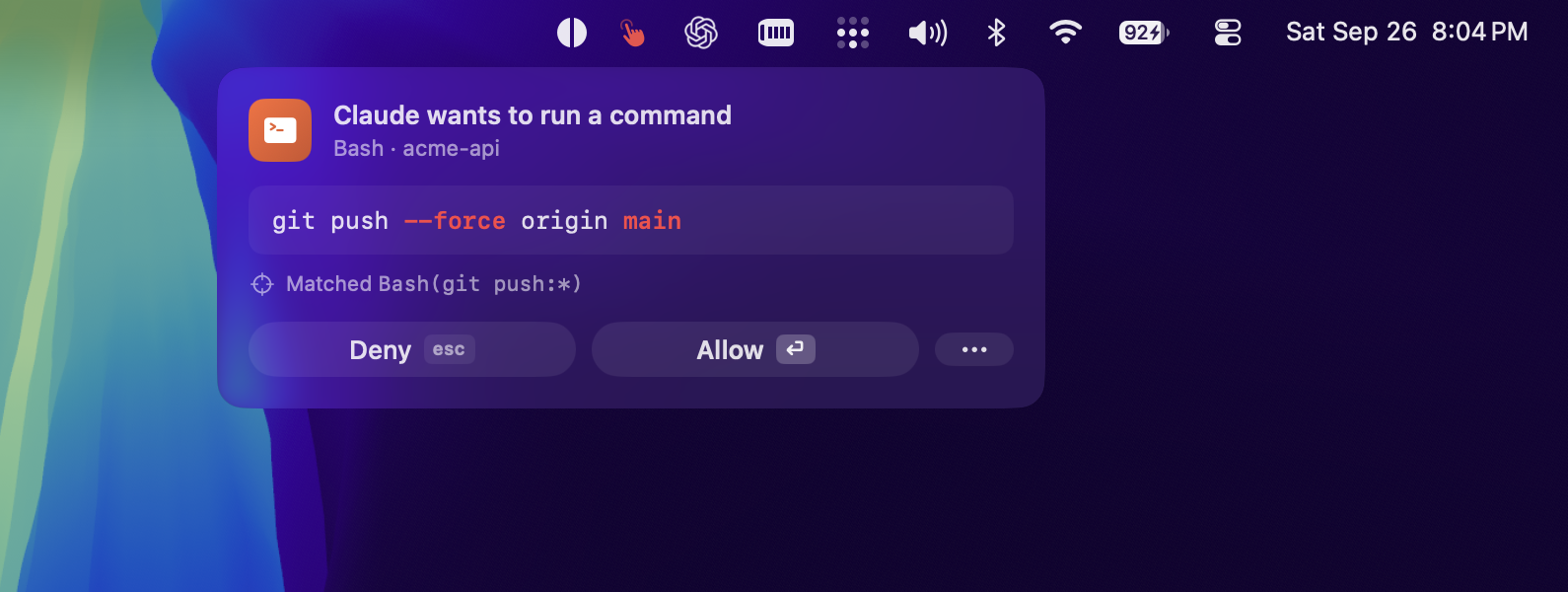
Patterns are for things you want to be asked about even when Claude wouldn't ask, like a command you've allow-listed. They live in ~/.config/nudge/patterns.txt, one rule per line, and edits apply immediately. An empty file is fine: Nudge still shows Claude's own prompts.
Patterns stay quiet in auto mode, where you've handed the calls to Claude. To be asked about something there anyway, add it to permissions.ask in ~/.claude/settings.json (or tell Claude to add it). Claude asks about those in every mode, auto included, and Nudge shows the prompt.
Bash(git push:*)        # prefix
Bash(*--force*)         # infix
Edit(/etc/**)           # path glob
Mcp(playwright__*)      # every tool on an MCP server
"Always allow" from the popover writes a matching rule into Claude Code's allow list, after backing up settings.json. The full syntax, chained-command handling, and importing from permissions.ask are in docs/patterns.md.
Settings
Click the menu bar icon when there's no prompt up, or right-click it to get the same toggles as a menu.
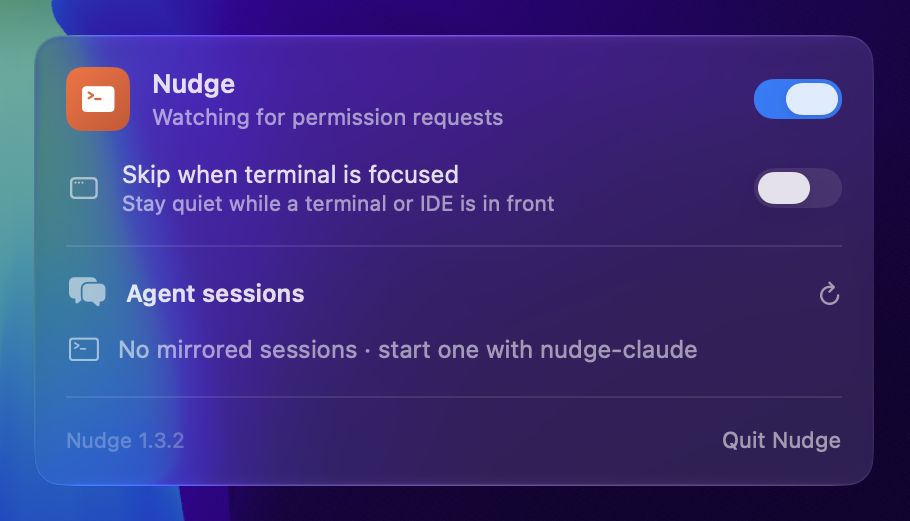
A few things the panel doesn't tell you:
- ⏎ / esc from any app needs Accessibility access: System Settings → Privacy & Security → Accessibility, which macOS 27 renamed Device Control and Data Access. The Enable… button in the panel opens it. Since 1.4.2 macOS keeps that grant across updates. Coming from an older version, remove Nudge from the list and add it back once. Keys are ignored for the first 0.6s a prompt is up, and until you've stopped typing elsewhere for a second, so the Enter at the end of a paragraph doesn't approve anything. They also do nothing while a terminal, an IDE, the Claude app or the ChatGPT app is in front, where they belong to the agent's own dialog. If you'd rather only click, switch off "Answer with ⏎ and esc".
- Skip when terminal is focused also covers the Claude app, for sessions running in it. If a pattern matches while you're there, Claude asks in its own prompt instead, so the command doesn't run unasked.
- Quit means quit. The hooks won't relaunch Nudge until you open it yourself. If it crashes, it comes back on the next hook call.
nudge-ask
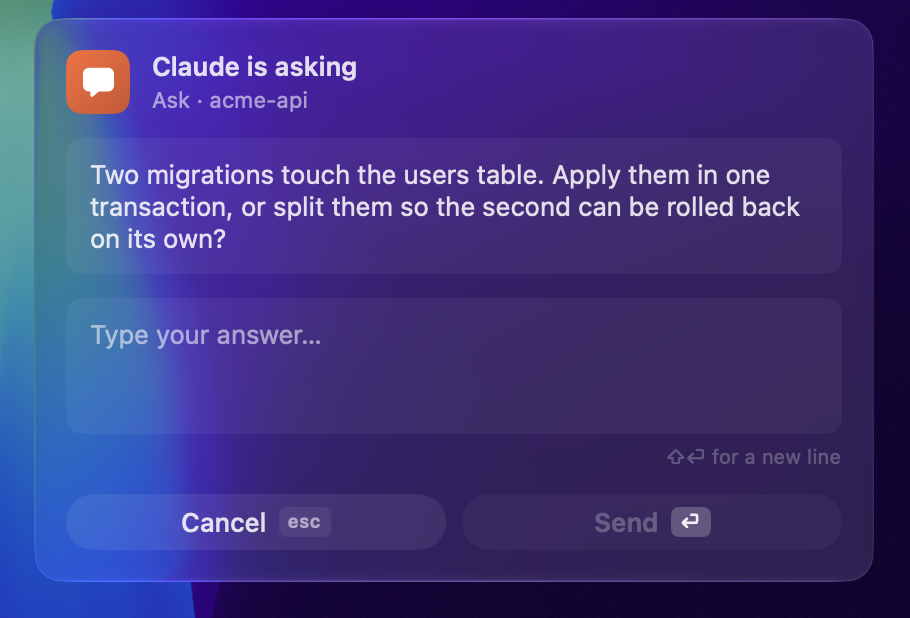
/Applications/Nudge.app/Contents/MacOS/nudge-ask "Which deployment target?"
# → prints what you typed; exit 130 if you cancel
To let Claude use it, copy the skill over and pre-allow the command so Claude doesn't ask permission to ask you a question:
cp -R skills/nudge-ask ~/.claude/skills/
and add Bash(/Applications/Nudge.app/Contents/MacOS/nudge-ask:*) to permissions.allow in ~/.claude/settings.json.
Agent sessions (experimental)
nudge-claude              # start Claude Code in a tmux session here
nudge-claude attach [id]  # re-attach (latest, or a specific one)
nudge-claude list         # list sessions
nudge-claude prune [days] # clean up ended sessions (default 7 days)
Detach with Ctrl-b d. Claude keeps working, and the menu bar panel lets you pick a session, see what it's doing (thinking, using a tool, waiting, idle), read the transcript, and send replies. Replies are pasted into the tmux pane, so Claude keeps its cwd, skills, MCPs, and hooks.
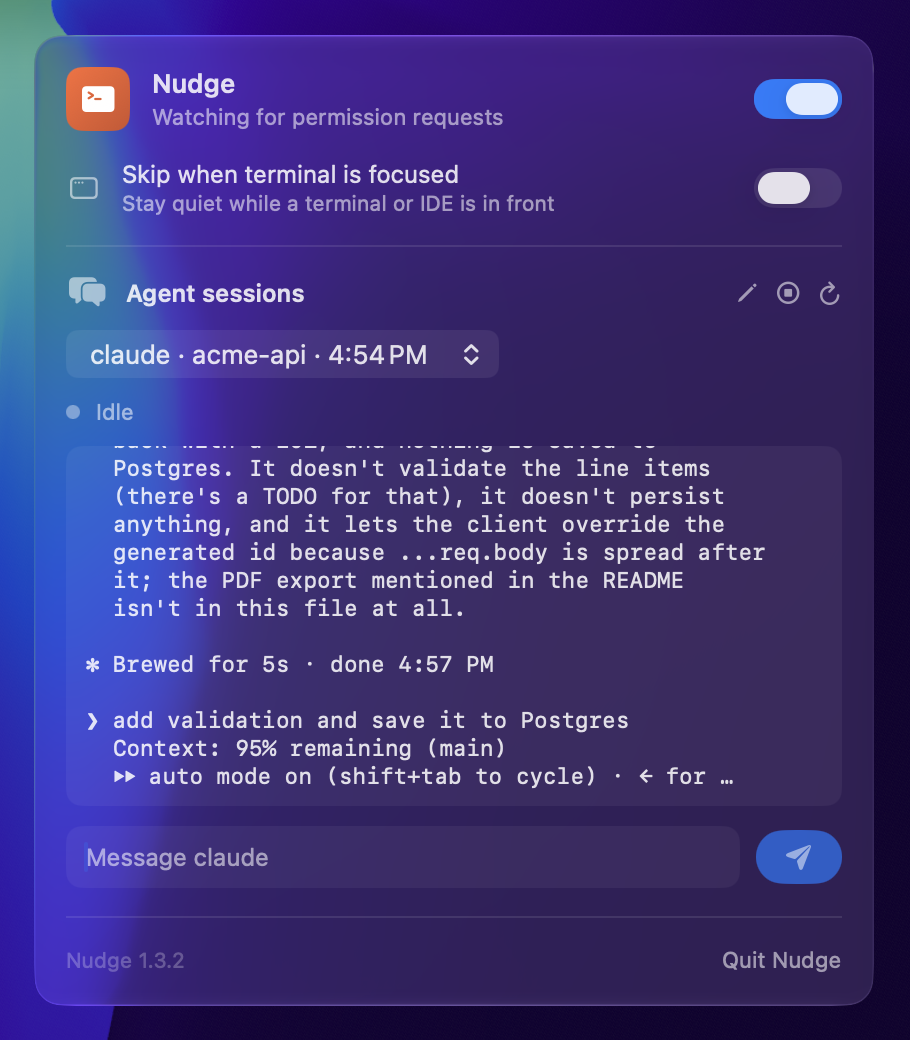
Nudge only mirrors sessions it started. It can't attach to a terminal tab that's already open. Set NUDGE_TMUX_PATH if tmux isn't somewhere Homebrew would put it. If your Claude setup reads files from ~/Documents (a CLAUDE.md import, say), macOS asks once whether nudge-claude may access that folder; allow it, or sessions start without those files.
Updating
nudge-update           # current vs latest
nudge-update --check   # exit 1 if an update is available
nudge-update --apply   # download, verify sha256, swap, relaunch
--apply won't install a download that doesn't match the release's published checksum.
Updating from 1.3.x or earlier: the first time the new Nudge starts, it adds its PermissionRequest hook to ~/.claude/settings.json, after backing the file up. It only does this once, and only if Nudge's other hooks are already there. If you take the entry out, it stays out.
How it works
Two hooks hand prompts to the menu bar app and wait for your answer:
PermissionRequestfires when Claude Code is about to show its own permission prompt. Nudge shows it too, and whichever you answer first wins.PreToolUsefires on every tool call. Nudge only asks there if the call matches one of your patterns.
A third hook, nudge-agent-hook, tells Nudge when a tool call finished or Claude's turn ended, so a prompt you answered in the terminal leaves the menu bar. When the turn ends while you're away, the same hook holds on while Nudge shows Claude's last message. If you reply, it hands your text back to Claude's Stop hook and Claude keeps going.
If Nudge isn't running, the hooks start it. If anything fails, Claude asks in the terminal as usual.
Which modes Nudge asks in:
- Claude's own prompts come through in every mode they happen in. In auto mode that's rare: ask rules, and calls the classifier won't decide. In
dontAskmode Claude never asks, so Nudge doesn't either. - Patterns ask in every mode except auto,
bypassPermissionsanddontAsk.
Pausing Nudge hands any prompt that's up back to Claude, so you answer it in the terminal instead.
If you allow a pattern prompt and an ask rule covers the same command, Claude asks again right after. Nudge answers that second one for you instead of showing it twice.
Known limits
- Not notarized. Releases are self-signed, so Gatekeeper doesn't know them: the pre-built zip needs the
xattrstep (Homebrew andnudge-updatehandle it). - Answering in the terminal. Esc or No there clears Nudge's copy right away. Yes clears it when the command finishes, because Claude doesn't tell hooks it was answered. For a slow command the prompt sits in the menu bar until then, and clicking it does nothing.
- Plan approvals and questions stay in the terminal. Accepting a plan means choosing how Claude carries on, and a plain Allow can't say which.
- "Always allow" is for patterns. Claude's own prompts get Allow, Deny, and allow for this session.
- FIFO queue, 5-minute timeout. Stack up enough prompts and the oldest ones expire. Finished messages wait behind any prompt and last ten minutes.
- One Mac. Patterns don't sync.
Uninstall
make uninstall
This removes the app and its hooks (backing up settings.json and Codex's hooks.json first). Your patterns and prefs stay in ~/.config/nudge/.
License
MIT
Reviews (0)
Sign in to leave a review.
Leave a reviewNo results found