muster
Health Uyari
- License — License: MIT
- Description — Repository has a description
- Active repo — Last push 0 days ago
- Low visibility — Only 5 GitHub stars
Code Basarisiz
- rm -rf — Recursive force deletion command in .github/scripts/release-publish.sh
- network request — Outbound network request in .github/scripts/tag_gate.py
Permissions Gecti
- Permissions — No dangerous permissions requested
Bu listing icin henuz AI raporu yok.
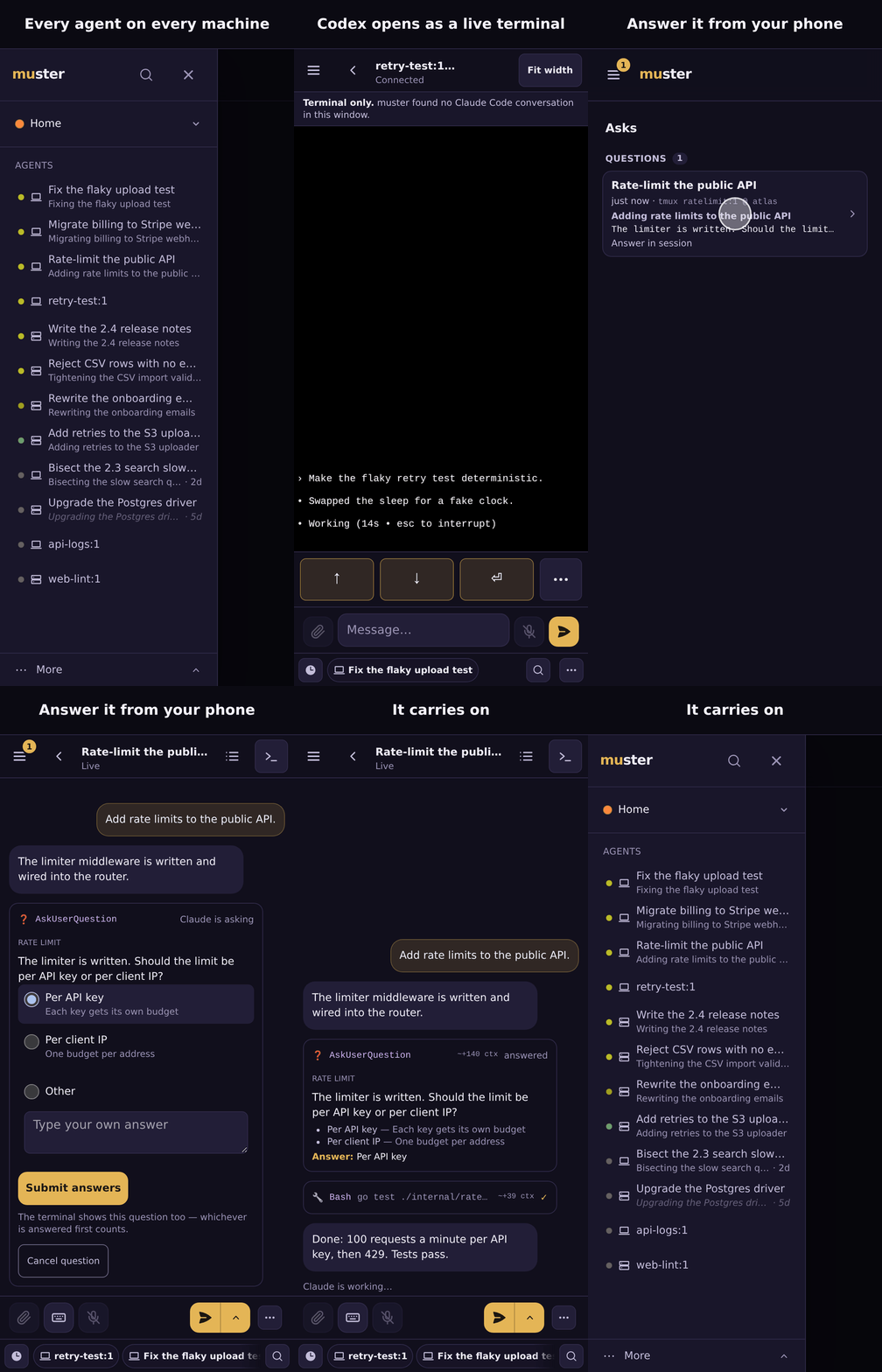
Every coding agent on every machine, in one list on your phone. Self-hosted.
muster
Every coding agent on every machine, in one list on your phone.
Claude Code · Codex · opencode (any model, incl. OpenRouter) · anything else you run in tmux.
When a Claude Code session needs you, you get a push, answer from your phone, and it carries on.
Self-hosted: start on this machine at http://localhost, then add your phone over your own Tailscale network.




Quick start
Two ways in. Both start on this machine, at a http://localhost address,
with nothing to fill in; your phone and your other machines come after, in one
step, over Tailscale.
(a) Let your agent install it. Paste this one prompt into the coding agent
(Claude Code, Codex, opencode, Gemini CLI, …) on the machine that should run
muster:
Set up muster for me. Download its install guide with `curl -fsSL -o muster-install.md https://github.com/ZacxDev/muster/releases/latest/download/INSTALL.md`, read that whole file and follow it step by step. If that download fails, stop and tell me what it printed; never work from another copy of the guide, such as the one on the main branch, or from memory. Ask me everything you need in one go up front, then do the rest yourself. Where the guide and the machine disagree, trust `muster doctor`, each command's `--help` and the code at https://github.com/ZacxDev/muster over memory.
The agent downloads INSTALL.md, a guide written for agents to
execute, from the newest release, asks its questions once, up front, installs
muster with the one-liner below, and finishes with muster doctor. If you
want the phone and your other machines, it adds Tailscale; on each further
machine, paste the same prompt and tell the agent muster already runs. More in
docs/onboarding.md.
(b) Install it yourself, in one line (Docker with Compose v2, and tmux):
curl -fsSL https://github.com/ZacxDev/muster/releases/latest/download/install.sh | sh
It starts muster in Docker with every secret generated, shows this machine's
tmux sessions, and runs muster doctor; adding your phone is one section of
docs/quickstart-local.md.
On Kubernetes (the advanced path, which also runs dispatched agents): the
Helm chart, docs/kubernetes.md.
What you get
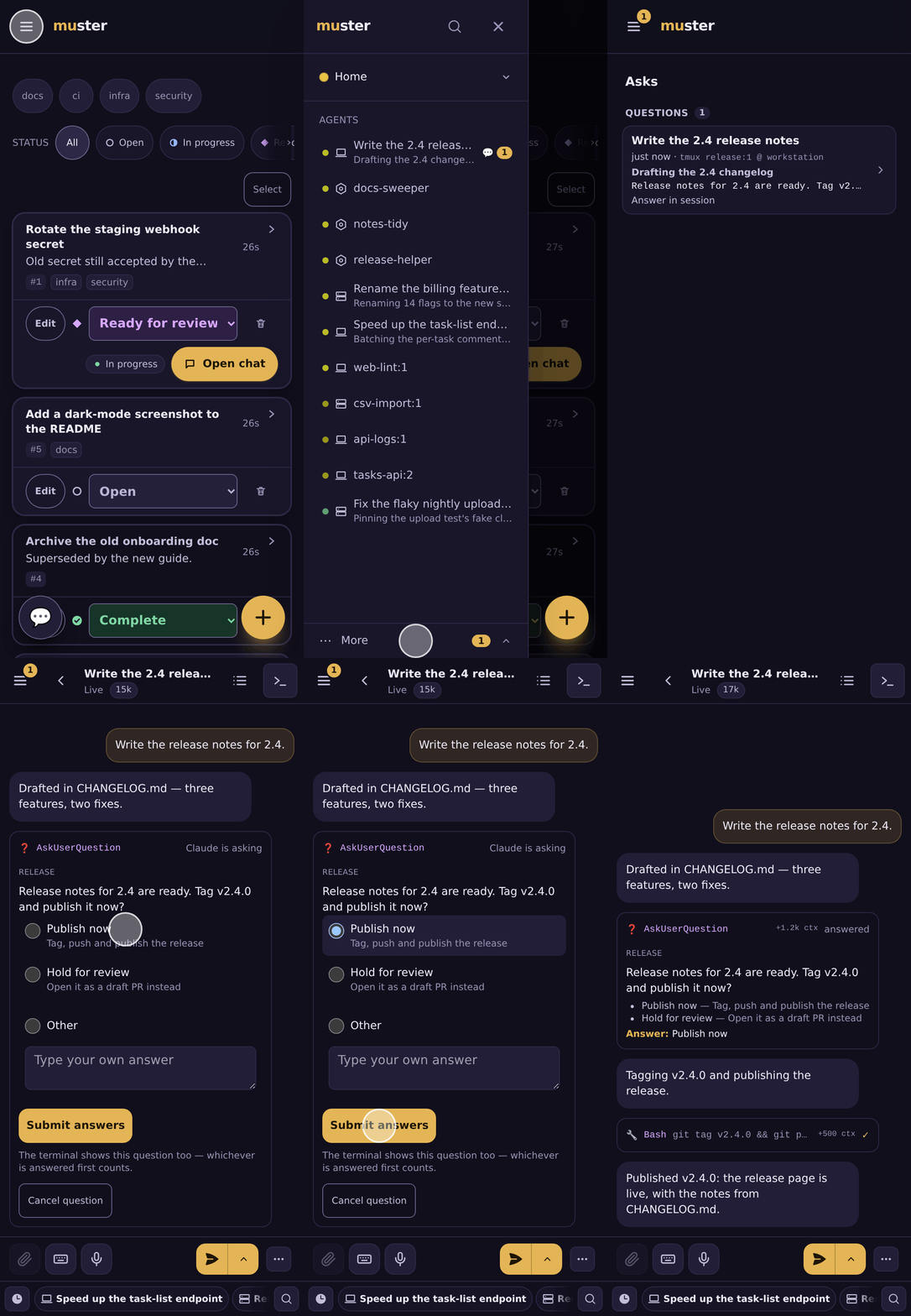
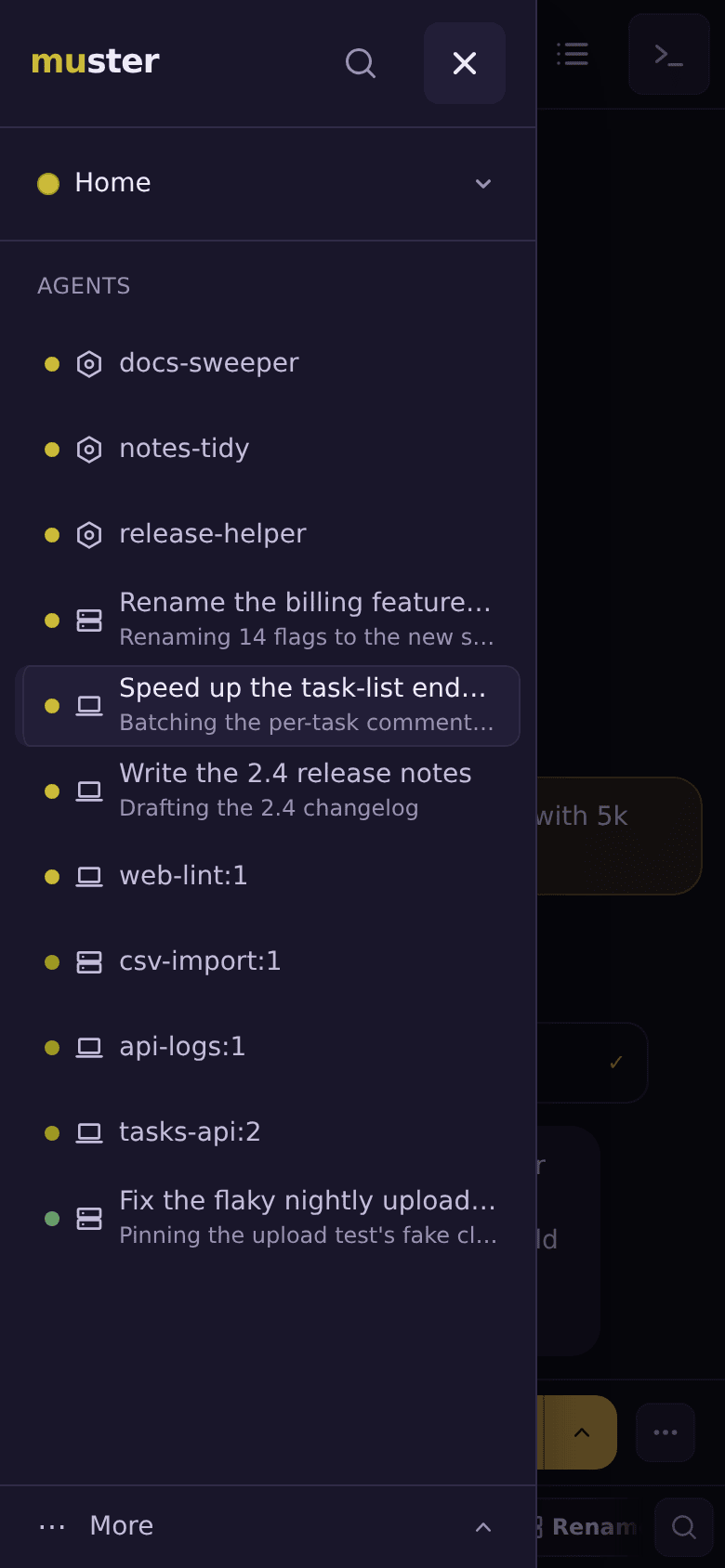 Every session, one list Every tmux window on every machine, Claude Code, Codex, opencode and shells alike, with the ones waiting on you first. |
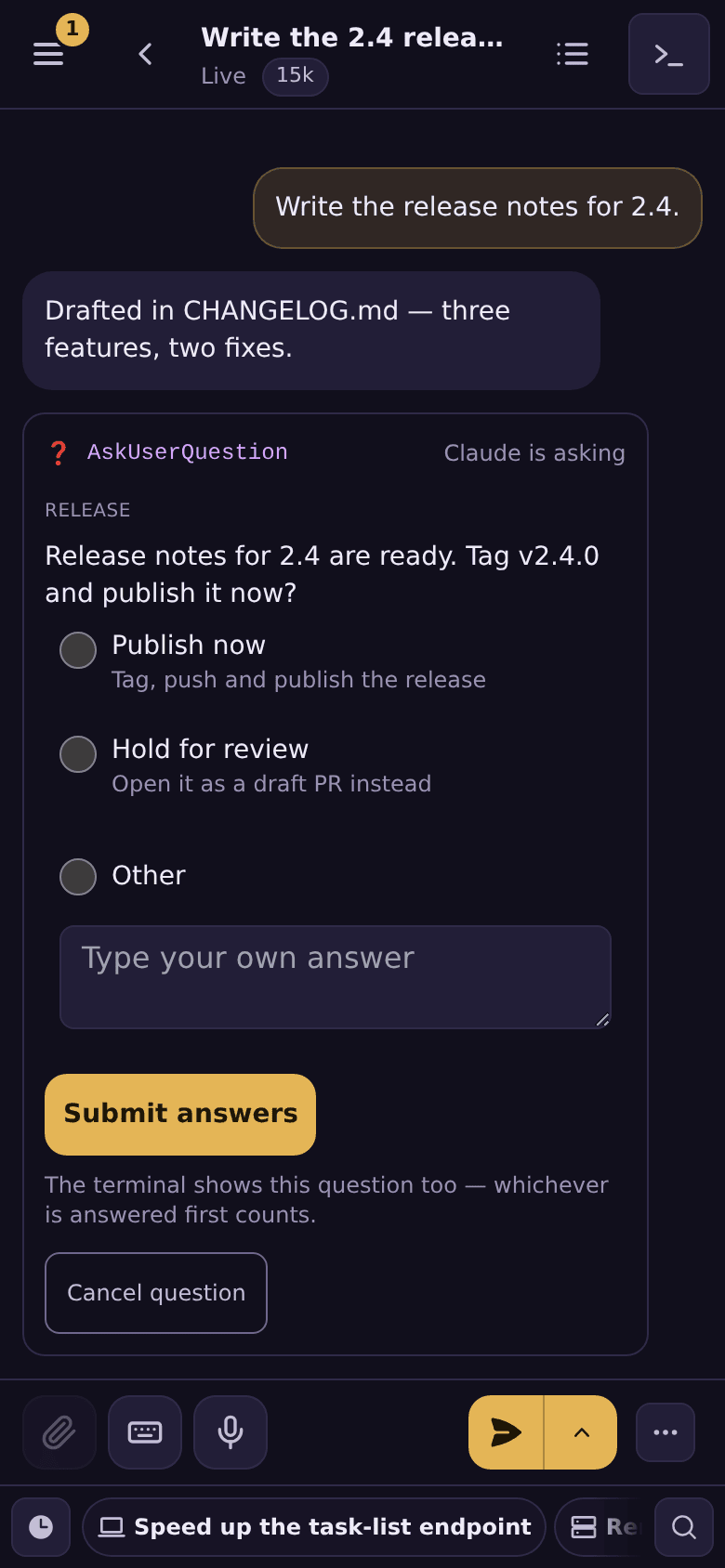 Agents ask instead of stopping A Claude Code question becomes a form on your phone, pushed with its text; answer it and the session carries on. One-time setup per machine. |
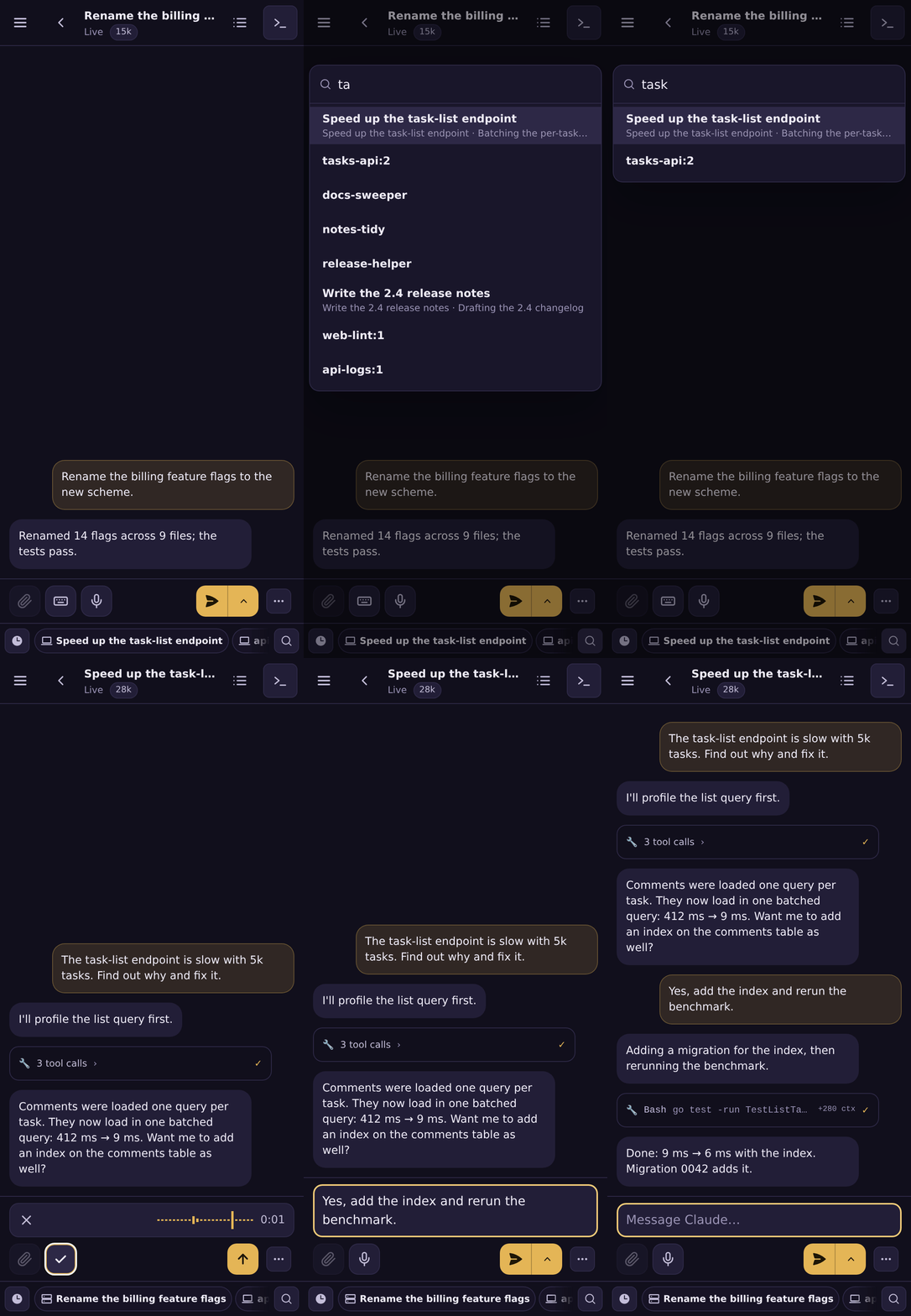
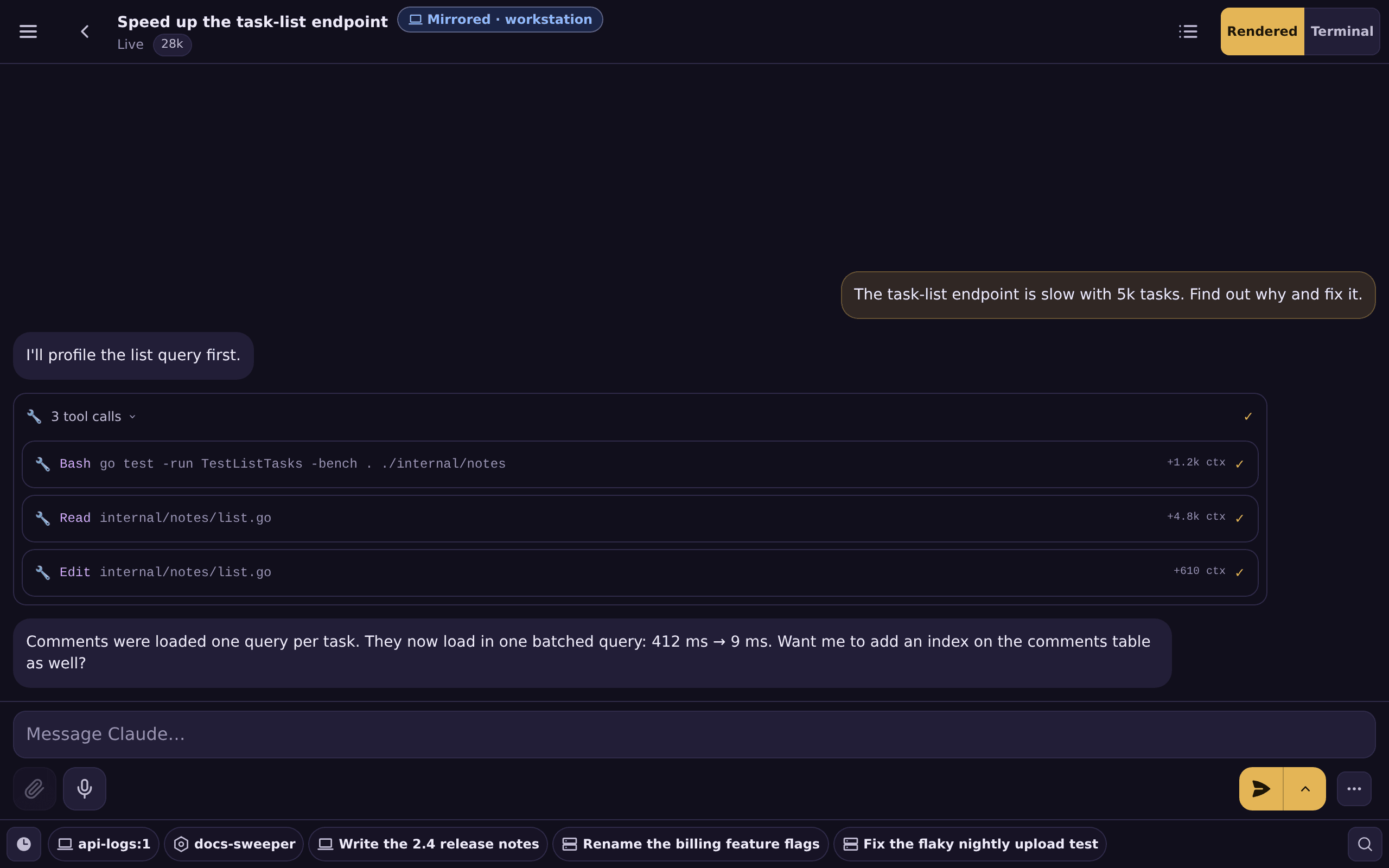
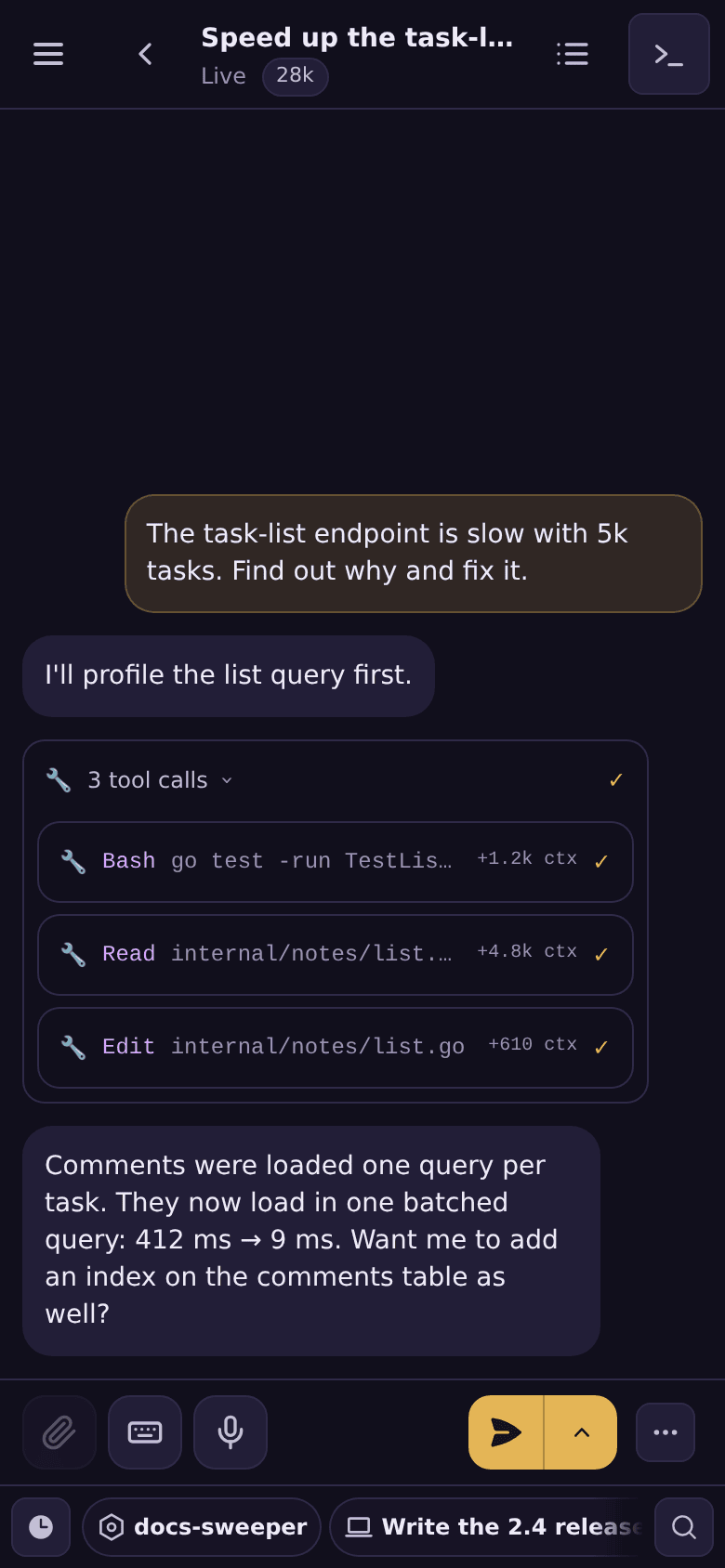 A chat, not a terminal A Claude Code session reads as a chat, with the message box under your thumb and the context each tool call added. |
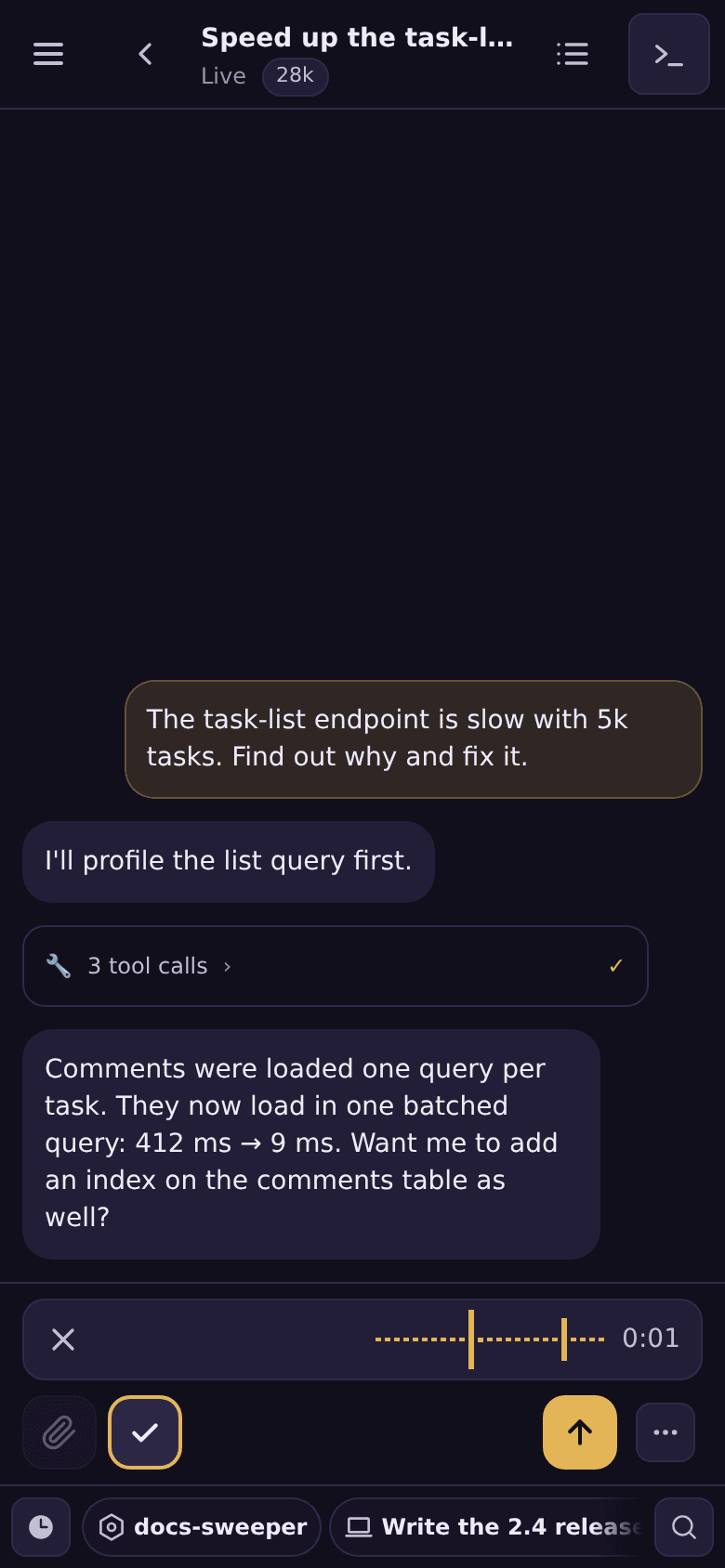 Talk instead of typing Optional dictation: tap the mic and speak, and read the transcript in the box before you press Send. |
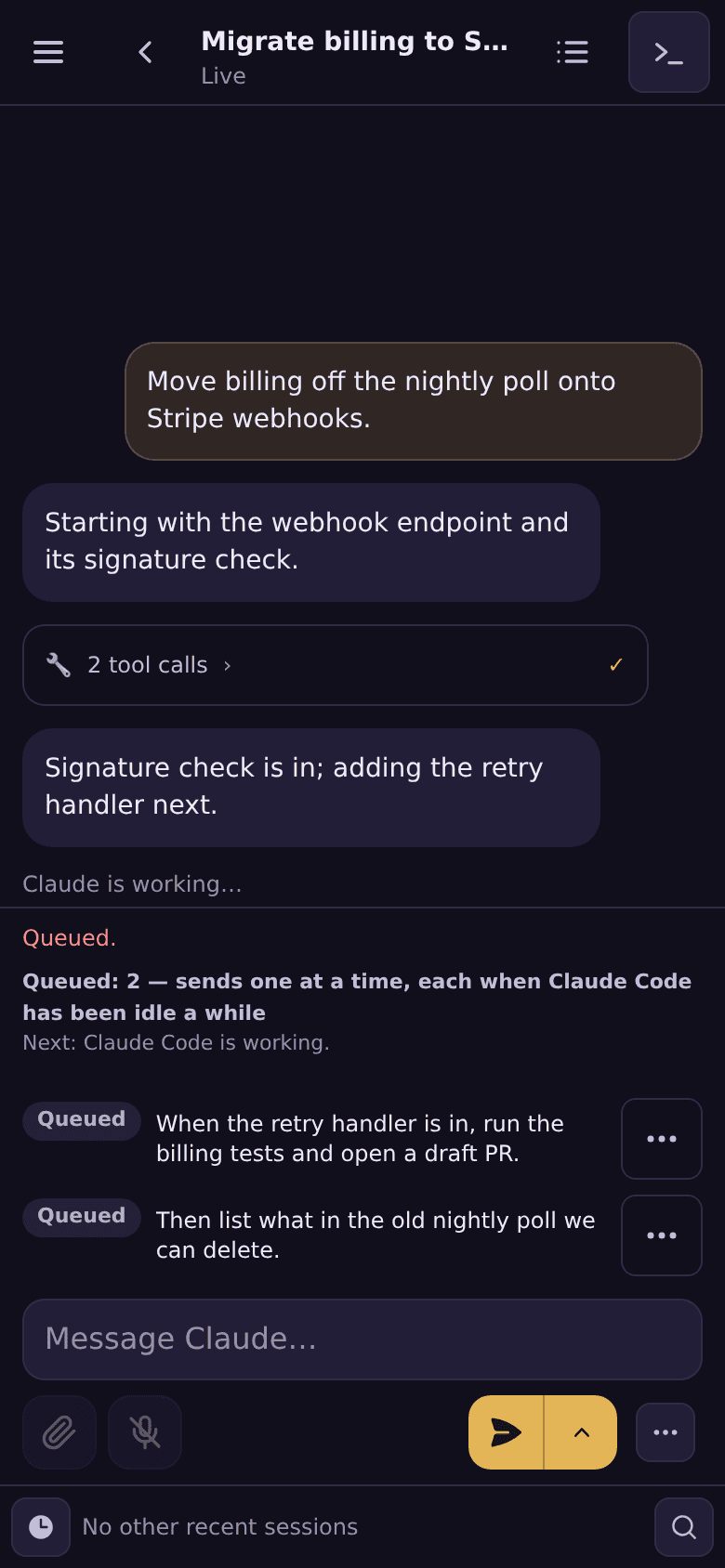 Queue the next message Queue messages while the agent works: the server sends each one once Claude Code has been idle for 30 s, even with your phone closed. |
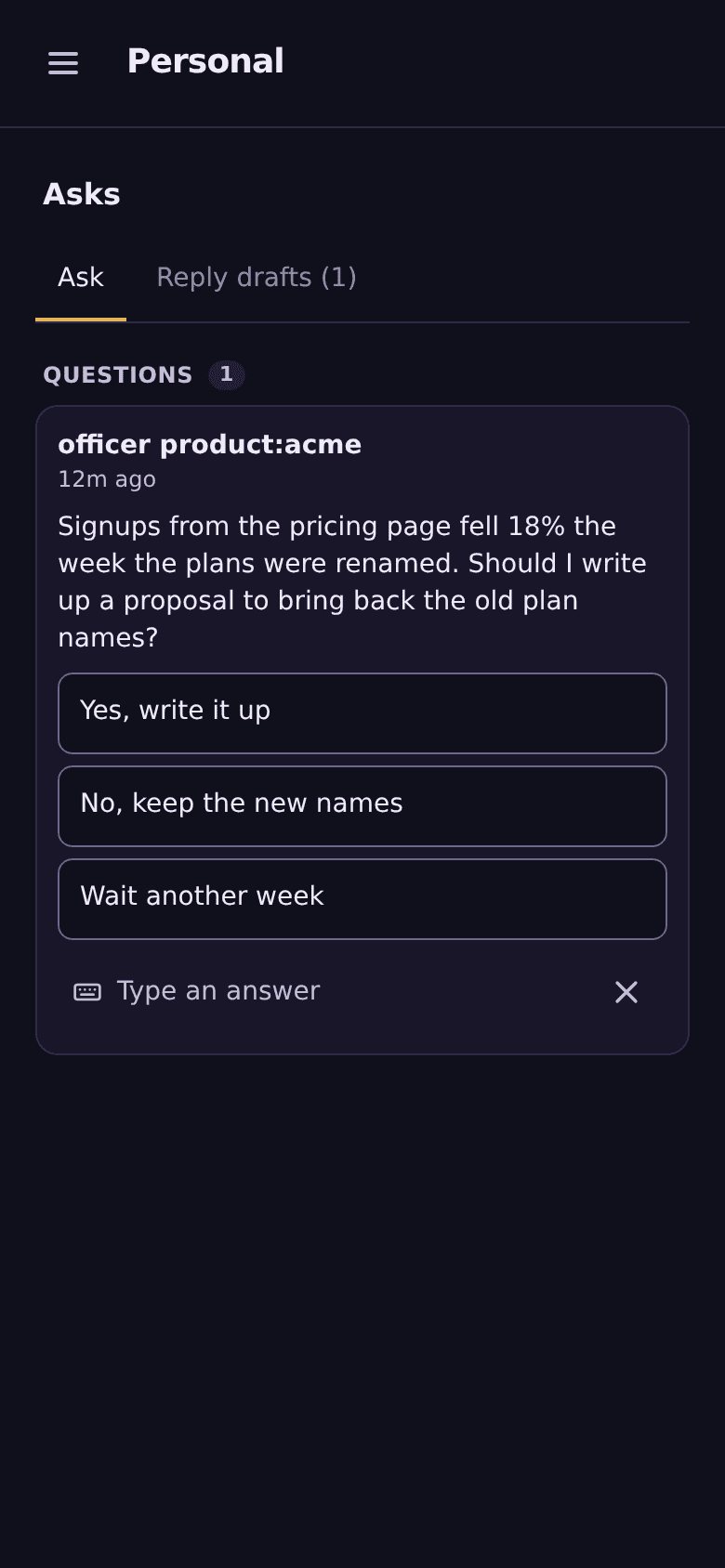 Officers and a chief Optional: standing agents with a job, which can ask you on the Asks page, and a chief you can ask what every session is on. |
Sessions are called by a name: the one you give with Rename…, or
their first good focus title (focus: optional, needs
an OpenRouter key). Without either, a window shows its tmux session and window
(work:1), or a label you give that tmux session (muster-mirror -labels-file), as the shells, the Codex windows and the opencode window in
these pictures do.
- A push when a session needs you, and one queue for everything waiting. A
session's stop is pushed once and never quoted; asks are pushed with their
text (below). The Asks page
gathers everything blocked on you. This needs Push, which INSTALL.md turns
on; on iOS, Add to Home Screen first. - Mixed agents in one place. Claude Code renders as a chat; opencode has
its own read view; Codex, Gemini CLI and plain shells are live terminals.
Each opens in a Terminal view you can type into, on a machine you let muster
type into. - Everything stays on your machines and your tailnet (unless you turn on
an optional feature that calls an outside API, such as suggested replies,
focus or a hosted speech-to-text). The server runs on one of your machines
and is reached only over Tailscale. Each machine dials
out to it, so muster opens no network port on them (the optional MCP
endpoint listens on loopback only). Machines are read-only until you let
muster type into them, one machine at a time.
- Agents ask you instead of stopping. A Claude Code session can ask you a
question with options and wait for your answer, and Claude Code's own
multiple-choice questions become a form you answer from your phone. Each
needs a one-time setup per machine. - A chief that knows what every session is on. An optional fleet agent
you chat with: ask it what everyone is working on, who is on what, or what
needs you, and have it hand a request or a task to the session already on
it (routing is off untilMUSTER_SESSION_ROUTING=1). It sends what it reads of your sessions to its model, and on an
OpenRouter key muster sets no budget: put a credit limit on the key.
Finding who is on what, routing and its standups rely on
focus, which needs an OpenRouter key. What it needs: docs/features.md;
prompts that work, with real replies:
docs/chief-cookbook.md. - Officers need Kubernetes, or run in the Compose stack as host-spawned
sessions on one opted-in machine: docs/features.md.
How it works
- A server (one Go binary and Postgres, in Docker Compose) runs on one of your
machines, reached over your tailnet throughtailscale serve. - On each machine,
muster-mirrordials out to it and mirrors every tmux
window as a mirrored session; a message from your phone is typed into
that same session, so it is all there when you are back at the keyboard. - Your phone opens the server as an installable web app (a PWA).
muster sees only sessions inside tmux, and the one-prompt install above sets
up mirrored sessions only. How to bring a session you already have
into tmux, and how mirrored sessions differ from the opt-in dispatched
agents that muster starts in Kubernetes pods:
docs/mirroring.md.
The components and what each trusts: docs/architecture.md.
Install
What each part needs, and what is optional: Core vs optional.
While there is no session yet, home shows how to start an agent in tmux
(tmux new -A -s work claude) and the same prompt, to connect another machine.
The one prompt above is the main path. In Claude Code you can instead add this
repository as a plugin marketplace and install the muster plugin:
/plugin marketplace add ZacxDev/muster
/plugin install muster@muster
Then ask Claude Code to "set up muster". The plugin holds one skill,muster-setup, which downloads the same INSTALL.md from the
newest release and follows it, so it never carries a copy of the steps.
Other coding agents can install the same skill with the
skills CLI:
npx skills add ZacxDev/muster --skill muster-setup
This is muster by ZacxDev. Other repositories publish unrelated
skills named muster, so install it by this repository's name, not by
searching for the word.
To hack on muster, docs/development.md runs it from source
against a throwaway database.
Notifications: only when you are needed
From v0.146.0 the Compose stack pushes each stop of a session once: when it
waits on you, or when it has sat idle 10 minutes (stalled). The push names the
session and never quotes it. Asks are pushed with their text: an agent's or the
chief's question, muster's own, a Claude Code question held by the ask hook, and
opencode questions and permission requests
(docs/attention.md). Task
events have their own switches under Account → Notifications. Turning
this off: docs/features.md.
Core vs optional
The core runs with no optional dependency: Docker Compose with its bundled
Postgres on one machine, and muster-mirror and tmux on each machine;
Tailscale adds the phone and other machines. Everything else is off until you give it what it needs, and is
turned on with a few lines in .env (and, for some, a Compose profile).
| feature | needs | default |
|---|---|---|
Core: mirrored sessions, chat and Terminal views, typing into sessions, sidebar and search, the Asks page, tasks, the installable app, the CLI and muster doctor |
Compose and its Postgres; muster-mirror and tmux on each machine; Tailscale |
on |
| Push | keys the Compose stack generates; HTTPS (Tailscale) for the phone | on |
| One push per stop | Push (above) | on in the Compose stack, from v0.146.0 |
| Dictation | --profile stt (bundled, CPU), --profile stt-cohere (GPU), or your own OpenAI-compatible speech-to-text |
off (the agent install asks) |
| Attachments | --profile s3, or your own S3-compatible store |
off |
| Suggested replies and focus | an OpenRouter key | off until the key is set; suggested replies then stay off for each user until they turn them on in Account (with no database, until MUSTER_SUGGEST=on) |
| Agent ask tool and ask cards | a one-time setup on each machine | off |
| Accounts (per-user sign-in, passkeys) | a GoTrue server you run | off (one shared password) |
| Chief | --profile chief (amd64 hosts), the connector store's key, and a Claude subscription token or an OpenRouter key; routing work to sessions also needs MUSTER_SESSION_ROUTING=1 |
off (routing too) |
| Dispatch | Kubernetes | off; not in the Compose stack |
| Officers | Kubernetes (pods), or in the Compose stack as host-spawned sessions on one opted-in machine (built-in backend only; outbound drafts and connectors work, HQ, ship gates, tiers, transcripts and the LLM proxy do not; the sessions run as that machine's user with no pod isolation, so muster's approval of their posts is the sanctioned path, not a boundary) | off |
| Approval router | an external permission router you run (advanced) | off |
Every other optional feature, what it needs and the .env lines that turn it
on: docs/features.md. muster doctor checks the install
end to end and says how to fix what fails
(docs/cli.md); each section of docs/features.md
ends with how to check that feature is on.
A guide per feature
Set up the core first, then add one optional dependency at a time, each with a
short guide (what it adds, what it needs, the settings, how muster doctor
confirms it, how to turn it off). The guides:
docs/README.md.
The words muster uses: docs/glossary.md.
muster vs Remote Control
If you use only Claude Code on a paid Claude plan, Remote Control is less
work: nothing to install or host, a native app with its own push for
permission prompts and questions, those prompts answered in the app,
first-party support, deeper Claude Code integration (subagent progress,
compaction), and Trusted Devices.
muster is for what it does not cover: agents other than Claude Code, Claude
Code on an API key, Bedrock, Google Cloud, Microsoft Foundry or a customANTHROPIC_BASE_URL, every tmux session on every machine in one list, and a
session that stays on your own machines and tailnet instead of going through
Anthropic's servers. muster also picks up every session already in tmux on
its own, with nothing to run inside each one, and reads the session on your
own machine.
The full comparison, with Happy and SSH + tmux too and the sources for every
cell, plus a line each on herdr and Paseo citing their READMEs:
docs/comparison.md.
Limits
- Linux. macOS hosts are experimental: the Terminal view cannot attach on
macOS yet (internal/mirrorhost/pty_other.go), so there only a Claude Code
window whose Rendered view resolves can be viewed, and Rendered-view
detection is unverified on a real Mac. No Windows. - muster assumes sessions run without permission prompts. Start your own
Claude Code sessions inbypassPermissionsor auto mode; the agents a host
starts for your chief are started without them by default, so they run
their tools without asking (-agent-spawn-skip-permissions=falseturns that
off: docs/mirroring.md).
A Claude Code permission prompt that does appear is answered in the Terminal
view: the chat view refuses to type into a waiting prompt, and there is no
one-tap approve (docs/sending-and-step-up.md). - Codex and Gemini CLI get no waiting push and no ask tool: they are
terminal views. The message box sends to opencode only on an opted-in host
(docs/mirroring.md). - It needs Docker on one machine and tmux on every machine, and Tailscale
for your phone and other machines; what each machine needs is checked by
INSTALL.md, "Preflight (every machine)". muster sees
only sessions inside tmux. - It is a PWA, not a native app. On iOS, install it to the Home Screen
before it can receive push. - Run one replica. Some background loops and the mirror tunnel keep their
state in memory. - An interactive mirror is a shell on that host. Anyone who can type into
that host's Terminal view (after a recent sign-in) can run commands as the
usermuster-mirrorruns as. - Agent dispatch is opt-in and only lightly proven. It needs Kubernetes:
the Helm chart incharts/musterinstalls it (docs/kubernetes.md).
The full list is in docs/limits.md.
Features
Every feature, what it needs and how to turn it on: docs/features.md.
The full documentation index: docs/README.md.
Not to be confused with two other apps called Muster: the Mac menu-bar app
(agentmuster.app) and the desktop app for running
parallel agents in git worktrees (musterup.dev). This
muster is the self-hosted one, for your phone and every machine you run agents
on.
To muster is to assemble a force for duty. A muster roll is the register of who
is present and what each is assigned.
Licence
MIT. See LICENSE.
Yorumlar (0)
Yorum birakmak icin giris yap.
Yorum birakSonuc bulunamadi