claude-super-sidebar
Health Gecti
- License — License: Apache-2.0
- Description — Repository has a description
- Active repo — Last push 0 days ago
- Community trust — 93 GitHub stars
Code Basarisiz
- network request — Outbound network request in codex/public/app.js
- os.homedir — User home directory access in codex/server.mjs
- process.env — Environment variable access in codex/server.mjs
- network request — Outbound network request in codex/server.test.mjs
Permissions Gecti
- Permissions — No dangerous permissions requested
Bu listing icin henuz AI raporu yok.
A visual sidebar for Claude Code and Codex: agent trees, live status, and conversation task flows.
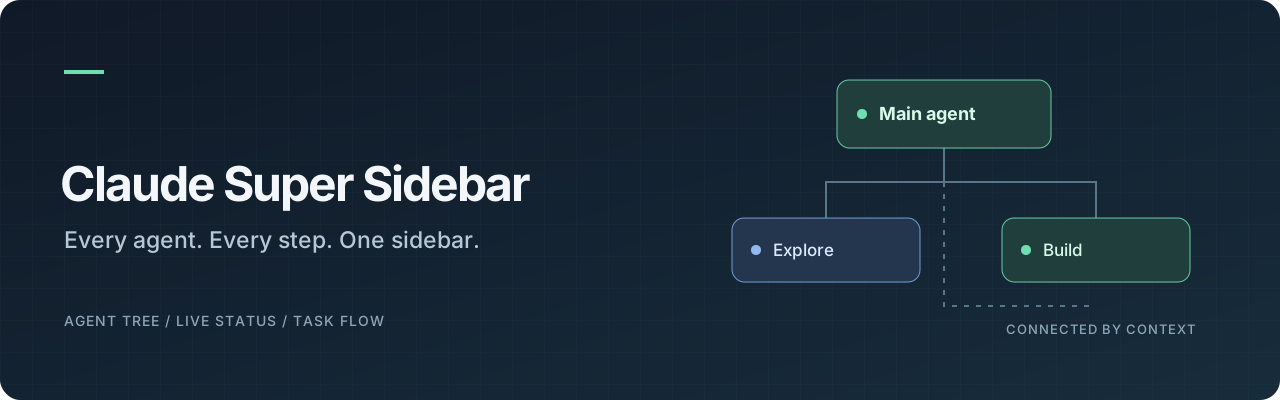
See your agents. Follow the work.
A native Claude pane and a local Codex session panel.





English · 简体中文
Preview · Installation · Usage · Codex · Development · Validation
Overview
Claude Super Sidebar brings the main agent, subagent relationships, execution details, and the current conversation’s work steps into one panel. Claude Code uses a native plugin pane; standalone Codex CLI/App uses a read-only local session dashboard. Neither requires a frontend build.
The repository and product are Claude Super Sidebar (claude-super-sidebar). The plugin installs as super-sidebar, with a native pane titled 状态 · Status. The host reserves the claude- prefix, so a plugin ID cannot start with claude-; the product name stays with the repository and this README. The Codex page is titled 状态 status, and its team section is 团队面板 Team panel. Each adapter uses its host's own data source; task summaries require no additional model call.
| Integration | Data source and UI | Current validation |
|---|---|---|
| Claude Desktop Code | Lifecycle hooks and session.messages() → native pane |
Historical portable checks passed; latest isolation regressions have not been run; current native engine validation and Desktop reload remain unverified |
| Codex CLI / App | Local sessions/rollout-*.jsonl → read-only browser panel |
Historical adapter/HTTP checks passed; latest isolation regressions have not been run; real local App session and page verified |
Preview
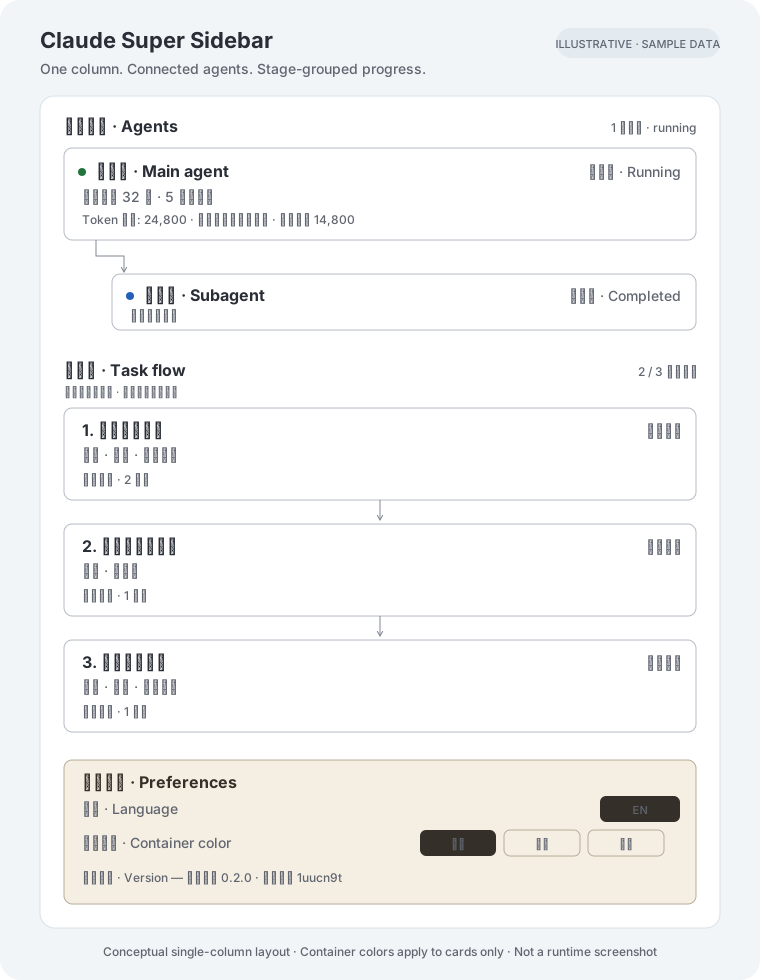
Illustrative layout with sample data, not a runtime screenshot. The single column shows agent relationships, a stage-grouped task flow, and a preferences container. Container colors (white, beige, black) apply to the cards only; the surrounding page background stays unchanged. Actual rendering differs between the Claude native pane and Codex browser panel.
Features
- Agent relationships — main agent and subagents in a unified tree, with directional connectors and details that expand in place.
- Execution status — colored running, waiting, completed, and failed states. Claude shows active elapsed time; Codex shows recorded time without inferring process liveness.
- Agent details — model, mode, role, observed token usage, available context usage, elapsed time, and tool-call count.
- Conversation task flow — Both adapters group observed operations into work stages, use concise action titles, and show bounded operation details on expansion. Results remain separate from the stage description; failures and missing results are preserved.
- Per-request scope — each new user request clears the previous flow; tool results preserve the current round. Up to 30 recent steps are shown.
- Plan display — Claude extracts observable plan text. Codex displays successfully submitted
update_plansteps; failed updates preserve the previous plan. - Execution and verification — “Operations completed” only describes tool execution. Explicit verification conclusions retain their conversation evidence and are labeled as assistant-reported; an exit code of zero never proves product behavior.
- Container colors — white, beige, and black apply to cards and preferences; the surrounding page background stays unchanged. Authored controls support Chinese and English.
- Local parsing — deriving the flow requires no additional LLM call.
Requirements
The following requirements apply to the Claude plugin. The Codex dashboard only requires Node.js 22.18+ and locally persisted Codex sessions.
- A Claude Desktop Code host that exposes the native hook-module and pane APIs.
- The matching Claude Code CLI for plugin installation.
- A stable local copy of this repository.
Developed against Claude Code engine 2.1.299, using an early-access plugin API. The host must support hook modules, claude-code imports, and native ui.render panes. Availability may differ between distributions and versions.
Installation
Claude Desktop Code
Add the marketplace straight from GitHub, then install the plugin:
claude plugin marketplace add Zafer-Liu/claude-super-sidebar
claude plugin install super-sidebar@super-sidebar
Prefer a local clone? Run this from the repository root instead:
claude plugin install super-sidebar --marketplace . --scope user
Verify that super-sidebar@super-sidebar has scope user and enabled: true:
claude plugin list --json
If it is installed but disabled:
claude plugin enable super-sidebar@super-sidebar
Start a new Code session to load the plugin. User scope makes it available across projects for the current user. The GitHub marketplace installs a cached copy, so the clone can live anywhere; a local-path install reads from the source folder, so keep the repository in place for that route.
If claude is not on PATH, invoke your host’s matching Claude Code executable by its full path. Project overrides and organization policies may affect plugin loading.
Usage
These controls apply to the Claude native plugin. See Codex configuration for the local dashboard and conversation binding.
The plugin attempts to open 状态 · Status on session startup. Type /super-sidebar in the conversation input to reopen it.
| Section | What it shows |
|---|---|
| Agent relationships | Main agent, subagents, parent–child connections, and expandable execution details |
| Task Flow | Work steps grouped into stages, with concise titles, status, operation details, and separate verification conclusions |
| Preferences | Language, container colors (white / beige / black), and a collapsible version block (plugin version and implementation revision) |
Use 展开 / 收起 to expand or collapse an agent. Use 刷新 to refresh immediately; the pane also refreshes every two seconds.
Task-flow arrows indicate chronological execution. A new user request starts a fresh flow automatically, without task-management controls.
Codex configuration
Codex model in a Claude host
If your Claude Desktop deployment offers a Codex model, follow the Claude installation above and select that model in the host’s model picker. No Codex-specific configuration file is required: the Claude host supplies session events and the native pane API.
Claude Super Sidebar does not add models or configure model providers.
Standalone Codex CLI or App
The read-only local session dashboard supports standalone Codex. From this repository:
npm run codex -- --cwd "/absolute/path/to/your/project"
Open the local panel, or ask Codex App to open that URL in its browser sidebar. No npm install, API key, or Codex configuration changes are required. Without --cwd, the panel observes the process working directory.
node codex/server.mjs --cwd "/path/to/project" --port 4318 --codex-home "/path/to/codex/data"
The panel incrementally reads local JSONL files under CODEX_HOME/sessions (default ~/.codex/sessions) every two seconds. Each panel stays bound to one conversation and its descendants, showing the latest turn's 30 most recent work steps, successfully submitted plan, and observed usage. Summaries come from public progress messages; wrapper names such as exec / js are hidden, with human-readable operation titles as fallbacks. The session picker, project path, task-flow explanation and refresh-mechanism footer are omitted. Stop with Ctrl+C.
Starting from Codex uses CODEX_THREAD_ID automatically. Alternatively pass --thread "full-thread-id" or open http://127.0.0.1:4317/?thread=full-thread-id. Without a binding, the panel initially pins the most recent local conversation and never switches as other conversations change.
npm run codex -- --cwd "/absolute/path/to/project" --thread "full-thread-id"
When the server is already running, open another conversation with its own ?thread=... URL. The URL binding overrides the server default; all conversations remain limited to the project path chosen at server startup.
This is a companion browser UI, not a Claude ui.render plugin inside Codex, and it does not drive conversations. The local rollout format is not a stable public API. Compatibility was checked with Codex CLI 0.162.1 and this machine's App session records. Ephemeral, remote, archived, and unpersisted sessions are excluded; abnormal exits can leave the last observed state. See Codex adapter details.
How it works
Claude Code session
  ├─ Agent / turn / tool events ──→ Agent status and usage
  └─ Conversation transcript ─────→ Stage-grouped work steps
                                      │
                              Session-scoped state
                                      │
                            Native Status pane (single column)
                            ├─ Agent relationships
                            ├─ Task flow (stages, operations, verification)
                            └─ Preferences (container colors, version)
The manifest loads hooks/register.tsx through hooks/hooks.json. Session startup registers the command and refresh timer; lifecycle hooks observe execution; session.messages() supplies the task-flow parser. Native components and SVG connectors render the pane.
Development
For a compatible interactive CLI, load the repository explicitly:
claude --plugin-dir .
For Desktop hot reload, invoke the bundled /plugin-authoring skill and accept the host’s hot-reload prompt. Edits reload at the end of the turn.
Validate the manifest and hook modules with the matching CLI:
claude plugin validate .
| Path | Responsibility |
|---|---|
| .claude-plugin/ | Plugin manifest and local marketplace |
| hooks/register.tsx | Lifecycle hooks, command, and refresh |
| hooks/pane.tsx | Native pane and connectors |
| hooks/steps.ts | Conversation-to-flow parser |
| hooks/model.ts | State and agent-tree helpers |
| types/index.d.ts | Plugin state contract |
| codex/ | Read-only Codex adapter, local server, browser UI and tests |
| verification/ | Historical captures and inspection notes |
Audit and validation
Historical check before the latest isolation fixes: npm test 32 passed, 0 failed. The current isolation audit added regression cases without running tests/builds; see current audit. Reproduce without installing packages:
npm run test:claude  # 9 tests: actual model/parser sources, mocked lifecycle host
npm run test:codex   # 23 tests: parsing, incremental reads, scope, HTTP/CLI
npm test            # All portable tests
This audit fixed premature activity clearing during overlapping Claude tools, stale native pane test labels, and a Codex project-scope bypass after a rollout file replacement. See the audit report and verification evidence.
Codex has real local session and browser evidence. Claude's portable logic regressions pass, but no runnable compatible Claude Code CLI was found for this audit: native claude plugin validate, claude plugin test, and Desktop loading were not rerun. The covered checks pass; this does not establish error-free behavior across both hosts and all versions. Historical installation results and screenshots do not replace current native-host validation.
Limitations
- Claude plan extraction has logic regression coverage but remains unverified in the current native pane. Codex plan updates have success/failure result coverage.
- Main-agent context usage comes from the host. Unavailable subagent metrics are shown as unavailable; token totals reflect observed completed turns, including cache tokens.
- Steps reflect the available transcript and progress-message grouping, rather than a dependency graph or task scheduler.
- Claude installation and enablement have historical evidence only; the current code still requires validation, loading, and fresh-session auto-opening checks in a compatible host.
- The Claude plugin does not aggregate cross-session history. Codex resolves explicitly bound conversations and descendants before the recent-session cap; unbound discovery is limited to 100 sessions; the API returns only that conversation and its descendants. Missing records show a waiting state without falling back to another conversation. Terminal fallbacks do not reproduce the native visual pane.
- Codex usage reflects recorded cumulative tokens and the last request's input tokens. Last input size is not live context occupancy. Unknown fields are ignored; malformed lines are skipped with a notice.
The Codex rollout format is not a stable public API; compatibility is limited to tested local versions. This panel does not provide multi-user authentication or remote monitoring.
Contributing
Issues and pull requests are welcome. For rendering problems, include the host and engine version, reproduction steps, and a screenshot with sensitive information removed. Keep native UI behavior and transcript-derived status changes within the host API contract.
License
Licensed under the Apache License 2.0.
Created by Zafer_Liu.
Yorumlar (0)
Yorum birakmak icin giris yap.
Yorum birakSonuc bulunamadi