hotseat
Health Uyari
- License — License: MIT
- Description — Repository has a description
- Active repo — Last push 0 days ago
- Low visibility — Only 5 GitHub stars
Code Basarisiz
- rm -rf — Recursive force deletion command in macos/build-app.sh
Permissions Gecti
- Permissions — No dangerous permissions requested
Bu listing icin henuz AI raporu yok.
Claude account switcher for macOS: switch Claude Code and Claude Desktop between your accounts without losing your place. Never touches tokens.
Hotseat
English · 简体中文
Claude account switcher for macOS: switch accounts, keep your place.
Hotseat is for people who have more than one Claude account, such as work and personal. It switches Claude Code and Claude Desktop between them in one click. Your sessions, settings, skills and history stay where they are, so a conversation you started under one account can be continued under another. It never touches your login tokens.

macOS 14 or later. Free and open source (MIT). Not affiliated with Anthropic.
Why
Switching Claude accounts by hand means logging out and back in. You lose your place, the Code session list in Claude Desktop belongs to one account only, and claude --resume in a second config dir sees none of your history. Hotseat keeps one workspace and lets accounts take turns in it, like players on a hotseat.
What you get
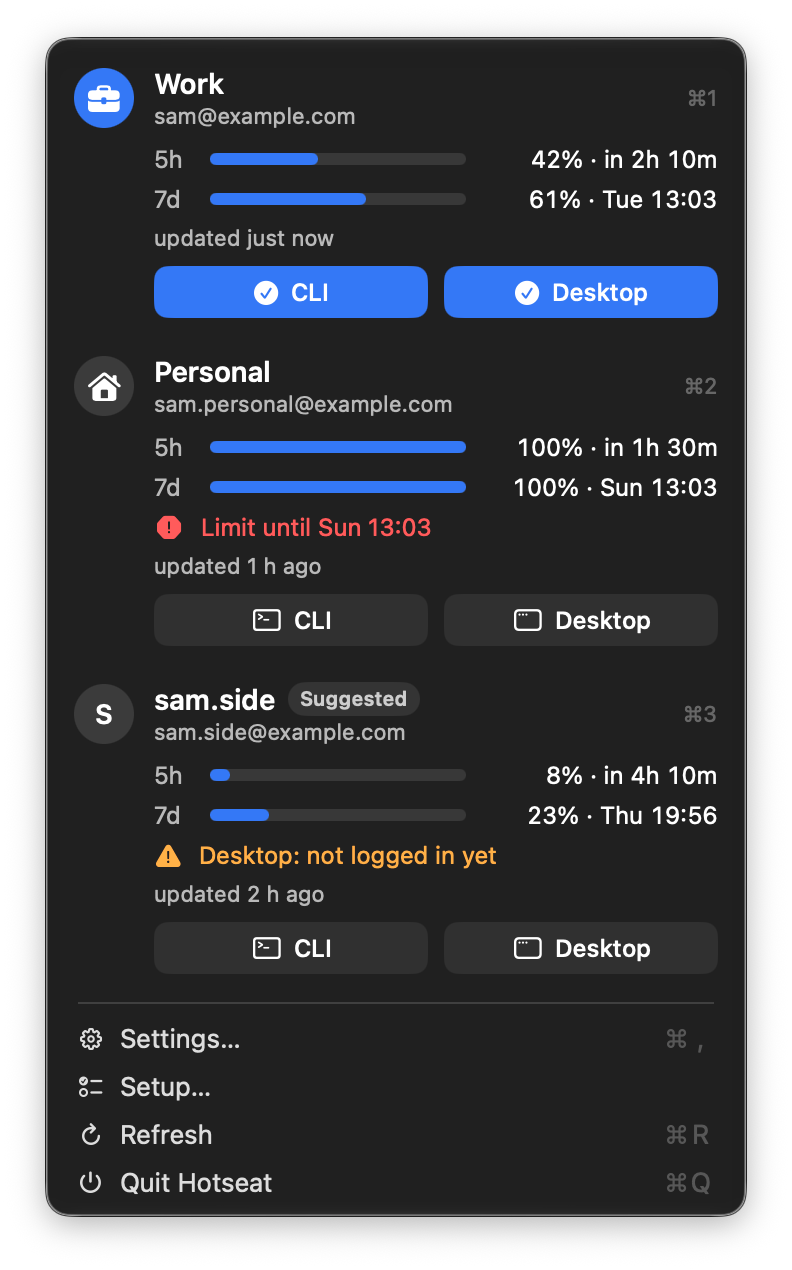
- A menu bar view of every account. It shows 5-hour and weekly usage, when each resets, how old the numbers are, and which account the terminal (CLI) and Claude Desktop each use.
- One-click switching. Click an account to move both the CLI and Claude Desktop to it. Use its CLI or Desktop button to move just one of them. Desktop restarts on the session you were in. The Code session list is the same for every account.
- Shared work data. Every account sees the same
projects/, history, settings, skills and MCP servers, soclaude --resumeworks across accounts. - Continue where you were. When a CLI session stops on a usage limit, a dialog offers to reopen that session under another of your accounts. Nothing switches until you click.
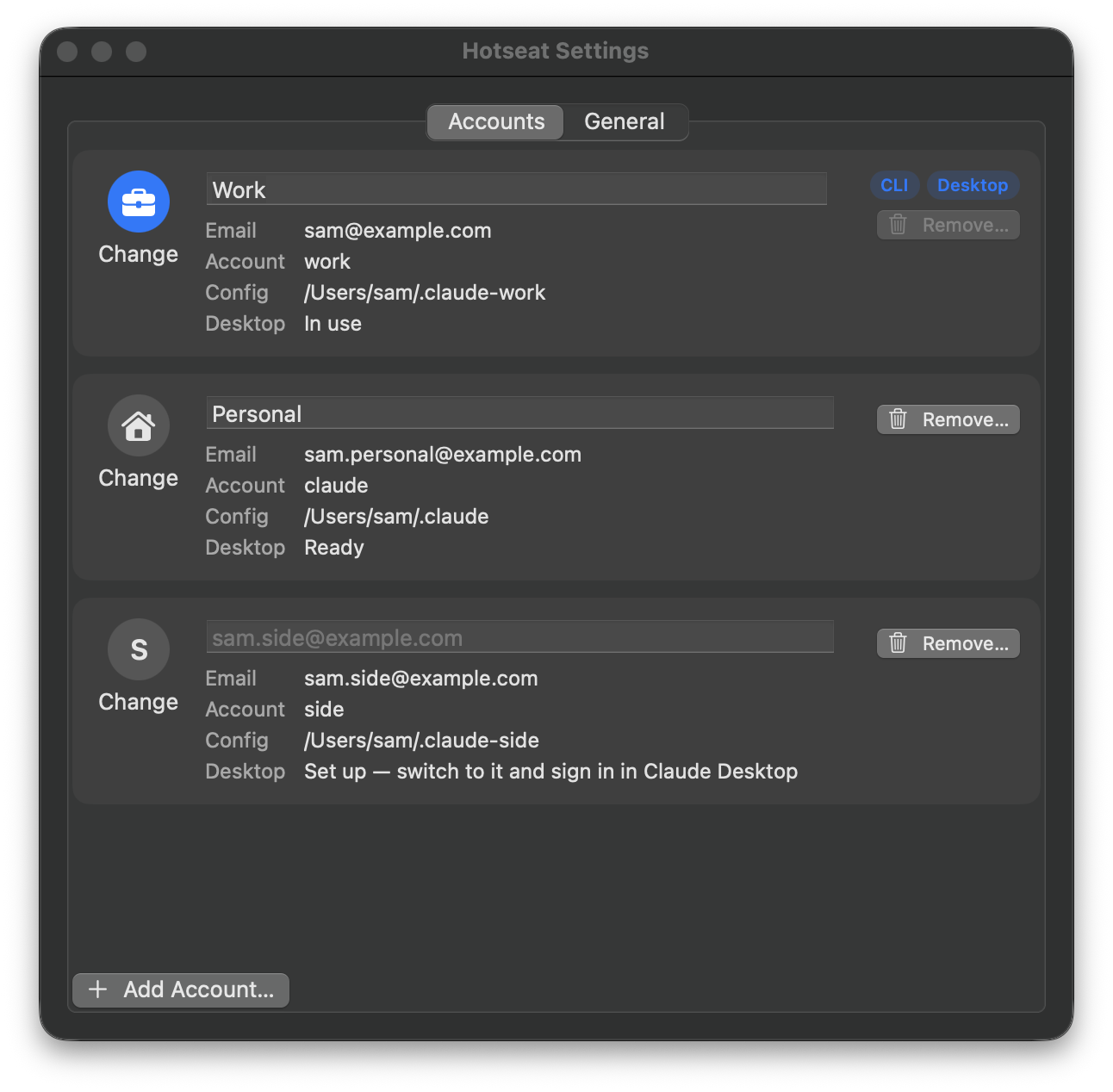
- Names and avatars. Accounts show your own note (for example "Work") or the email's name part. Pick a symbol for each one in Settings.
- Guided setup and clean uninstall. The app walks you through setup and says what each step changes.
hotseat uninstalltakes it all back out.
Install
Homebrew. This builds on your Mac, so macOS does not block the app.
brew install zahT3/tap/hotseat
mkdir -p ~/Applications
cp -R "$(brew --prefix)/opt/hotseat/Hotseat.app" ~/Applications/
open ~/Applications/Hotseat.app
Download. Get Hotseat-<version>-macos.zip from Releases, unzip it, move Hotseat.app to ~/Applications (create the folder if it does not exist), then run once:
xattr -dr com.apple.quarantine ~/Applications/Hotseat.app
Hotseat is not notarized by Apple (that costs money, and Hotseat is free). Without that command, macOS refuses to open an app downloaded from the internet.
From source. You need Go 1.26 and the Xcode Command Line Tools. Xcode itself is not needed.
go build -o ~/.local/bin/hotseat ./cmd/hotseat
macos/build-app.sh --install
Quick start
Open Hotseat. The Setup window lists each step, says what it changes, and runs it when you click Run:
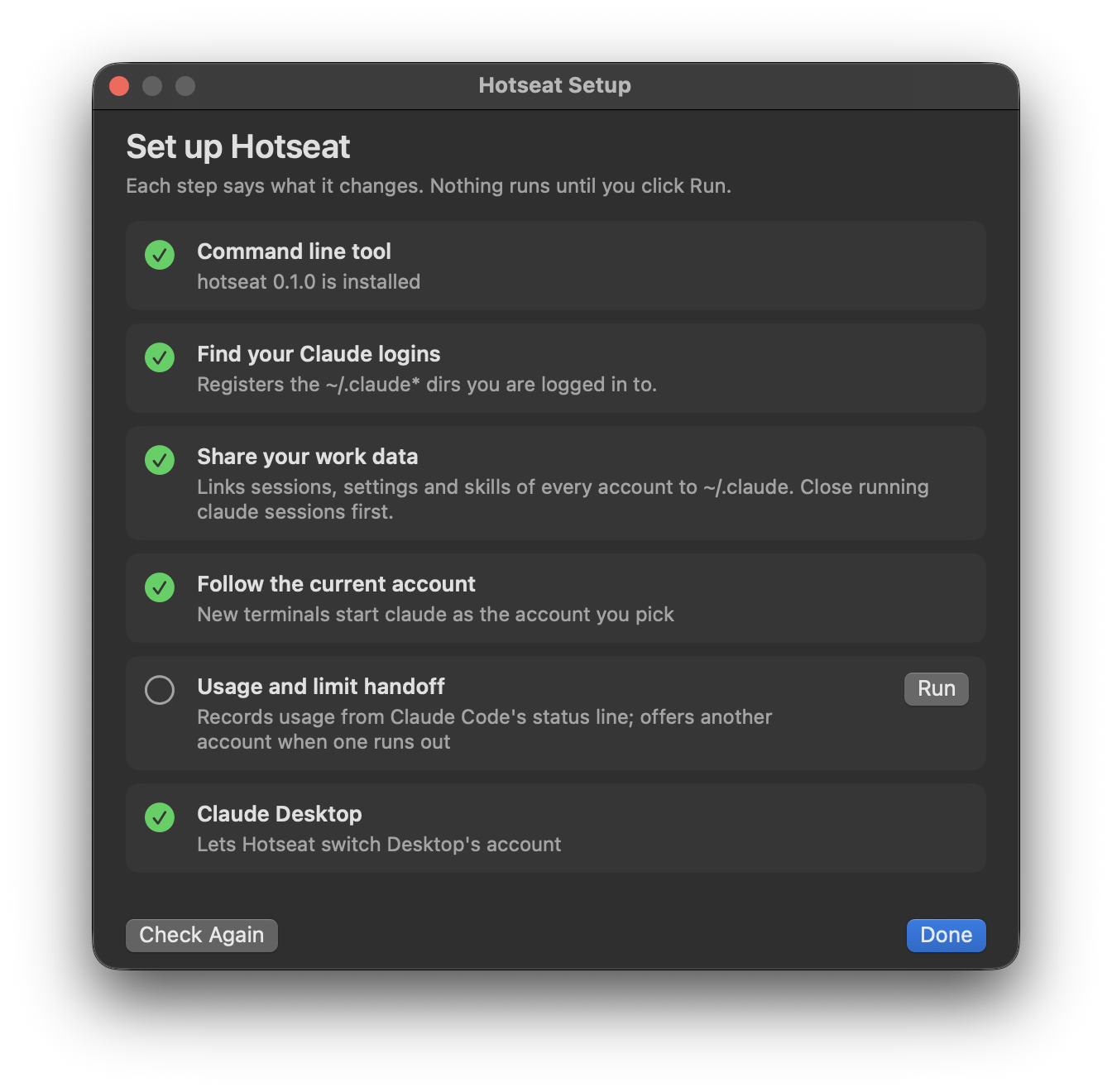
- Install the
hotseatcommand line tool (the app carries it). - Find your Claude logins (
~/.claude,~/.claude2,~/.claude-work, ...). No logins yet? Runclaudeonce and log in. - Share work data between them.
- Make new terminals start
claudeas the account you pick. - Record usage and offer to continue a session under another account when one stops on a limit.
- Let Hotseat manage Claude Desktop.
Add more accounts in Settings → Accounts → Add Account…. Terminal opens with Claude's own login.
The command line tool is installed to ~/.local/bin/hotseat. If hotseat is not found in Terminal, add that folder to your PATH, for example echo 'export PATH="$HOME/.local/bin:$PATH"' >> ~/.zshrc.
How it works
Claude Code supports one config dir per account (CLAUDE_CONFIG_DIR) and keeps each dir's login in its own keychain entry. Hotseat builds on that:
~/.claudeholds the single real copy of your work data (projects/,history.jsonl,file-history/,skills/,settings.json, ...). Every other account dir links those entries back to~/.claudeand keeps only its own login and caches.- A small
claudeshim follows the account you pick. Aliases that setCLAUDE_CONFIG_DIRthemselves, such asalias claude2='CLAUDE_CONFIG_DIR=~/.claude2 claude', keep a terminal pinned to one account. - Claude Desktop holds one login at a time, so each account gets its own complete Desktop data dir.
- The current account's dir sits at the real path,
~/Library/Application Support/Claude. Opening Desktop from the Dock, from Spotlight or after an update always opens the current account. - The others are parked in
~/.config/hotseat/desktop/profiles/<account>/. - A switch quits Desktop (it waits; it never force-kills) and carries the Code session list, MCP servers, preferences, extensions and scratch work over. It then swaps the two dirs and reopens Desktop on your session through Claude's
claude://resumelink.
- The current account's dir sits at the real path,
- Usage numbers come only from what Claude Code hands its status line and from Claude Desktop's local usage history. An account you have not used for a while shows its last known numbers and how old they are.
What Hotseat never does
- It never reads, copies or stores tokens or credentials. That covers
.credentials.json, the keychain,CLAUDE_CODE_OAUTH_TOKEN, and Desktop's cookies and storage. From.claude.jsonit reads only the account and organization IDs, themcpServerskey and the email address. Logins always go through Claude's own login. - It never switches accounts on its own. Every switch is a click or a command. There is no rotation and no account pool, and no proxy.
- It never deletes your data. Anything it replaces or removes goes into
~/.config/hotseat/backups/. - The app makes no network requests. It runs the
hotseatCLI and nothing else.
Command line
hotseat accounts                 # registered accounts; * marks the current one
hotseat use work [--yes]         # CLI and Desktop to `work` (--yes lets it restart a running Desktop)
hotseat use work --cli-only      # only new terminal sessions
hotseat desktop switch work      # only Claude Desktop
hotseat usage                    # 5-hour and weekly usage, reset times, data age
hotseat add work                 # new account: config dir + Claude's own login
hotseat remove work --yes        # sign out, move its files into a backup
hotseat note work "Work"         # your label for it
hotseat icon work briefcase.fill # an SF Symbol name or an emoji
hotseat doctor                   # drift, logins that changed, setup problems
hotseat setup status             # which setup steps are done
hotseat uninstall --yes          # remove the shim, status line and hook
hotseat init                 # find existing ~/.claude* logins and register them
hotseat share plan           # show what would be linked or merged (read-only)
hotseat share apply          # do it; refuses while any claude process is running
hotseat share backups        # list backups
hotseat share rollback <id>  # undo an apply
hotseat share set <name> shared|local
hotseat shim install|uninstall
hotseat statusline install|uninstall
hotseat hook install|uninstall
hotseat desktop adopt [<account> <dir>]
hotseat desktop add <account>
hotseat desktop status
hotseat desktop recover      # finish or undo a switch that was interrupted
hotseat panel --json         # everything the menu bar app shows
Every command accepts --json.
Sharing details. share apply merges each account's history.jsonl into the shared one and copies entries that only exist in an account dir into ~/.claude. When both sides have a different version of a file, the shared copy wins, the account's copy stays in the backup, and apply lists those paths. MCP servers are synced as a union: every account gets every server.
Rolling back. Close every claude session first. A rollback puts each file back as it was before the apply. Files that changed since then are moved into backups/<id>/rollback-removed/ instead of being overwritten. For .claude.json, only the mcpServers key is restored.
In the terminal, the status line reads Work · 5h 42% · 7d 61%. If you had your own status line, it is kept and shown first.
Uninstall
hotseat uninstall --yes # removes the claude shim, the status line and the StopFailure hook
Your data stays:
- the links between
~/.claude*dirs (undo them withhotseat share backupsandhotseat share rollback <id>); ~/.config/hotseat(backups, parked Claude Desktop profiles, usage records);- the app itself.
A status line you changed after installing Hotseat is left as it is.
FAQ
Is using several accounts allowed? Read Anthropic's terms and decide for yourself; Hotseat cannot answer this for you. Here is what they said when this was written (October 2026):
- The Consumer Terms forbid sharing your login or credentials with anyone and "bypassing any of our systems or protective measures". They do not mention multiple accounts.
- The Usage Policy forbids creating multiple accounts "to avoid detection", using another account to get around a ban, and intentionally bypassing "capabilities, restrictions, or guardrails established within our products".
Hotseat is meant for people who legitimately have more than one account, such as work and personal, and want one workspace across them. It is not meant for pooling accounts to get around usage limits.
Will a Claude Desktop update break it? Desktop's data layout is not a public interface. Hotseat checks which account each profile is logged in to before every switch, and hotseat doctor reports anything it does not recognise. Updates so far have not needed changes, but one could.
How is it different from other account switchers? Most switchers swap tokens or the login only, so each account still sees its own history. Hotseat keeps one shared workspace: the same sessions, settings and Desktop session list on every account. It does this without ever reading a token.
Why one config dir per account? Claude Code stores one login per config dir. The dirs are tiny, because the work data is linked to ~/.claude.
Do not use Log out in Claude Desktop to change accounts. It signs that account out on Anthropic's side, and its profile has to log in again. Switch with Hotseat instead.
Windows or Linux? Not yet. Hotseat is macOS only.
The app does not see my HOTSEAT_HOME. Apps do not inherit variables set in your shell. If you use one, point the app at a wrapper script: defaults write io.github.zahT3.hotseat hotseatPath /path/to/script.
Files
~/.config/hotseat/accounts.json: registered accounts, notes and icons (override the dir withHOTSEAT_HOME)~/.config/hotseat/current: the current account~/.config/hotseat/backups/: everything Hotseat replaced or removed~/.config/hotseat/desktop/: parked Claude Desktop profiles and switch state~/.config/hotseat/bin/claude: the shim
Contributing
See CONTRIBUTING.md. Report security issues as described in SECURITY.md.
License
MIT
Yorumlar (0)
Yorum birakmak icin giris yap.
Yorum birakSonuc bulunamadi