passenger
Health Uyari
- License — License: MIT
- Description — Repository has a description
- Active repo — Last push 0 days ago
- Low visibility — Only 6 GitHub stars
Code Uyari
- network request — Outbound network request in site/site.js
Permissions Gecti
- Permissions — No dangerous permissions requested
Bu listing icin henuz AI raporu yok.
A Rider-inspired IDE for C# and .NET, written in C# with Avalonia: its own editor over Roslyn, its own debugger and profiler, unit tests, Git, NuGet and a terminal, all of it open to your coding agent
Passenger
An IDE for C# and modern .NET, inspired by JetBrains Rider, written in C# with Avalonia. Windows and macOS first, with
builds for Linux (how to install them).
passenger-ide.net: what it does, downloads, and how to connect a coding agent.
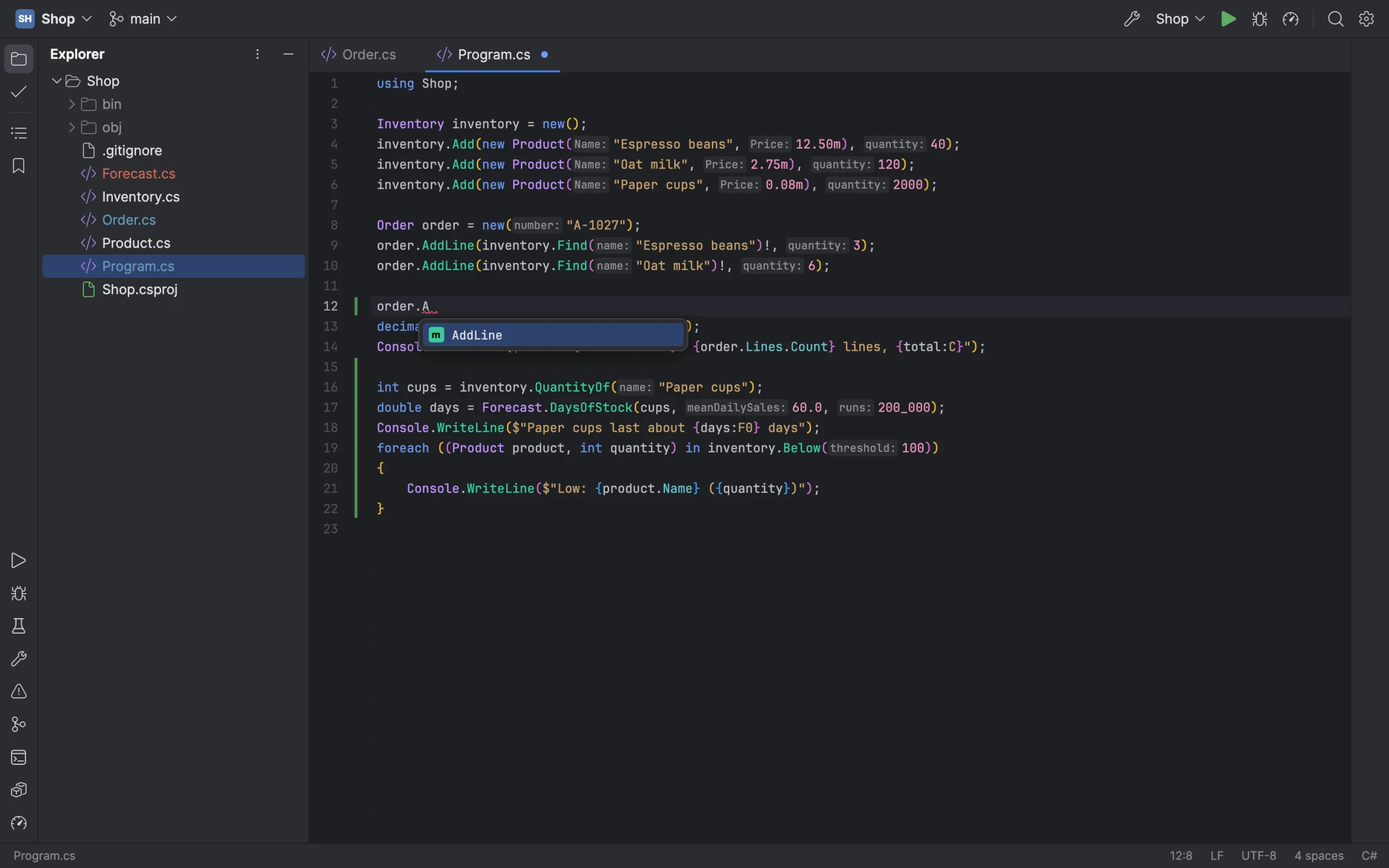
It's early, but it's a working IDE: an editor of its own (a rope, multiple carets, code folding, Rider's Visual Studio
keymaps), Roslyn's colours, diagnostics, completion, hovers, fixes, refactorings, rename and navigation through the
Roslyn language server, a Solution view, building, running and unit tests, a debugger and a profiler of its own, Git,
NuGet and a terminal. And your coding agent can use all of it too: debugging, profiling and testing in the same IDE
you do. The MVP milestone
lists what comes next.
The pictures here are of a small sample shop, drawn by Passenger itself on Avalonia's headless platform.
Debugging
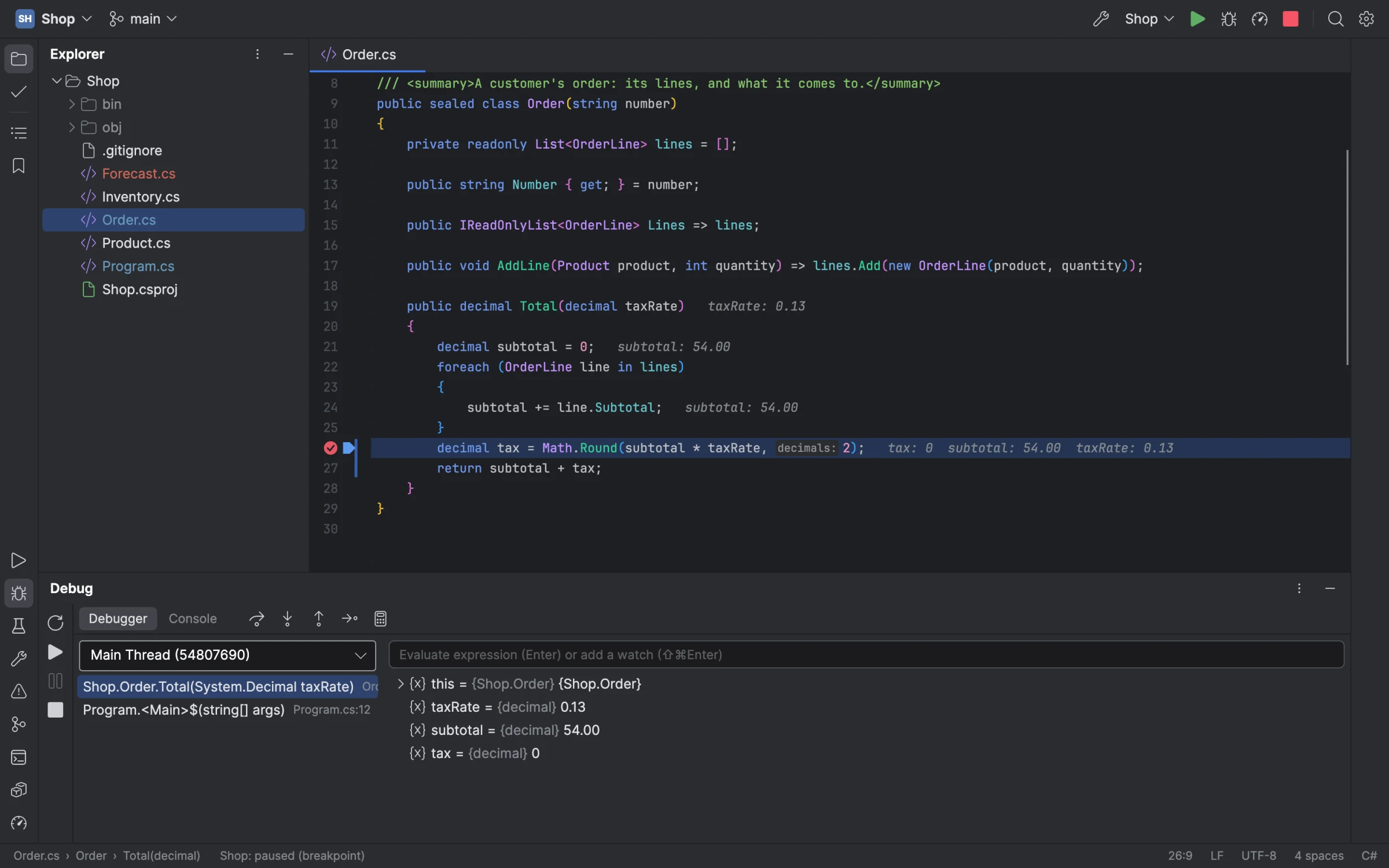
Passenger's own debugger (started from SharpDbg, over ICorDebug): breakpoints with conditions, hit counts and log
messages, stepping, Run to Cursor and Set Next Statement, the call stack and threads, variables you can open and set,
watches and evaluation, and the values each line used drawn after it, as Rider does.
Run | Attach to Process (Ctrl+Alt+P, ⌘⌥P on a Mac) lists the .NET programs running on your machine, by executable,
process ID, user and command line, and debugs the one you choose as if Passenger had started it. Run | Detach lets it
go again, running on, and Reattach to Process (Alt+Shift+P) attaches to the last one again, even started anew. It
lists programs on .NET Core 3.0 and later, whose runtime opens pipes for a debugger; .NET Framework and Mono are not
Passenger's.
On a Mac this needs no setup: no Developer Tools access, no debugger entitlement, no signing of yours or the
program's. The debugger reaches a program's runtime through those pipes, in your temporary folder, not through the
task port macOS guards, so a program you started in a terminal, one signed under the hardened runtime, and Passenger
itself attach as a program the debugger starts does. The program has to run as you, with your temporary folder
(TMPDIR), and with its diagnostics on (DOTNET_EnableDiagnostics not set to 0).
Profiling
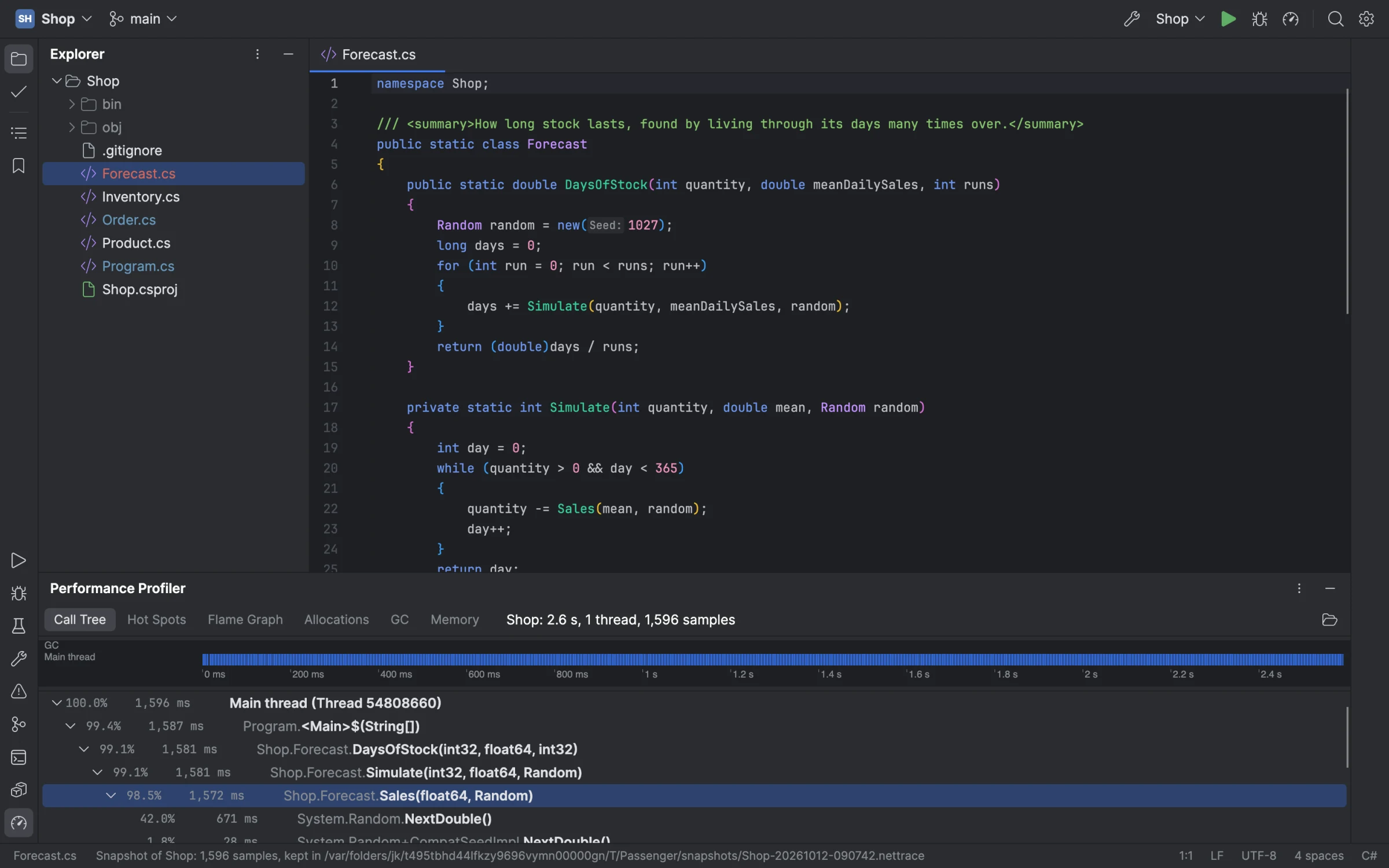
A sampling profiler like dotTrace's, over the runtime's EventPipe: a configuration profiled from its first
instruction, then its call tree, hot spots, flame graph, allocations and garbage collections, narrowed to any stretch
of the timeline. A memory snapshot counts a running program's heap by type.
Git
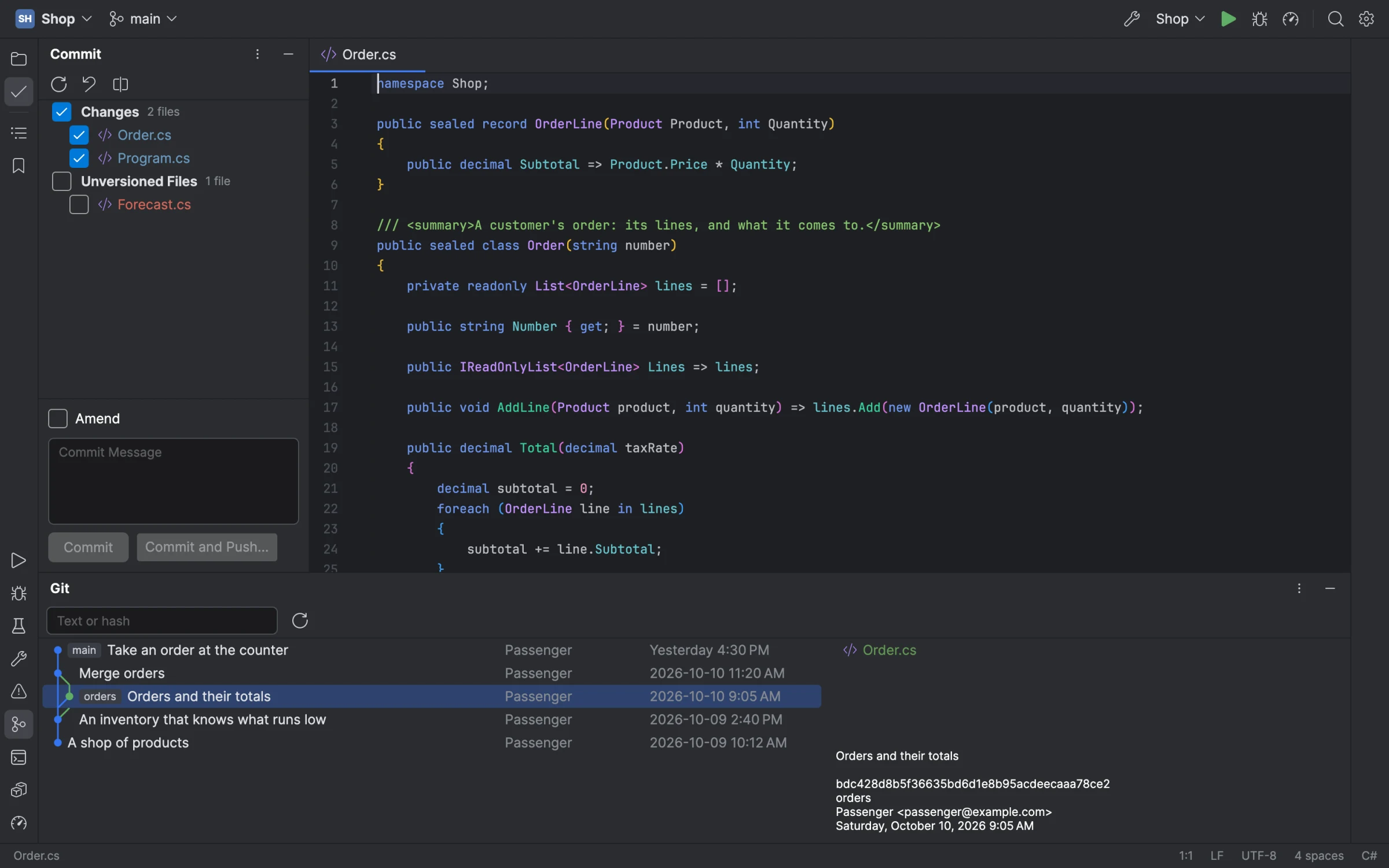
The Commit window with its changes and unversioned files, the log with its branch graph and each commit's files,
diffs, blame annotations, change bars in the gutter that roll back a hunk, branches, push, pull and fetch.
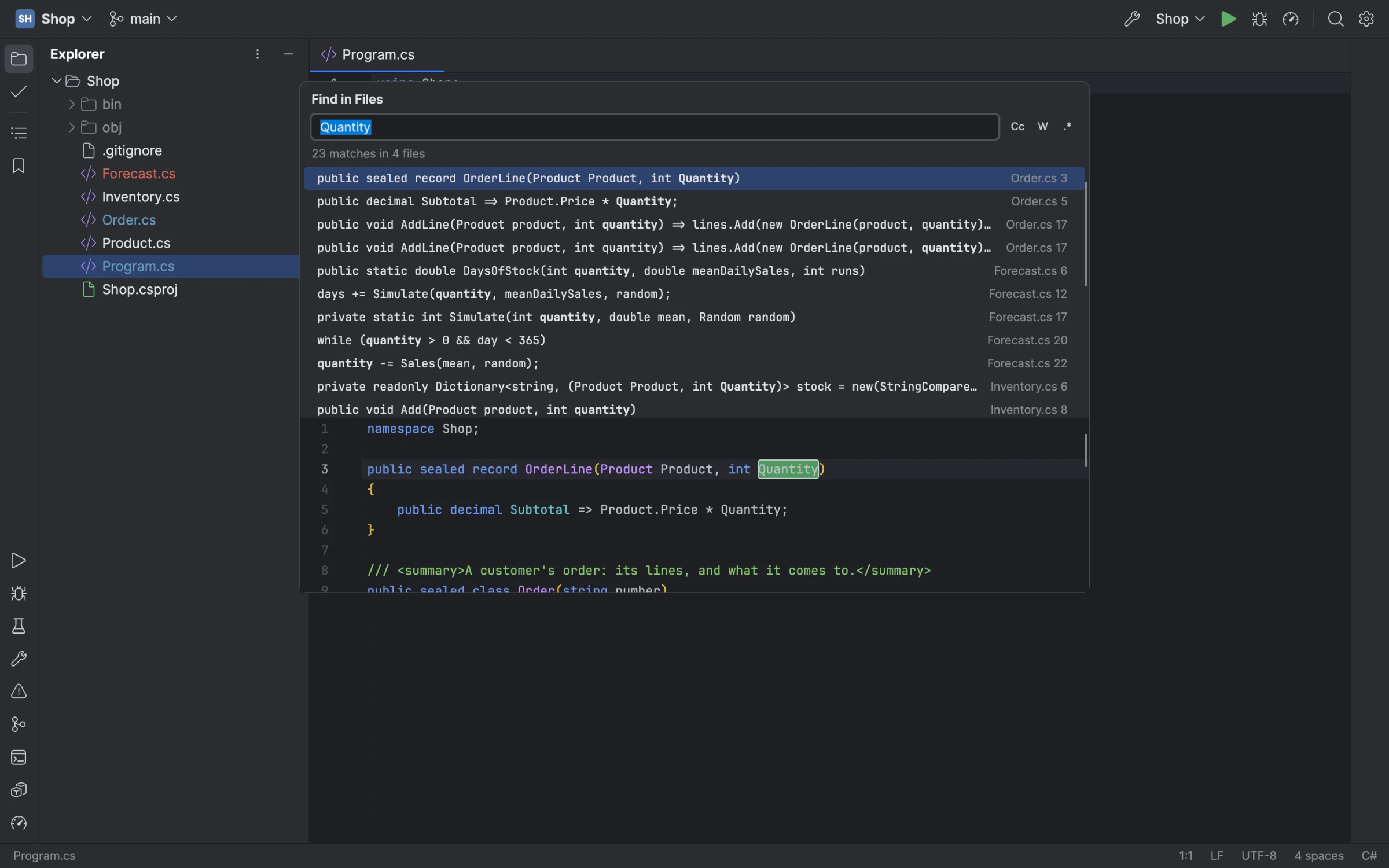
Search
Search Everywhere, Go to File, Go to Symbol and Find Action, Find and Replace in Files with a preview, Recent Files,
bookmarks, and Extend Selection through the syntax tree.
Building
You need the .NET 11 SDK (the release candidate works until it ships in November 2026) and
just.
just build                 # Debug build; warnings are errors
just run                   # run it
just screenshot shell.png  # draw the main window to a PNG off-screen (--size 1600x1000 --scale 2)
just publish osx-arm64     # a self-contained Release build (osx-x64, win-x64, win-arm64, linux-x64, linux-arm64 too)
just package-mac           # the macOS disk image (or osx-x64); signed with PASSENGER_SIGN_IDENTITY, else ad hoc
just package-win win-x64   # the Windows installer (or win-arm64), unsigned unless tools/package-win.sh's variables sign it
just package-linux         # the Linux archive with its install.sh (linux-x64, or linux-arm64), as site/linux.html uses it
just notices               # fail naming any package THIRD_PARTY_NOTICES.md does not name
Every recipe sets AVALONIA_TELEMETRY_OPTOUT=1. Avalonia's build task (Avalonia.BuildServices, which every Avalonia
package brings) otherwise sends AvaloniaUI a record of each build: a machine id it keeps, hashes of the machine and
user names and of the project's name, the system, the IDE and the CI it ran under. It reads its opt-out only from the
environment, so set the variable yourself for a build outside just (dotnet build, an IDE's).
Packages come only from nuget.org (nuget.config), at the versions and content each project's packages.lock.json
pins, and on Windows and Linux only as nuget.org signed them (NuGet checks no signatures on macOS). A restore on your
machine updates a lock file when you add or change a package; commit it with the change, since CI restores only what
the lock files name.
Your coding agent, using the IDE as you do
Connect a coding agent such as Claude Code to Passenger and it works through the IDE, not just your files. It finds
where things are declared and used, reads the compiler's warnings, and renames and fixes code as the IDE does. It
builds, runs and tests. It sets breakpoints, steps through the program, reads and changes its variables, and profiles
a run to find what is slow. It commits, adds packages, types into the terminal, and takes a screenshot to see what you
see.
Connect it to the window you have open and watch it work: its breakpoints and stops show in your editor, its runs in
your Run window. Or give it a Passenger of its own with no window, for work it does alone. A window lets agents in
only once you turn on Settings | MCP Server | Enable MCP Server, through a connection only you can reach, and asks you
the first time an agent wants to change anything.
Tell your agent to start Passenger with --mcp-attach, and it joins the window you have open. Passenger is/Applications/Passenger.app/Contents/MacOS/Passenger on a Mac, %LOCALAPPDATA%\PassengerIDE\current\Passenger.exe
on Windows, and ~/.local/bin/passenger on Linux (/usr/local/bin/passenger when installed for everyone). For a Passenger of the agent's own, with no window, use --mcp and the folder or solution instead.
# Claude Code
claude mcp add passenger -- /Applications/Passenger.app/Contents/MacOS/Passenger --mcp-attach
# Codex CLI
codex mcp add passenger -- /Applications/Passenger.app/Contents/MacOS/Passenger --mcp-attach
Claude Desktop takes it in Settings | Developer | Edit Config ("mcpServers": {"passenger": {"command": "<Passenger's path>", "args": ["--mcp-attach"]}}), and the Codex desktop app in Settings | MCP servers | Add server (STDIO, with
the same command and argument). Passenger connects through MCP, the standard most coding agents use to reach their
tools, so any other agent that can add an MCP server connects the same way. In this repository, .mcp.json runsjust mcp, which starts the last build over this folder.
Licence
MIT (LICENSE). Third-party code and assets keep their own licences, listed in THIRD_PARTY_NOTICES.md.
Yorumlar (0)
Yorum birakmak icin giris yap.
Yorum birakSonuc bulunamadi