herdr-rig
Health Warn
- License — License: MIT
- Description — Repository has a description
- Active repo — Last push 0 days ago
- Low visibility — Only 5 GitHub stars
Code Fail
- exec() — Shell command execution in mods/rig-board/main.js
- spawnSync — Synchronous process spawning in rig.test.ts
- process.env — Environment variable access in rig.test.ts
- fs module — File system access in rig.test.ts
- exec() — Shell command execution in rig.ts
- spawnSync — Synchronous process spawning in rig.ts
- process.env — Environment variable access in rig.ts
Permissions Pass
- Permissions — No dangerous permissions requested
No AI report is available for this listing yet.
One manager agent drives worker and reviewer coding agents (Claude Code, Codex, opencode, pi, omp, Command Code) in herdr.
▲ rig
One manager agent. Many coding agents. One terminal workspace.
Talk to a single manager session. It writes tickets, hands them to worker and reviewer agents (Claude Code, Codex, opencode, pi, omp, Command Code), keeps them on track, and merges what passes review. Everything runs in herdr panes you can watch and type into, or headless in the background.


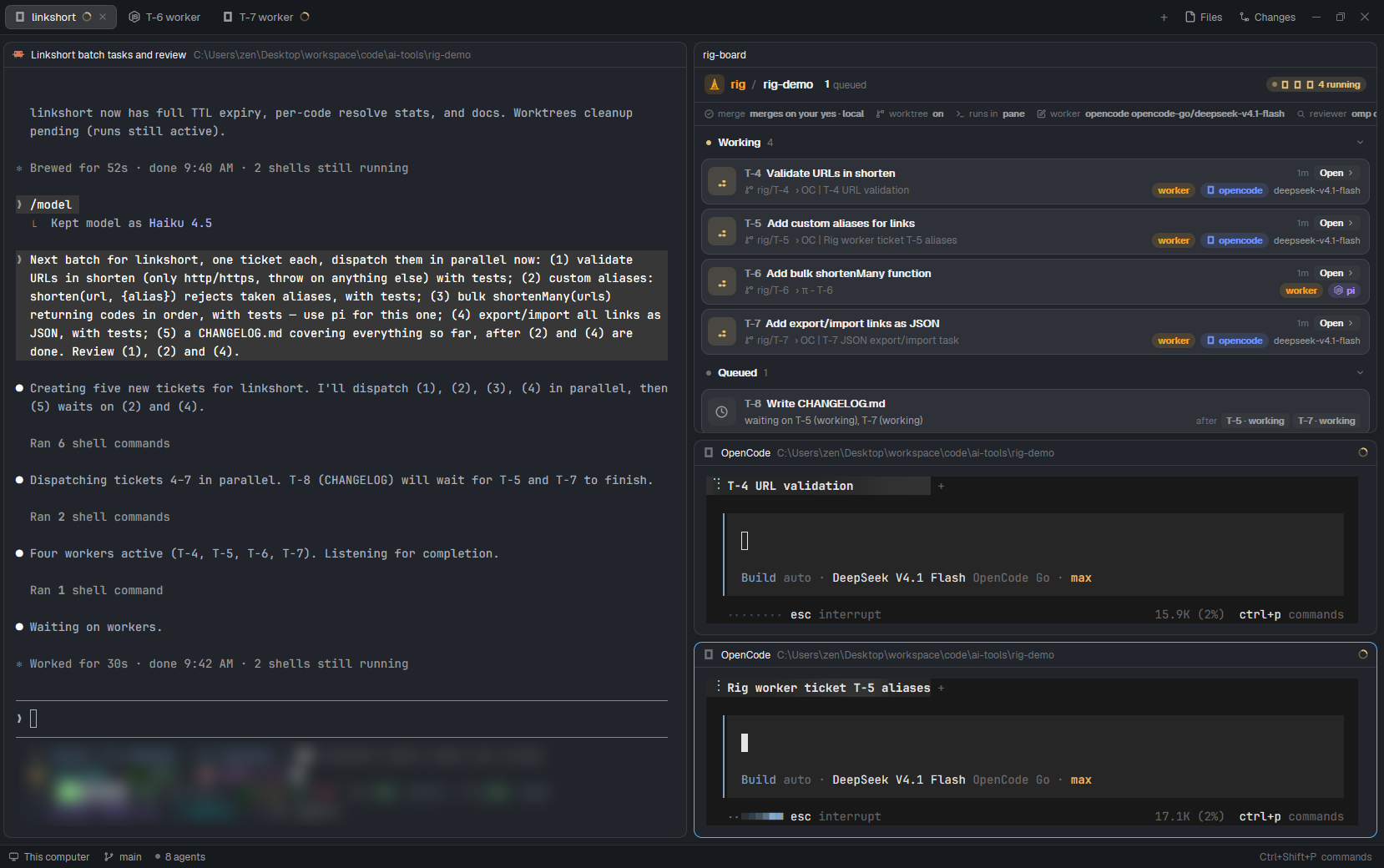
A Claude Code manager (left) split one request into five tickets. Four run in parallel on opencode and pi, and a CHANGELOG ticket waits for two of them.
Why
Running several coding agents at once is easy. Keeping track of them is not. Which one is stuck on a question? Did the review pass? Whose branch is safe to merge? rig gives that job to one agent:
- You talk to one session. The manager turns a request into tickets with a goal, acceptance checks and verify commands, then dispatches them.
- Any harness, any role. Manager, worker and reviewer can each be Claude Code, Codex, opencode, pi, omp or Command Code, with their own model and effort. Mix them freely, for example a cheap fast worker with a reviewer from a different model family.
- Isolated by default. Each ticket gets its own git worktree and
rig/T-nbranch, cut from the branch you are on. - Review that isn't redundant. The manager only triages the diffstat. One reader, a reviewer or the manager, reads the actual diff.
- Nothing to babysit. Workers report back on their own. A watcher tells the manager when an agent goes idle without reporting, gets blocked, or exits.
- Minimal by design. One Bun file and SQLite. The judgement lives in three skills (
manager,worker,reviewer), not in code. No daemon, no MCP server.
The board
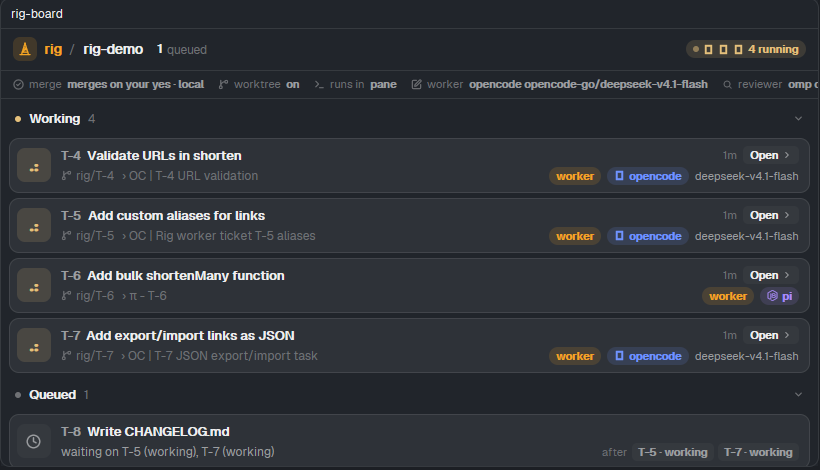
The board groups tickets by what they need from you: Needs you · Working · Ready · Queued · To do · Done. It shows who is on each ticket (role, harness, model, effort), what the agent says it is doing, and what a queued ticket waits on.
| herdr desktop app (native mod) | terminal (herdr CLI, or any terminal) |
|---|---|
 |
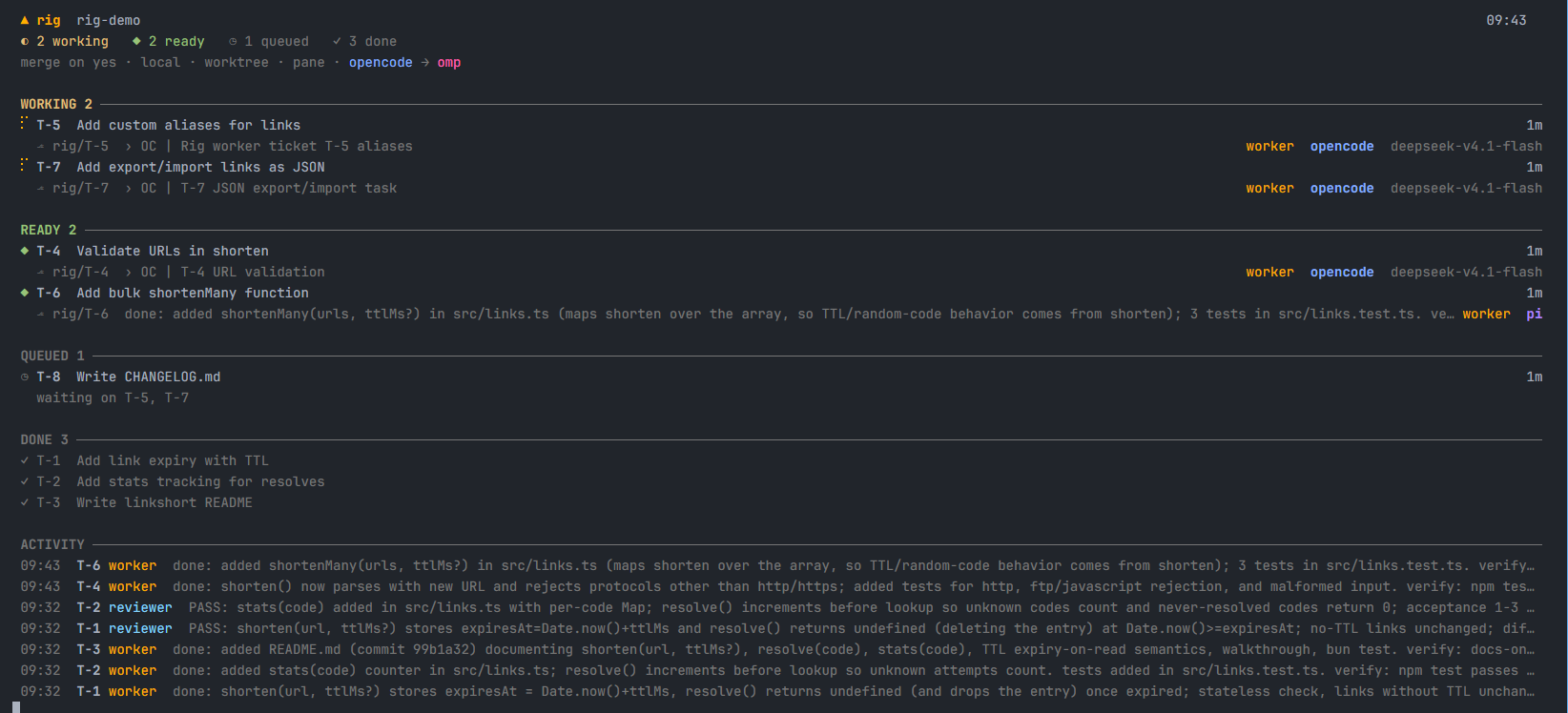 |
| Click Open to jump to an agent's pane. A toast appears when something needs you. | Spinners, harness colors, and a live activity feed in whatever height is left. |
Install
You need Bun ≥ 1.2, git, and either the herdr CLI (≥ 0.9) or the herdr desktop app. gh is only needed for merge pr.
bun add -g github:zanuartri/herdr-rig   # puts `rig` on your PATH
rig install       # copies the rig-manager/-worker/-reviewer skills into every agent it finds,
                  # and the board mod into the herdr desktop app if it is installed
To hack on it instead, clone the repo and run bun link inside it. rig then runs your checkout, so changes apply right away (run rig install again after editing a skill). To update an install, run the bun add -g line again.
For Claude Code you can use the plugin instead: claude plugin marketplace add zanuartri/herdr-rig, then claude plugin install rig@herdr-rig.
Quick start
Open your agent in a herdr pane inside a git repo and start the manager skill:
| harness | start the manager |
|---|---|
| Claude Code | /rig-manager (plugin: /rig:manager) |
| Codex | $rig-manager |
| opencode | "use the rig-manager skill" |
| pi, omp | /skill:rig-manager |
| Command Code | /rig-manager |
| anything else with a shell | "run rig skill manager and follow it" |
Then ask for work in plain words:
Add link expiry and a stats endpoint, review both, and write a README with pi.
The first time in a repo, the manager asks once about harness, model, effort, pane/tab/headless, worktrees, autonomy and how to merge, and remembers the answers (rig get). After that it only asks when something is actually unclear.
How it works
 you ──► manager ──rig new──► ticket T-3 (goal · acceptance · verify · scope)
            │
            ├─rig dispatch──► worker  (own worktree, rig/T-3) ──rig say──► manager
            ├─rig dispatch --role reviewer──► reviewer ── PASS / FIX ──► manager
            └─merge (squash or PR) ──rig edit T-3 status=done──► panes closed, worktree removed
- State:
<repo>/.rig/rig.db(gitignored by itself). Tickets are numbered per repo, and several managers can share a repo. Each one owns its own tickets (rig ls --mine). - Messages: workers and reviewers run
rig say manager "…". The manager listens withrig inbox --waitas a background command, so nothing is typed into its pane while you write. Without a listener, rig types a message in only while you are not focused on that pane, and bundles anything that piled up into one message. - Base branch: a ticket starts from, and lands on, the branch the manager had checked out when it was created (
--basepicks another). - Order:
rig new "…" --after T-3,T-4keeps a ticket Queued, and the manager hears when it is unblocked. - Cleanup:
donecloses the ticket's panes and tabs and removes its worktree and branch once the changes are in the base branch (normal or squash merge). Unmerged work is kept.rig cleansweeps leftovers.
Layout
The manager keeps the left half. The board opens by itself in the top half on the right, and up to pane.max (default 2) pane runs stack under it. Later runs open as tabs. Panes always open beside the manager, in its own space, not wherever you happen to be looking.
Change it for one run with --mode tab|pane|headless, or for good with rig set pane.max 3, rig set mode tab, rig set board tui|off.
rig picks the backend from the manager's terminal: HERDR_PANE_ID uses the herdr CLI, and HC_TERMINAL_ID uses the desktop app (hc + herdr-app).
Commands
rig new "title" [--body -] [--review] [--after T-1,T-2] [--base br]
rig dispatch T-3 [note] [--role worker|reviewer] [--harness h] [--model m] [--effort e] [--mode pane|tab|headless]
rig tell T-3 "…" [--now]       steer a run (--now interrupts first; headless resumes the session)
rig stop T-3 · rig close T-3|<run#> · rig ps · rig ls [--mine] · rig show T-3 · rig inbox [--wait]
rig edit T-3 status=done       close panes, remove the worktree once merged
rig board [--open|--tab] [--tui] [--mine]
rig get · rig set worker.harness codex · rig set harness.<name> '<json>'   (add or override a harness)
rig clean [T-3] [--force] · rig install [harness…] · rig skill manager|worker|reviewer
rig help has the full list.
Tested
| herdr desktop app | herdr CLI | |
|---|---|---|
| worker: Claude Code, Codex, opencode, pi, omp, Command Code | ✅ | ✅ |
| manager: Claude Code, Codex, opencode, pi, omp, Command Code | ✅ | ✅ pi, omp |
| watcher (idle / blocked / exited), board, cleanup | ✅ | ✅ |
bun test runs on Linux, macOS and Windows in CI. The pane workflow has been driven by hand on Windows, so reports from macOS and Linux are very welcome.
Known limitations
- Startup dialogs. Claude Code, Codex and Command Code ask once to trust each new folder, and every worktree is a new folder. rig keeps the pane open and tells you, and the agent continues once you answer.
- Codex as manager runs commands in a sandbox that can't reach
.gitor herdr. Approverig(and the mergegitcommands) when Codex asks. - opencode's background server can hold a finished worktree folder open on Windows.
rig cleanremoves it once it is released. - Watcher. An agent that pauses for a long time between tool calls can be reported as idle a little early. The manager reads its screen before acting.
- Not yet exercised end to end:
merge pr(push andgh pr create), and auto-merge withautonomy merge.
Contributing
Issues and PRs are welcome. Keep it small: logic that is judgement belongs in skills/, and rig.ts only keeps state and launches runs. Run bun test before sending a change.
License
MIT © Zanuar Tri Romadon
Reviews (0)
Sign in to leave a review.
Leave a reviewNo results found