aiwff-runtime
Health Warn
- License — License: MIT
- Description — Repository has a description
- Active repo — Last push 0 days ago
- Low visibility — Only 5 GitHub stars
Code Fail
- child_process — Shell command execution capability in agent/index.js
- process.env — Environment variable access in agent/index.js
- fs module — File system access in agent/index.js
- fs module — File system access in examples/mock-worker/worker.js
- child_process — Shell command execution capability in scripts/demo.js
- process.env — Environment variable access in scripts/demo.js
- network request — Outbound network request in scripts/demo.js
- child_process — Shell command execution capability in scripts/doctor.js
- spawnSync — Synchronous process spawning in scripts/doctor.js
- fs.rmSync — Destructive file system operation in scripts/doctor.js
- process.env — Environment variable access in scripts/doctor.js
- fs module — File system access in scripts/doctor.js
- fs module — File system access in scripts/ip-redline-scan.js
- fs module — File system access in scripts/verify-demo.js
- fs.rmSync — Destructive file system operation in tests/reliability.test.js
- process.env — Environment variable access in tests/reliability.test.js
- fs module — File system access in tests/reliability.test.js
- network request — Outbound network request in tests/reliability.test.js
- Hardcoded secret — Potential hardcoded credential in tests/reliability.test.js
Permissions Pass
- Permissions — No dangerous permissions requested
No AI report is available for this listing yet.
Minimal agent task runtime with three-panel cockpit WebUI — open source foundation for building your own AI brain
aiwff-runtime
繁體中文說明 -> README.zh-TW.md







What is this?
aiwff-runtime is a local minimal brain for personal AI work: send a message to Telegram, Claude runs on your machine autonomously, the result is pushed back to you, and you can watch progress in the browser.
It is designed for a single local operator who wants an agent runtime, not just another chat surface.
| Not this | This |
|---|---|
| A chatbot that only replies once and stops | A local agent loop that can create a task, run Claude CLI, write artifacts, and report completion |
| An API wrapper around a hosted chat model | A file-backed local runtime using your machine, your files, and your Claude CLI |
| A fixed workflow builder where every path is drawn in advance | A task queue where Claude can plan and use tools inside the configured boundary |
| A SaaS service where your task state lives elsewhere | A repo-local daemon, file-bus, WebUI, memory files, and optional Telegram interface |
The shortest version is:
Telegram message
  -> local daemon creates a task
  -> Claude CLI reads CLAUDE.md and runs the task
  -> result is written under data/artifacts/
  -> Telegram and WebUI show the outcome
Where it sits in the AI stack
| Layer | Typical shape | What happens there | aiwff-runtime position |
|---|---|---|---|
| L1 | ChatGPT.com / Claude.ai | Chat starts, answer returns, session ends | Below aiwff-runtime |
| L2 | API wrapper | A model API is wrapped with a custom UI | Below aiwff-runtime |
| L3 | IDE or CLI assistant | Tool use exists, but state is mostly session-bound | Below aiwff-runtime |
| L4 | n8n / Make / Zapier | Predefined workflows run along fixed paths | Below aiwff-runtime |
| L5 | Local agent runtime | Receive arbitrary instructions, plan, use tools, keep task state | aiwff-runtime minimal-brain |
| L6 | Multi-node orchestration | Several machines and agents coordinate as a fleet | Full AIWFF |
aiwff-runtime is the L5 base: a single-machine agent runtime with persistent task state. Full AIWFF is the larger L6 system.
Architecture
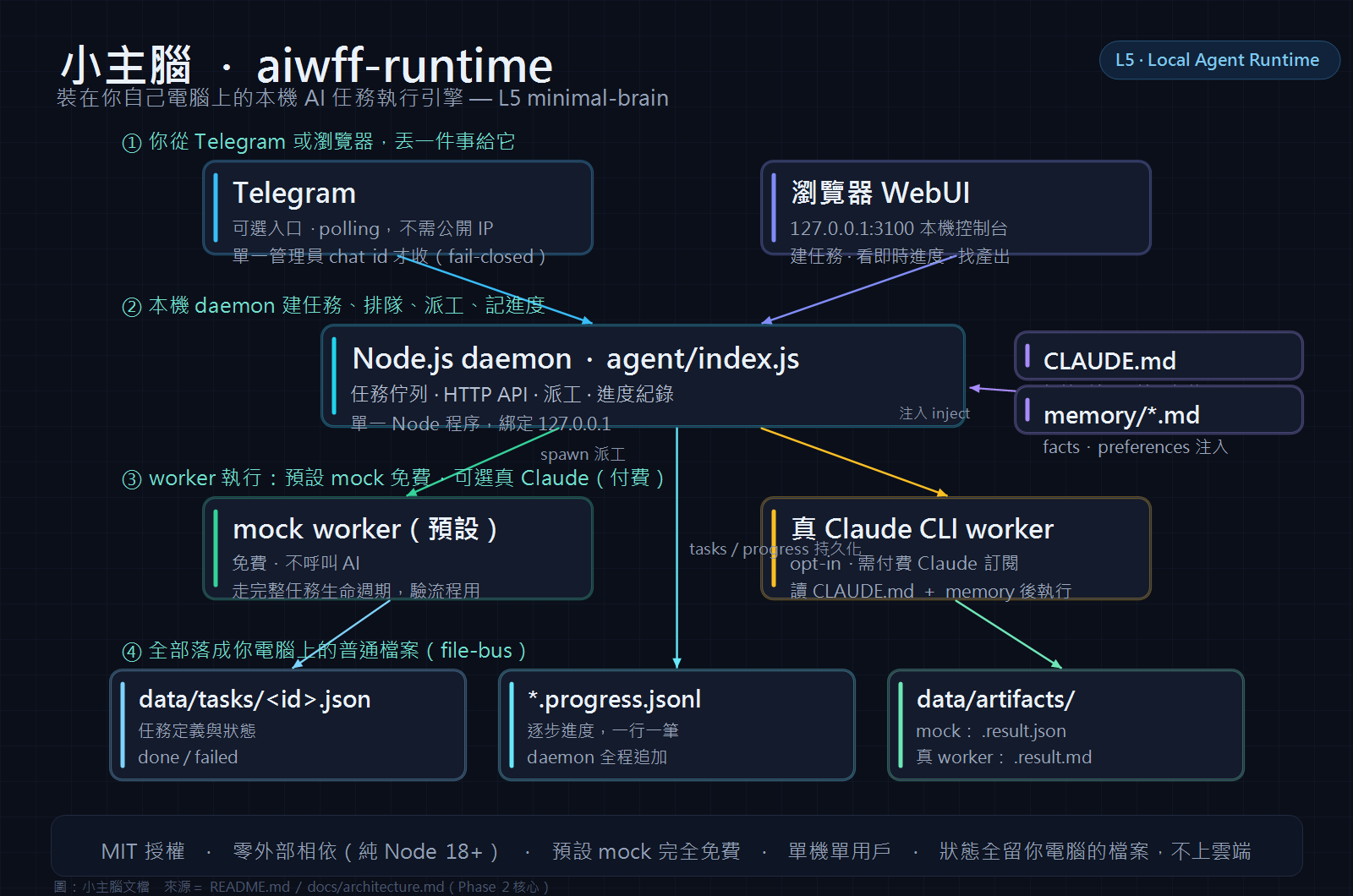
The minimal-brain design has 8 components. Phase 2 implements the practical core: daemon, Telegram polling, Claude CLI worker, file-bus, WebUI, CLAUDE.md brain configuration, and lightweight memory injection.
The infographic above shows the full runtime loop at a glance. For a compact source-oriented map, see docs/architecture.md.
| Component | Plain meaning | Phase 2 status |
|---|---|---|
| A. Daemon | A Node.js process that owns the runtime loop, task queue, HTTP API, WebUI, and worker spawning | Active in agent/index.js, listening on 127.0.0.1:${PORT} |
| B. TG Bot | Telegram is the input and output surface. Send a message, get a completion notice back | Active when TG_BOT_TOKEN is set; polling is used, no webhook or public IP required |
| C. Brain | Claude CLI is spawned as the worker. It receives the task and uses tools to complete it | Active through CLAUDE_CMD, defaulting to claude |
| D. File-bus | Tasks, progress logs, and artifacts are normal files under data/ |
Active: data/tasks/, data/tasks/*.progress.jsonl, data/artifacts/ |
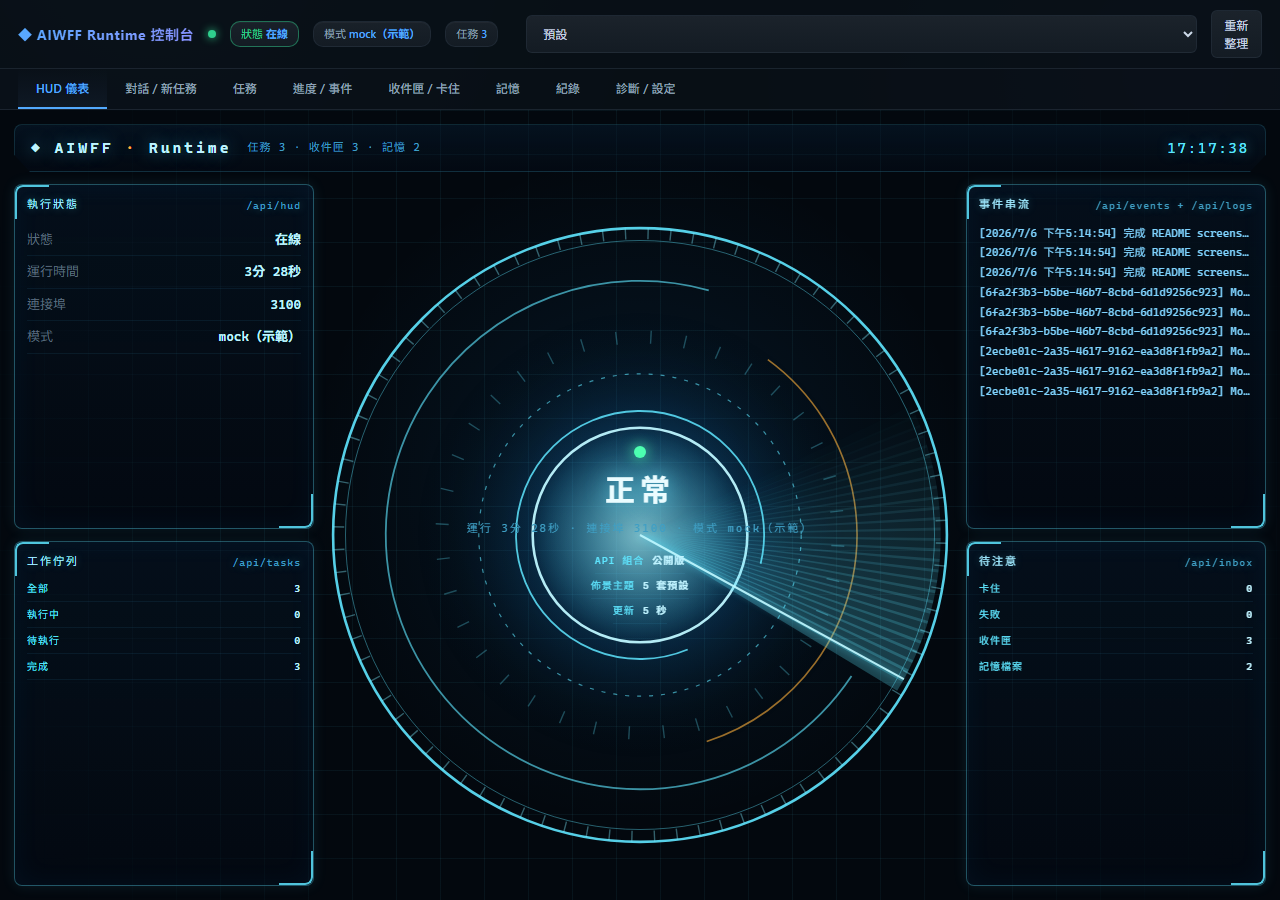
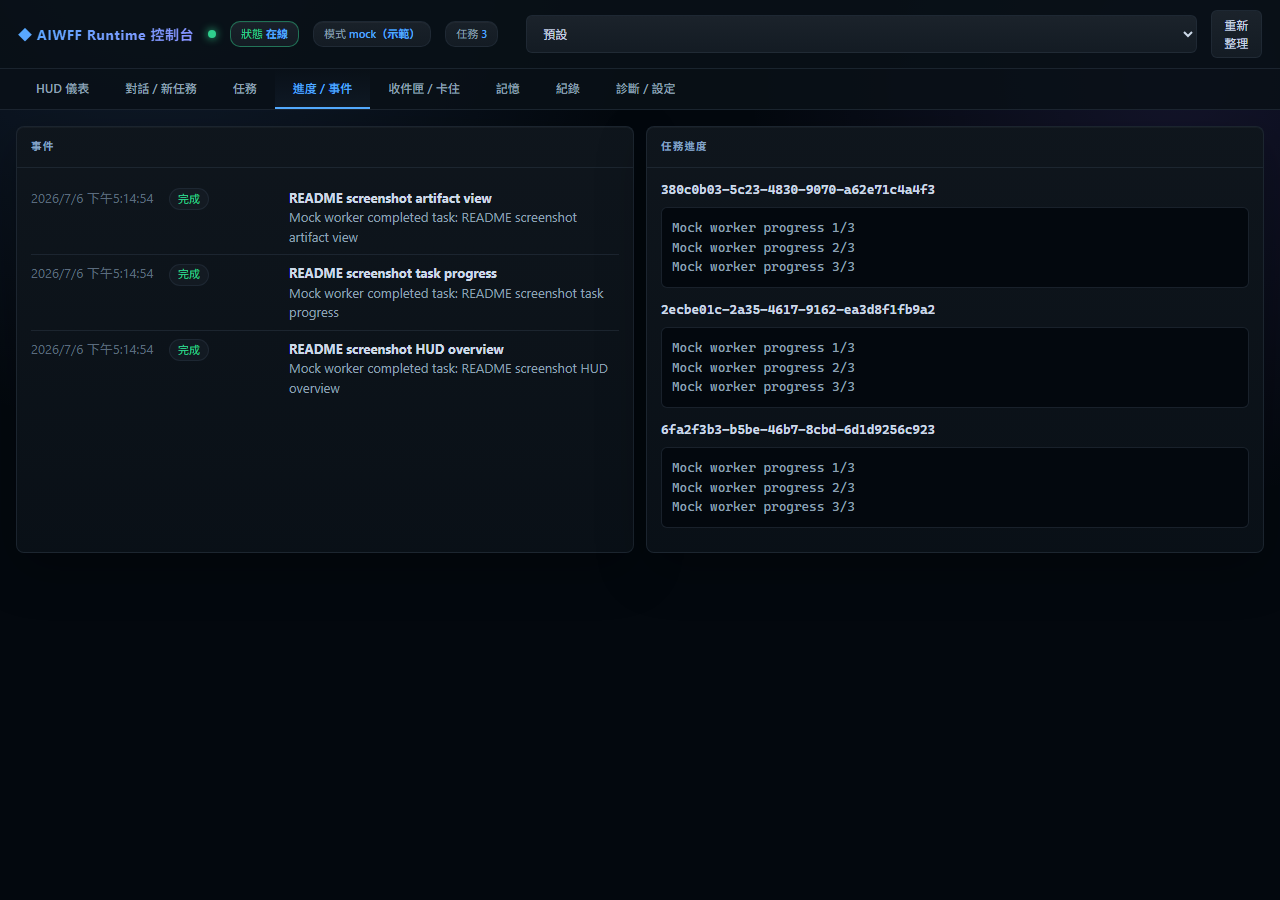
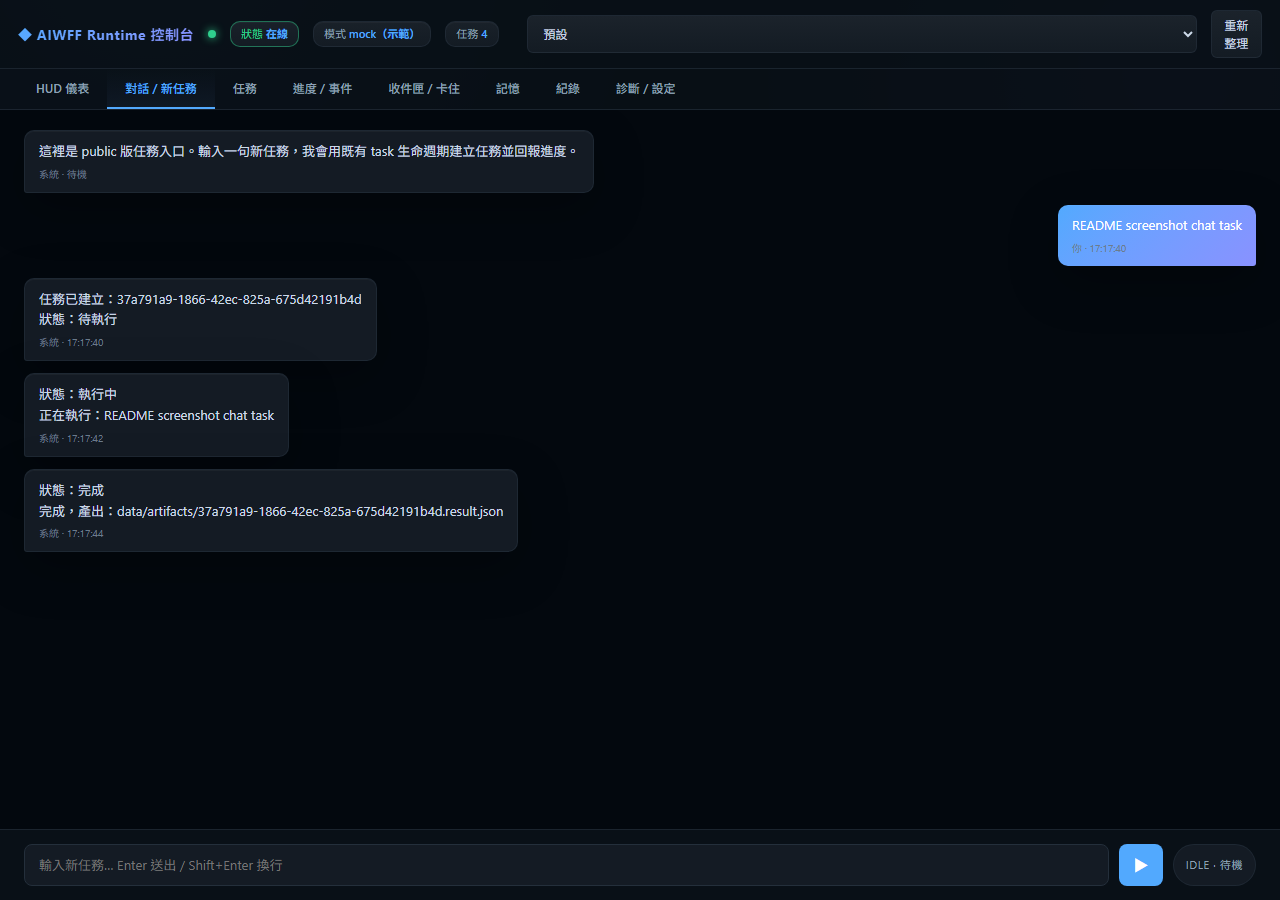
| E. WebUI Cockpit | Browser view for task status, task creation, progress, and artifact paths | Active at http://127.0.0.1:3100 by default |
| F. Memory | Markdown memory files are injected into Claude's prompt | Active for memory/facts.md and memory/preferences.md |
| G. Inbox / Watching | A design surface for pending events and cross-session reminders | Minimal-brain design component; not documented here as a current .env option |
| H. Self-verify | A design surface for a second-pass completion check | Phase 2 checks artifact existence; fuller Claude self-review is a later hardening target |
                 ┌────────────────────┐
                 │     Telegram       │
                 │ message / result   │
                 └─────────┬──────────┘
                           │ polling with TG_BOT_TOKEN
                           v
┌────────────┐     ┌────────────────────┐     ┌────────────────────┐
│  Browser   │<--->│  Node.js daemon    │---->│   Claude CLI worker │
│  WebUI     │     │  agent/index.js    │     │   reads CLAUDE.md   │
└────────────┘     └─────────┬──────────┘     └─────────┬──────────┘
                             │                          │
                             v                          v
                    ┌────────────────────┐     ┌────────────────────┐
                    │ data/tasks/*.json  │     │ memory/facts.md    │
                    │ progress .jsonl    │     │ memory/preferences │
                    └─────────┬──────────┘     └────────────────────┘
                              │
                              v
                    ┌────────────────────┐
                    │ data/artifacts/    │
                    │ <task>.result.md   │
                    └────────────────────┘
One full pass looks like this:
You send a Telegram task
  -> TG polling receives it
  -> daemon writes data/tasks/<id>.json
  -> daemon spawns Claude CLI
  -> Claude reads CLAUDE.md plus memory files
  -> Claude writes progress and a result artifact
  -> daemon marks the task done or failed
  -> Telegram receives the result notice
  -> WebUI shows the same task state
Screenshots
| HUD dashboard | Task progress | Chat / new task |
|---|---|---|
 |
 |
 |
Quick Start
Prerequisites:
| Requirement | Check |
|---|---|
| Node.js >= 18 | node --version |
| Claude CLI | claude --version for real worker mode |
| Telegram Bot Token | Create one with @BotFather for Telegram mode |
10-minute setup:
git clone https://github.com/zaxardery8011-design/aiwff-runtime
cd aiwff-runtime
cp .env.example .env
Edit .env:
TG_BOT_TOKEN=<your_bot_token>
ADMIN_TG_CHAT_ID=<your_chat_id>
Start the runtime:
npm start
Custom port / Windows note: the default port is
3100. To use another port:PORT=3200 npm start(bash / macOS / Linux). On Windows PowerShell the inlineVAR=value commandform does not work; run$env:PORT=3200; npm startinstead.
Then verify it:
- Open
http://127.0.0.1:3100. - Send any message to your Telegram Bot.
- Confirm a new task appears in the WebUI.
- Wait for the Telegram completion notice.
- Inspect the artifact path shown in the task detail panel.
Useful local checks:
npm run doctor
npm run demo
npm run verify-demo
For a mock-only run without Claude CLI execution, set:
MOCK_WORKER=1
Codex Install Prompt
Paste this prompt into a local coding agent when you want a mock-only install and verification pass:
你是我的本機 coding agent。請幫我安裝並驗證 aiwff-runtime。

目標:
- clone 官方 repo 到本機工作資料夾
- 只跑 mock demo
- 不接 Telegram、LINE、Claude OAuth、Task Scheduler
- 不讀取、上傳或修改我的私人檔案
- 安裝完成後啟動 WebUI,並回報可開啟的 localhost URL

步驟:
1. git clone https://github.com/zaxardery8011-design/aiwff-runtime
2. cd aiwff-runtime
3. 檢查 Node.js 與 npm:node --version;npm --version。Node.js 必須 >= 18。
4. npm install
5. npm run doctor
6. MOCK_WORKER=1 npm run demo
   - PowerShell 可用:$env:MOCK_WORKER='1'; npm run demo
7. npm run verify-demo
8. npm run web
9. 回報:
   - demo task id
   - artifact path
   - verifier verdict
   - localhost URL

如果任何一步失敗,不要亂改系統、不要接 Telegram/OAuth、不要改 Task Scheduler;先停下來回報錯誤與你已執行的命令。
TG Bot Setup
- Open Telegram and search for
@BotFather. - Send
/newbot. - Follow the prompts and copy the token.
- Paste it into
.envasTG_BOT_TOKEN. - Send any message to
@userinfobot. - Copy your numeric chat ID.
- Paste it into
.envasADMIN_TG_CHAT_ID.
ADMIN_TG_CHAT_ID is required when TG_BOT_TOKEN is set. If it is left empty, the runtime refuses Telegram polling.
This runtime uses polling. You do not need a webhook, public hostname, reverse proxy, or public IP address.
Brain Configuration
Editing CLAUDE.md changes the brain's behaviour. No JavaScript code change is needed.
Claude CLI reads CLAUDE.md from the repo root. In Phase 2, the daemon also injects:
memory/facts.mdmemory/preferences.md- the task title, instruction, and task ID
- the required artifact path
- the final
DONE: ...completion line contract
Minimal CLAUDE.md template:
# Agent Configuration

You are the user's local AI assistant. When you receive a task, do not only answer.
Use tools and execute the task until it is complete.

## Execution Rules
1. Understand the intent, not only the literal wording.
2. Use tools to complete the task: Read / Write / Edit / Bash / Glob / Grep.
3. Save the result to `data/artifacts/<task_id>.result.md`.
4. The final line must be: `DONE: <one sentence describing what you completed>`.

## Boundaries
- Do not modify `.env` or credential files.
- Do not make external network requests unless the task explicitly asks for them.
- If you do not know how to complete the task, say so in progress. Do not pretend it is done.

## Working Directory
{project_root}
Examples of things you can tune in CLAUDE.md:
| What to tune | Example |
|---|---|
| Operating style | "Prefer concise status updates and source-bound claims." |
| Safety boundary | "Never edit credential files or delete user data." |
| Output contract | "Always write a Markdown report and end with DONE:." |
Prebuilt personas live in templates/claude/: dev partner, research assistant, and daily helper.
Configuration
Copy .env.example to .env. The current .env.example exposes these fields:
| Variable | Required? | Default / empty value | Used by | Description |
|---|---|---|---|---|
PORT |
No | 3100 |
agent/index.js |
HTTP port for the daemon and WebUI |
TG_BOT_TOKEN |
Required for Telegram | empty | agent/index.js |
Telegram Bot token from @BotFather; if empty, WebUI still runs but TG polling does not start |
ADMIN_TG_CHAT_ID |
Required when TG_BOT_TOKEN is set |
empty | agent/index.js |
Restricts accepted TG messages to one admin chat |
CLAUDE_CMD |
No | claude |
agent/index.js |
Command used to spawn Claude CLI; on Windows, claude.cmd is resolved through cmd.exe |
MOCK_WORKER |
No | 1 |
agent/index.js |
Public-safe default: use the mock worker instead of Claude CLI |
ENABLE_REAL_CLAUDE_WORKER |
Required for real Claude worker | empty | agent/index.js |
Set to 1 only when you intentionally want Claude CLI execution |
CLAUDE_BYPASS_APPROVALS |
Optional unsafe mode | empty | agent/index.js |
Set to 1 only if you intentionally want --dangerously-skip-permissions on claude --print |
In real Claude mode, the daemon sends the generated task prompt through stdin instead of placing it in argv. This avoids long prompt and quoting issues while preserving streamed stdout progress.
Current .env.example:
PORT=3100
TG_BOT_TOKEN=
ADMIN_TG_CHAT_ID=
CLAUDE_CMD=claude
MOCK_WORKER=1
ENABLE_REAL_CLAUDE_WORKER=
CLAUDE_BYPASS_APPROVALS=
WORK_DIR appears in the design draft, but it is not present in the current .env.example and is not read by the current Phase 2 runtime.
Vs Full AIWFF
The rule of this repo: remove multi-node complexity, keep the single-machine agent loop understandable.
| Area | Full AIWFF | aiwff-runtime minimal-brain |
|---|---|---|
| Brain configuration | Multi-file governance stack for identity, boundaries, and operating rules | CLAUDE.md for identity, boundaries, rules, and output contract |
| Cross-session memory | Structured memory, typed frontmatter, sedimentation, dedupe | Lightweight Markdown memory files injected into the prompt |
| Task governance | Inbox, watching, patrol, backlog SSOT | Minimal design target: simplified inbox and watching surfaces |
| Fleet | Main brain machine + other nodes + cross-machine dispatch | Single-machine only |
| External consultation | Gemini / Codex / other advisory workers | Optional future extension, not required for Phase 2 |
| Self-verification | Multi-agent review and stronger governance checks | Artifact existence check now; fuller self-review is a hardening target |
| Interfaces | TG, LINE, WebUI, and more | TG plus WebUI in Phase 2 |
| Setup difficulty | High, because the governance model is larger | Low, because .env and CLAUDE.md are the main user-facing controls |
Honest Limitations
These limitations are intentionally not softened.
| Limitation | Meaning |
|---|---|
| Claude subscription required for real worker mode | Mock mode is free; real Claude worker mode depends on a paid Claude account and CLI access |
| Single-user design | One Telegram bot is bound to one admin chat ID; this is not a multi-user helpdesk |
| No multi-node fleet | This runtime runs on one machine and does not coordinate a fleet |
| Windows PATH setup | Claude CLI on Windows needs claude.cmd available on PATH |
| Memory is text injection, not RAG | Large memory files consume context; keep memory/facts.md focused |
| Not for long-running tasks | Tasks longer than about 10 minutes do not have checkpoint resume support; full AIWFF handles heavier workflows |
Roadmap
| Phase | Status | Scope |
|---|---|---|
| Phase 1 | Done | Mock-first task lifecycle, local file-bus, WebUI, demo verification |
| Phase 2 | PR branch / not public baseline until merged | Claude CLI worker, TG Bot polling, CLAUDE.md brain configuration, lightweight memory injection |
| Phase 3 | Planned | Memory Layer hardening: better extraction, organization, and long-term context management |
Until this PR is merged, the public master baseline remains Phase 1. Phase 2 is the current PR branch scope.
Support
- Technical support: GitHub Issues.
- Full / customized version: https://zax.com.tw
Related — the discipline toolchain
aiwff-runtime is the engine — the local agent runtime that actually runs your agents. Want it to stay disciplined once it's running? Pair it with the guardrails:
- soplint — static SOP-compliance audit for AI work nodes
- execution-proofs — MCP telemetry gateway: force agents to prove "done" with real files & timestamps
- aiwff-runtime — the local agent runtime (this repo)
引擎(跑得動的 agent)+護欄(審紀律、逼證明),同一套「讓 AI 守紀律」哲學的兩面。
License
MIT
Reviews (0)
Sign in to leave a review.
Leave a reviewNo results found