beast-dashboard
Health Uyari
- No license — Repository has no license file
- Description — Repository has a description
- Active repo — Last push 0 days ago
- Low visibility — Only 5 GitHub stars
Code Basarisiz
- process.env — Environment variable access in bin/install-hooks.js
- fs module — File system access in bin/install-hooks.js
- fs.rmSync — Destructive file system operation in lib/actions.js
- process.env — Environment variable access in lib/actions.js
- fs module — File system access in lib/actions.js
- fs module — File system access in lib/claude.js
- fs module — File system access in lib/discovery.js
Permissions Gecti
- Permissions — No dangerous permissions requested
Bu listing icin henuz AI raporu yok.
Self-hosted dashboard for your dev server: projects, processes, docker, git, tunnels and live Claude Code sessions — from your laptop or phone, over Tailscale. Zero dependencies.
Beast Dash
A self-hosted control room for the Linux box where your code and your AI agents live.
Open it from your laptop or your phone; the machine keeps working while the laptop is closed.
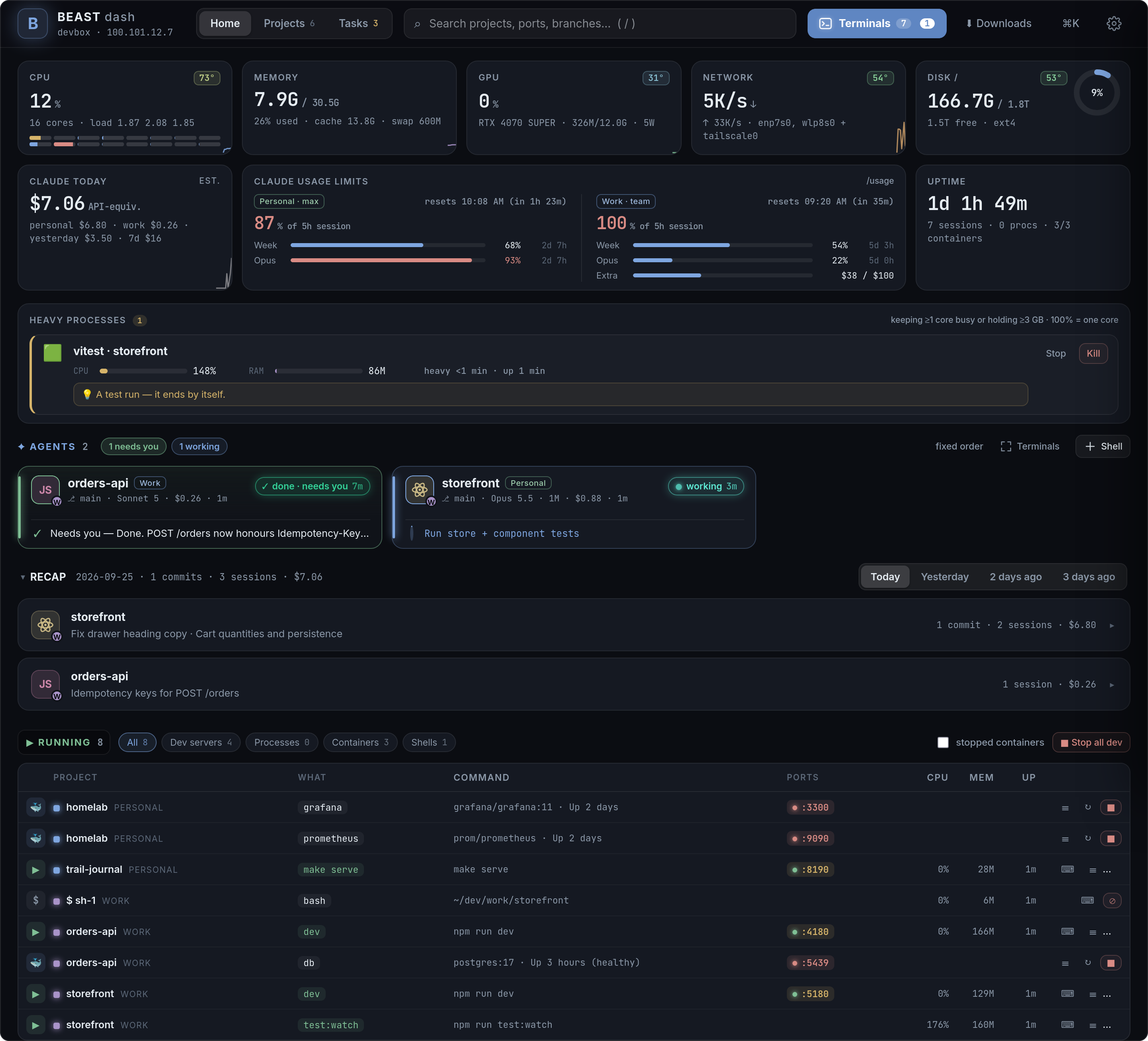
Beast Dash is one Node process with zero npm dependencies. Point it at the folder that holds
your projects and it gives you:
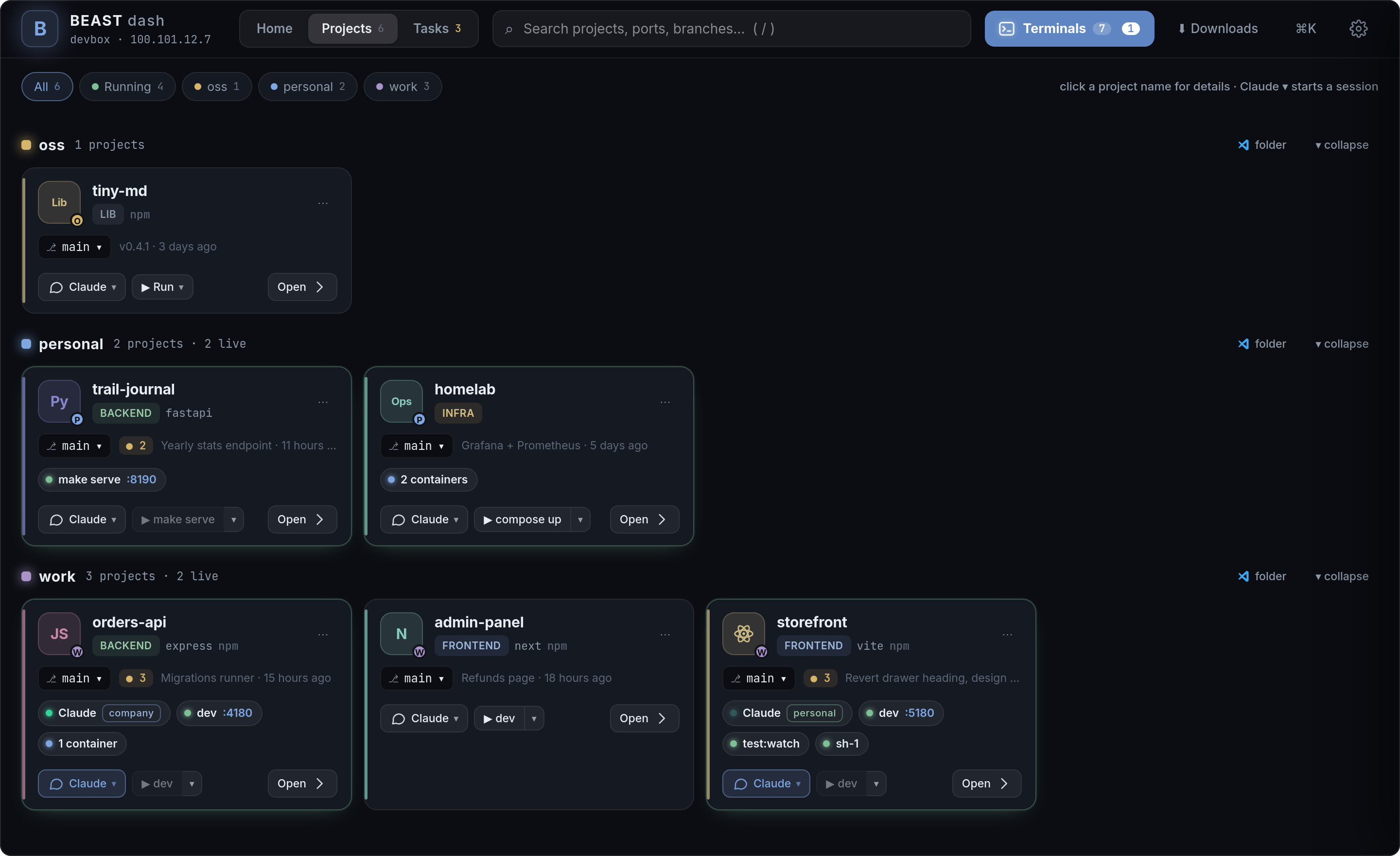
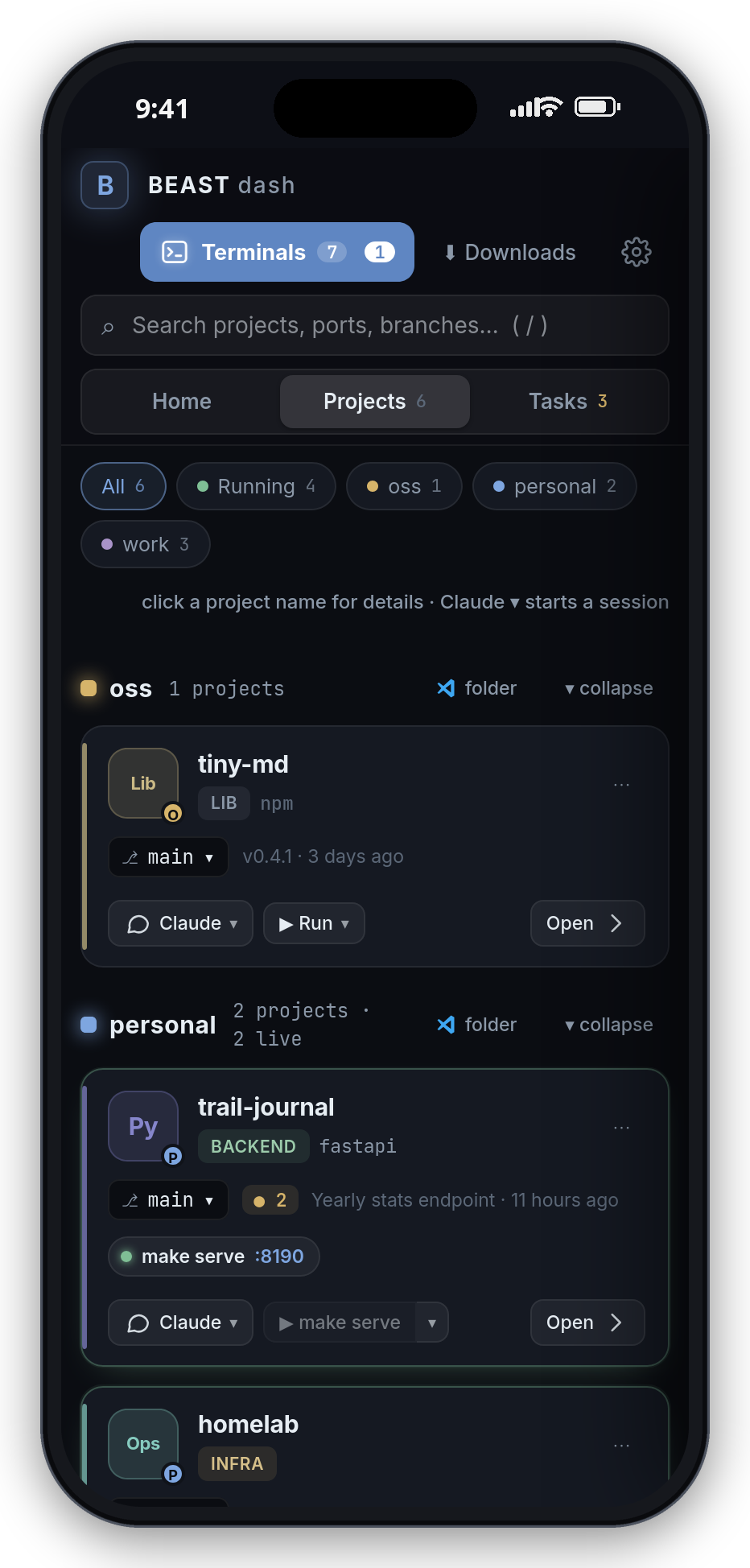
- Every project on one screen — discovered automatically (git repos,
package.json,pyproject,docker-compose, Makefiles), grouped by the top-level folder they live in, with
branch, uncommitted changes, last commit and the commands each one can run. - Claude Code sessions as cards — which project, what it is doing right now (
working: npm test),
whether it is done and waiting for you, needs permission or hit an error, its last message,
and a reply box. Sessions live in tmux on the server, so they run 24/7 without your laptop.
A session waiting on its own background agents shows as background (which agent, doing what,
for how long), not as idle. Busy? ⏳ Send when free queues your message and it goes out the
moment Claude finishes. Unsent text is kept per chat. - Start / stop anything — dev servers, tests, builds, docker compose — each in its own tmux
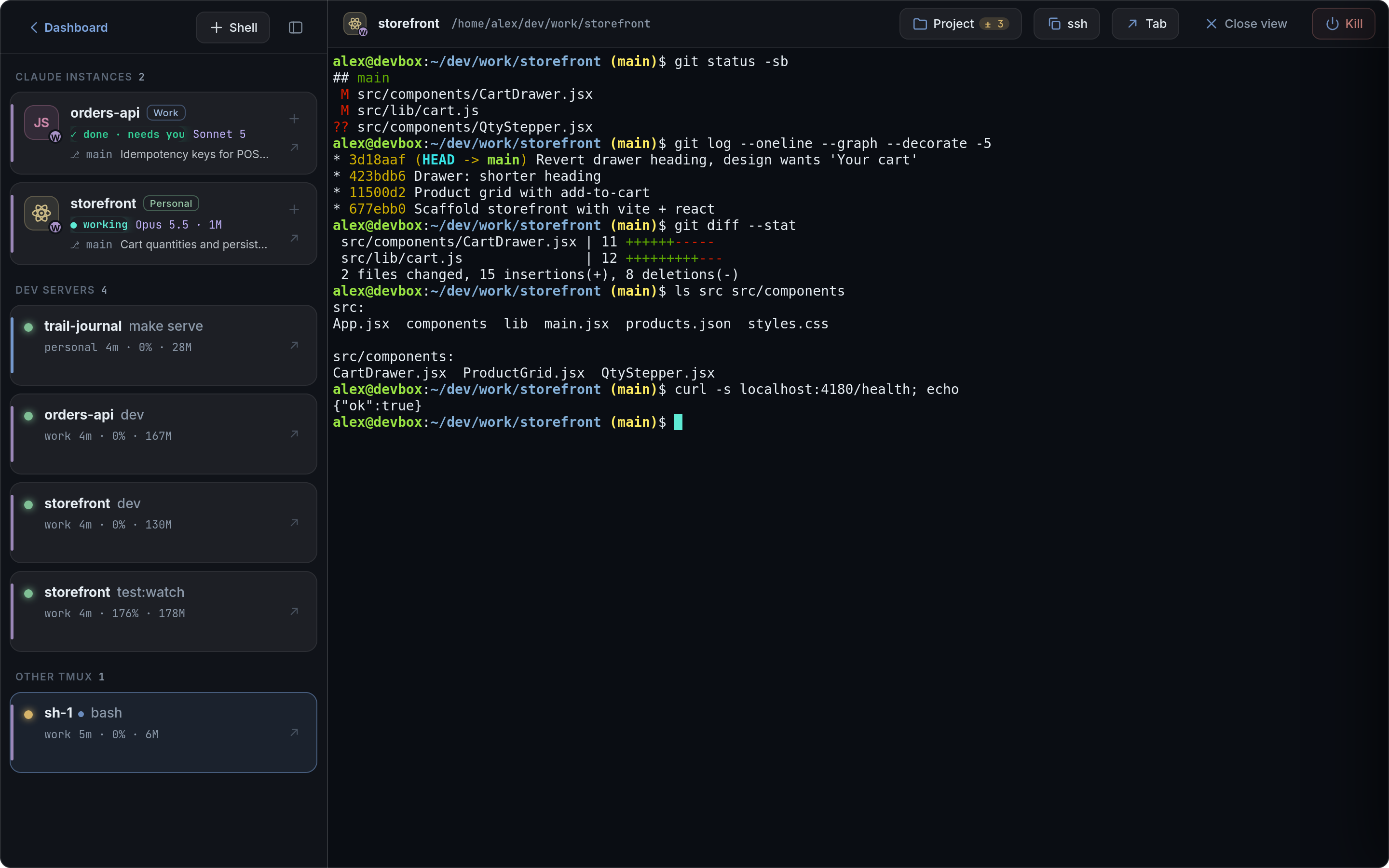
session with live, colour-preserving logs. A dev server that dies raises a banner and a push. - A terminal in the browser (ttyd + tmux) with a phone-friendly layer: Esc/Tab/arrows/Ctrl keys,
paste, file upload, finger scrolling. Two devices can share the same session. + Terminal picks a
project, the Claude account and New / Resume last in one dialog — or just a plain shell. - Push notifications to your phone and laptop when an agent finishes or needs you — tapping one
opens that conversation, also when the app was in the background. - Voice input — tap the mic, talk, Stop: transcribed on your own server with Whisper
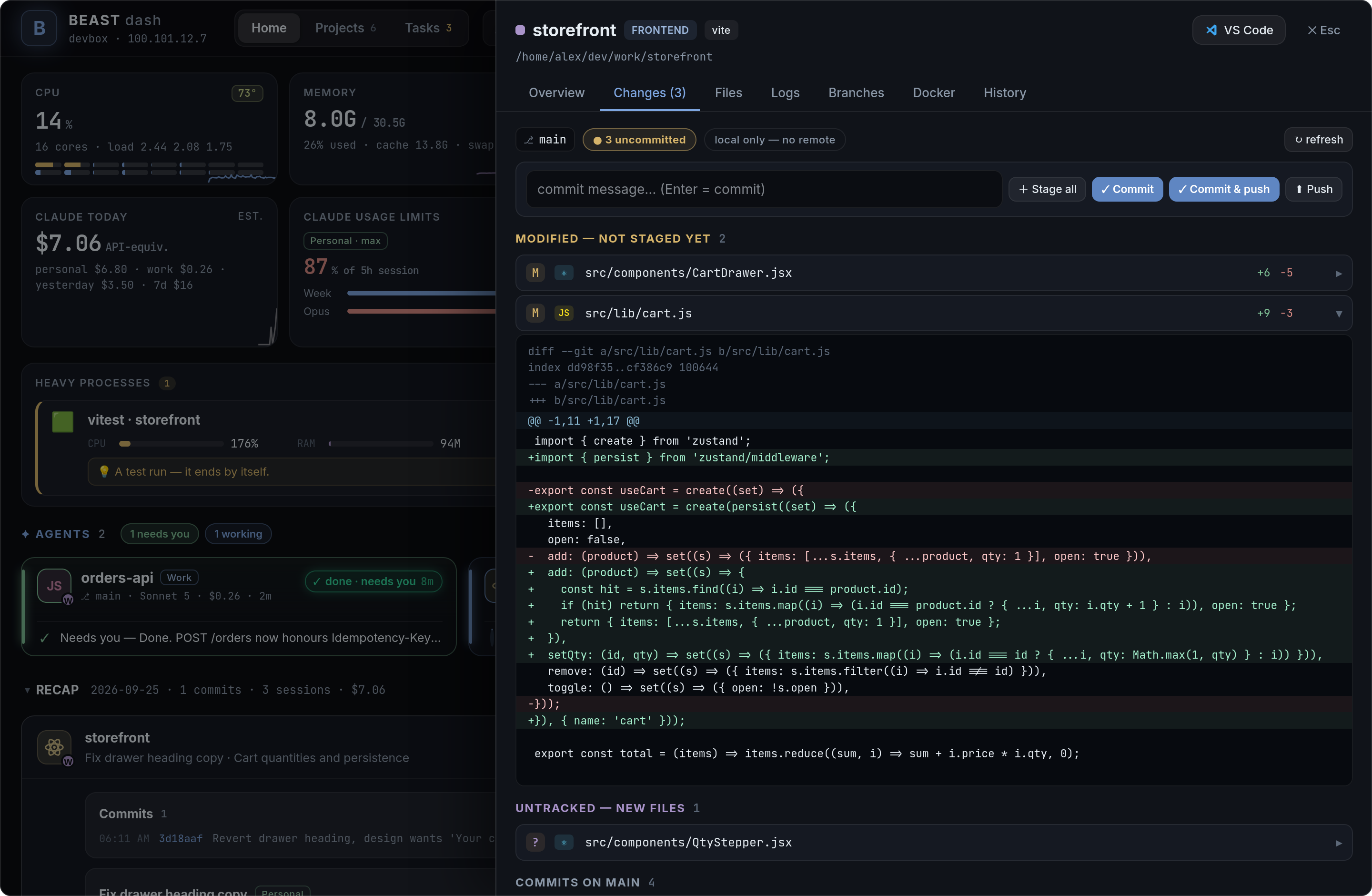
(optional, below); falls back to the browser's speech recognition. - Git without a terminal — switch branches, stage, commit, push, read diffs, edit files.
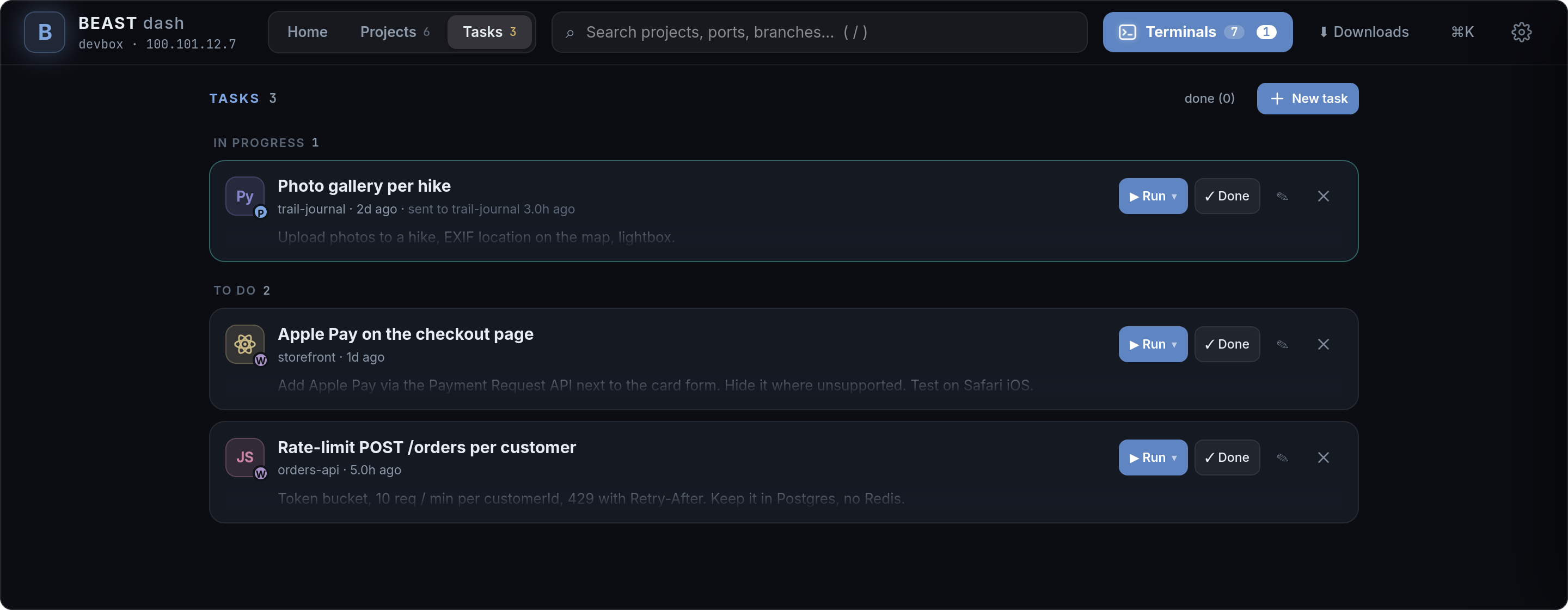
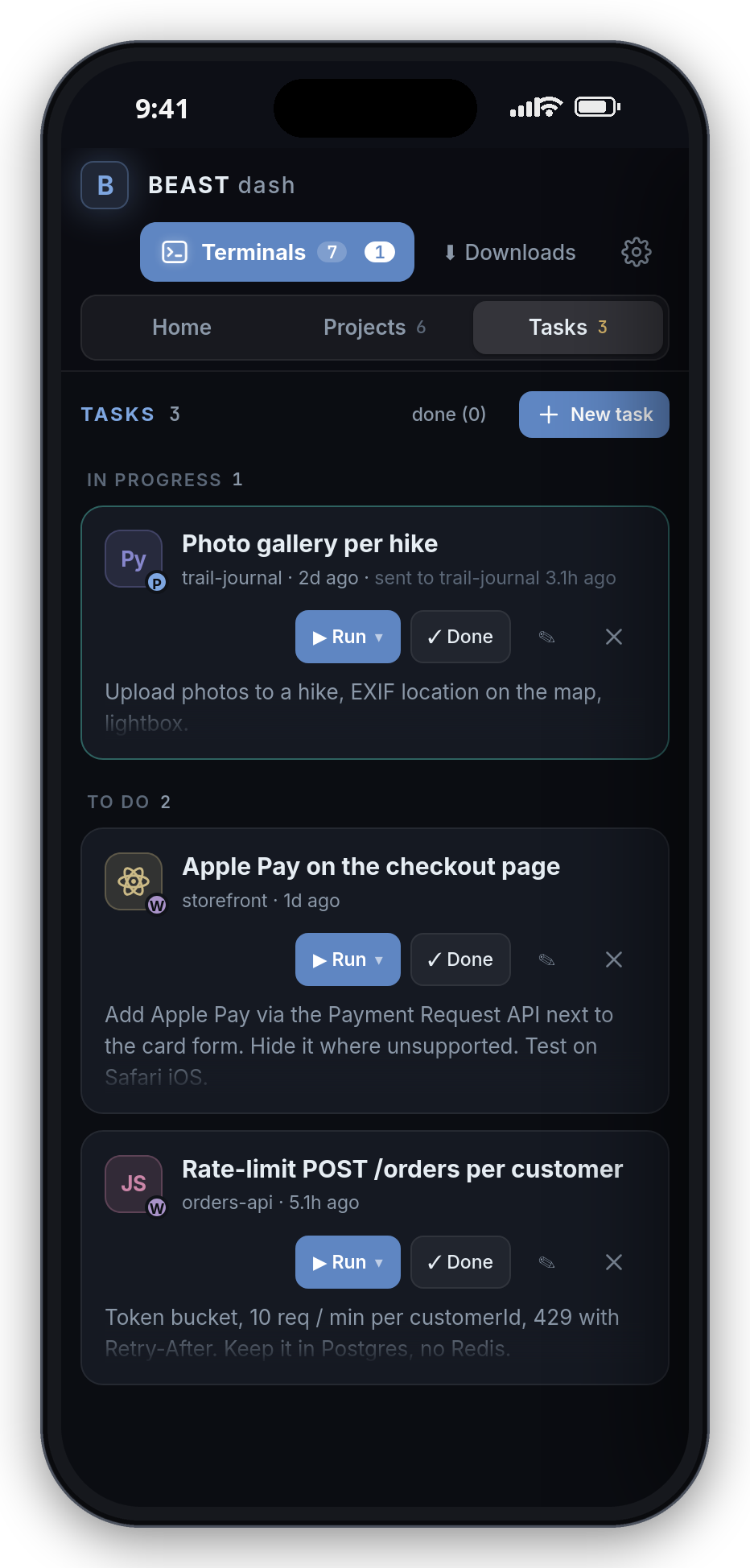
- Tasks — a personal backlog of prompt-style tasks per project; "Run" hands one to a Claude
session (or starts one). - Tunnels — ports that projects bind on
127.0.0.1are forwarded onto your Tailscale IP withsocat, sohttp://100.x.y.z:5173just works from any of your devices. - Recap — what happened today / yesterday / the day before, per project: your commits, the
Claude sessions that ran (title, what you asked, files edited) and what they cost. - System — CPU (per core + temperature), memory, GPU, disk, network; each tile opens a
24-hour detail (usage + temperature charts, per-core bars). Heavy processes get their own card:
what is keeping cores busy or holding GBs of memory, in words (Android emulator · Pixel_8,vite · my-app,Gradle daemon), with tips for known fixes and Stop / Kill. A push when the CPU
runs hot, memory runs out or a process pins several cores for 10+ minutes. - Downloads —
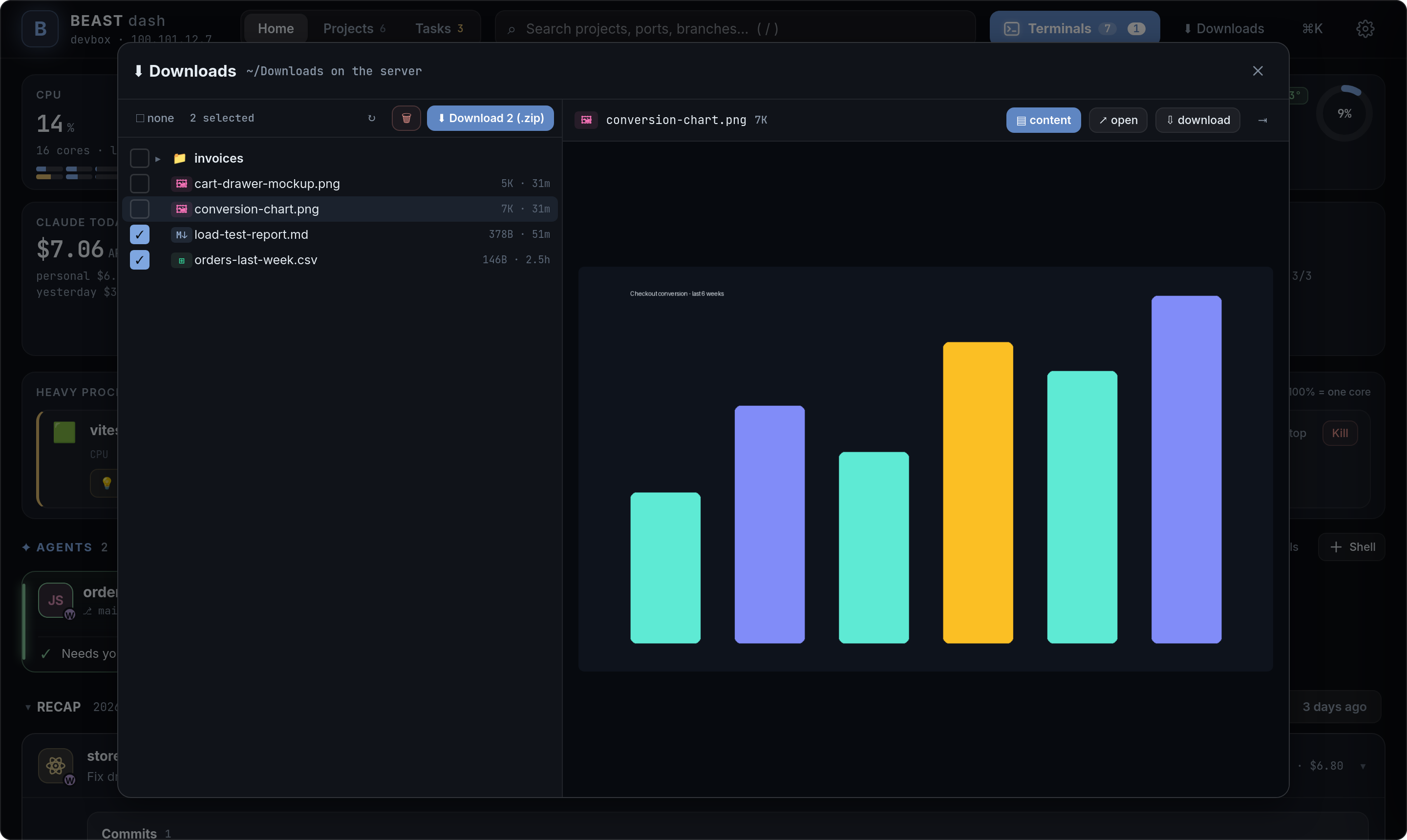
~/Downloadson the server in a file explorer: preview images / PDFs / text,
tick files and download one, or several (and folders) as one zip. Ask Claude to "drop the
report in Downloads" and grab it from your phone. - Updates itself — open pages reload into a new build on their own when idle.
It runs on a home server, a VPS or any Linux machine you can SSH into. No accounts, no cloud,
nothing leaves your tailnet.
A tour
Screenshots from a demo box: example projects, two Claude Code sessions, made-up usage numbers.
Talk to Claude from anywhere
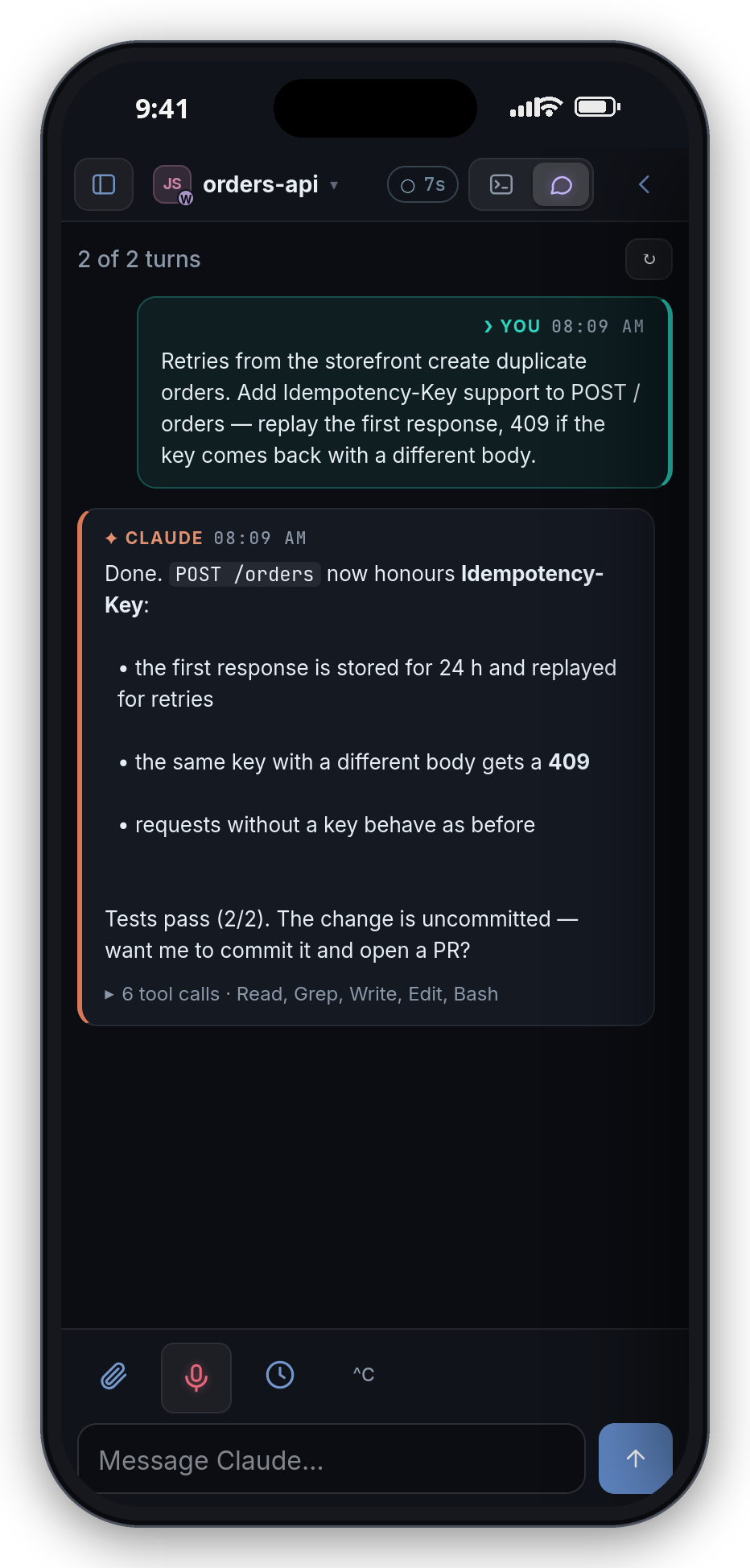
Chat renders the session from its transcript: your messages on the right, Claude's on the
left, and while it works a live turn with what it is running right now and its own status line.
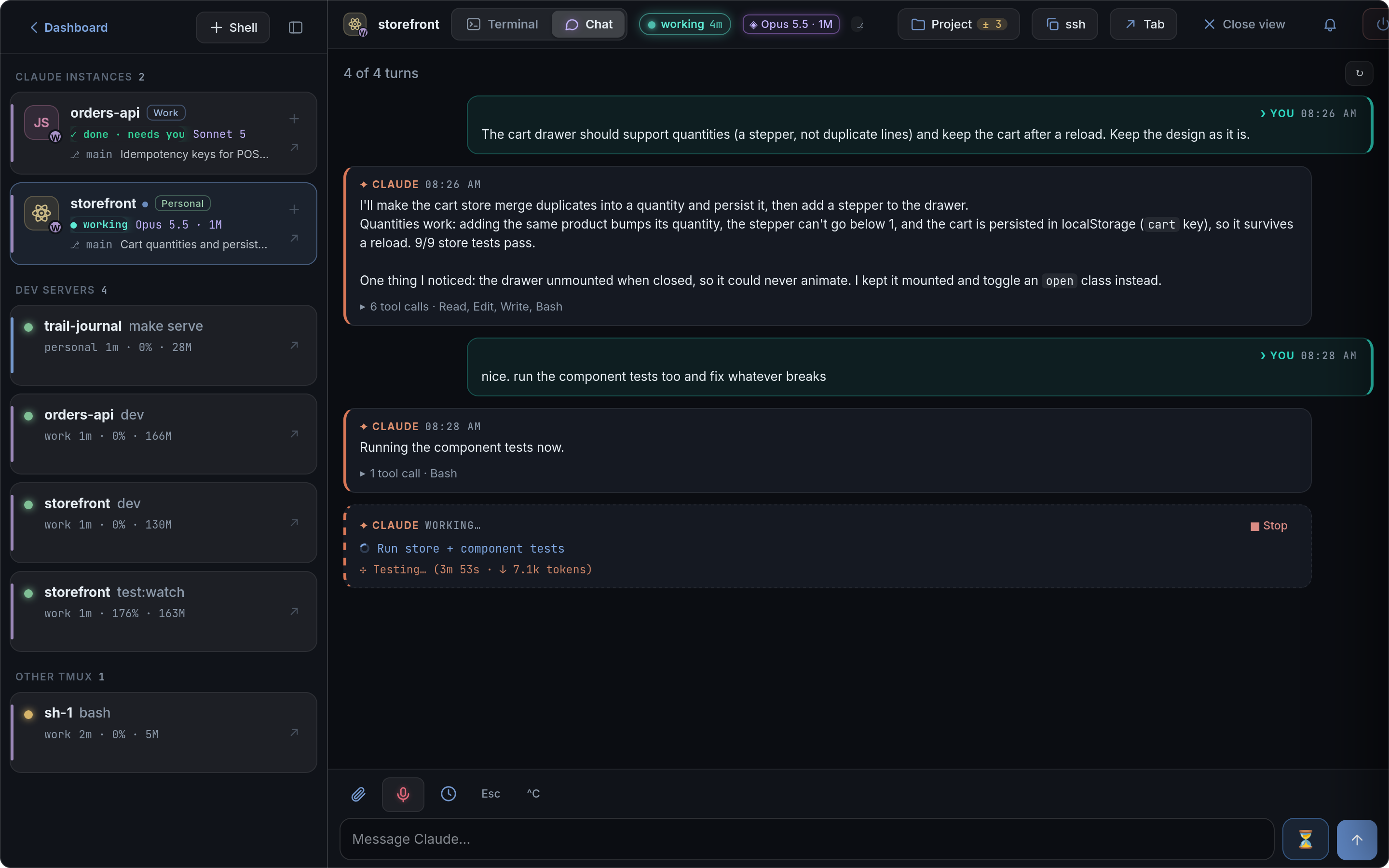
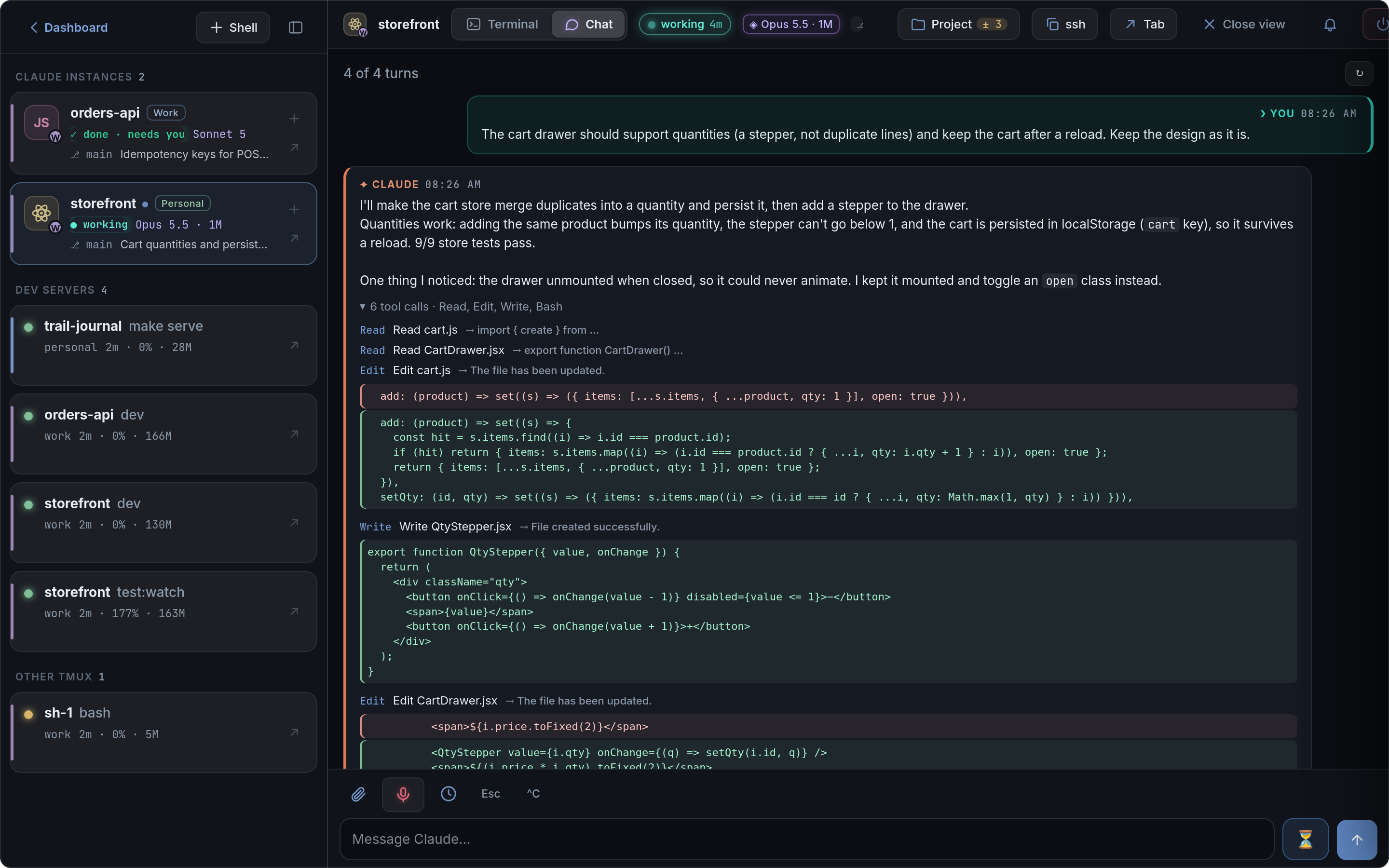
Each turn keeps its tool calls folded into one line (▸ 6 tool calls · Read, Edit, Write, Bash).
Open it to see exactly what Claude changed: the Edit / Write diffs and the Bash commands with their results.
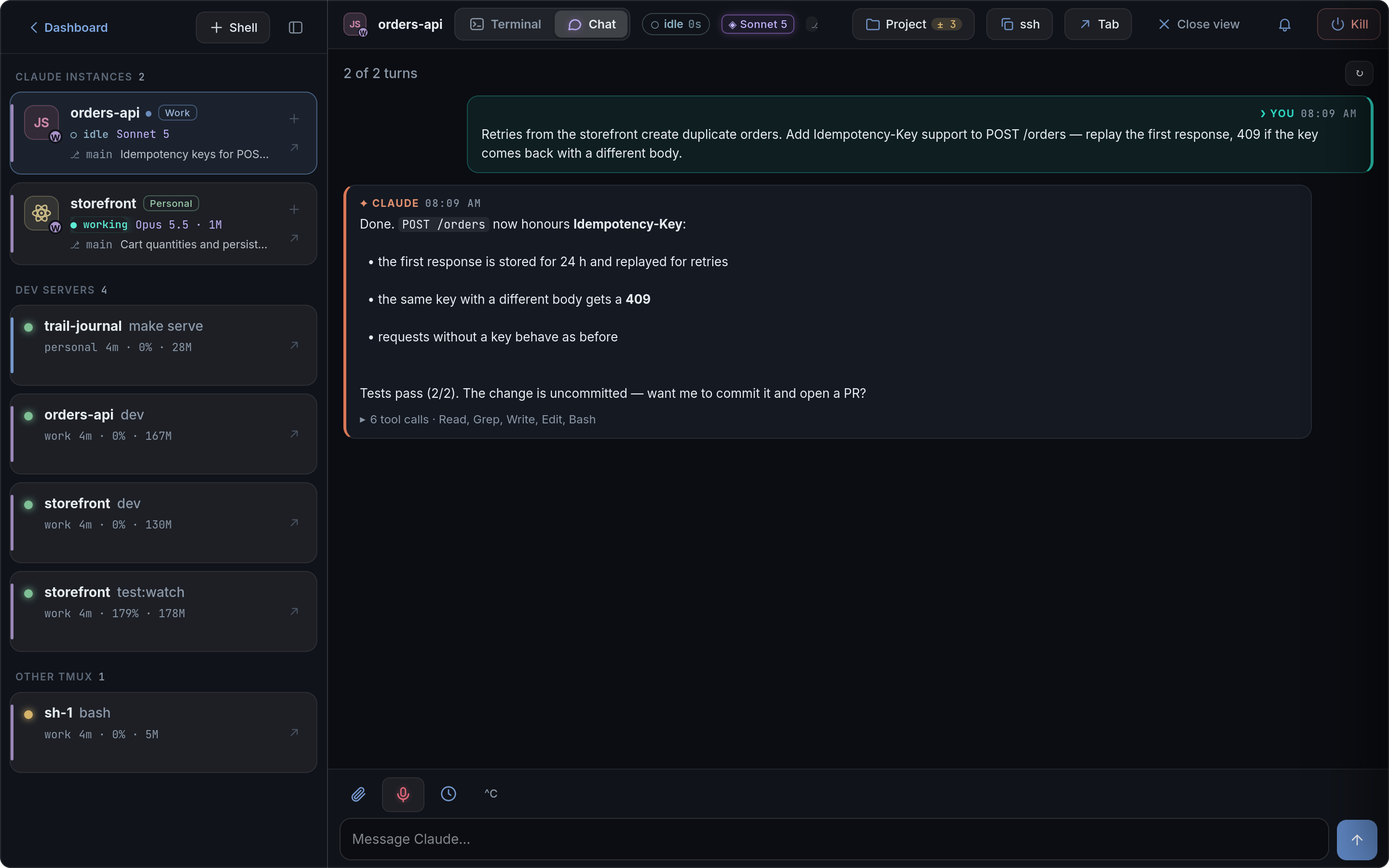
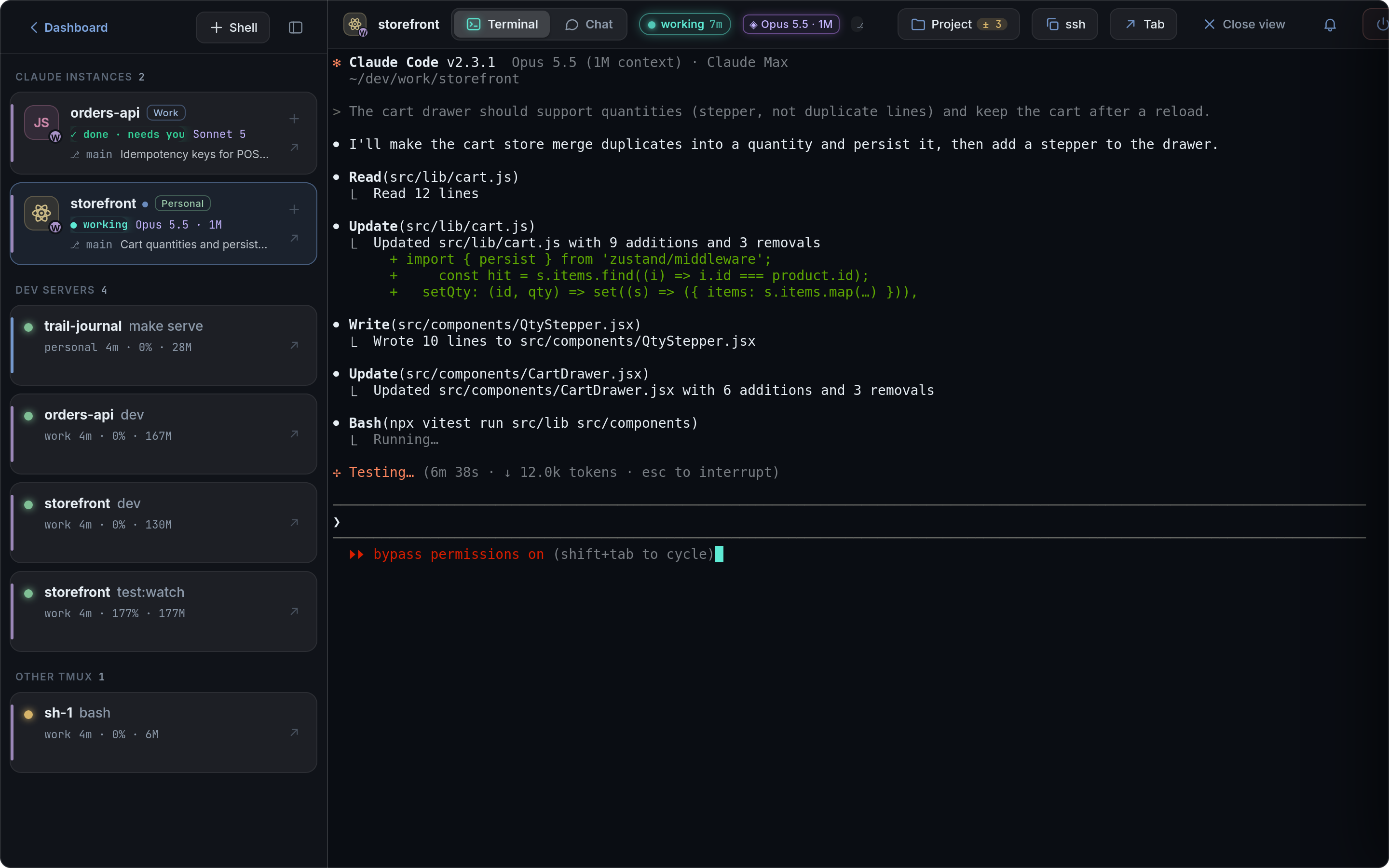
| Done, waiting for you | The same session as the real Claude Code TUI |
|---|---|
 |
 |
Terminals, git and files
| A shell in tmux on the server | Changes: diff, stage, commit, push |
|---|---|
 |
 |
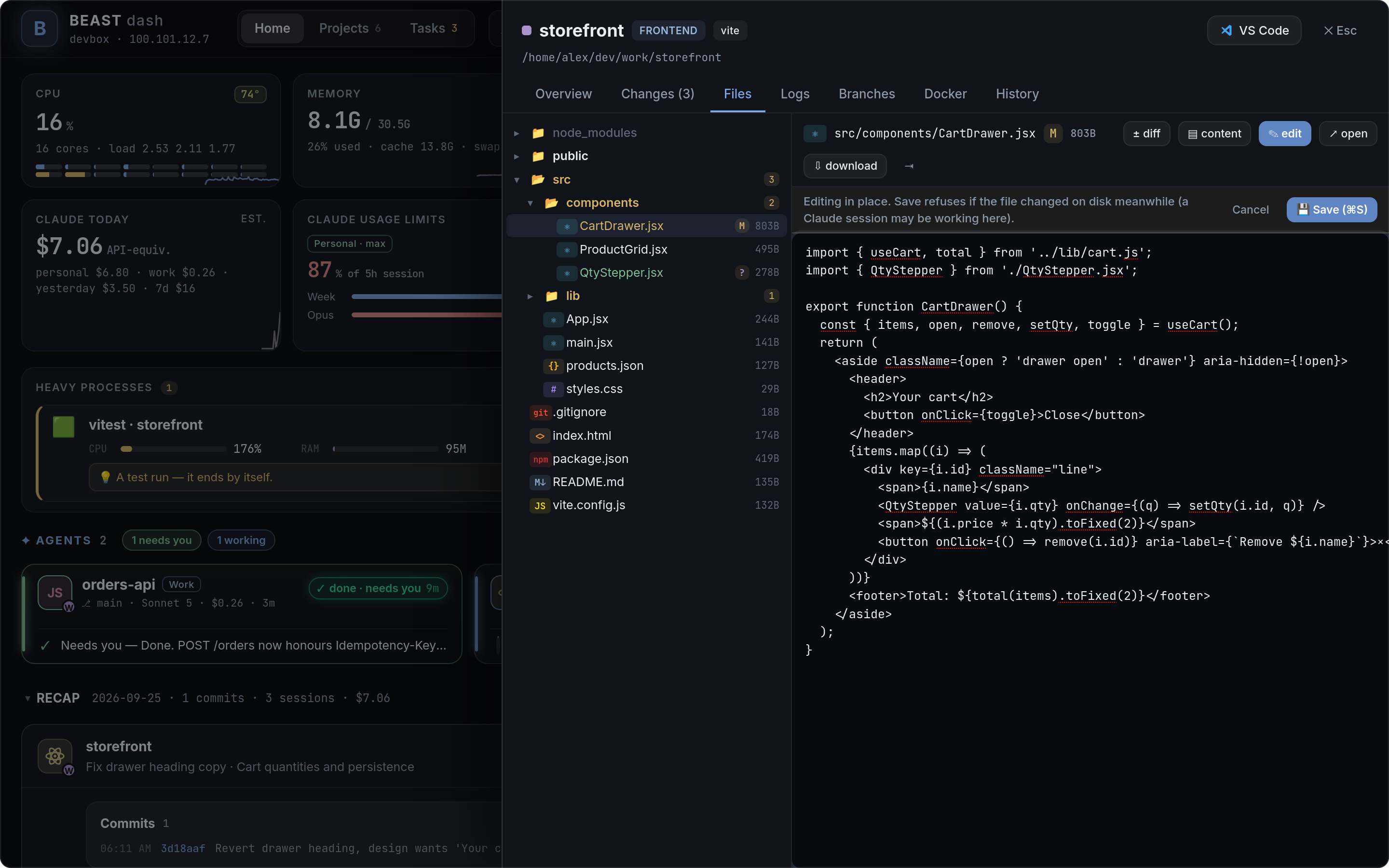
| Files: tree, preview, edit in place | Downloads: preview, tick, get one file or a zip |
 |
 |
Plan the work
| Projects, grouped by folder | Tasks per project |
|---|---|
 |
 |
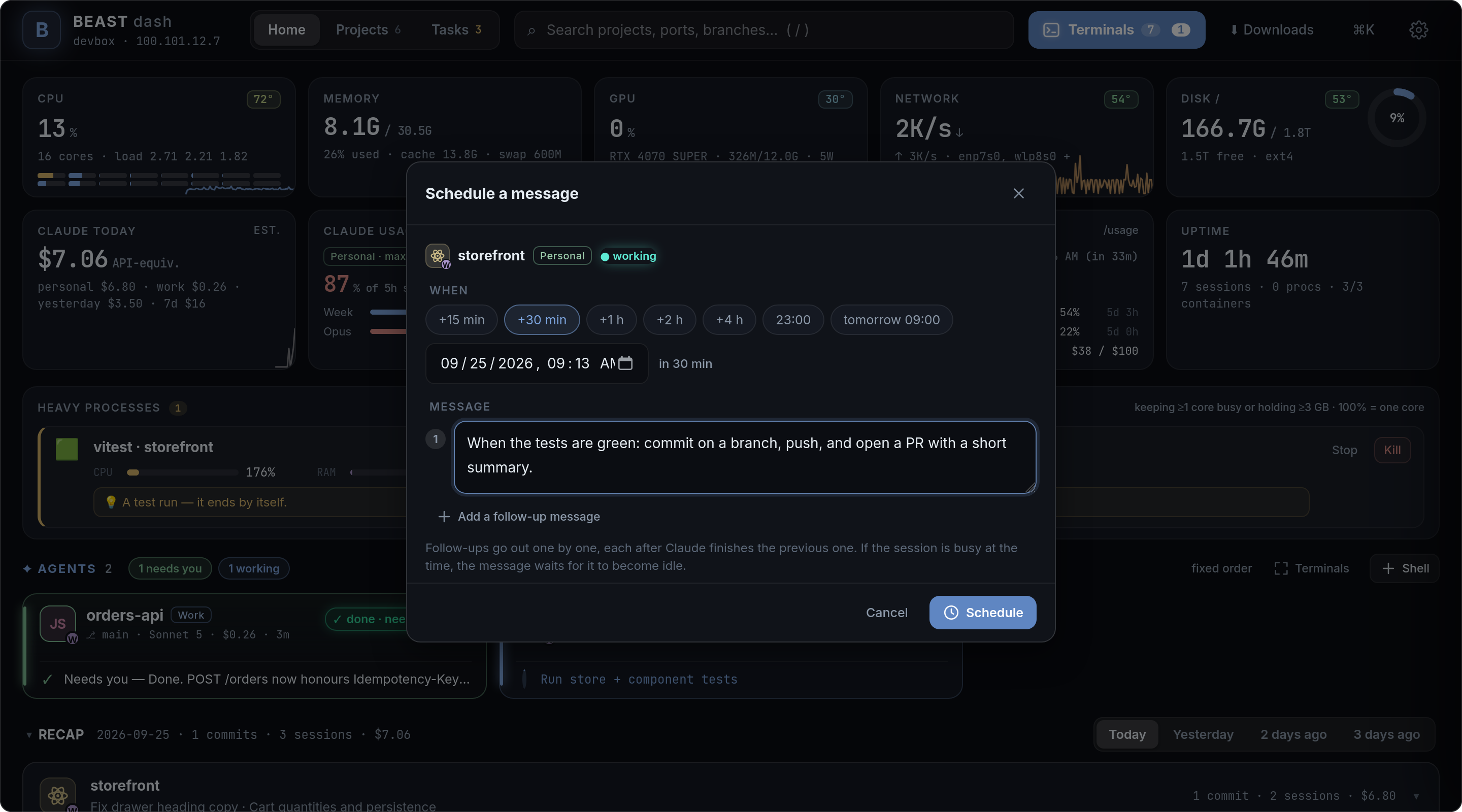
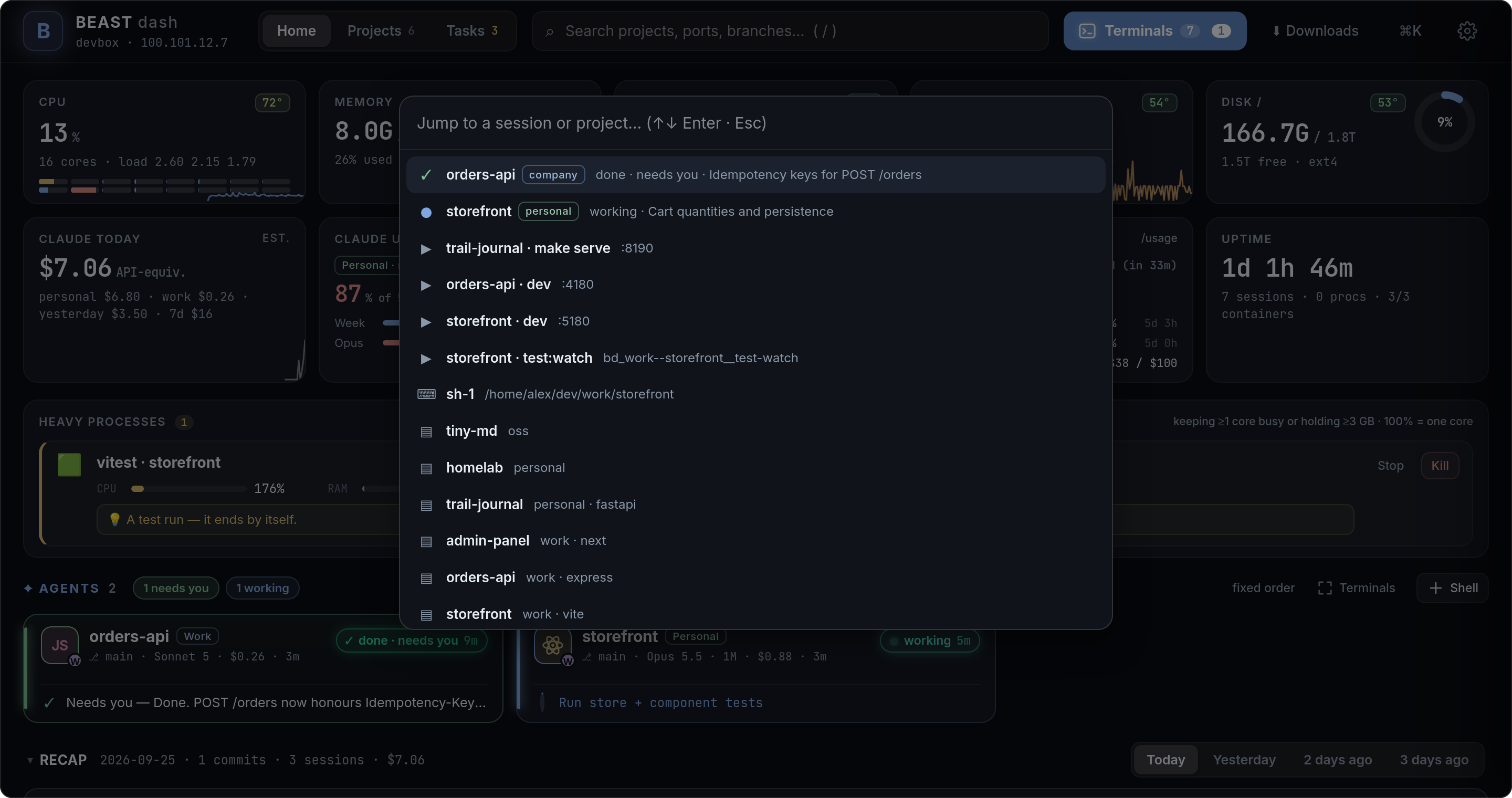
| Schedule a message (or a chain) | ⌘K: jump anywhere |
 |
 |
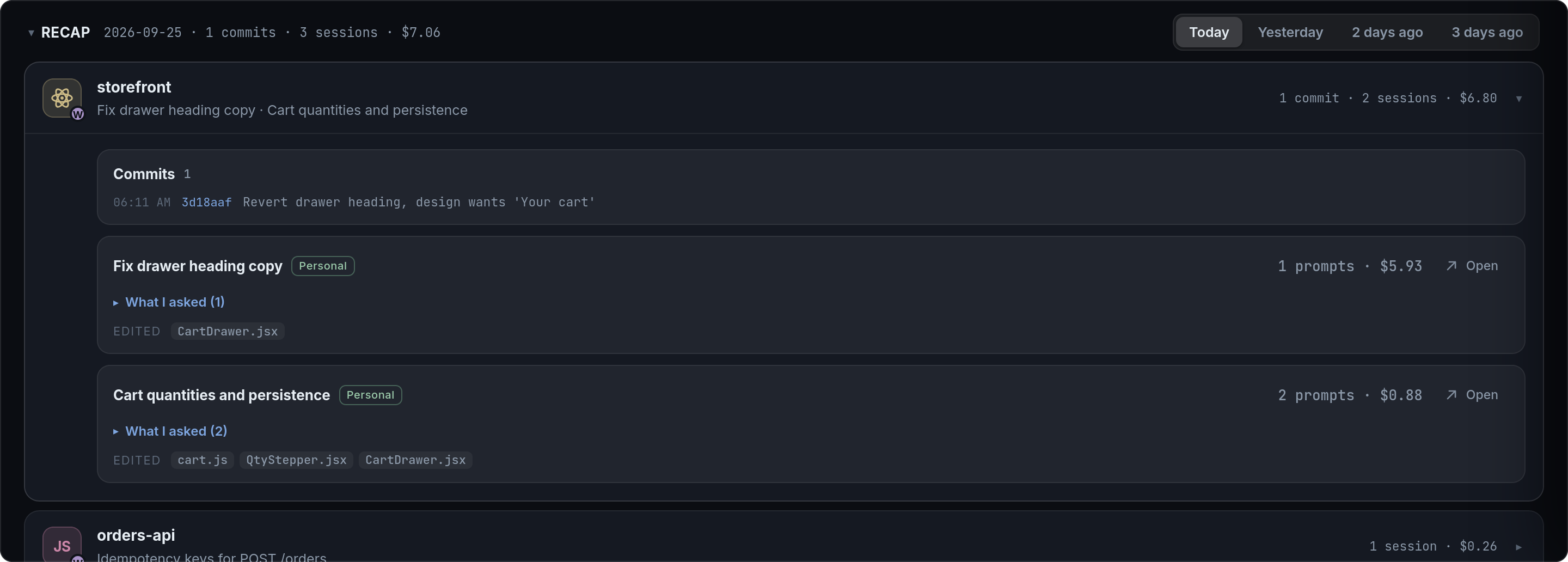
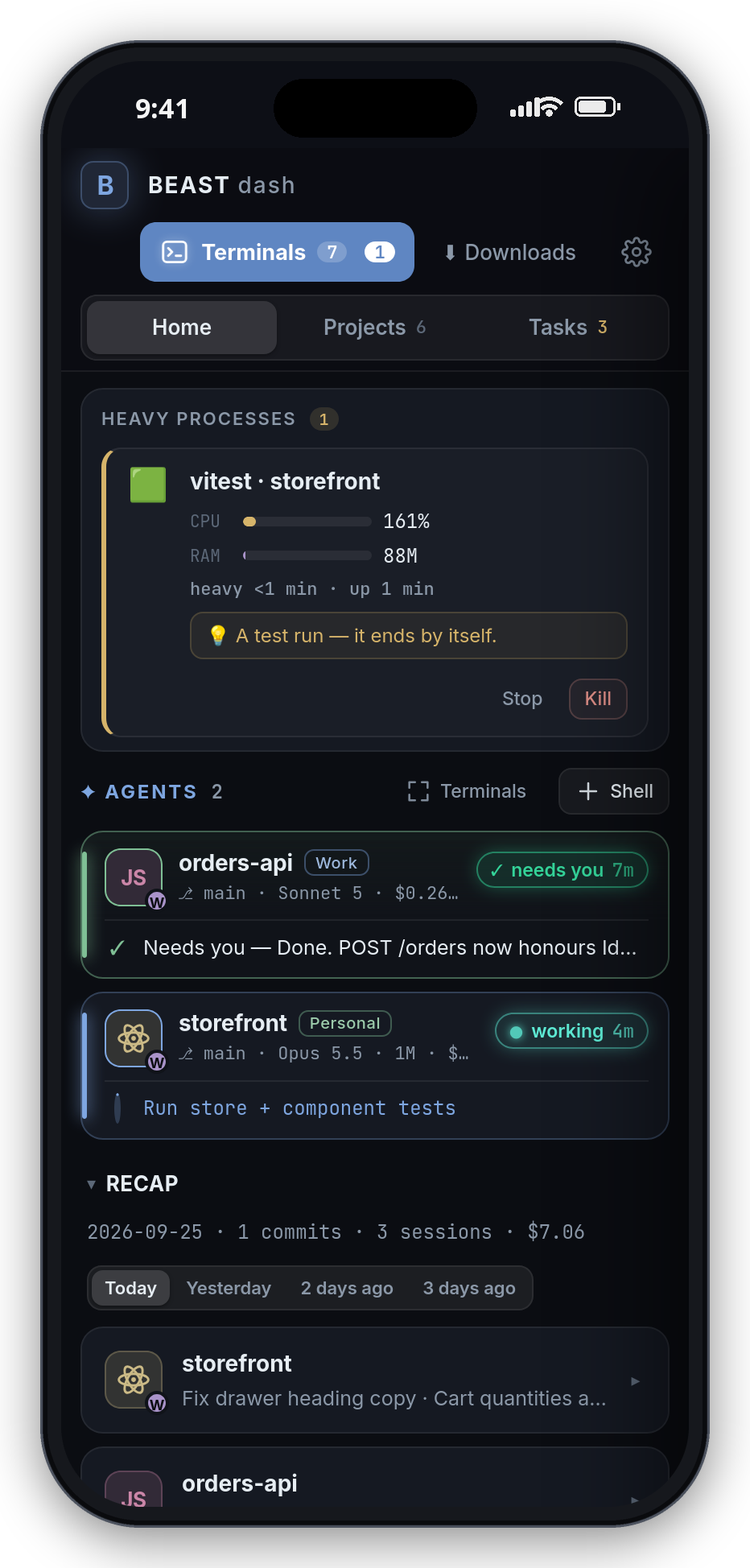
Recap — what happened today, per project: your commits and the Claude sessions (what you
asked, files edited, cost).
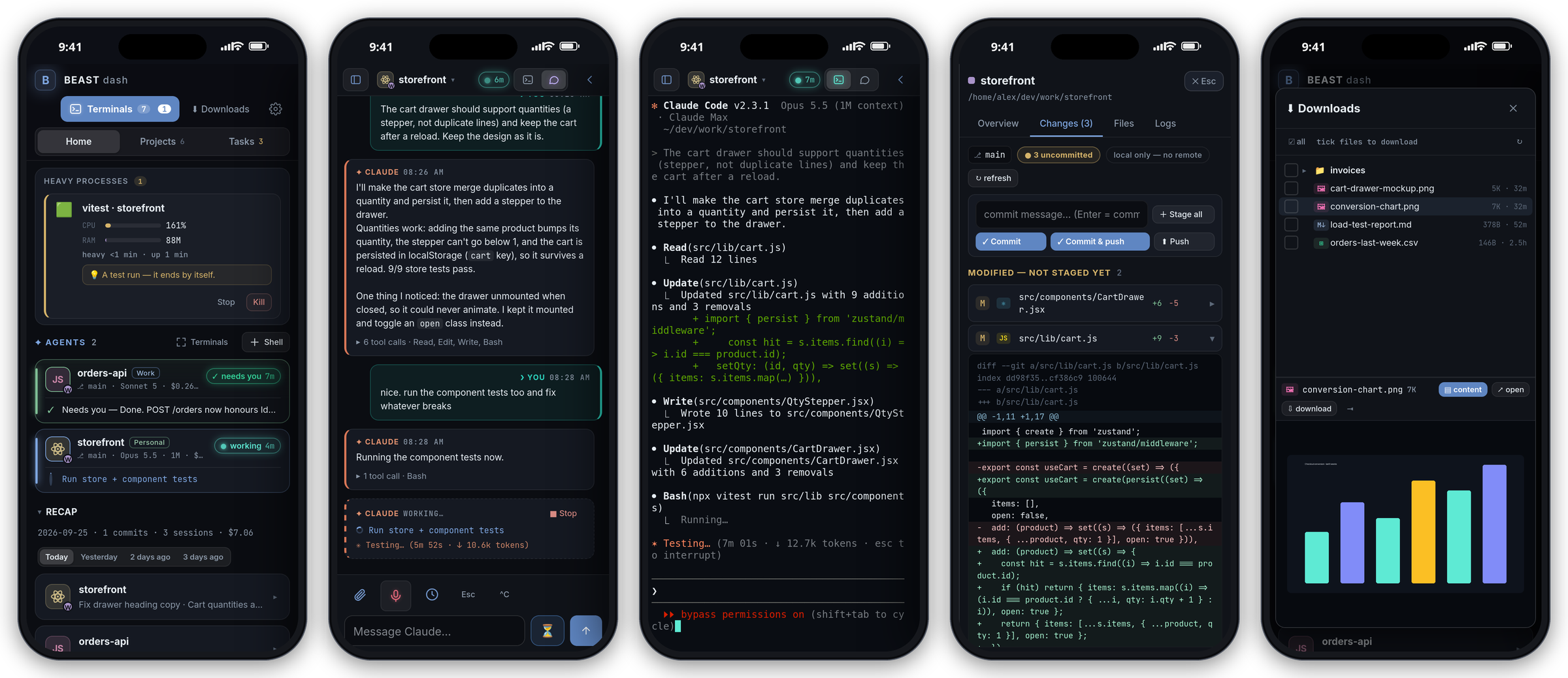
On the phone
Who this is for
You keep your repositories on one always-on Linux machine and work on them from wherever you are.
You run one or more Claude Code sessions on it and want to see at a glance what each one is
doing, answer a permission prompt from the phone, start the dev server, check a diff, and get a
push when an agent is done — without opening a laptop or juggling SSH windows.
If that is you, Beast Dash is the page you leave open.
Requirements
- Linux with systemd (Ubuntu/Debian/Fedora/Arch … — the installer uses
systemctl --user) - Node 18+ (developed on 24) — no
npm installneeded - tmux — required; every command the dashboard runs lives in a tmux session
- Tailscale on the server and on your devices — the intended way to reach it (see Access)
Optional, each one unlocks a feature and is skipped cleanly when missing:
| Tool | Gives you |
|---|---|
ttyd |
the terminal in the browser |
git |
branch / changes / commits on the cards |
socat |
automatic port forwarding onto the tailnet |
docker |
container list, compose up/down, container logs |
jq |
smaller Claude hook payloads (falls back to a size cap) |
nvidia-smi |
the GPU tile |
python3 |
the "⌨ Shell" button reads devRoot; icon regeneration |
| Claude Code | the agent cards, transcript view, usage limits |
sudo apt install tmux git socat ttyd jq # Debian / Ubuntu
Quick start
git clone https://github.com/zbla92/beast-dashboard.git ~/beast-dash
cd ~/beast-dash
./install.sh
The installer writes two systemd --user units (dashboard + terminal), starts them, registers the
Claude Code hooks, enables linger (so the services survive logout) and — if tailscale andufw are both present — allows the tailnet interface through the firewall. It prints the URL at
the end, normally http://<tailscale-ip>:8787.
Open it, click ⚙ Settings:
- Projects folder (
devRoot) — where to scan. Default~/dev. The first folder level below
it becomes the "org" grouping (~/dev/acme/web→ org acme, project web). - SSH host alias — the name of this server in
~/.ssh/configon your laptop. It makes the
VS Code button open the folder over Remote-SSH and the copy ssh command actions work.
That is the whole setup. Everything else has defaults.
To try it without installing anything: node server.js and open http://localhost:8787.
Access — read this before exposing anything
There is no login screen. The dashboard runs commands and opens shells as your user; whoever
can reach the port owns the machine. Its only protection is who can connect:
- requests from
127.0.0.1and from the Tailscale range (100.64.0.0/10,fd7a:115c:a1e0::/48)
are accepted; - everything else gets
403.
So the model is: install Tailscale on the server and on your phone/laptop, and reach the dashboard
at http://100.x.y.z:8787 from anywhere in the world, over WireGuard, with no port open to the
internet. That is what it was built for.
No Tailscale? Use an SSH tunnel and open http://localhost:8787:
ssh -L 8787:localhost:8787 -L 7681:localhost:7681 myserver
Another private network (a WireGuard net, a LAN)? Add its prefix to allowedPrefixes instate/settings.json, e.g. ["10.8.0."]. Do not put the dashboard on a public IP or behind
a plain reverse proxy.
The IP check alone would still let any web page open in your laptop's or phone's browser (which is
on the tailnet) talk to the dashboard. So it also only answers to its own names — localhost, IP
addresses, *.ts.net, short host names — and refuses requests from any other origin (another host
or another port, Sec-Fetch-Site: cross-site); the terminal (ttyd -O) only accepts its websocket
from its own origin. Reach it by another DNS name (e.g. devbox.local, devbox.lan)? Add that toallowedHosts in state/settings.json and restart (systemctl --user restart beast-dash).
-O only stops browsers: the terminal port (7681) has no login of its own, so like the dashboard
port it must never be reachable from outside your tailnet / LAN (keep the firewall closed).
Upgrading from 1.1.x: git pull && ./install.sh (re-installs the units, so the terminal gets-O). If the page now says forbidden (unknown Host), you open it by a name that isn't an IP,localhost or *.ts.net — add it to allowedHosts as above.
On a VPS
Same steps. ./install.sh works on any systemd distro as an unprivileged user; it needs sudo
twice (linger + the ufw rule) and tells you if it can't. Tailscale on the VPS + Tailscale on the
phone is the whole networking story — the VPS firewall can stay closed except for SSH.
HTTPS, push notifications and the phone
Push notifications and "Add to Home Screen" as a real app need a secure origin. Tailscale gives
you one for free:
- Once, in the Tailscale admin console: DNS → HTTPS Certificates → Enable.
- On the server:
./bin/enable-https.sh— sets uptailscale serveso thathttps://<server>.<tailnet>.ts.net/is the dashboard and/term/is the terminal, on one
origin. Tailnet-only; nothing is published to the internet. - Open the HTTPS URL on the phone and laptop → ⚙ Settings → Push → Enable on this device.
Plain http://<ip>:8787 keeps working; only push and the installable app need HTTPS.
On iPhone, add the page to the Home Screen (Share → Add to Home Screen): you get a full-screen
app, notifications, and the terminal with a key bar above the keyboard.
Claude Code
Beast Dash treats Claude Code sessions as first-class citizens.
Starting one. On a project card, ✦ Claude ▾ creates a tmux session claude-<project>
in that folder running claude --dangerously-skip-permissions and opens it in the browser
terminal. Two Claude Code logins are supported: the default ~/.claude, and a second one kept in~/.claude-company (started with CLAUDE_CONFIG_DIR, session claude-<project>-company). What
they are called on the cards is yours — ⚙ Settings → Claude accounts (e.g. "Me" / "Work"). The
second one is optional; if the folder doesn't exist, nothing mentions it. More than one session per project:
Another instance or in a git worktree… (claude --worktree), so two agents never edit the same
files.
Knowing what it's doing. bin/install-hooks.js registers bin/claude-hook.sh as a Claude Code
hook (SessionStart, UserPromptSubmit, PreToolUse, PermissionRequest, Notification, Stop,
StopFailure, SessionEnd). Every event is POSTed to the dashboard tagged with the tmux session, so a
card knows within milliseconds that its agent is running npm test, waiting for a y, or done.
As a fallback the pane itself is read (tmux capture-pane). Sessions you started by hand inside
tmux are picked up too.
Talking to it. Type in the reply box on the card (from the phone, without a terminal), or open
the session in Chat mode — the conversation rendered from the transcript: your messages on
the right, Claude's on the left, tool calls collapsed per turn (expand them for the Edit / Write
diffs and the Bash commands), and while Claude works a live turn with what it is running and its
own status line (✻ Testing… 4m 08s · ↓ 7.5k tokens) plus ■ Stop. Files edited links to the
diffs. Esc, ^C, y/n are one tap away. Terminal mode is the same session as the real
Claude Code TUI; the switch is one per device.
Scheduling. ⏰ on a session: send a prompt (or a chain of prompts — each waits for the previous
one to finish) at a given time. Combine with Tasks: write yourself prompt-style tasks with
attachments, then Run one — or Run all open tasks of a project, chained on one session — while
you're away. When Claude finishes, its closing summary lands on the task (Needs your review →
Accept / Done), and the push notification can be answered with a quick reply.
Cost and limits. Claude today prices the tokens in the local transcripts at API list price
(on a subscription nothing is billed per token — it measures how much work the agents did). Usage
limits shows the same 5-hour / 7-day windows as /usage inside Claude Code. For that it reads the
OAuth token Claude Code keeps in ~/.claude/.credentials.json and asks Anthropic's usage
endpoint — the token is never sent anywhere else and never refreshed by the dashboard.
After a reboot. Sessions are remembered (state/claude-sessions.json); a banner offers
Restore all (claude --resume <id> in the same folder), or set auto-restore in Settings.
The card also shows ↻ when a newer Claude Code is installed; one click restarts the session on it.
Search. ⌘K then ? words searches every past conversation on the machine; open one
read-only and Resume here.
Everyday use
Home — system tiles, the agents that need you first, the day's recap, and the running
table (dev servers, processes started by hand, containers) with ports, CPU, memory, logs,
restart, stop. On a phone the agents come first and chat is the default view of a session.Projects — cards grouped by org. ▶ runs the primary command; ▾ lists every script /
Makefile target / compose action / your own custom commands. Open → the drawer: Overview,
Changes (stage · commit · push, diffs), Files (tree, diffs, editor), Logs, Branches, Docker,
History.Tasks — your backlog, per project, with attachments that survive restarts.
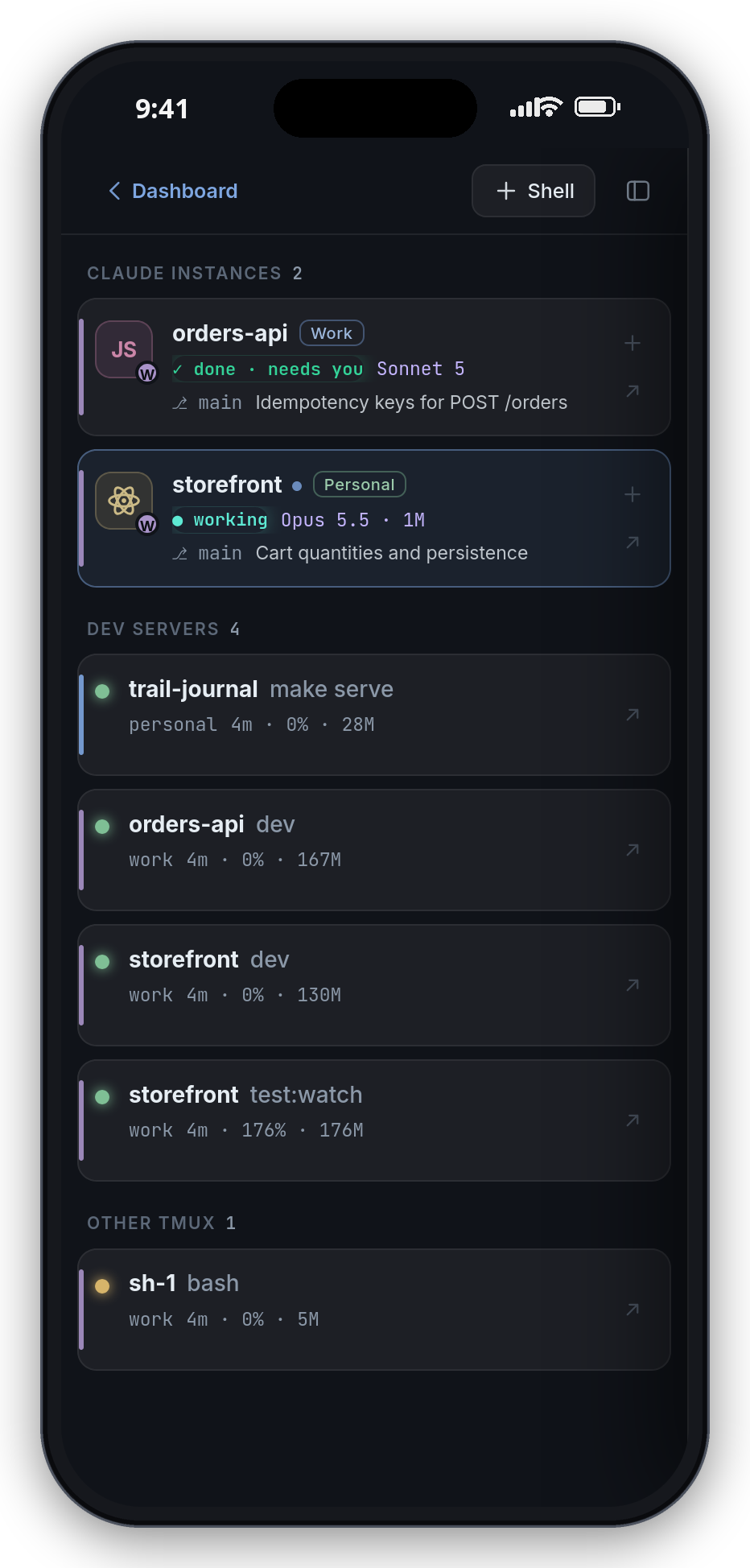
Terminals — the terminal panel with a session list;
t,n(next session that needs you),s(new terminal),1-9switch. Inside a terminal:Ctrl+Shift+←/→switch,Ctrl+Shift+↑back.⌘K / Ctrl+K — jump to any session or project, start Claude, run actions, search conversations.
Tunnels (⚙ → Tunnels) — loopback-only ports of running projects are forwarded onto the
Tailscale IP automatically; Rebuild all after a resume; manual expose for anything else.mac/beast-tunnel.shis the optional laptop-sidessh -Lhelper for the rare service that
must belocalhost.Menubar —
mac/beast-menubar.shis an xbar/SwiftBar plugin: how many agents need you,
right in the macOS menubar.
Configuration
Everything lives in state/ (gitignored) and is edited through ⚙ Settings, which writesstate/settings.json. The keys and their defaults are in lib/settings.js:
| Key | Default | What |
|---|---|---|
devRoot |
~/dev |
folder to scan for projects |
scanDepth |
4 |
how deep to look |
port |
8787 |
HTTP port |
sshHost, sshUser |
'' |
your laptop's ssh alias for this server (VS Code links, copied commands) |
publicHost |
auto | host used in generated links (defaults to the Tailscale IPv4) |
allowedPrefixes |
[] |
extra client IP prefixes to accept, e.g. ["10.8.0."] |
allowedHosts |
[] |
extra host names the dashboard answers to (besides localhost, IPs, *.ts.net, publicHost), e.g. ["devbox.lan"] |
autoExpose |
true |
forward loopback ports onto the tailnet with socat |
autoRestore |
false |
bring Claude sessions back automatically after a reboot |
accountLabels |
{personal: 'Personal', company: 'Company'} |
display names of the two Claude logins (~/.claude, ~/.claude-company) |
pushContact |
mailto:[email protected] |
VAPID contact sent to push services — set it to yours |
notify |
all on | which events push, quiet hours |
serverName |
hostname | name in system push titles ("myserver CPU 92 °C") |
voiceLangs |
[] |
languages the mic toggles between, e.g. ["en", "de"] (first = default); empty = auto |
Per-project overrides (hide, rename, custom commands, pin) are set from the card's ⋯ menu.
Nightly, state/ is tarred into state-backups/ (also gitignored) — download from Settings.
Keep both folders out of git: state/push.json holds the VAPID private key and your push
subscriptions.
Voice input (Whisper)
Optional. bin/setup-whisper.sh makes whisper/.venv with faster-whisper
(plus the CUDA 12 libraries when there is an NVIDIA GPU) and installs the beast-whisper user unit. It is
not started at boot: pressing the mic starts it (the model loads in 1–3 s while you already talk — the
recording is buffered), and it exits a minute after the last use, so the GPU isn't held.
- Settings in
whisper/whisper.env(fromwhisper.env.example): model, device (auto= GPU if there is one,
else CPU int8 — usesmallthere), the languages you speak (detection never picks a third one), a prompt
with your jargon, regex fixes for words it keeps mishearing. - On a GPU (
large-v3-turbo) a 30 s recording transcribes in well under a second; idle, the loaded model
costs a few hundred MB of RAM and ~2 GB of VRAM, nothing else. - The recording sheet covers the page: Starting mic… until the microphone is really live, then a beep —
iOS takes a moment (and home-screen apps ask for the mic again after being killed).
Without it the mic uses the browser's own speech recognition (Safari / Chrome).
How it fits together
server.js            HTTP + SSE API, one tick loop (fast while someone is watching, slow when not)
lib/discovery.js     scans devRoot, classifies projects, finds their commands
lib/runtime.js       processes, ports, tmux sessions, containers — attributed to projects
lib/actions.js       start/stop/restart in tmux, Claude sessions, shells
lib/claude.js        session state from hooks + pane; restore after reboot
lib/usage.js         transcript cost        lib/limits.js   plan limits
lib/schedule.js      timed prompts          lib/tasks.js    task backlog
lib/gitinfo.js       git status/diffs       lib/files.js    file tree / editor
lib/expose.js        socat forwards         lib/push.js     Web Push (VAPID + aes128gcm, no deps)
lib/health.js        port health            lib/sys.js      system stats (temps kept 30 days, /api/temps?days=N)
lib/recap.js         per-day recap from git log + transcripts
public/              the UI — vanilla JS, one file
term/                ttyd's page + the phone layer (build with bin/build-term-index.sh)
bin/                 hook script + installer, HTTPS setup, terminal entrypoint, icon generator
The dashboard never runs a command in its own process: everything goes throughtmux new-session … bash -ic, so nvm, .bashrc and your environment are exactly what a manual
terminal would have, and it all keeps running if the dashboard restarts.
Setting it up with an AI agent
AGENT-SETUP.md is written for Claude Code (or any agent) doing the installation on
a machine that is not the author's: what to ask the user first, the access model, every step with
its verification, and what to say when something is missing. Point your agent at it:
Read AGENT-SETUP.md in this repo and install Beast Dash on this machine.
Uninstall
./install.sh --uninstall          # stops and removes the two services
node bin/install-hooks.js --remove   # takes the hook out of Claude Code's settings
./bin/enable-https.sh off         # if you set up tailscale serve
License
MIT.
Yorumlar (0)
Yorum birakmak icin giris yap.
Yorum birakSonuc bulunamadi