kai
Health Uyari
- License — License: MIT
- Description — Repository has a description
- Active repo — Last push 0 days ago
- Low visibility — Only 5 GitHub stars
Code Gecti
- Code scan — Scanned 12 files during light audit, no dangerous patterns found
Permissions Gecti
- Permissions — No dangerous permissions requested
Bu listing icin henuz AI raporu yok.
Kai: a pocket voice pal for your self-hosted AI agent. Push-to-talk ESP32 (M5StickS3) with a pixel face: Gemini Live answers in ~2 s, Hermes Agent does research, memory, reminders and watches. Encrypted link, MIT.
Kai
A pocket voice pal for your self-hosted AI agent. Kai gives a Hermes Agent
a body you can clip to your bag: push-to-talk voice, a pixel face, a badge and a chime, on a 20 g ESP32 stick.
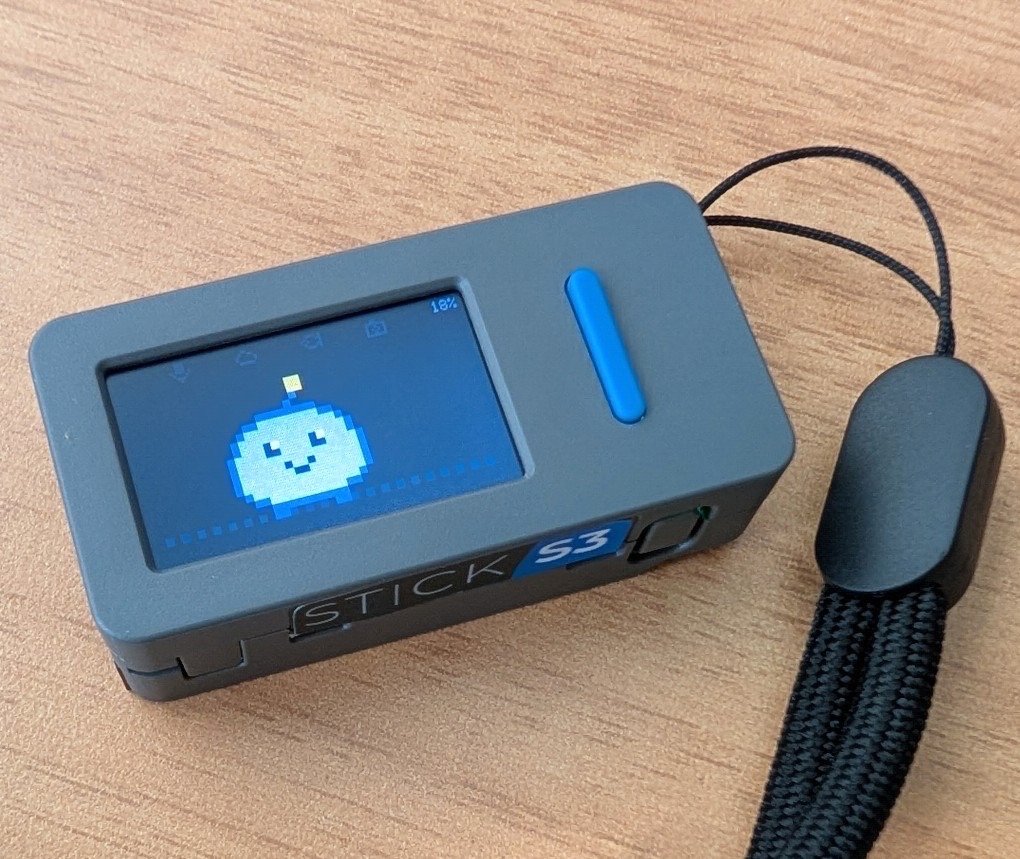
Kai on a real M5StickS3 (48 × 24 × 15 mm, 20 g), clipped to a lanyard.
Hold the button on the M5StickS3 and ask. Kai answers out loud, with a pixel face and a small info
card:
- Quick questions get an answer in about two seconds, from Gemini Live.
- Bigger jobs ("research…", "plan…", "tell me later") go to your agent, and Kai tells you when they're
done. - Your agent remembers you across conversations, and can wake the Stick for reminders, briefings and
watches.
How it works: a fast path and a slow path
                      home server
M5StickS3 ──TLS────▶ kai-relay ──▶ Gemini Live ................ FAST PATH: answers in ~2 s
 push-to-talk  Opus │   │          + Google Search, Kai's tools   (tides, weather, light, parking, notes)
 face + cards       │   │
                    │   └─ ask_agent ──▶ Hermes Agent ......... SLOW PATH: seconds to minutes
                    │                     (Docker, locked down)   (research, planning, many searches)
                    └──── inbox ◀── results, and Hermes's own updates (kai_notify)
| Fast path | Slow path (optional) | |
|---|---|---|
| Brain | Gemini Live (gemini-3.8-live), native voice |
Hermes Agent with Gemini Flash |
| Good for | facts, news, tides, weather, golden hour, parking, notes | research, comparing options, planning, anything needing several searches |
| Timing | you hear the answer in ~2 s | Kai says "On it"; the answer comes later |
| Delivery | spoken now, plus a card | spoken the moment it's ready if the Stick is awake; otherwise a badge, read out on "any updates?" |
- The Stick stays thin. It streams Opus audio (~24 kbit/s up, ~32 kbit/s down) over home Wi-Fi,
draws the face and cards, and deep-sleeps between uses. The link to the relay is encrypted and
mutually authenticated (TLS-PSK, one key per device). - The relay (Python, on any always-on Linux box) bridges the Stick to Gemini Live. It also:
- runs Kai's own tools: NOAA tides, Open-Meteo weather and marine, golden and blue hour, Google
Places parking, trip notes; - makes sure a card appears even when Gemini skips a tool;
- hands slow work to Hermes, and keeps the inbox.
- runs Kai's own tools: NOAA tides, Open-Meteo weather and marine, golden and blue hour, Google
- Hermes runs next to the relay in a pinned Docker container: web search, memory and skills, but no
shell, file or browser tools, and nothing acts unattended. After each conversation it updates its
memory of you and sends Kai a short brief, so Kai starts every conversation already knowing you.
It reaches back into Kai through a small MCP server on localhost (kai_notifyand Kai's data tools).
Anything it brings back from the web is treated as data, never as instructions.
For Hermes Agent and OpenClaw users
Your agent already researches, remembers and runs on a schedule. Kai is the device that lets you talk to
it, and hear back from it, away from a keyboard.
Hermes Agent works today: a pinned, locked-down Docker setup in
relay/deploy/hermes/, applied by oneconfigure.sh. There's no shell,
file or browser access, nothing acts unattended, and anything it brings back from the web is treated
as data, never as instructions.The contract is small, so other agents can plug in. The relay asks the agent; the agent answers
through Kai's MCP server:Direction What Hermes today relay → agent start a background run with a task; poll for {speak, card, details_md}POST /v1/runs(relay/kai_relay/hermes.py, under 100 lines)agent → Kai kai_notify: a spoken update now, or a badge if the Stick is asleepMCP client, bearer token, localhost agent → Kai kai_profile_brief: the short memory brief Kai's voice starts withMCP, with a one-time key per memory run agent → Kai read-only data tools: tides, weather, sun and light MCP agent schedule briefings and watches report through kai_notify; the relay wakes the Stick for themHermes cron jobs OpenClaw has the same pieces (background work, cron, a heartbeat), but there's no adapter yet:
one would replacehermes.pyand call Kai's MCP tools. Contributions are welcome.
Screens
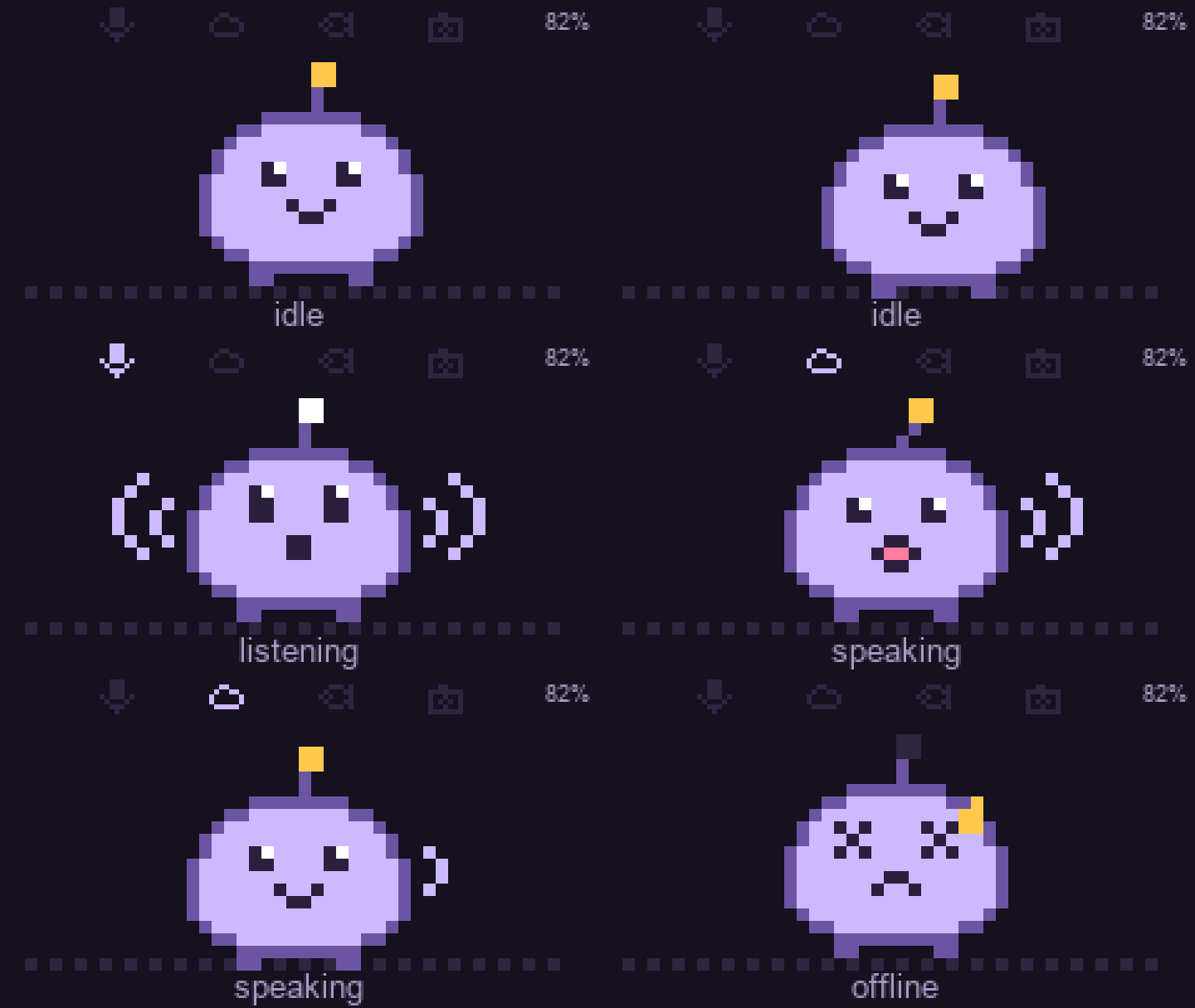
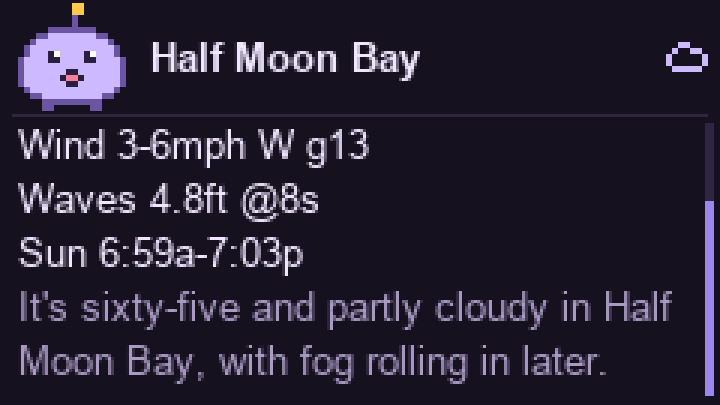
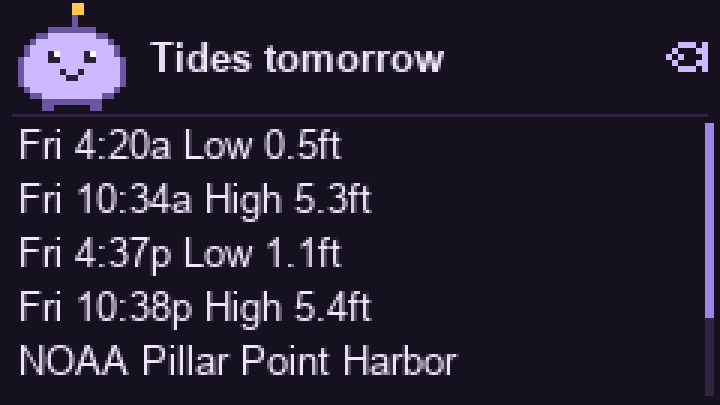
| Weather, mid-answer | Tides | Saved note |
|---|---|---|
 |
 |
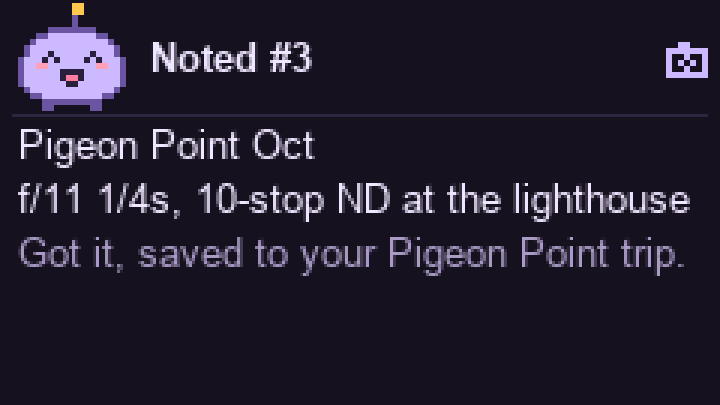 |
Rendered from the firmware's sprite and layout code (firmware/src/face.cpp) at 3x; fonts are approximate.
What you can ask
| Ask | Path | On screen |
|---|---|---|
| "Who won the Giants game?" | fast: Google Search | transcript |
| "When's high tide at Pillar Point tomorrow?" | fast: get_tides |
the day's highs and lows |
| "What's the weather in San Mateo?" | fast: get_weather |
temperature, high/low, rain, wind, waves |
| "When's golden hour at Pescadero Saturday?" | fast: get_sun_times |
golden and blue hour, sunset clouds |
| "Find parking near the Ferry Building" | fast: find_parking |
5 closest |
| "Note: f/11, 1/4 s, 10-stop ND at the lighthouse" | fast: save_note |
"Noted #3", filed under the current trip |
| "Research three sunrise spots near Half Moon Bay for this weekend, tell me later" | slow: ask_agent → Hermes |
"On it", then the result card |
| "Any updates?" | check_inbox |
the waiting results; the badge clears |
| "What did I say about Pigeon Point last month?" | slow: recall → Hermes memory |
the answer, or an update if it takes a while |
| "Remind me at 5:30 to pack the ND filters" | remind (the relay's own) |
chime and "Reminder" at 5:30, waking the Stick if needed |
| "Every Saturday at 5:45 give me a fishing brief for Pillar Point" | slow: schedule_briefing → Hermes job |
chime and the brief every Saturday |
| "Tell me if the wind at Half Moon Bay drops under 10 mph this weekend" | slow: watch_for → Hermes job |
chime and the news, once, when it happens |
"Here" and "near me" mean the home location in the relay's .env (KAI_HOME_*).
Using it
| Button | Action |
|---|---|
| Front hold | talk; release to send. Pressing while Kai talks interrupts it. |
| Side click | scroll the reply; from the face, reopen the last reply |
| Side hold | hush Kai mid-answer; otherwise show status (Wi-Fi, relay, battery) |
- Badge: a yellow number in the top-left means updates are waiting.
- Chime: two rising notes mean Kai is about to tell you something you didn't just ask: a reminder,
a briefing, a watch that fired, or a finished task. The Stick wakes itself for these; watches stay
quiet at night (22:00–07:00). - Sleep: Kai dims after 15 s. On battery it deep-sleeps after 45 s; either button wakes it, and
holding the front button to wake records at once, so you can just press and talk. On USB the screen
turns off at 45 s but Kai stays connected. - Battery: about 6 days per charge at 20 questions a day (projected, see
docs/POWER.md).
Setup
1. Relay on an always-on Linux box on your LAN (Raspberry Pi, mini PC, NAS); no sudo needed.
curl -LsSf https://astral.sh/uv/install.sh | sh
git clone https://github.com/zbruceli/kai ~/kai && cd ~/kai/relay
cp .env.example .env && chmod 600 .env && nano .env   # GEMINI_API_KEY, KAI_DEVICE_TOKEN, KAI_HOME_*
uv run kai-psk kai-stick1                             # a device key: KAI_DEVICE_PSKS line into .env
uv sync --frozen && uv run kai-relay                  # prints wss://<server-ip>:8443/ws
- Keys: get a Gemini key from AI Studio. Parking also needs a
Maps key with Places API (New); everything else works without it. - Run at boot: copy
deploy/kai-relay.serviceto~/.config/systemd/user/, set itsTZ=, thenloginctl enable-linger "$USER"andsystemctl --user enable --now kai-relay. - Logs:
journalctl --user -u kai-relay -fshows the transcript and tool calls. - Update:
git pull && uv sync --frozen && systemctl --user restart kai-relay. - Fixed IP: give the server a DHCP reservation, because the Stick connects to its IP.
2. Slow path (optional): Hermes in Docker. Follow relay/deploy/hermes/README.md:docker compose up -d, a few secrets, then ./configure.sh. Without it, Kai simply has no ask_agent.
3. Stick.
cd firmware && cp src/secrets.example.h src/secrets.h   # Wi-Fi, RELAY_HOST, token, the kai-psk lines
pio run -t upload
If the port isn't found, hold the side button ~2 s until the green LED blinks (download mode). Builds
embed your Wi-Fi password, token and device key, so releases are source only; never share a builtfirmware.bin. The link to the relay is encrypted and mutually authenticated (TLS-PSK); see
docs/ARCHITECTURE.md.
Without a Stick: uv sync --extra sim && uv run kai-sim --host <server-ip> talks to the relay through
the Mac's mic and speakers. Give it its own key: KAI_SIM_PSK=kai-sim:<hex> in .env, with the same entry
in the relay's KAI_DEVICE_PSKS.
Tests: cd relay && uv run pytest (offline). Add -m network -s to hit NOAA and Open-Meteo for real.uv run python evals/routing.py checks which path Gemini Live picks for a set of requests (real Gemini, ~1 min per 30 cases).
Repo map
firmware/src/   main.cpp (modes, buttons, Wi-Fi, sleep) · audio.* (mic, speaker) · voice_codec.* (Opus) · face.* (sprite, cards)
firmware/scripts/patch_websockets.py   adds TLS-PSK to the WebSockets library at build time
relay/kai_relay/
  server.py     listeners (wss:// with TLS-PSK) and device auth
  tls.py        the encrypted link; `kai-psk` makes device keys
  session.py    Stick <-> Gemini Live bridge; wire protocol at the top
  tools/        fast-path tools, one file each (@tool decorator)
  backstop.py   runs the tool itself when Gemini answers without one, so a card always appears
  agent.py      slow path: hand-off to Hermes, the inbox, the badge
  hermes.py     Hermes API client
  schedule.py   reminders, briefings, watches, and when the Stick should wake
  mcp_server.py Kai MCP server that Hermes calls back into
relay/evals/    routing eval: which path Gemini Live picks for a set of requests
relay/deploy/   systemd unit · hermes/ (pinned compose, configure.sh, SOUL.md)
More in docs/ARCHITECTURE.md (protocol, tools, security),
docs/POWER.md and CHANGELOG.md.
Roadmap
- Voice, search, tides, weather, light, parking, notes, with cards
- Deep sleep with press-and-talk from sleep; Opus audio; power savings
- Slow path, phase 1: hand-off to Hermes, inbox with badge, results spoken when ready
- Slow path, phase 2: memory across conversations (transcripts to Hermes, a profile brief Kai starts with,
recall) - Slow path, phase 3: reminders, briefings and watches that wake the Stick on a timer
- Encrypted Stick link (TLS-PSK), security audit and hardening, routing eval
- Approvals: a spoken read-back plus a long press before anything with side effects
- Remote access: phone as a BLE bridge (GPS for "near me"), or a relay reachable away from home
- IMU gestures (lift to wake, shake to hush), OTA updates
License
MIT, see LICENSE.
Yorumlar (0)
Yorum birakmak icin giris yap.
Yorum birakSonuc bulunamadi