deer
Health Uyari
- License — License: MIT
- Description — Repository has a description
- Active repo — Last push 0 days ago
- Low visibility — Only 5 GitHub stars
Code Basarisiz
- process.env — Environment variable access in .kadai/actions/build-install.ts
- process.env — Environment variable access in .kadai/actions/screenshot.ts
- exec() — Shell command execution in .kadai/actions/setup.ts
- process.env — Environment variable access in .kadai/actions/setup.ts
- process.env — Environment variable access in .kadai/actions/test-install.ts
- network request — Outbound network request in .kadai/actions/test-install.ts
Permissions Gecti
- Permissions — No dangerous permissions requested
This tool is an orchestrator that runs multiple isolated, unattended Claude coding agents in parallel using git worktrees. It manages these sandboxed instances and provides a TUI dashboard to monitor progress and open pull requests.
Security Assessment
Overall risk: Medium. The tool has a notable attack surface due to its core functionality. It executes shell commands directly and makes outbound network requests, likely for agent communication or repository management. The codebase also accesses environment variables extensively to handle authentication, reading sensitive tokens like `CLAUDE_CODE_OAUTH_TOKEN` and `ANTHROPIC_API_KEY` from your system. While the purpose is to sandbox the AI agents safely using `--dangerously-skip-permissions`, users must be aware that the host application itself reads plain-text credentials and executes system commands. No hardcoded secrets were found.
Quality Assessment
The project is very new and has extremely low community visibility, currently sitting at only 5 GitHub stars. However, it is actively maintained (last updated today) and is properly licensed under the permissive MIT license. Because it is a niche tool with minimal community vetting, hidden bugs or security edge cases are highly possible. A major concern is the installation method, which instructs users to pipe a remote script directly into bash (`curl | bash`), a practice that bypasses manual code review prior to execution.
Verdict
Use with caution. The orchestration concept is useful, but executing remote install scripts and granting a relatively unvetted tool access to your plain-text API keys carries non-trivial risk.
The simplest unattended coding agent orchestrator.
🦌 deer / deerbox
deer is what I consider the simplest tool for running multiple unattended claude instances safely.
If you want to parallelize claude agents, but don't like the complexity of agent orchestrators like multiclaude and claude-squad, deer may be for you.
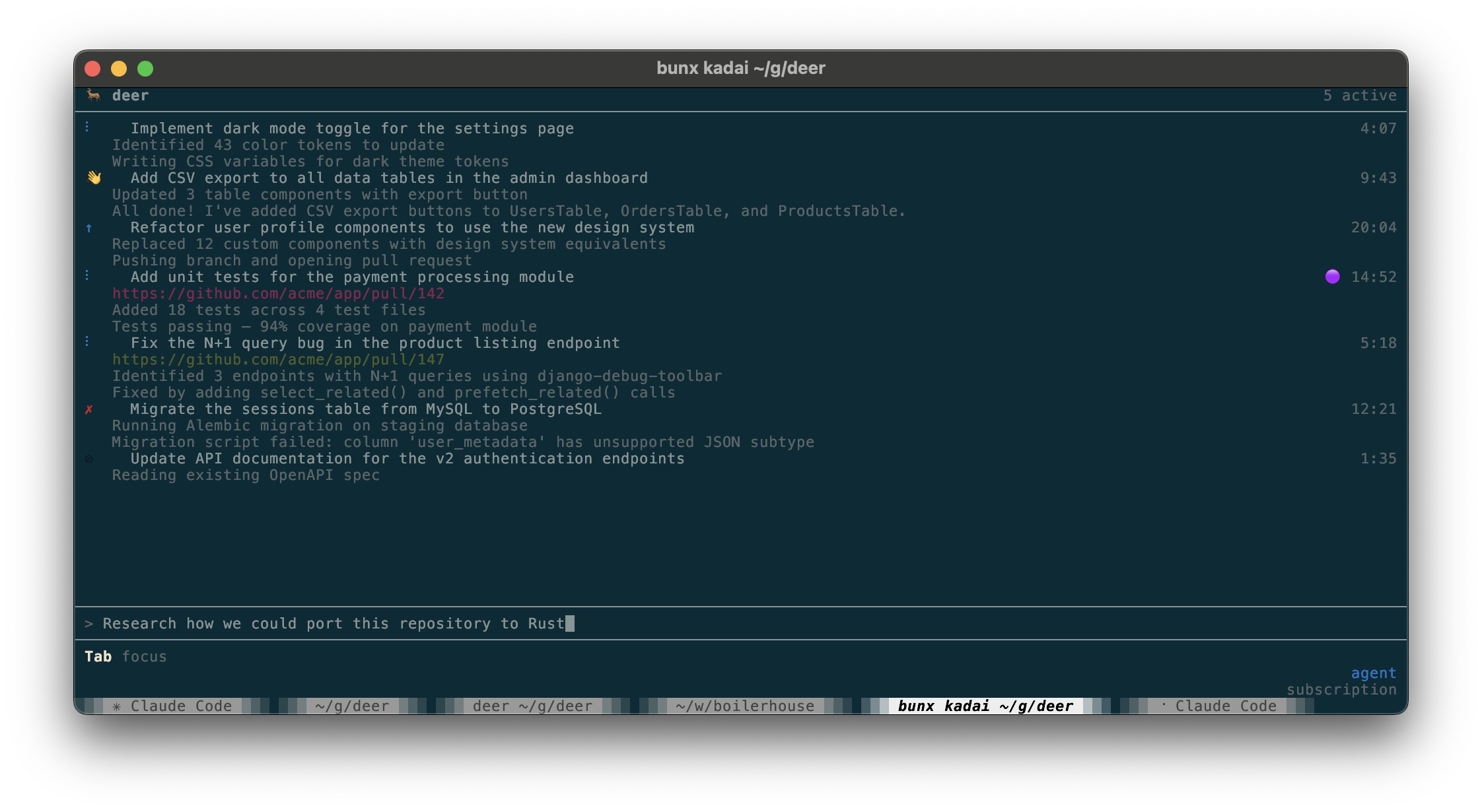
Screencast
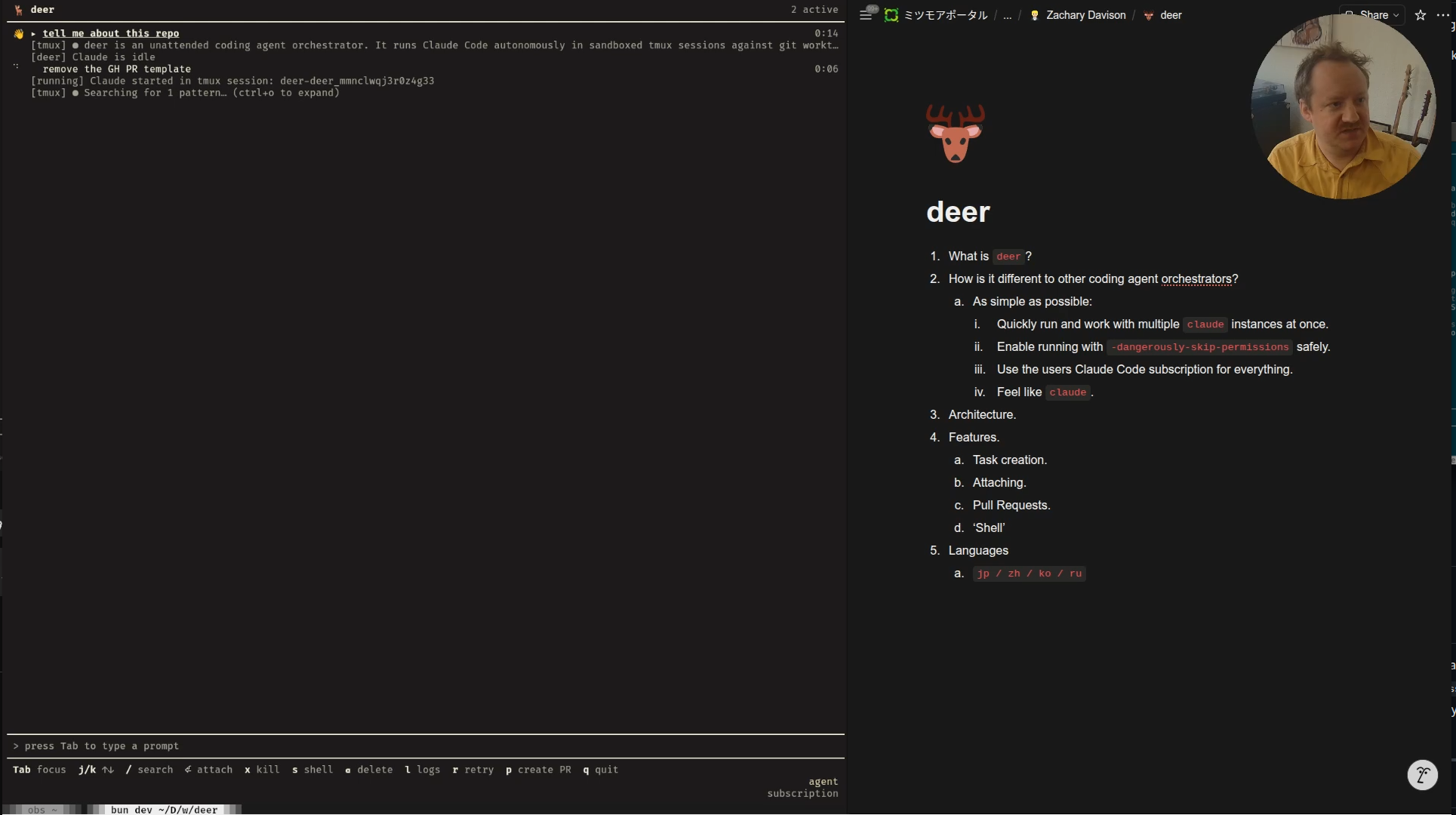
Goals
- Quickly run and work with multiple
claudeinstances at once. - Enable running with
--dangerously-skip-permissionssafely. - Use the users Claude Code subscription for everything.
- Feel like
claude.
How it works
- Launch
deer. - Send prompts (each prompt is a worktree and agent isolated from filesystem and network).
- Monitor agents and attach into them if necessary.
- Press
pto open a PR when finished.
Installation
curl -fsSL https://raw.githubusercontent.com/zdavison/deer/main/install.sh | bash
To install a specific version:
curl -fsSL https://raw.githubusercontent.com/zdavison/deer/main/install.sh | bash -s -- --version 0.7.8
Supported platforms
| OS | Arch |
|---|---|
| macOS | x64, arm64 |
| Linux | x64, arm64 |
Authentication
deer uses your Claude credentials to power the agent. It checks for credentials in this order:
CLAUDE_CODE_OAUTH_TOKENenvironment variable~/.claude/agent-oauth-tokenfile (plain text token)- macOS Keychain (automatically extracted from Claude Code's stored credentials)
ANTHROPIC_API_KEYenvironment variable (fallback — API key)
If you have Claude Code installed and logged in, deer will use your subscription automatically on macOS with no extra setup.
Subscriptions are prioritized over API keys, so if you have both setup, deer will use your subscription.
Usage
# Run from inside a git repo
cd your-project
deer
If you just want the sandboxing part of deer, without the TUI, you can use deerbox:
cd your-project
deerbox
After Claude exits, deerbox prompts you with a menu of actions:
| Key | Action |
|---|---|
p |
Create a pull request (or update an existing one if --from was used) |
k |
Keep the worktree (default) |
s |
Open a shell in the worktree |
m |
Merge directly into your original branch (shown when applicable) |
d |
Discard — remove the worktree and changes |
By default the worktree is cleaned up when you're done. The m option merges the session branch into the branch you were on when you invoked deerbox, without creating a PR.
deerbox options
| Flag | Short | Description |
|---|---|---|
--model <model> |
-m |
Claude model to use |
--base-branch <branch> |
-b |
Branch to base the worktree on |
--from <branch-or-PR> |
-f |
Continue work on an existing branch or PR |
--keep |
-k |
Keep the worktree after Claude exits |
--from: continuing work on an existing branch or PR
--from lets you run deerbox against a branch that already exists, rather than starting fresh from the base branch. This is useful for iterating on a PR — for example, addressing review comments.
# Continue work on an existing branch
deerbox --from feature/my-branch "add unit tests"

# Address review comments on a PR (by number or URL)
deerbox --from 42 "address the review comments"
deerbox --from https://github.com/owner/repo/pull/42 "address the review comments"
--from accepts:
- A branch name — checks out that branch; if an open PR exists for it,
deerboxwill offer to update it when done - A PR number — fetches the PR's head branch and base branch automatically
- A GitHub PR URL — same as a PR number
When --from is used, only commits made during the session are considered when detecting changes and generating PR metadata.
Dashboard
Keyboard shortcuts
Input mode (default — prompt bar is active):
| Key | Action |
|---|---|
Enter |
Submit prompt and launch agent |
↑ / ↓ |
Navigate prompt history |
Tab |
Switch focus to agent list |
Agent list mode (press Tab from input to enter):
| Key | Action |
|---|---|
Tab |
Switch focus back to input |
j / ↓ |
Select next agent |
k / ↑ |
Select previous agent |
/ |
Fuzzy-search agents |
Enter |
Attach to agent's tmux session |
x |
Kill running agent |
r |
Retry (re-run agent from scratch) |
p |
Create PR (or open PR if one exists) |
u |
Update existing PR |
s |
Open a shell in the agent's worktree |
l |
Toggle log detail panel |
c |
Copy logs to clipboard (when log panel open) |
v |
Toggle verbose log mode (when log panel open) |
Backspace |
Delete agent entry |
q |
Quit (confirms if agents are still running) |
Search mode (press / from agent list):
| Key | Action |
|---|---|
j / ↓ |
Next match |
k / ↑ |
Previous match |
Enter |
Select highlighted match |
Esc |
Cancel search |
Actions that require confirmation (kill, delete with uncommitted work, retry while running) prompt
(y/n)before executing.
Attaching to a running agent
Each task runs in a named tmux session. You can attach directly to watch the agent in real time by pressing Enter while the agent is selected.
While attached, a tmux status bar is displayed with basic instructions on how to detach (Ctrl+b, d).

Language
The dashboard UI and generated PR content can be displayed in multiple languages:
| Language | --lang= value |
LLM-translated |
|---|---|---|
| English | (default) | |
| Japanese (日本語) | ja |
✓ |
| Chinese Simplified (简体中文) | zh |
✓ |
| Korean (한국어) | ko |
✓ |
| Russian (русский) | ru |
✓ |
deer --lang=zh
Language is detected in this order (first match wins):
--lang=<code>CLI flagCLAUDE_CODE_LOCALEenvironment variable (e.g.CLAUDE_CODE_LOCALE=zh)- System
LANGenvironment variable (e.g.LANG=zh_CN.UTF-8) - Default: English
Setting a non-English language also instructs the agent to write PR titles and descriptions in that language. Branch names remain short kebab-case ASCII English regardless of the selected language.
LLM-translated languages may contain errors. PRs to improve translations are welcome — see src/i18n.ts.
Configuration
Configuration is layered. Later sources override earlier ones:
- Built-in defaults
~/.config/deer/config.toml— global configdeer.tomlin your repo root — repo-local config- CLI flags
Global config (~/.config/deer/config.toml)
[defaults]
base_branch = "main"       # default base branch for PRs
timeout_ms = 1800000       # agent timeout in ms (default: 30 minutes)
setup_command = ""         # command to run inside the worktree before the agent starts

[network]
# Replaces the built-in allowlist entirely (see repo-local allowlist_extra to extend it)
allowlist = [
  "api.anthropic.com",
  "registry.npmjs.org",
  # ...
]

[sandbox]
runtime = "srt"            # ths is the only runtime for now
env_passthrough = []       # host env vars to forward into the sandbox
Repo-local config (deer.toml)
Place this in your repo root — it is safe to commit.
You only need this if the defaults are not sufficient for you.
# Override the base branch for this repo
base_branch = "master"

# Run a setup command inside the worktree before the agent starts
setup_command = "pnpm install"

# Extend the network allowlist (merged with global allowlist)
[network]
allowlist_extra = ["npm.pkg.github.com"]

# Forward additional host env vars into the sandbox
[sandbox]
env_passthrough_extra = ["NODE_ENV", "MY_VAR"]

# Inject extra credentials via the host-side auth proxy.
# The sandbox never sees the real token — the proxy injects it as an auth header.
# [[sandbox.proxy_credentials_extra]]
# domain = "your-registry.example.com"
# target = "https://your-registry.example.com"
# [sandbox.proxy_credentials_extra.hostEnv]
# key = "MY_REGISTRY_TOKEN"
# [sandbox.proxy_credentials_extra.headerTemplate]
# authorization = "Bearer ${value}"
# [sandbox.proxy_credentials_extra.sandboxEnv]
# key = "NPM_CONFIG_REGISTRY"
# value = "http://your-registry.example.com"
See deer.toml.example for a full annotated example.
Security model
deer runs each agent in an isolated sandbox using the Anthropic Sandbox Runtime (SRT):
- Filesystem: the agent can only write to its git worktree; the rest of the filesystem is read-only or inaccessible.
- Network: outbound traffic is filtered through a domain allowlist; only explicitly permitted domains are reachable.
- Credentials: API keys and OAuth tokens never enter the sandbox — a host-side MITM proxy intercepts requests to credentialed domains and injects auth headers transparently. By default this applies to
claudekeys/OAuth tokens only, but you can add additional ones if necessary. - Environment: only explicitly listed env vars are forwarded; host secrets are not leaked via the process environment.
How PRs are created
Press p on an idle task to create a pull request.
This will generate a branch name, PR title, and PR description that describes the work done and push it to the repo.
Your PR template (.github/PULL_REQUEST_TEMPLATE.md) is conformed to automatically.
Contributing
bun install
bun test
bun dev
Yorumlar (0)
Yorum birakmak icin giris yap.
Yorum birakSonuc bulunamadi