BatRadar
Health Uyari
- No license — Repository has no license file
- No description — Repository has no description
- Active repo — Last push 0 days ago
- Low visibility — Only 9 GitHub stars
Code Gecti
- Code scan — Scanned 12 files during light audit, no dangerous patterns found
Permissions Gecti
- Permissions — No dangerous permissions requested
Bu listing icin henuz AI raporu yok.
BatRadar 🦇
Monitor your AI coding tool usage limits — Claude Code, Codex, Gemini CLI, Copilot, OpenRouter, Antigravity — from a floating desktop overlay.



What is BatRadar?
BatRadar is a lightweight Windows desktop app that sits in your system tray and shows a small floating icon on screen. It automatically reads your existing credentials for Claude Code, Codex, Gemini CLI, Copilot, OpenRouter and Antigravity, and polls their usage APIs so you always know how much of your quota you've burned — without switching windows or opening a browser.
When usage gets high, it sends a Windows notification before you hit the limit.
Screenshots
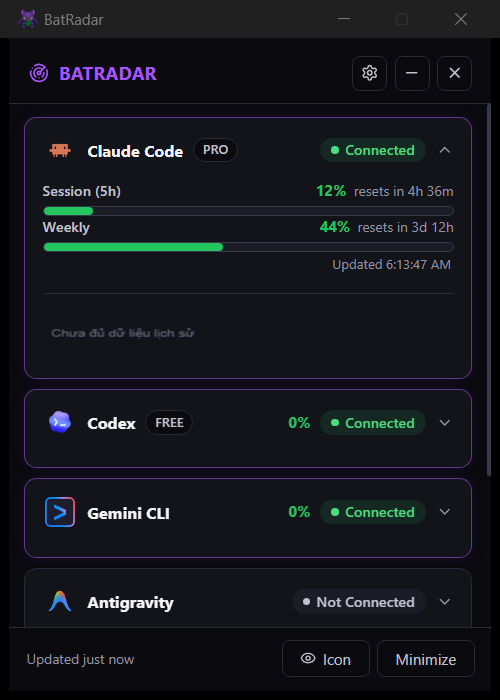
| Dashboard | Floating Icon |
|---|---|
 |
 |
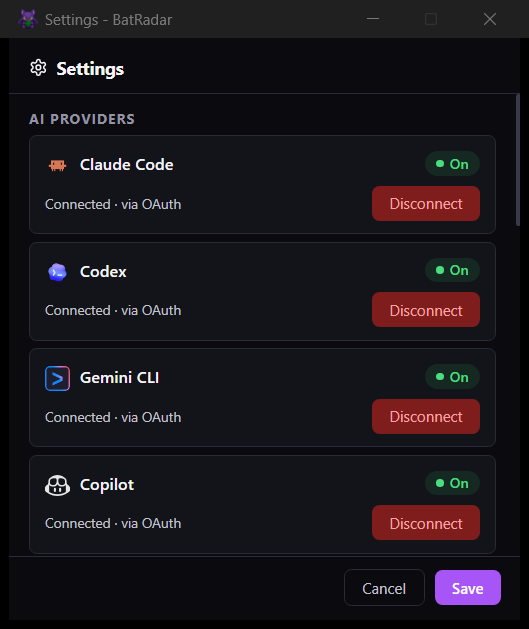
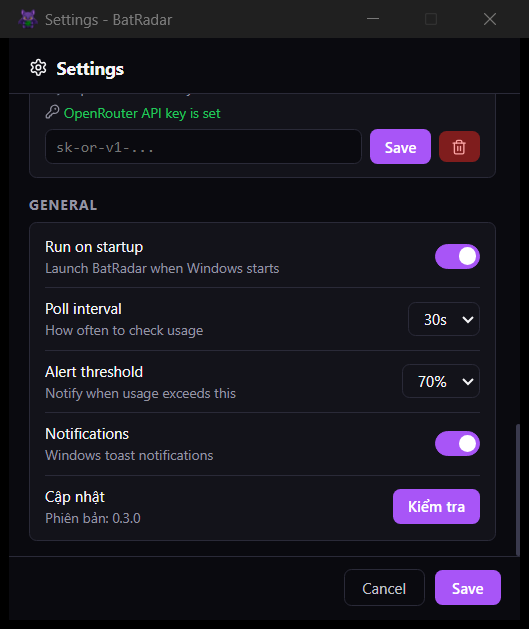
| Settings — Providers | Settings — General |
|---|---|
 |
 |
Download
Go to Releases and download BatRadar_x.x.x_x64-setup.exe (~5 MB).
Run the installer — no configuration needed. BatRadar will appear in your system tray immediately and keeps itself up to date (it asks before installing).
Upgrading from 0.3.x (the old Electron build): accept the in-app update — it installs 0.4.0, removes the old version and keeps your settings in %APPDATA%\batradar.
Features
- Floating overlay — a draggable circular icon that shows your highest current usage % and pulses a radar-style glow that speeds up and reddens as you approach the limit
- Dashboard — click the icon to open a panel with per-provider usage bars (5h session, 7-day weekly, Opus/Sonnet breakdowns, extra credit spend); cards are collapsible and can be reordered by drag-and-drop
- Usage history — a chart per provider (24h / 7d / 30d) built from a lightweight local log, so you can see burn-rate over the last 30 days
- Seasonal themes — the dashboard and overlay dress up for events like Halloween; can be turned off in Settings
- Live polling — auto-refreshes in the background with a configurable interval (default 30s), rate-limit safe
- Alerts — desktop notifications at warning (80%) and critical (95%) thresholds before you hit the wall
- System tray — runs quietly in the background, right-click to access dashboard or settings
- Multi-provider — Claude Code, Codex, Gemini CLI, GitHub Copilot, Antigravity (auto-detect) + OpenRouter (API key)
- Autostart — optional Windows login startup
Supported Providers
| Provider | Auth method | How to connect |
|---|---|---|
| Claude Code | OAuth (auto) | Run claude login in terminal |
| Claude Code | API Key | Enter key in Settings → Manual API Key |
| Codex | OAuth (auto) | Run npm i -g @openai/codex then codex |
| Gemini CLI | OAuth (auto) | Run npm i -g @google/gemini-cli then gemini |
| Copilot | GitHub token (auto) | Login Copilot in VS Code/JetBrains, or gh auth login |
| OpenRouter | API Key | Create a free key at openrouter.ai/keys, enter in Settings |
| Antigravity | Local app (auto) | Install from antigravity.google, login, keep the app open |
BatRadar reads credentials directly from the files these tools create on your machine — no re-login required if you're already signed in.
Building from source
Requires the Rust toolchain, the MSVC build tools ("Desktop development with C++") and the Tauri CLI (cargo install tauri-cli --version "^2").
git clone https://github.com/ZenithHawking/BatRadar.git
cd BatRadar
cargo tauri dev     # run with hot-reloaded UI
cargo tauri build   # installer in src-tauri/target/release/bundle/nsis/
npm test            # seasonal-theme unit tests (Node 18+)
Usage Metrics Shown
Claude Code
- Session usage (5-hour window)
- Weekly usage (7-day window)
- Weekly Sonnet / Opus breakdowns
- Extra usage credit spend
Codex
- Session usage (primary window)
- Weekly usage (secondary window)
- Credit balance
Settings
| Setting | Default | Description |
|---|---|---|
| Poll interval | 30s | How often to refresh usage data |
| Alert threshold | 80% | Warning notification trigger |
| Critical threshold | 95% | Critical notification trigger |
| Autostart | Off | Launch BatRadar when Windows starts |
| Notifications | On | Toggle desktop alerts |
Running from Source
See Building from source.
Project Structure
BatRadar/
├── src/                 # UI (plain HTML/CSS/JS ES modules)
│   ├── index.html       # Dashboard window
│   ├── floating.html    # Floating overlay window
│   ├── settings.html    # Settings window
│   ├── js/
│   │   ├── dashboard.js # Dashboard UI logic + history chart
│   │   ├── floating.js  # Overlay drag & display logic
│   │   ├── settings.js  # Settings form & provider management
│   │   ├── season/      # Seasonal theme engine (+ node:test suites)
│   │   └── utils.js     # Shared helpers
│   ├── themes/          # Bundled offline copy of themes/
│   ├── css/             # Per-window stylesheets
│   └── assets/icons/    # Provider icons, tray icon, app icon
├── src-tauri/           # Rust backend — windows, tray, polling, IPC, updater, history log
├── themes/              # Seasonal themes + schedule, fetched by the app from GitHub
├── scripts/             # Release helpers (update manifests)
└── screenshots/         # App screenshots for README
How It Works
- On startup, BatRadar reads your existing credential files (
~/.claude/.credentials.json,~/.codex/auth.json) — nothing is stored by this app except your settings and an optional encrypted API key in%APPDATA%/batradar/ - It polls the provider APIs in the background on your configured interval
- Usage data is broadcast to all open windows (dashboard, overlay, settings) in real time
- If usage crosses a threshold, a Windows notification fires — once per usage window, not on every poll
Seasonal themes
The app checks themes/schedule.json on GitHub every 6 hours and dresses the dashboard and floating icon for the current event (e.g. Halloween). To add one: create themes/<id>/theme.json + SVGs, add a dated entry to the schedule, copy the folder into src/themes/ (offline fallback), run npm test, push to main. Themes can only set whitelisted colours and pictures — never CSS or scripts. Turn it off in Settings → "Giao diện theo mùa".
Privacy
- All data stays on your machine
- No analytics or telemetry
- API keys stored locally with base64 encoding
- Credentials are only sent to the respective provider APIs (Anthropic, OpenAI)
Release a New Version
# Bump the version in package.json, src-tauri/Cargo.toml and src-tauri/tauri.conf.json, then:
git tag v0.4.1
git push origin v0.4.1
GitHub Actions builds the signed installer, latest.json (Tauri updater) and latest.yml (for users still on the old Electron build) into a draft release. Check it, then publish — users are offered the update from that moment. The workflow needs the repo secrets TAURI_SIGNING_PRIVATE_KEY and TAURI_SIGNING_PRIVATE_KEY_PASSWORD.
License
MIT
Yorumlar (0)
Yorum birakmak icin giris yap.
Yorum birakSonuc bulunamadi