pycharm-agent-session-relay
Health Warn
- License — License: MIT
- Description — Repository has a description
- Active repo — Last push 0 days ago
- Low visibility — Only 6 GitHub stars
Code Pass
- Code scan — Scanned 12 files during light audit, no dangerous patterns found
Permissions Pass
- Permissions — No dangerous permissions requested
No AI report is available for this listing yet.
JetBrains/PyCharm plugin to review an agent's changes in your IDE and relay batched, line-anchored comments back into its running session — instead of retyping feedback into the terminal.
 Agent Session Relay
A JetBrains/PyCharm plugin — Relay for short — that lets you review the agent's changes
in your IDE and relay batched, line-anchored comments straight into its running session.
Relay is a two-way channel between you and an agent CLI (Claude Code, Codex, or any
agent): the terminal carries agent → you, and a batched, line-anchored review surface
carries you → agent — relayed into the specific session that made the changes.


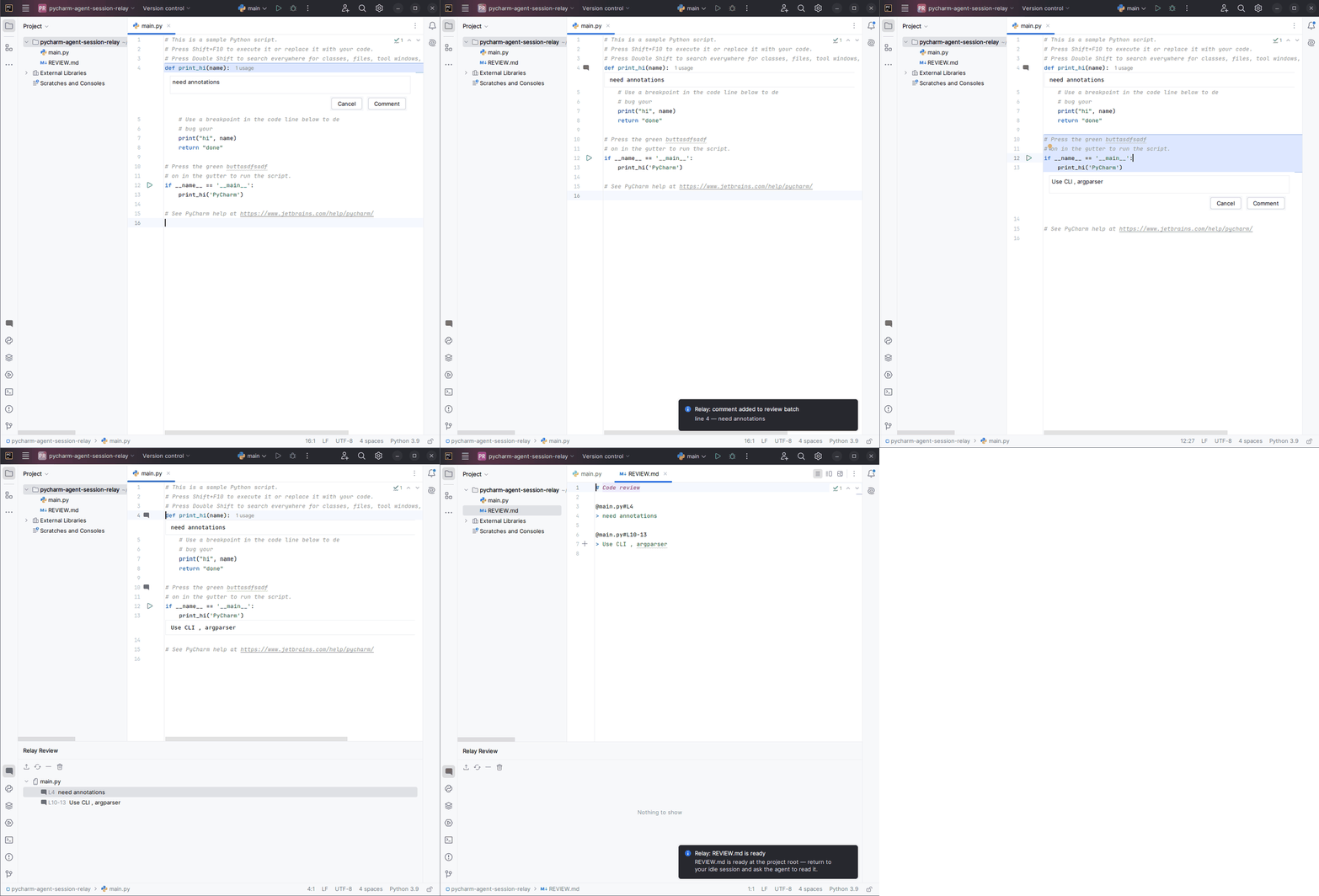
Status: MVP implemented. The full annotate → batch → export → deliver loop works (see
docs/ARCHITECTURE.mdfor the design). Persistence across restarts, typed
terminal relay, and multi-session/worktree support remain deferred follow-ons.
Install
Agent Session Relay on the JetBrains Marketplace →
In your IDE: Settings → Plugins → Marketplace, search "Agent Session Relay", then Install.
Requires a 2024.2 or newer IntelliJ-based IDE — built for PyCharm Community, runs in any
IntelliJ-based IDE.
The problem
When an agent edits your files remotely and they sync back locally, PyCharm shows you the
diff — but there's no way to attach several line-anchored comments and return them to the
agent as one reviewable batch. You end up retyping feedback into the terminal, losing the
file/line anchoring the agent could otherwise resolve directly.
What Relay does
Relay is a line-anchored annotation layer over any file in the project, batched and
exported to an agent CLI. The canonical flow:
 0. agent edits files  →  they land in your local working tree (synced in, if remote)
 1. Refresh & review  →  VFS refresh so the edits on disk show up
 2. open a file, select lines, leave a comment  (repeat across files)
 3. see / edit / delete pending comments  (inline cards + tool window)
 4. open the tool window, preview the batch, add more
 5. (the agent sits idle, waiting for input)
 6. press Submit  →  Relay writes REVIEW.md at the project root and notifies you to hand it to the agent
The export uses Claude Code's native reference syntax (@path/file.py#L10-15 + comment
body), so the agent resolves anchors directly — no in-file comment markers that would
collide with the agent's own edits under bidirectional sync.
What Relay is not
- It does not emulate a terminal — it reuses PyCharm's.
- It does not render diffs — it reuses PyCharm's diff viewer.
- It does not use git as a transport between hosts, and it does not manage file sync —
it only reads and writes your local working tree (including the exportedREVIEW.md).
Carrying files to and from a remote sandbox is the session's own job. (Reading your local
working-tree diff for change detection is fine; the constraint is only about cross-host
commit/push/pull.)
Development
Language: Kotlin (IntelliJ Platform Plugin Template, Gradle)
This is a spec-driven repository (OpenSpec):
every feature starts as a change proposal under openspec/changes/ before any code. Two
sources of truth, read both before proposing or implementing:
openspec/changes/— product requirements: what the system is for the user (capture
modes, user flow, per-capability behavior, scope phasing).docs/ARCHITECTURE.md— technical design: how the solution
works and why (domain model, anchor drift, multi-session mechanics, threading, SDK reuse).
Build & run
The plugin is built with the IntelliJ Platform Gradle Plugin;
the target IDE is PyCharm Community 2024.2 (platformType/platformVersion ingradle.properties). Requires a JDK 21.
./gradlew buildPlugin   # produce build/distributions/agent-session-relay-<version>.zip
./gradlew runIde        # launch a sandbox PyCharm with the plugin pre-installed (fastest dev loop)
./gradlew verifyPlugin   # run the JetBrains plugin verifier
The first build downloads the target IDE (~1 GB) into the Gradle cache.
Reviews (0)
Sign in to leave a review.
Leave a reviewNo results found