yappr
Health Warn
- No license — Repository has no license file
- Description — Repository has a description
- Active repo — Last push 0 days ago
- Community trust — 36 GitHub stars
Code Pass
- Code scan — Scanned 12 files during light audit, no dangerous patterns found
Permissions Pass
- Permissions — No dangerous permissions requested
No AI report is available for this listing yet.
A modular local AI agent built with Python and Ollama, featuring tool calling, memory, web search, document processing, embeddings, and RAG.
Yappr AI Agent

A locally running AI agent built with Python and Ollama that can use tools, search the web, remember information, read documents, and retrieve relevant information using RAG. It combines these capabilities into a modular local assistant that can handle different tasks and interact with external information.
Python · Ollama · Qwen 2.5 · SQLite · Tavily · RAG
What is Yappr?
Yappr is a local AI agent built with Python and Ollama.
It can use external tools, access real-world information, maintain persistent memory, process documents, and retrieve relevant information using a lightweight RAG pipeline.
Current capabilities
- Calculator
- Current weather
- Time and time zones
- Web search
- Persistent SQLite memory
- Document processing
- RAG retrieval
- Multiple tool calls
- Runtime logging
- Error handling
- Automated testing
Architecture
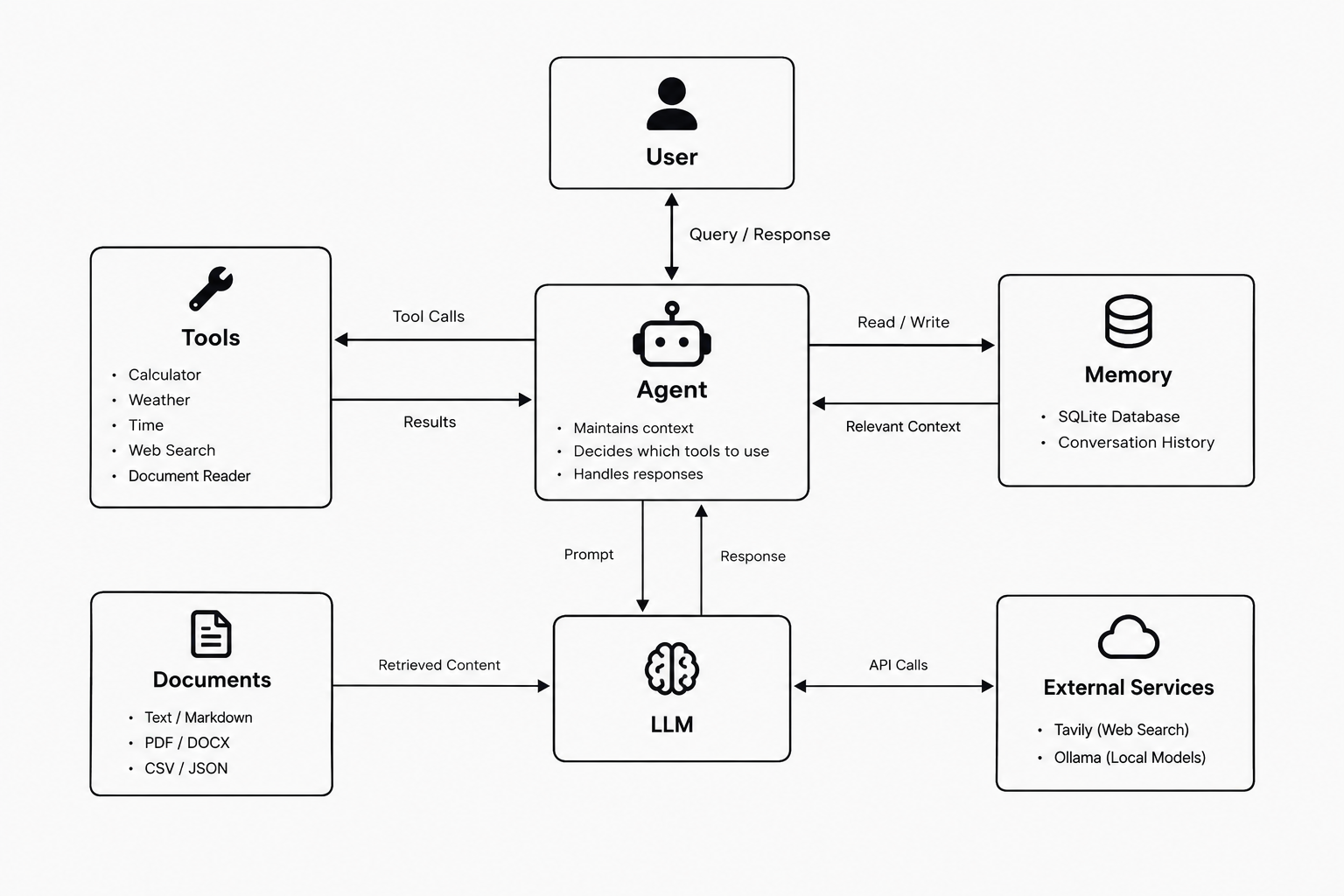
User → Yappr → Local LLM → Tool Registry → Tools → Results → Local LLM → Response
Turing uses a dynamic tool registry to keep tools separate from the main agent, making the architecture easier to extend and maintain.
Tools
| Tool | Purpose |
|---|---|
| Calculator | Mathematical calculations |
| Weather | Current weather |
| Time | Time and time zones |
| Web Search | Internet search using Tavily |
| Memory | Persistent storage using SQLite |
| Document Reader | Read supported documents |
| RAG | Retrieve relevant document information |
Supported documents
.txt.md.json.csv.pdf.docx
Tech Stack
- Python — Agent logic and tool execution
- Ollama — Local LLM runtime
- Qwen 2.5 — Language model
- SQLite — Persistent memory
- Tavily — Web search
- Open-Meteo — Weather data
- Ollama Embeddings — Document embeddings
- PyMuPDF — PDF processing
- python-docx — DOCX processing
- pytest — Automated testing
Project Structure
turing-ai-agent/
│
├── assets/
│   ├── architecture.png
│   └── demo.gif
│
├── data/
│   ├── memory.db
│   ├── memoryexample.db
│   └── README.md
│
├── documents/
│   ├── empty.txt
│   ├── notes.csv
│   ├── notes.docx
│   ├── notes.json
│   ├── notes.md
│   ├── notes.pdf
│   ├── notes.txt
│   └── README.md
│
├── logs/
│   ├── agent.log
│   ├── agentexample.log
│   └── README.md
│
├── RAG/
│   ├── embeddings/
│   │   └── ollama_embedding.py
│   ├── chunker.py
│   ├── indexer.py
│   ├── retriever.py
│   ├── similarity.py
│   └── vector_store.py
│
├── tests/
│   ├── __init__.py
│   ├── test_calculator.py
│   ├── test_document_reader.py
│   ├── test_memory.py
│   ├── test_registry.py
│   └── test_web_search.py
│
├── tools/
│   ├── __init__.py
│   ├── calculator.py
│   ├── document_reader.py
│   ├── memory_tool.py
│   ├── rag.py
│   ├── registry.py
│   ├── time.py
│   ├── weather.py
│   └── web_search.py
│
├── .env.example
├── .gitignore
├── main.py
├── memory.py
├── requirements.txt
├── setup.sh
├── shell.sh
└── README.md
Directory overview
assets/
Contains the project architecture image and demo GIF used by the README.
data/
Contains the SQLite database used for persistent memory and an example database for reference.
documents/
Contains sample documents used for document processing and RAG testing. The project supports TXT, Markdown, JSON, CSV, PDF, and DOCX files.
logs/
Contains the runtime log generated by Turing and an example log file.
RAG/
Contains the retrieval-augmented generation pipeline, including document chunking, indexing, embeddings, similarity calculation, vector storage, and retrieval.
tests/
Contains automated tests for the project's core tools and components.
tools/
Contains Yappr's individual tools and the dynamic tool registry used by the agent.
Setup
Requirements
- Python 3
- Ollama
- Git
- Tavily API key
1. Clone the repository
git clone <your-repository-url>
cd ai_agent
2. Run the setup script
chmod +x setup.sh shell.sh
./setup.sh
The setup script:
- Checks for Python
- Creates the virtual environment
- Installs Python dependencies
- Checks for Ollama
- Pulls the Qwen model if required
- Pulls the embedding model if required
3. Configure environment variables
Create a .env file based on .env.example:
TAVILY_API_KEY=your_api_key_here
The .env file contains private credentials and should never be committed to GitHub.
4. Start Yappr
./shell.sh
The shell script activates the virtual environment and starts main.py.
Testing
Turing uses pytest for automated testing.
Run the complete test suite with:
pytest
The test suite covers components including:
- Calculator
- Document reader
- Memory
- Tool registry
- Web search
Contributions
Contributions are welcome.
You can:
- Report bugs
- Suggest improvements
- Improve documentation
- Submit pull requests
- Add useful tools or features
Please open an issue before making major architectural changes.
Author
Slyyr $
Reviews (0)
Sign in to leave a review.
Leave a reviewNo results found