codemux
Health Uyari
- License — License: NOASSERTION
- Description — Repository has a description
- Active repo — Last push 0 days ago
- Low visibility — Only 5 GitHub stars
Code Gecti
- Code scan — Scanned 12 files during light audit, no dangerous patterns found
Permissions Gecti
- Permissions — No dangerous permissions requested
Bu listing icin henuz AI raporu yok.
The Agentic Development Environment You Need.

Codemux
The Agentic Development Environment for Builders
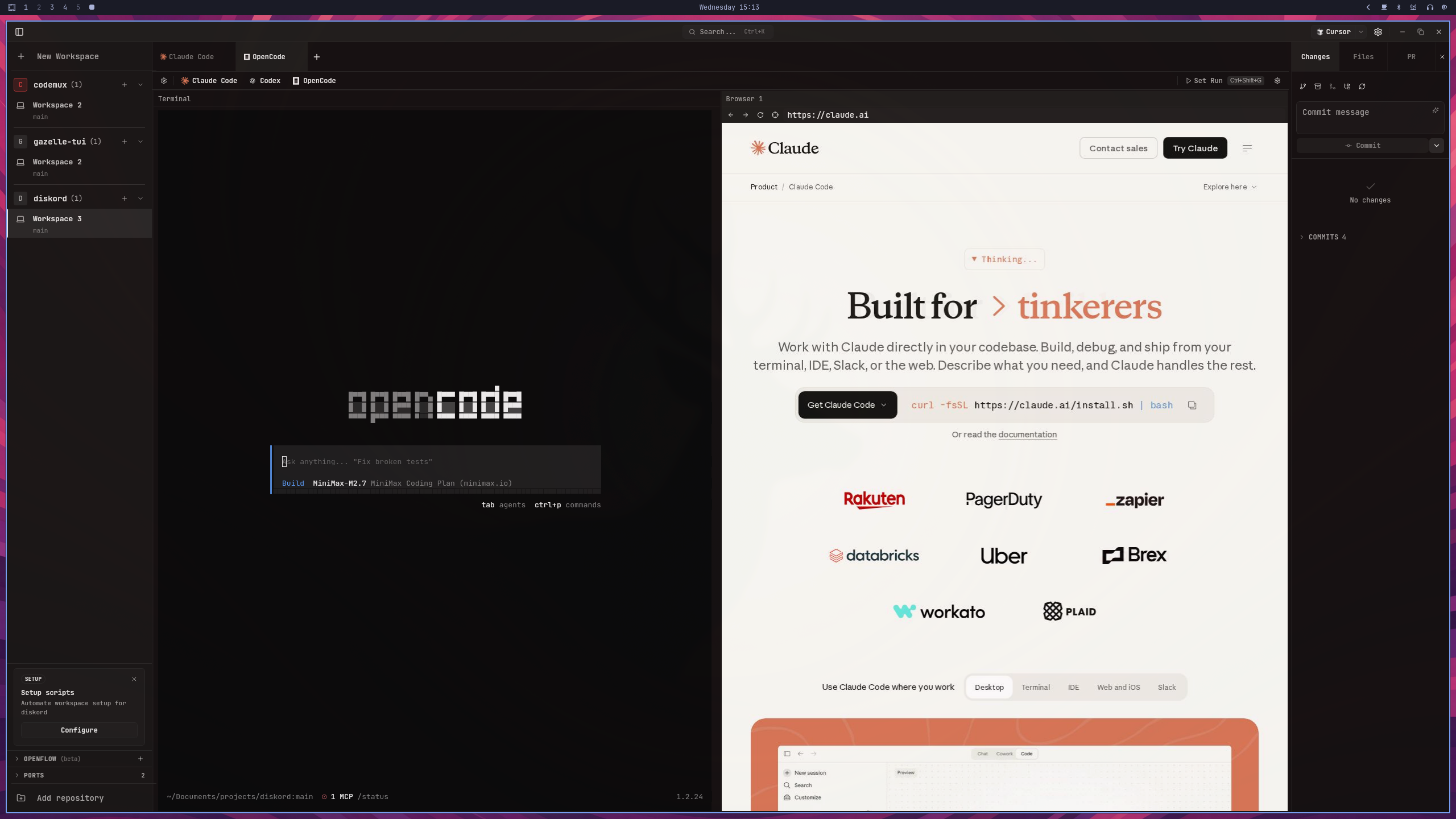
Codemux is a Linux-first workspace that brings terminals, browser panes, and multi-agent orchestration into one app. Run coding agents side by side, review changes, test in-browser, and ship — without leaving the window.
Features
- Multi-workspace terminals — Split, resize, swap, and manage terminal sessions across isolated workspaces
- Browser panes — Embedded browser alongside your terminals for testing and agent-assisted browsing
- Git worktree isolation — Each workspace gets its own worktree so agents never interfere with each other
- Built-in diff review — See what changed, commit, and manage branches without switching tools
- OpenFlow orchestration — Run multiple AI agents in parallel with automatic task delegation and stuck detection
- Notifications & attention signals — Know exactly when an agent needs you, with desktop notifications and per-pane indicators
- CLI & socket control — Automate everything via
codemuxCLI or the local Unix socket API - Custom keybinds — Full keyboard-first workflow with a command palette and rebindable shortcuts
Install
AppImage (any Linux distro)
Download the latest .AppImage from Releases, make it executable, and run:
chmod +x Codemux-*.AppImage
./Codemux-*.AppImage
Requirements
- Linux (X11 or Wayland)
- git
- ydotool with ydotoold running — needed for browser automation
- A Chromium-based browser (Chromium, Google Chrome, or Brave) — for browser panes
- ripgrep — file content search
- fd — file name search
- GitHub CLI — PR creation and GitHub integration
- xdg-utils — open in file manager
Quick Start
- Launch Codemux
- Create a project by pointing it at a git repository
- Create a workspace — each workspace gets an isolated git worktree
- Open terminal panes, start your coding agent, and work
Split panes with keybinds, open a browser pane for testing, and use the changes panel to review diffs and commit when ready.
MCP Server
Codemux ships an MCP server (codemux mcp) that lets any MCP-compatible client drive a running Codemux app programmatically — managing workspaces and git worktrees, launching agent presets, reading and writing terminals, controlling the browser pane, and browsing GitHub issues. It's bundled with the binary; no separate install. See the MCP Server docs for setup and the full tool surface.
Build from Source
# Clone the repo
git clone https://github.com/Zeus-Deus/codemux.git
cd codemux

# Install dependencies
npm install

# Run in development mode
npm run tauri:dev

# Build for release
npm run tauri:build
System dependencies: Rust, Node.js, and the Tauri prerequisites for your distro.
License
Elastic License 2.0 — see LICENSE.md.
Yorumlar (0)
Yorum birakmak icin giris yap.
Yorum birakSonuc bulunamadi