remote-control-on-demand
Health Uyari
- License — License: Apache-2.0
- Description — Repository has a description
- Active repo — Last push 0 days ago
- Low visibility — Only 5 GitHub stars
Code Gecti
- Code scan — Scanned 12 files during light audit, no dangerous patterns found
Permissions Gecti
- Permissions — No dangerous permissions requested
RCOD is an operator console that lets you manage and interact with AI coding sessions (Claude, Codex, Gemini) remotely via a web dashboard or a Telegram bot. It provides real-time monitoring, prompt sending, and remote process management from your phone or browser.
Security Assessment
Overall risk: Medium. This tool inherently requires elevated permissions to function. According to its documentation, it discovers local git repositories, runs bash commands on your machine based on remote input, and manages long-running local processes. It also makes external network requests, both to communicate with the Telegram API and to stream data to the web dashboard via WebSockets.
While the automated code scan found no hardcoded secrets or malicious patterns in the scanned 12 files, the core design of the tool involves taking external triggers (from Telegram or the web) and executing local shell commands. This significantly expands the attack surface if your Telegram account, bot token, or local network are compromised.
Quality Assessment
The project is licensed under Apache-2.0 and is actively maintained, with its last push occurring today. It features automated build and release workflows, indicating a solid development setup. However, community trust and visibility are currently very low. With only 5 GitHub stars, the tool has not yet undergone widespread peer review or community testing, meaning vulnerabilities or edge cases may be undiscovered.
Verdict
Use with caution: While the open-source code appears clean, giving a Telegram bot and web dashboard the ability to execute local bash commands carries inherent risks that require a secure operating environment.
Manage Claude Code sessions remotely via Telegram.
RCOD: Remote Control On Demand



RCOD is an operator console for AI coding sessions. It runs on your machine or server, discovers git repositories under one base folder, and gives you two control surfaces:
- a web dashboard with a live session wall, focused agent view, prompt and bash composer, telemetry, and provider-aware session management
- a Telegram bot for starting Claude remote-control sessions, checking logs/status, and chatting with Codex or Gemini from your phone
Built by zevro.ai.
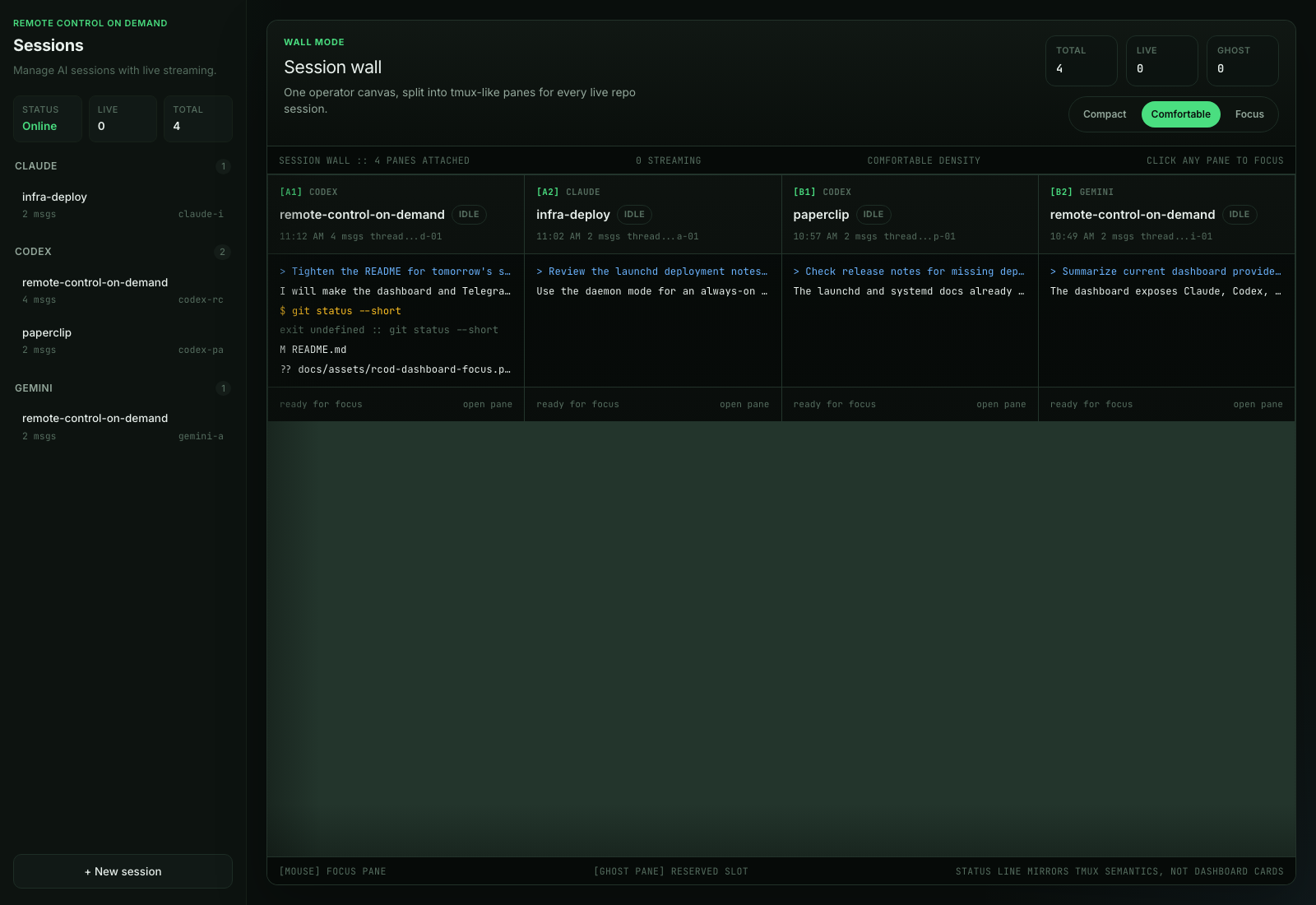
Current Dashboard
The dashboard is served by the cmd/rcodbot binary when api.port is enabled.
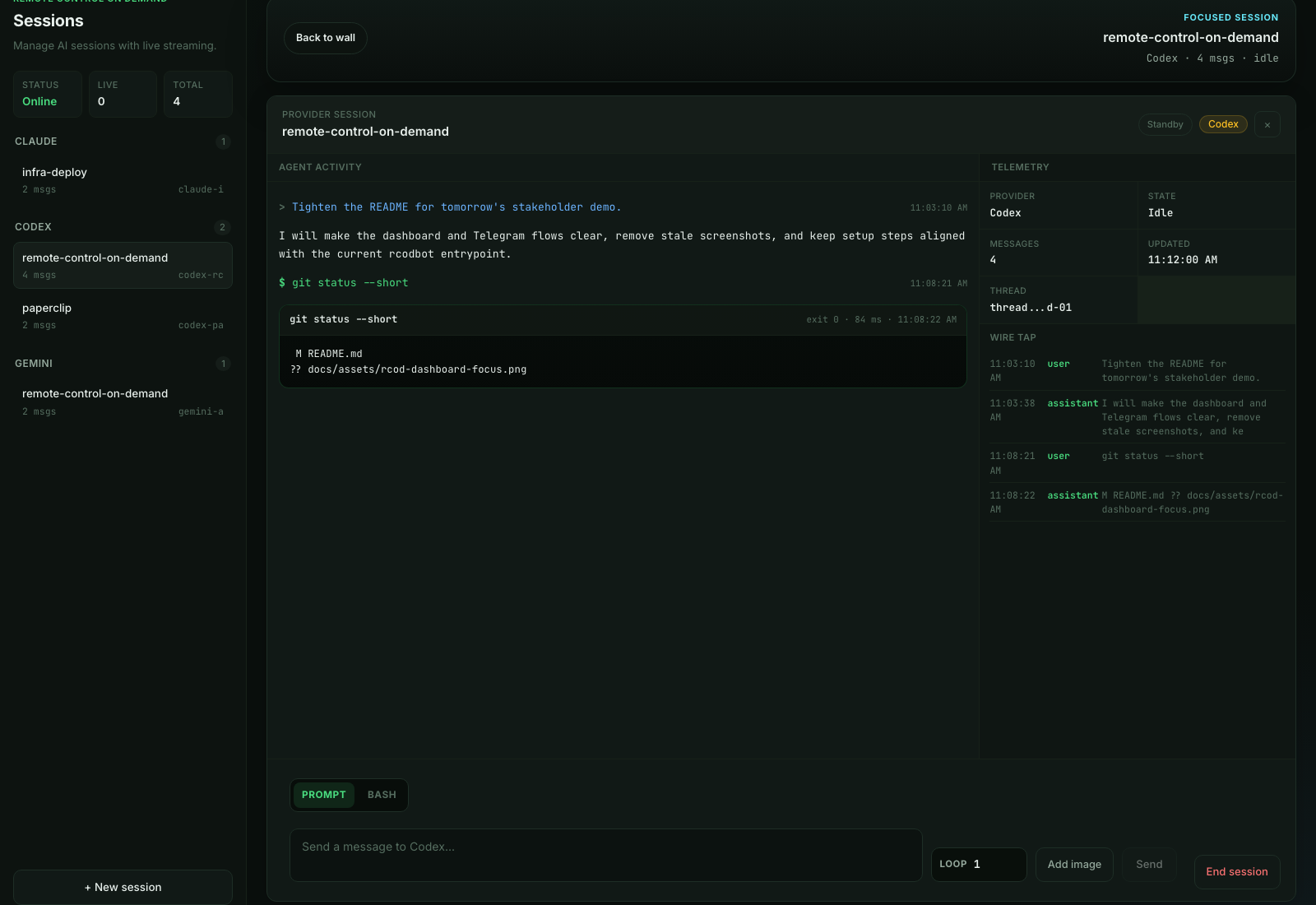
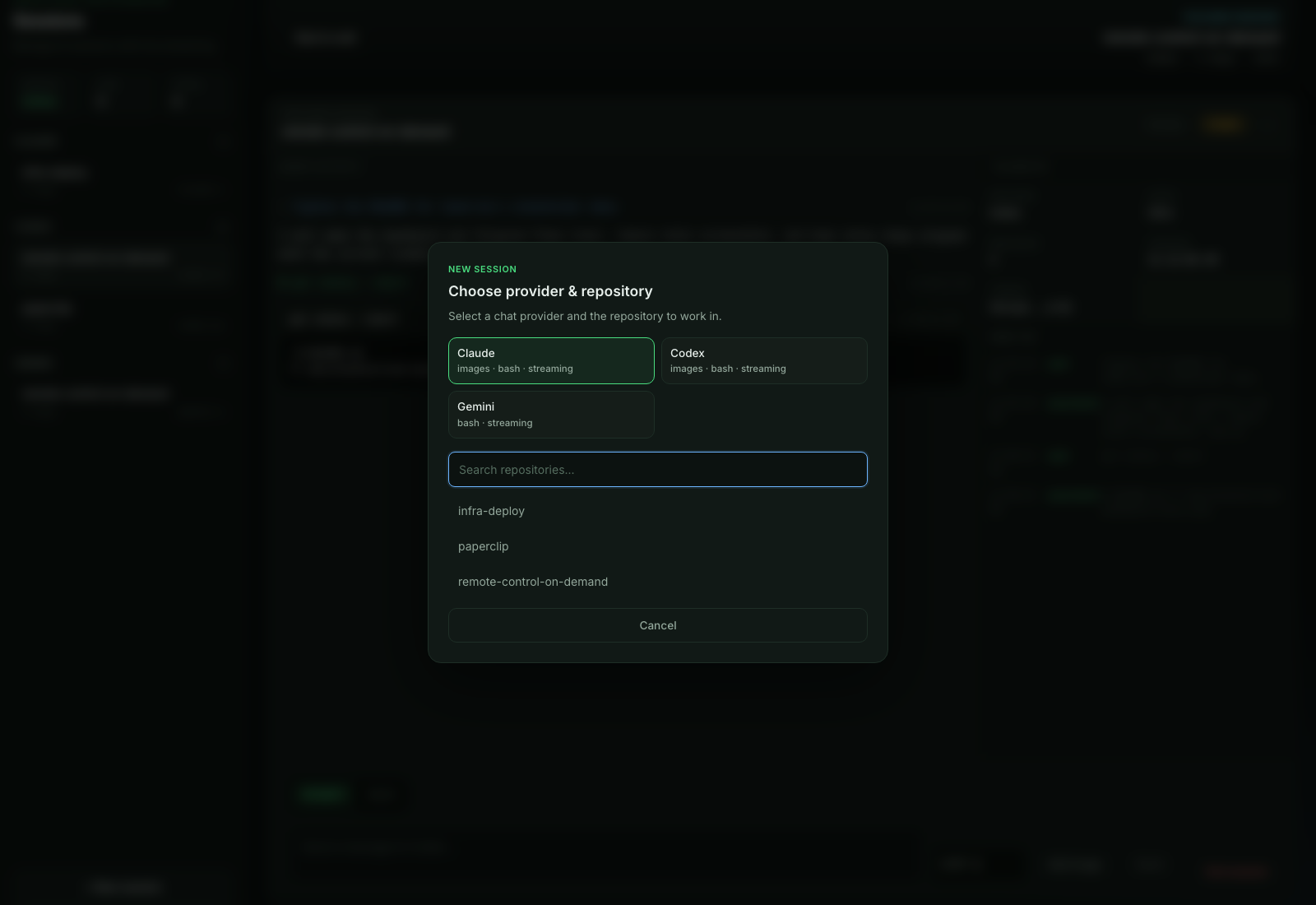
| Session focus | New session picker |
|---|---|
 |
 |
What RCOD Does
- Shows all active chat sessions in a tmux-like session wall
- Opens a focused session view with agent activity, telemetry, wire tap, and message history
- Sends prompts to configured chat providers from the browser
- Runs bash commands in the selected repository from the focused dashboard session
- Supports image attachments for providers that expose image support
- Creates new chat sessions by provider and repository
- Adopts existing Codex sessions from local Codex state
- Streams updates through WebSocket so the dashboard stays live
- Starts, stops, restarts, and monitors long-running
claude rcremote-control sessions - Sends Claude URLs, status, logs, crash notifications, and progress heartbeats to Telegram
- Keeps runtime state in JSON files so sessions can be restored after restart
Providers
| Provider | Surface | Notes |
|---|---|---|
| Claude runtime | Telegram + API | Long-running claude rc process control with URL detection, logs, auto-restart, and per-project .rcod.yaml overrides |
| Claude chat | Dashboard | Repository-scoped chat sessions backed by the Claude CLI |
| Codex chat | Dashboard + Telegram | Repository-scoped chat sessions, streaming output, tool calls, bash command execution, image attachments, and adoption of existing Codex threads |
| Gemini chat | Dashboard + Telegram | Optional provider for Gemini CLI sessions; enable it with providers.gemini.enabled: true |
cmd/rcodbot is the current main entrypoint. The older cmd/bot entrypoint is a narrower Telegram-only Claude runtime bot.
Prerequisites
| Requirement | Notes |
|---|---|
| Go 1.25.6+ | Needed when building from source |
| Node.js + npm | Needed to build the React dashboard assets |
| Claude Code CLI | Required for Claude runtime and Claude chat flows |
| Codex CLI | Required for Codex chat flows |
| Gemini CLI | Optional; only needed when Gemini is enabled |
| Telegram bot token | Create one via @BotFather |
| Telegram user ID | Get it from @userinfobot |
The CLIs you enable must be available in the runtime user's PATH.
Quick Start
git clone https://github.com/zevro-ai/remote-control-on-demand.git
cd remote-control-on-demand

make build
cp config.example.yaml config.yaml
# edit config.yaml
./rcod --config config.yaml
Manual build commands:
cd app && npm ci && npm run build && cd ..
go build -o rcod ./cmd/rcodbot
If config.yaml is missing, RCOD starts an interactive onboarding flow and writes a local config file with mode 0600.
When api.port is enabled, open:
http://localhost:8080
Adjust the port to match your config.
Configuration
Minimal config.yaml:
telegram:
  token: "YOUR_BOT_TOKEN"
  allowed_user_id: 123456789

api:
  port: 8080
  token: "replace-with-a-local-api-token"

rc:
  base_folder: "/home/user/Projects"

providers:
  claude:
    chat:
      permission_mode: "workspace-write"
    runtime:
      auto_restart: true
      max_restarts: 3
      restart_delay_seconds: 5
  codex:
    chat:
      permission_mode: "workspace-write"
  gemini:
    enabled: false
    chat:
      permission_mode: "auto_edit"
See config.example.yaml for a fuller example with notification patterns and external dashboard auth.
Dashboard Auth
The dashboard/API supports:
- no API auth when
api.portis enabled withoutapi.tokenorapi.auth - bearer token auth with
api.token - external browser login with
api.auth, using either generic OIDC or GitHub OAuth
External auth uses an RCOD-managed session cookie after login. Browser API calls and WebSocket connections reuse that cookie automatically. Token auth remains available for scripts and can also stay enabled alongside external auth.
External auth requires:
api.auth.session_secretwith at least 32 random characters- exactly one provider under
api.auth.oidcorapi.auth.github - a callback URL pointing back to RCOD, usually
https://your-host/api/auth/callback
Example OIDC/Authentik-style config:
api:
  port: 8080
  auth:
    session_secret: "replace-with-at-least-32-random-characters"
    oidc:
      issuer_url: "https://auth.example.com/application/o/rcod/"
      client_id: "rcod"
      client_secret: "replace-me"
      redirect_url: "https://rcod.example.com/api/auth/callback"
      scopes: ["openid", "profile", "email"]
      allowed_emails:
        - "[email protected]"
      allowed_groups:
        - "rcod-admins"
Example GitHub config:
api:
  port: 8080
  auth:
    session_secret: "replace-with-at-least-32-random-characters"
    github:
      client_id: "Iv1.xxxxx"
      client_secret: "replace-me"
      redirect_url: "https://rcod.example.com/api/auth/callback"
      allowed_users:
        - "octocat"
      allowed_orgs:
        - "zevro-ai"
Important Fields
| Field | Description |
|---|---|
telegram.token |
Bot token from @BotFather |
telegram.allowed_user_id |
Only this Telegram user can control the bot |
api.port |
Enables the HTTP dashboard/API when greater than 0 |
api.token |
Optional bearer token for API clients and dashboard access |
api.auth.session_secret |
Required for external dashboard sessions |
api.auth.oidc.* |
Generic OIDC provider config for Authentik and similar providers |
api.auth.github.* |
GitHub OAuth config for external dashboard login |
rc.base_folder |
Directory RCOD scans for git repositories |
providers.claude.runtime.* |
Claude runtime restart and notification settings |
providers.claude.chat.permission_mode |
Claude chat permission mode |
providers.codex.chat.permission_mode |
Codex chat access mode: workspace-write, read-only, danger-full-access, or bypassPermissions |
providers.gemini.enabled |
Enables the Gemini chat provider |
providers.gemini.chat.permission_mode |
Gemini permission mode: auto_edit, plan, yolo, read-only, workspace-write, danger-full-access, or bypassPermissions |
RCOD intentionally starts Claude runtime sessions with claude rc --permission-mode bypassPermissions. This is not configurable for the runtime process.
Legacy rc.permission_mode, rc.auto_restart, rc.max_restarts, rc.restart_delay_seconds, and rc.notifications are still accepted as fallbacks for older configs.
Per-Project Overrides
Create .rcod.yaml inside a repository under rc.base_folder to override Claude runtime defaults for that project:
auto_restart:
  enabled: true
  max_attempts: 5
  delay: 10s
prompt: "Focus on triaging open issues first"
max_duration: 2h
notifications:
  progress_update_interval: 10m
  idle_timeout: 10m
  patterns:
    - name: "task_completed"
      regex: "(?i)(task completed|all done)"
      once: true
Telegram Commands
Claude runtime control:
| Command | Description |
|---|---|
/start [repo] |
Start a claude rc runtime session |
/folders |
Browse repositories for Claude runtime sessions |
/list |
List active Claude runtime sessions |
/status [id] |
Show folder, PID, uptime, restart count, and Claude URL |
/logs [id] |
Show recent Claude runtime logs |
/restart [id] |
Restart a Claude runtime session |
/kill [id] |
Stop a Claude runtime session |
Chat control:
| Command | Description |
|---|---|
/new [repo] |
Create a Codex or Gemini chat session |
/sessions |
List chat sessions |
/use [provider:id] |
Switch the active chat session |
/current |
Show active chat sessions |
/close [provider:id] |
Close a chat session |
| normal text | Send a message to the active chat provider |
/help |
Show bot help |
Direct repository arguments resolve exact matches first, then unique partial matches. Ambiguous matches are rejected and shown back to you.
Runtime State
Use --state-dir to keep mutable state separate from config:
./rcod --config /etc/rcod/config.yaml --state-dir /var/lib/rcod
Common state files:
sessions.jsonfor Claude runtime sessionsclaude_sessions.jsonfor Claude chat sessionscodex_sessions.jsonfor Codex chat sessionsgemini_sessions.jsonfor Gemini chat sessionsbot_state.jsonfor Telegram bot selection state
Deployment
RCOD supports:
- Debian/Ubuntu
.debpackages - Debian/Ubuntu
systemdsystem services and user services - macOS
launchdLaunchDaemons and LaunchAgents
Start with:
Templates and helpers:
- packaging/systemd/rcod.service
- packaging/systemd/rcod.user.service
- packaging/launchd/ai.zevro.rcod.plist
- packaging/launchd/ai.zevro.rcod.agent.plist
- scripts/install-rcod-systemd.sh
- scripts/install-rcod-launchd.sh
Development
make build
make test
make vet
make fmt
Equivalent commands without make:
cd app && npm ci && npm test && npm run build && cd ..
go build -o rcod ./cmd/rcodbot
go test ./...
go vet ./...
gofmt -w cmd internal
Security Notes
config.yamlcontains secrets and should stay localapi.token,api.auth.session_secret, OIDC client secrets, and GitHub client secrets should be treated like credentials- Only
telegram.allowed_user_idcan control the Telegram bot - Dashboard/API auth can be enforced with
api.tokenor an external provider underapi.auth - Child processes inherit the runtime user's account permissions
bypassPermissionsanddanger-full-accessshould only be used on machines and repositories where that access is intended- RCOD strips Claude session environment variables before spawning nested
claude rcruntime processes
See SECURITY.md for reporting guidance.
Contributing
See CONTRIBUTING.md.
License
Yorumlar (0)
Yorum birakmak icin giris yap.
Yorum birakSonuc bulunamadi