aurix-ai-agent
Health Warn
- License — License: Apache-2.0
- Description — Repository has a description
- Active repo — Last push 0 days ago
- Low visibility — Only 8 GitHub stars
Code Fail
- exec() — Shell command execution in aurix-ai-agent-extension/gui/src/components/Chat.tsx
Permissions Pass
- Permissions — No dangerous permissions requested
No AI report is available for this listing yet.
AURIX AI Agent: Generate, build, and flash Infineon AURIX firmware with GitHub Copilot and MCP in VS Code.
AURIX AI Agent | AI Firmware Development for Infineon AURIX
From natural-language requirements to firmware running on Infineon AURIX™.
AURIX AI Agent is a firmware development assistant powered by GitHub Copilot and the Model Context Protocol (MCP) in VS Code. Describe the behavior you need, and it uses Infineon AURIX documentation, iLLD drivers, and code examples to create or modify firmware, build it with GCC, and flash it to your board.
Built entirely on free tools: the GCC compiler, AURIX Flasher, and the public iLLD driver library and code examples.
English | 简体中文
🚀 Blink your first LED in 2 minutes
You need: VS Code + GitHub Copilot · an AURIX IDE installed (AURIX Development Studio or AURIX Configuration Studio) · your board plugged in over USB.
Install the
aurix-ai-agent-extensionVSIX.Open AURIX AI in the sidebar.
Select your Target Device, set the IDE Path, and click Generate Copilot Config.
Open Copilot Chat in Agent mode.
Open Configure Tools and make sure
aurix-mcp-serveris checked.Type one sentence:
"Create a TC375 blinky and flash it."
That's it. The agent creates an empty project for your target device, generates the required code, builds it with GCC, and flashes it to your board with AURIX Flasher — and the LED starts blinking. 💡
your prompt ➜ 🧠 generate ➜ 🔨 build ➜ ⚡ flash ➜ 💡 blink
Prefer a guided setup? Open the AURIX AI Configurator in the sidebar, fill in your device + IDE path, and click Generate Copilot Config — it writes .github/copilot-instructions.md and registers the AURIX MCP server. In Copilot Chat, open Configure Tools and enable aurix-mcp-server.
🎬 See it in action
Blinky — one sentence, ~2 minutes
One prompt to make every LED blink on a TC387 — generate, build, and flash.
| Prompt | Time | ||
|---|---|---|---|
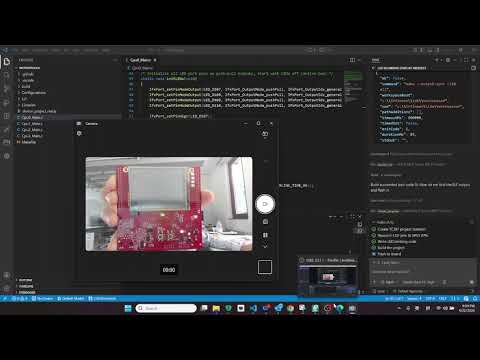 |
"Make all LEDs blink on TC387" | ~2 min | ▶ Watch |
Pose Game — webcam → Ethernet → TC375 → SPI TFT
AI-generated pose detection on a PC webcam, streamed over Ethernet to a TC375 driving an SPI TFT touchscreen — real-time display and a mini game, all coded by the agent.
| Time | |||
|---|---|---|---|
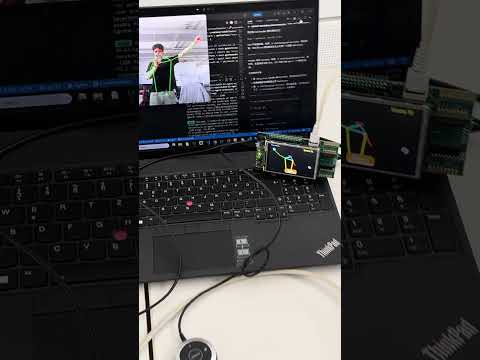 |
Real-time pose game on TC375 | ~60 s | ▶ Watch |
🛠️ What the agent can do
Copilot calls these AURIX MCP tools automatically when relevant:
| Tool | What it does |
|---|---|
ads.create_project |
Create an iLLD project (Makefile + linker + startup) |
build.run |
Build with the free GCC compiler (finds it on PATH for you) |
flash.program |
Flash .elf / .hex to the board over USB with AURIX Flasher |
examples.search · examples.import · examples.read_source |
Find, inspect, and import public iLLD code examples |
documentation.search |
Search bundled TC2xx/TC3xx/TC4Dx documentation with device-aware routing and physical PDF page citations |
illd.provision |
Install / update the public iLLD driver library |
project.scan |
Look at the workspace structure |
🧠 Built-in AURIX skills
The agent ships with expert AURIX workflows. The open skill files live in skills/. Generate Copilot Config copies the selected skills into your project under .github/skills/, so Copilot follows proven, AURIX-specific steps instead of guessing.
| Skill | What it teaches Copilot |
|---|---|
| Behaviour Workflow | Implement hardware behaviour — blink LED, PWM, UART, SPI, ADC, timers, interrupts, DMA |
| Code Migration | Port code between AURIX devices and families (e.g. TC4D7 → TC334) |
| Cross-Vendor Migration | Evaluate and functionally port NXP, ST, Renesas, or TI MCU demos to AURIX |
| iLLD Lookup | Search iLLD headers for API signatures, registers, and pin maps |
✅ Requirements
- Windows x64. The packaged VSIX is currently built for
win32-x64only. - VS Code with GitHub Copilot (Agent mode).
- An AURIX IDE — AURIX Development Studio or AURIX Configuration Studio. Both are free and give you the GCC compiler and AURIX Flasher.
- No Python or uv setup needed. The Windows extension includes uv and automatically downloads an isolated Python runtime and the tested MCP packages on first use.
The iLLD driver library and code examples are public and downloaded for you — nothing extra to buy.
📦 Packages
- aurix-ai-agent-extension — VS Code extension: Configurator UI,
copilot-instructions.md+ skill generator, and MCP server auto-registration. - aurix-mcp-server-py — Model Context Protocol server (Python) exposing the AURIX tools above.
See each package's README for installation and configuration details.
License
This project is licensed under the Apache License 2.0.
Bundled Infineon code-example excerpts retain their original per-file notices
and Boost Software License 1.0 terms. See the package-level third-party notices.
AURIX™ and TriCore™ are trademarks of Infineon Technologies AG. Use of these
marks identifies product compatibility and does not imply endorsement.
Reviews (0)
Sign in to leave a review.
Leave a reviewNo results found