legax
Health Uyari
- License — License: MIT
- Description — Repository has a description
- Active repo — Last push 0 days ago
- Low visibility — Only 6 GitHub stars
Code Gecti
- Code scan — Scanned 12 files during light audit, no dangerous patterns found
Permissions Gecti
- Permissions — No dangerous permissions requested
Bu listing icin henuz AI raporu yok.
Mobile-first remote control for coding agents, with self-hosted relay, Telegram support, and local-first privacy.
Legax: Universal Remote Control & Relay for AI Coding Agents
English | Simplified Chinese
Control Codex, Claude Code, Gemini CLI, and OpenCode from your phone or any device.
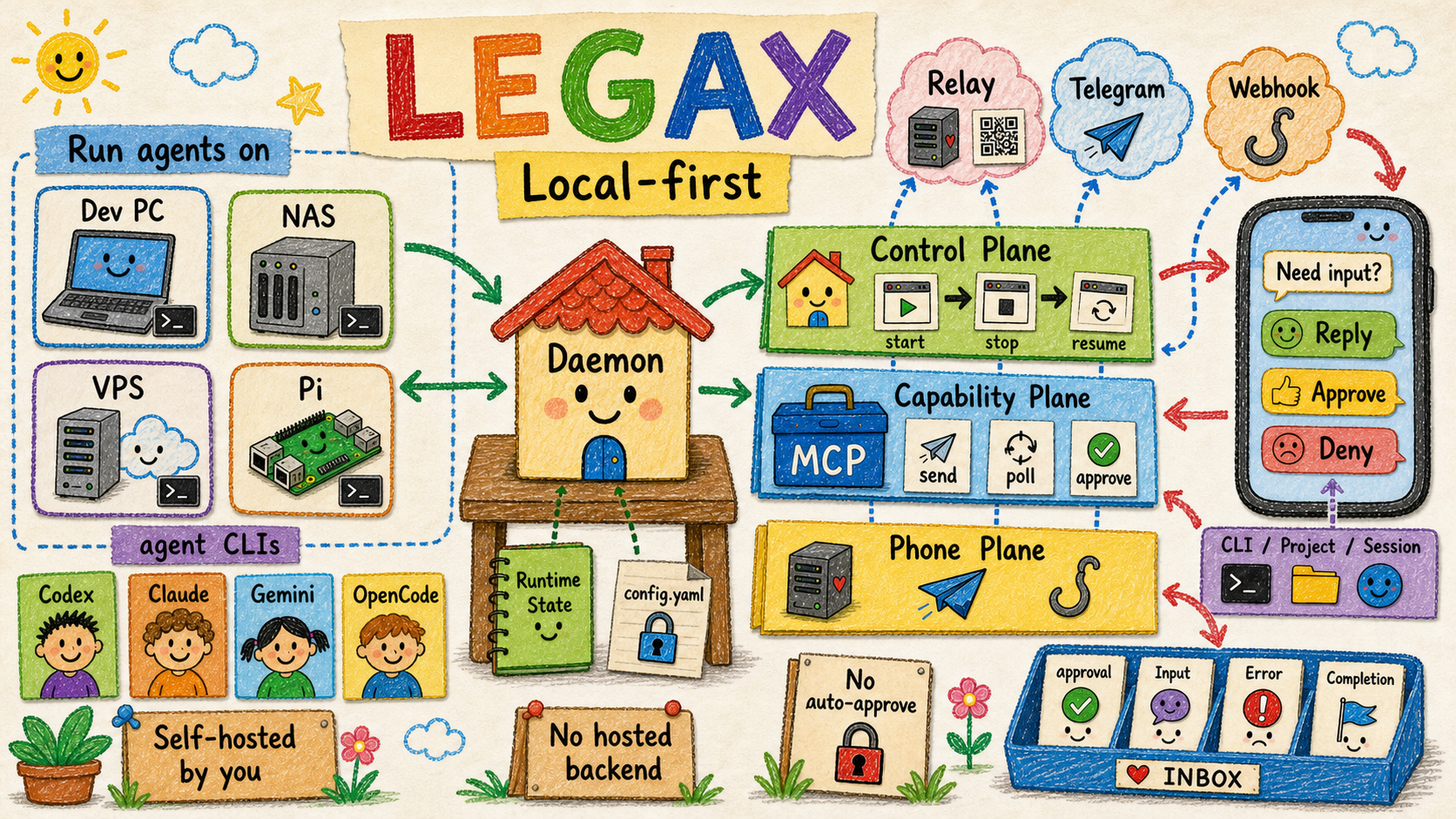
Legax is a local-first remote control layer for AI coding agents. It forwards important agent events to your phone, routes replies back to the selected CLI/project/session, and returns supported approval decisions through each agent's native callback path.



Try It In 30 Seconds
Use npx when you just want to create a config and verify the local runtime:
npx legax@latest init
npx legax@latest doctor --offline
For a local phone pairing demo, keep the relay and daemon in separate terminals:
# Terminal 1
npx legax@latest relay start
# Terminal 2
npx legax@latest daemon start:bg
npx legax@latest daemon pair
Open the printed pair URL from your phone, or scan the QR code. For a real phone outside the same machine or LAN, the relay must be reachable from the phone; see the User Manual for the split relay setup.
Why Developers Want It
Coding agents often need attention after you leave the desk: a permission prompt, a clarification, a finished run, or a session you want to continue from another room. Legax keeps that loop on infrastructure you control.
| Problem | Legax path |
|---|---|
| You miss approval prompts while away from the computer. | Forward supported native approvals to your phone and return the decision through the agent callback. |
| You need to continue a local session remotely. | Route phone replies to the selected CLI, project, and session. |
| You want phone access without exposing terminal control. | Use relay pairing, Telegram buttons, and adapter APIs instead of UI scraping. |
| Your team uses multiple agent CLIs. | Run Codex, Claude Code, Gemini CLI, and OpenCode adapters under one daemon. |
Feature Matrix
| Feature | Codex CLI | Claude Code CLI | Gemini CLI | Legax |
|---|---|---|---|---|
| Phone or browser remote control | Limited to native surfaces | No general phone relay | No general phone relay | Web UI, Telegram, webhook |
| Multi-agent routing | No | No | No | Codex, Claude Code, Gemini CLI, OpenCode |
| Self-hosted relay | No | No | No | Yes |
| Cross-device session selection | No | No | No | CLI, project/chat, and session menus |
| Native approval mirroring | Codex only | Claude only | Gemini only | Supported native paths across adapters |
| MCP tools for agent workflows | Host-specific | Host-specific | Host-specific | Generic Legax MCP server |
OpenCode text routing works through opencode serve; OpenCode-native permission callback bridging is not implemented yet.
How It Works
graph LR
  A["Agent CLI: Codex / Claude / Gemini / OpenCode"] <--> B["Legax Daemon"]
  B <--> C{"Self-hosted Relay / Telegram"}
  C <--> D["Phone: Web UI / Telegram"]
  B <--> E["Legax MCP Tools"]
The daemon owns process supervision, inbound routing, session selection, and on-demand launches. Adapters own each CLI's lifecycle and session model. MCP tools are capabilities for agents, not lifecycle managers.
Install For Daily Use
Install the all-in-one CLI on the machine that runs your coding agents:
npm install -g legax
legax init
legax doctor --offline
legax relay start
legax daemon start:bg
legax daemon pair
legax init writes config.yaml under the Legax home directory by default. Set LEGAX_HOME to choose another operator-owned directory, or pass --config <path> for a single command.
Let An AI Install It
Copy this prompt into your coding agent:
Install and configure Legax for me.

Use the AI-facing install guide as your execution checklist:
- If you are working in a local Legax checkout, read docs/AI_INSTALL.md.
- Otherwise, read https://github.com/zhanex/legax/blob/main/docs/AI_INSTALL.md.

Follow the guide exactly. Do not print secrets or commit local config/runtime files. Ask me before creating DNS records, exposing ports, rotating secrets, changing npm auth, or selecting a Telegram chat. Finish by running the validation commands from the guide and summarize the config paths, enabled transports, enabled agent CLIs, and any remaining manual steps.
What Ships Today
| Area | Current support |
|---|---|
| Agent adapters | Codex, Claude Code, Gemini CLI, OpenCode |
| Phone transports | Self-hosted relay web UI, Telegram Bot API, outbound webhook notifications |
| Native approvals | Codex JSON-RPC, Claude permission-prompt MCP, Gemini CLI approval mode |
| Session routing | CLI, project/chat, and session selection from relay and Telegram menus |
| Codex plugin | Installable plugin bundle with Legax skill and MCP tools |
| Runtime state | Local JSON state for adapter cursors, selected sessions, inbox queues, and launch requests |
Developer Experience
| Need | Start here |
|---|---|
| Minimal config | examples/config.example.minimal.yaml |
| Example walkthrough | examples/README.md |
| Full setup guide | docs/USER_MANUAL.md |
| AI/LLM repository context | docs/context_for_llms.md |
| Codespaces | Open this repo in Codespaces |
This is a dependency-free Node.js project. Everything runs against the Node 18+ standard library.
Common Commands
| Command | Purpose |
|---|---|
legax init |
Create an operator config with generated local secrets. |
legax doctor --offline |
Validate local config and enabled CLI commands without relay network checks. |
legax relay start |
Start the development relay. |
legax daemon start |
Start the unified daemon and enabled adapters in the foreground. |
legax daemon start:bg |
Start the daemon in the background for local demos and pairing. |
legax daemon pair |
Print a short-lived phone pairing URL and QR payload. |
legax doctor |
Run full diagnostics after the relay is reachable. |
Deployment Choices
| Deployment | Use it when |
|---|---|
| Local all-in-one | You are trying Legax on one machine, or the phone can reach the relay URL you configured. |
| Split relay and daemon | A public VPS, NAS, or server hosts the relay while agent CLIs stay on a private development machine. |
| Telegram-first | You prefer Telegram messages and buttons over the browser relay UI. |
The project does not operate a hosted backend, shared relay, or shared Telegram bot. You choose where data goes by configuring the transports.
Codex Plugin
This repository is also structured as an installable Codex plugin:
.codex-plugin/plugin.jsonis the plugin manifest..mcp.jsonregisters the Legax MCP server.skills/legax/SKILL.mdtells Codex when and how to use the phone relay tools..agents/plugins/marketplace.jsonexposes the root plugin through a repo marketplace for local or team testing.
See the Codex Plugin Guide for install commands, release-candidate checks, and the current official Plugin Directory status.
Security Model
Legax handles sensitive local agent context, approval requests, paths, and sometimes command output.
- Secrets stay in local YAML config files, not tracked examples or environment fallbacks.
- Browser access uses short-lived pairing codes and paired-device cookies, not URL tokens.
- Approval decisions are returned through supported native callbacks.
- Legax must not simulate UI clicks, auto-approve prompts, or bypass an agent's security policy.
Read the Privacy Notice, Security Policy, and Functional Boundaries before exposing a relay publicly.
Documentation
| Need | Read |
|---|---|
| Install and operate Legax | User Manual |
| Ask an agent to install Legax | AI Install Guide |
| Understand adapter behavior | Adapter Guide |
| Install or review the Codex plugin | Codex Plugin Guide |
| Understand architecture | Architecture |
| Understand product boundaries | Functional Boundaries |
| Extend the project | Extending Legax |
| Release packages | Release Guide |
Development
npm run ci
npm run ci is the full merge gate. For targeted work, run the narrow regression tests first, then the relevant broader gate.
Common checks:
npm test
npm run check:node
npm run check:docs
npm run test:e2e
node scripts/legax-daemon.mjs --dry-run
If you add a new script or E2E file, append it to the explicit lists in package.json.
Contributing
Read Contributing before opening a PR. Bugs and feature requests belong in GitHub issues. Security reports must use the private process in Security Policy, not public issues.
Documentation and config examples ship as English and Simplified Chinese pairs. Run npm run check:docs after documentation changes.
Yorumlar (0)
Yorum birakmak icin giris yap.
Yorum birakSonuc bulunamadi