AgentsDock
Health Uyari
- License — License: Apache-2.0
- No description — Repository has no description
- Active repo — Last push 0 days ago
- Community trust — 39 GitHub stars
Code Uyari
- process.env — Environment variable access in electron/scripts/asar-swap-regression.mjs
Permissions Gecti
- Permissions — No dangerous permissions requested
Bu listing icin henuz AI raporu yok.
AgentsDock: an IDE designed for agentic AI research





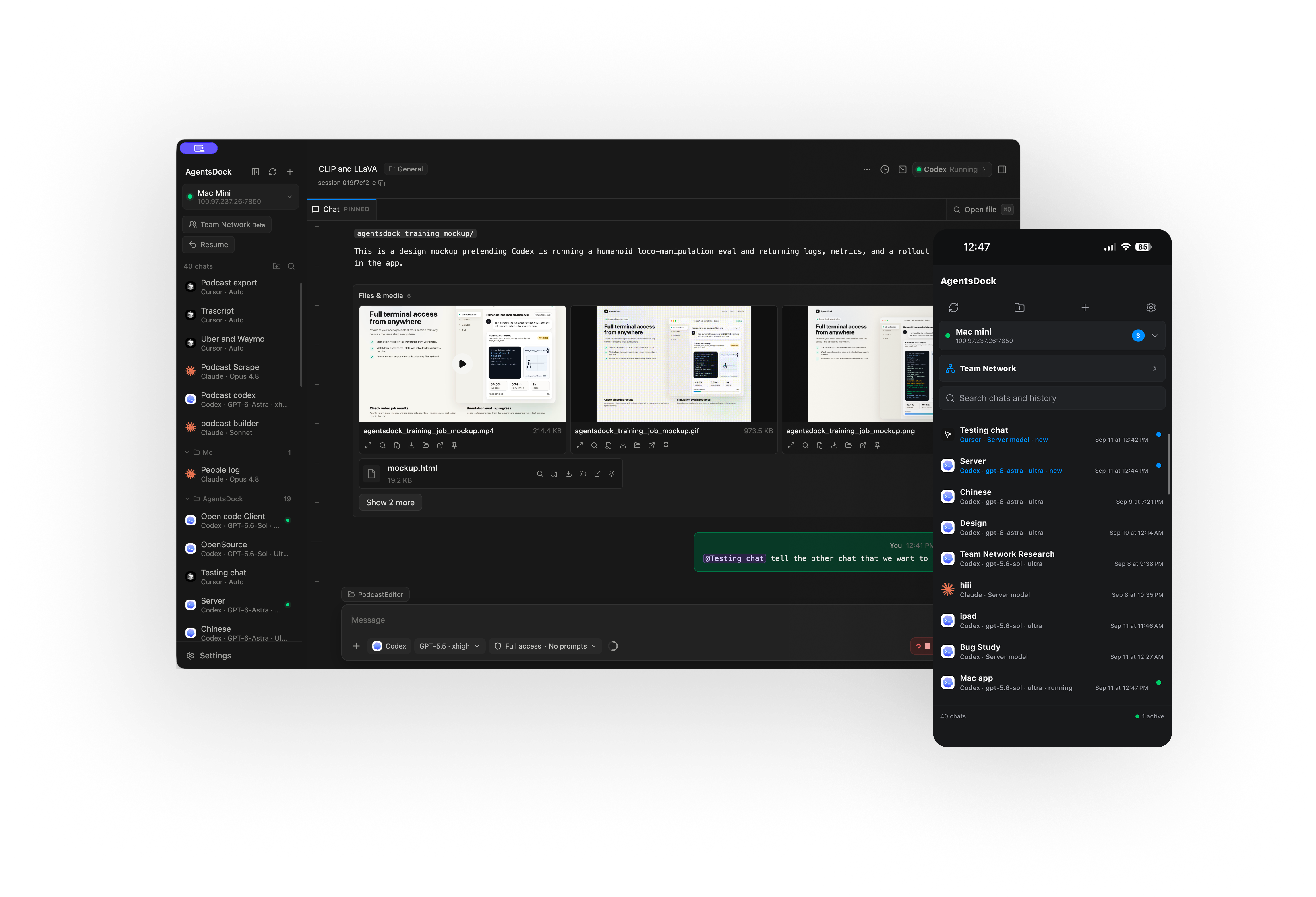
Desktop beta 1.0.0-beta.1: macOS · Linux x86_64 · Linux ARM64 · Windows (unsigned preview) · Release page · Stable 0.2.12
Mobile: iPhone & iPad · Android
AgentsDock is the client; AgentsServer is the self-hosted backend.
What you can do
- Work with your agents: start and resume chats, follow live activity, and
queue the next task. - Review the results: view images and videos inline, browse files, inspect
code changes, and download artifacts. - Keep long-running work organized: group chats, search history, create
digests, and schedule recurring jobs. - Open a real terminal: use a persistent tmux terminal attached to each
chat's workspace. - Move between devices and servers: connect multiple clients to the same
server, or manage several servers from one app.
How it works
AgentsDock is the client. AgentsServer
is the backend. Install the server on the machine that has your projects and
agent CLIs. That can be the same computer as the desktop app or a remote
machine you control. The desktop and mobile apps connect to it to send tasks
and display results.
The agent CLIs must be installed and authenticated on the server, not on
your phone. Self-hosting gives you control of the server and stored history;
it does not make the models local. Your selected provider still processes
model requests, and clients may cache content on your devices.
Get started
- Install the app. Get a desktop build from
public GitHub Releases
(current stable),
or find the current iPhone/iPad distribution link on
the website. - Set up AgentsServer. Direct macOS and Linux builds provide
Set up AgentsServer. For other clients or manual installation, follow
the server's installation instructions.
Install and sign in to the agent CLI you want to use on that machine. - Connect and start a chat. Add the server connection in AgentsDock,
choose an agent and a working directory on the server, and send a task.
For remote access, use a private network such as Tailscale rather than exposing
the server directly to the internet. The server needs tmux for persistent
terminals; see its documentation for the full prerequisites. Connection help
is in the setup guide.
Develop from source
Use Git, Node.js 24, and pnpm 11.9.0 (the version pinned by the project).
Desktop and mobile are separate packages; install dependencies in the package
you are working on. You also need a running AgentsServer to use the app.
git clone https://github.com/ZhengyiLuo/AgentsDock.git
cd AgentsDock
Desktop
The current desktop app is built with Electron, React, and TypeScript. From
the repository root:
cd electron
pnpm install --frozen-lockfile
pnpm typecheck
pnpm test
pnpm dev
pnpm build compiles the app without packaging or publishing it. For desktop
architecture and platform-specific packaging, see
electron/README.md.
Mobile: iPhone, iPad, and Android source
The current iPhone/iPad app lives in mobile-react/, using React Native
and Expo. Android source and native modules live in that same package. From
the repository root:
cd mobile-react
pnpm install --frozen-lockfile
pnpm typecheck
pnpm test:history
pnpm test:server-setup
For local iOS development on macOS with Xcode, continue in mobile-react/:
pnpm exec expo prebuild --platform ios
pnpm exec expo run:ios
Use a simulator or your own signing configuration. Read the
mobile development guide before installing on a
device: using the existing bundle identifier can replace your installed app.
Android development requires the Android toolchain.
Website
The product site is plain HTML, CSS, and JavaScript. With Python 3 installed,
run this from the repository root:
cd website
npm run dev
Open http://localhost:4175. No website dependency installation is needed.
Where things live
| Directory | Purpose |
|---|---|
electron/ |
Current desktop client for macOS, Linux, and Windows |
mobile-react/ |
Current React Native mobile client, including native modules in modules/ |
website/ |
Product website and user guides |
team-hub/ |
Team Hub service code and tests |
docs/ |
Architecture, development notes, and release-channel documentation |
server/ |
Frozen compatibility fixtures for cross-stack tests, not the deployable server |
Sources/, Apps/, ZenithDock.xcodeproj |
Legacy Swift clients, not the current Electron or React Native apps |
The maintained backend is in the separate
AgentsServer repository. Do not
deploy the server/ directory from this repository.
Contributing
See CONTRIBUTING.md for checks and contribution guidelines.
Keep changes scoped and add regression tests where appropriate. Use synthetic
test data; do not commit credentials, private infrastructure details, chat
transcripts, or screenshots containing user data.
The repository's CI verifies source. It does not publish desktop releases,
upload mobile builds, or deploy servers. Official binaries and update feeds
are managed separately; see release channels.
License
AgentsDock's original code is licensed under the Apache License 2.0,
except where a component explicitly states another license. See NOTICE
for attribution and separately licensed components. Existing third-party
copyrights, licenses, and notices remain in effect.
Yorumlar (0)
Yorum birakmak icin giris yap.
Yorum birakSonuc bulunamadi