codex-chatgpt-bridge
Health Gecti
- License — License: MIT
- Description — Repository has a description
- Active repo — Last push 0 days ago
- Community trust — 103 GitHub stars
Code Gecti
- Code scan — Scanned 2 files during light audit, no dangerous patterns found
Permissions Gecti
- Permissions — No dangerous permissions requested
Bu listing icin henuz AI raporu yok.
A safe bridge for Codex and ChatGPT to hand off coding work, save tokens, and keep local execution under control.
Codex ChatGPT Bridge
A safe bridge that lets Codex and ChatGPT hand off coding work — ChatGPT does the heavy thinking, Codex keeps local execution and verification under control.
Save Codex tokens · ChatGPT plans, Codex executes · Local execution stays scoped and re-keyable




Why · Quick Start · Agent Setup · Routing · Security · FAQ · 简体中文
Why
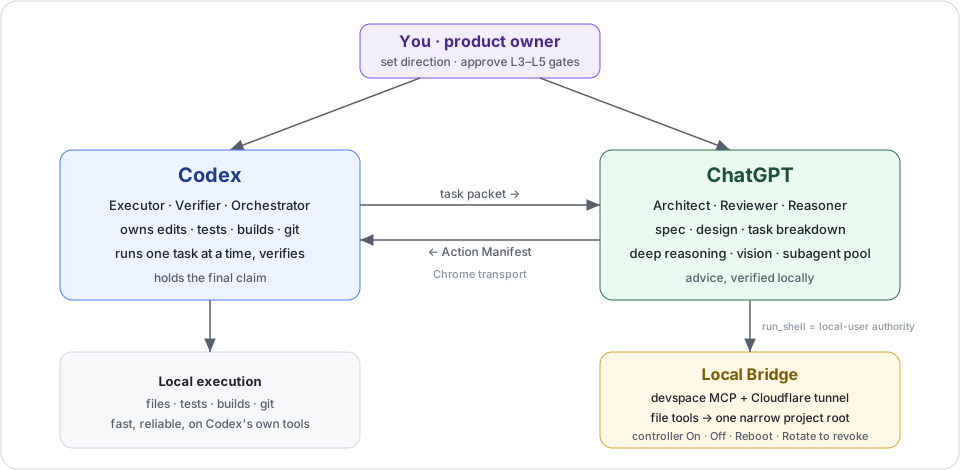
Long Codex sessions burn quota on planning, re-reading, and repeated design. This bridge moves that heavy thinking to ChatGPT and keeps Codex focused on execution and verification, so a long build stays within budget and under local control.
| Before | After |
|---|---|
| Copy large context into the Codex chat to get a review | ChatGPT reads the scoped project directly over the bridge |
| Codex spends quota planning, re-reading, and iterating | ChatGPT plans and reviews; Codex executes one task at a time |
| A remote tool with unclear reach into your machine | A narrow, OAuth-gated root that is off by default and re-keyable |
Quick Start
git clone https://github.com/Zhenyu98/codex-chatgpt-bridge.git
cd codex-chatgpt-bridge
powershell -ExecutionPolicy Bypass -File .\install.ps1
If a copy is already installed, the installer moves it to a timestamped backup before copying the new skill. Use -ForceOverwrite only when you intentionally want to discard that installed copy. Add -RegisterRestartTask only if you also want the optional, on-demand Reboot task.
Expected success signal:
Installed codex-chatgpt-bridge skill to C:\Users\<you>\.codex\skills\codex-chatgpt-bridge
Restart Codex or reload skills to use it.
Then check the local environment (no tunnel started):
$skill = "$env:USERPROFILE\.codex\skills\codex-chatgpt-bridge"
powershell -ExecutionPolicy Bypass -File "$skill\scripts\local_bridge.ps1" -Action Doctor
Agent Setup
Copy this to Codex, Claude Code, Cursor, or another coding agent:
Read https://github.com/Zhenyu98/codex-chatgpt-bridge/blob/main/agent-setup.md and follow it to install and configure codex-chatgpt-bridge for me.
See agent-setup.md for the full copy-paste prompt, prerequisites, and safe defaults.
Routing Modes
NORMAL: ChatGPT acts like a strong review/reasoning subagent. Codex inspects enough context to steer the task, then executes and verifies.TOKEN_SAVING: Codex acts mostly as the orchestrator. Safe non-mutating reading, broad review, and synthesis go to ChatGPT whenever they save Codex tokens.CHATGPT_ARCHITECT: the planning-inverted mode for long, continuous builds. ChatGPT is the architect/manager (spec, design, task decomposition, per-task prompts, review); Codex executes one small task at a time and verifies. With your explicitL3grant, ChatGPT can also write over the bridge while Codex integrates.
The router picks by marginal cost: a unit of work goes to ChatGPT when it saves far more Codex tokens than one slow bridge round-trip. When a plan needs parallel subagents, ChatGPT can serve as the subagent pool so the fan-out stays off Codex quota, while Codex remains the single orchestrator that integrates and verifies.
Bridge Controller
$skill = "$env:USERPROFILE\.codex\skills\codex-chatgpt-bridge"
$controller = "$skill\scripts\bridge_controller.ps1"

# Save a non-secret profile once. Use cloudflare for a changing Quick Tunnel,
# or cloudflare-worker plus a stable Worker URL.
powershell -ExecutionPolicy Bypass -File $controller -Action Configure -ProjectRoot "D:\your\project" -Tunnel cloudflare -InstallCloudflared

powershell -ExecutionPolicy Bypass -File $controller -Action On
powershell -ExecutionPolicy Bypass -File $controller -Action Reboot
powershell -ExecutionPolicy Bypass -File $controller -Action Off
powershell -ExecutionPolicy Bypass -File $controller -Action Status
powershell -ExecutionPolicy Bypass -File $controller -Action Doctor

# Panic button: revoke issued OAuth tokens and mint a new Owner password.
powershell -ExecutionPolicy Bypass -File "$skill\scripts\local_bridge.ps1" -Action Rotate
Use the controller for normal operation. On records an intentional running state. Off records an intentional stopped state and closes the service and tunnel while preserving the ChatGPT app configuration. Restart and Reboot are the same mutex-protected transaction: stop, start, refresh Worker KV when configured, and verify the local, Quick Tunnel, and stable Worker endpoints before success. A Reboot refuses to reopen a bridge intentionally turned off with Off; use On to open it again.
For a stable Worker setup, configure the profile and store a minimum-scope Cloudflare token with Windows DPAPI before the first On:
powershell -ExecutionPolicy Bypass -File $controller -Action Configure -ProjectRoot "D:\your\project" -Tunnel cloudflare-worker -PublicBaseUrl https://bridge.example.workers.dev -InstallCloudflared
powershell -ExecutionPolicy Bypass -File "$skill\scripts\set_cf_api_config.ps1" -Action Set -AccountId <account-id> -KvNamespaceId <namespace-id>
powershell -ExecutionPolicy Bypass -File $controller -Action On
The credential helper reads the saved Worker URL from the controller profile and writes the matching non-credential operational metadata to worker-proxy.json alongside the DPAPI-protected credential. The file still contains your Worker URL and KV namespace ID: keep it local and out of git. You can override the URL explicitly with -WorkerBaseUrl for a standalone setup.
The optional scheduled task is an external, on-demand recovery entrypoint. It has no automatic trigger and always calls the single Reboot transaction:
powershell -ExecutionPolicy Bypass -File "$skill\scripts\restart_task.ps1" -Action Install
powershell -ExecutionPolicy Bypass -File "$skill\scripts\restart_task.ps1" -Action Run
Run only requests the task asynchronously. Confirm the final result in %LOCALAPPDATA%\devspace-bridge\controller-result.json, then run controller Doctor. The default task uses the same interactive Windows user, so that user must be logged on; it improves recovery reliability but is not a security boundary. True isolation needs a separate least-privilege OS account plus ACL-separated scripts, state, logs, and credentials.
Rotate remains the panic button: it stops the bridge, revokes all issued OAuth tokens, and mints a new Owner password. Run it after suspected unauthorized access, then use controller On and re-authorize.
For a stable ChatGPT app URL across restarts, put a stable Worker / custom proxy or external tunnel in front of the changing Quick Tunnel. Full walkthrough for creating the ChatGPT app (developer mode, app URL, OAuth, smoke test) is in README_zh.md.
Security Model
Be honest about the trust boundary: once you OAuth-authorize the ChatGPT app, the bridge grants file read/write and shell execution on your machine. The L0–L5 levels are policy Codex instructs ChatGPT to follow; they are guidance, and run_shell is not confined to the root, so an authorized app effectively holds local-user code execution. The boundaries actually enforced are OAuth approval (a strong random Owner password), the narrow allowedRoots for file tools, and closing reachability with controller Off.
Practical rules:
- Use controller
Offwhen the bridge is idle — the always-on public endpoint is the main attack surface. - Keep the root narrow and free of secrets; for stronger isolation, run under a least-privilege OS account or a disposable VM.
- If you suspect someone else connected, run
-Action Rotateto revoke all tokens and re-key. - Controller state and logs contain local paths, PIDs, and tunnel URLs. Redact them before sharing screenshots or diagnostics.
FAQ
Can ChatGPT run anything on my machine?
Once you OAuth-authorize the app, the bridge allows file read/write and shell within your setup. run_shell is not sandboxed, so treat an authorized app as local-user execution: keep the root narrow, use controller Off when idle, and use Rotate to revoke access.
Does Off revoke ChatGPT's access?
Off records that the shutdown is intentional and closes the tunnel and service, so the workspace becomes unreachable. It keeps the app authorization so the next On can reuse the same app. To revoke issued tokens, run Rotate.
Why not run low-level Start and Stop directly?
They remain recovery primitives, but they do not own the persistent desired-state contract. Normal operation goes through On, Off, and Reboot, which prevent an intentional shutdown from being mistaken for a failed bridge and add Worker KV plus health verification.
Will ChatGPT edit my source directly?
In the default advice profile, Codex applies and verifies every change. With your explicit L3 grant, ChatGPT writes over the bridge and Codex reviews the diff, runs an independent check, and owns git plus the final claim.
The Quick Tunnel URL keeps changing.
Quick Tunnel URLs rotate on restart, which suits testing. For a fixed ChatGPT app URL, front it with a stable Worker / custom proxy or external tunnel.
Contributing
Issues and pull requests are welcome. Please keep reports specific, include reproduction steps when possible, and avoid sharing secrets in logs or screenshots.
Acknowledgements
- Built on the open-source DevSpace project by Waishnav.
- Special thanks to LINUX.DO for providing a promotion platform.
License
Released under the MIT License. See LICENSE.
Star History
Yorumlar (0)
Yorum birakmak icin giris yap.
Yorum birakSonuc bulunamadi