sdlc-quality
Health Uyari
- License — License: MIT
- Description — Repository has a description
- Active repo — Last push 0 days ago
- Low visibility — Only 7 GitHub stars
Code Uyari
- process.env — Environment variable access in .github/workflows/sdlc-audit.yml
- process.env — Environment variable access in action.yml
- fs module — File system access in action.yml
Permissions Gecti
- Permissions — No dangerous permissions requested
Bu listing icin henuz AI raporu yok.
Software Development Lifecycle standards plugin for AI coding assistants. Enforces build, quality, testing, CI/CD, security, and documentation best practices.
sdlc






Software Development Lifecycle standards and requirements plugin for AI coding assistants.
Plugin Name:
sdlc
Overview
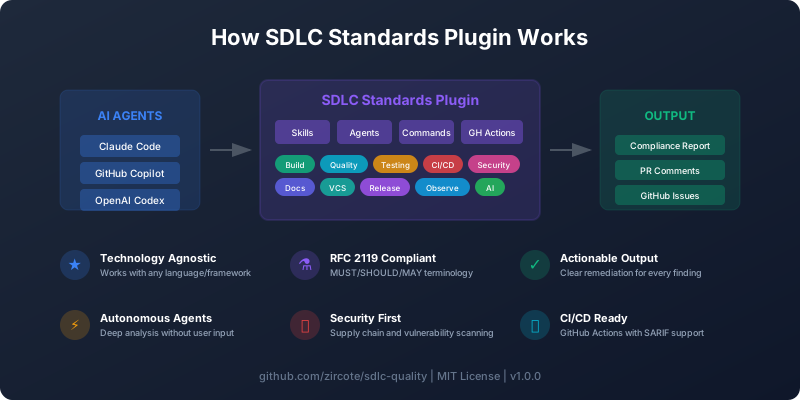
This plugin provides comprehensive SDLC standards guidance that works with any AI coding assistant (Claude, Gemini, Codex, Copilot, OpenCode, etc.). It codifies project quality requirements across the entire software development lifecycle.
Features
- Technology-agnostic: Standards apply to any language/framework
- Self-contained: Full guidance works without external dependencies
- RFC 2119 compliant: Uses MUST/SHOULD/MAY terminology
- AI-first design: Structured for AI assistant consumption
- Comprehensive coverage: Build, quality, testing, CI/CD, security, docs, VCS, release
- Autonomous agents: Deep analysis without constant user input
- Actionable output: Clear remediation steps for every finding
Installation
This repository provides SDLC skills that work with multiple AI coding assistants:
| Interface | Use Case | Installation |
|---|---|---|
| GitHub Copilot | Automated skill enforcement via coding agent | Skills auto-loaded from .github/skills/ |
| Claude Code Plugin | Interactive skill guidance & commands | claude plugins add |
| GitHub Action | CI/CD enforcement without AI agent | uses: zircote/sdlc-quality@v1 |
Recommended: Use GitHub Copilot coding agent with these skills for AI-powered SDLC compliance.
GitHub Copilot (Recommended)
Install the SDLC skills in your project for GitHub Copilot coding agent:
# Clone the skills into your project
git clone --depth 1 https://github.com/zircote/sdlc-quality.git /tmp/sdlc
cp -r /tmp/sdlc/.github/skills .github/skills
rm -rf /tmp/sdlc
Or add as a git submodule:
git submodule add https://github.com/zircote/sdlc-quality.git .github/sdlc-quality
ln -s sdlc-quality/.github/skills .github/skills
Once installed, GitHub Copilot coding agent will automatically use these skills when running SDLC audits in your workflows.
Workflow example:
# .github/workflows/sdlc-audit.yml
name: SDLC Audit

on:
  issues:
    types: [assigned]

jobs:
  audit:
    if: contains(github.event.issue.labels.*.name, 'sdlc-audit')
    runs-on: ubuntu-latest
    steps:
      - uses: actions/checkout@v4
      # Copilot coding agent uses .github/skills/ automatically
Assign the sdlc-audit label to an issue and Copilot will run the compliance audit using these skills.
GitHub Action (Standalone)
For CI/CD enforcement without Copilot:
# .github/workflows/sdlc.yml
name: SDLC Compliance

on: [pull_request, push]

jobs:
  compliance:
    runs-on: ubuntu-latest
    steps:
      - uses: actions/checkout@v4
      - uses: zircote/sdlc-quality@v1
        with:
          domains: "all"
          fail-on-error: "true"
See GitHub Actions Integration for full documentation.
Claude Code Plugin
Install for interactive SDLC guidance:
claude plugins add github:zircote/sdlc-quality
Use slash commands:
/sdlc:check    # Run compliance check with remediation help
/sdlc:init     # Initialize SDLC-compliant project structure
Quick Start
Check Your Project (Claude Code)
# Run comprehensive compliance check
/sdlc:check
Output:
SDLC Compliance Report

| Domain   | Status | Issues |
|----------|--------|--------|
| Build    | ✓      | 0      |
| Quality  | ✓      | 0      |
| Testing  | ✗      | 2      |
| CI/CD    | ✓      | 0      |
| Security | ✗      | 1      |
| Docs     | ✓      | 0      |
| VCS      | ✓      | 0      |

Critical: Missing test coverage configuration
Important: SECURITY.md needs update
Initialize a New Project
# Create SDLC-compliant project structure
/sdlc:init
Creates:
Makefilewith standard targetsREADME.md,CONTRIBUTING.md,CHANGELOG.mdLICENSE,SECURITY.md.github/workflows/ci.yml- Issue and PR templates
- ADR directory structure
Skills
Skills provide contextual guidance when you ask related questions.
| Skill | Purpose | Triggers |
|---|---|---|
sdlc:build |
Build system automation | "Makefile", "build targets", "dependencies" |
sdlc:quality |
Code formatting, linting | "linter", "formatter", "code style" |
sdlc:testing |
Test organization, coverage | "tests", "coverage", "TDD" |
sdlc:ci |
CI/CD pipeline structure | "GitHub Actions", "CI pipeline", "workflow" |
sdlc:security |
Dependency scanning | "vulnerabilities", "security audit", "supply chain" |
sdlc:docs |
Documentation requirements | "README", "changelog", "ADR" |
sdlc:vcs |
Version control practices | "git", "branching", "commits" |
sdlc:release |
Semantic versioning | "release", "versioning", "publish" |
sdlc:observability |
Logging, metrics | "logging", "metrics", "performance" |
sdlc:ai |
AI context configuration | "CLAUDE.md", "copilot-instructions" |
sdlc:setup |
Project initialization | "new project", "setup", "scaffold" |
Agents (Claude Code only)
Specialized agents for autonomous, deep analysis:
| Agent | Purpose | When to Use |
|---|---|---|
compliance-auditor |
Full SDLC audit | Pre-release, periodic reviews |
security-reviewer |
Security analysis | Security assessments, supply chain audits |
quality-enforcer |
Code quality checks | Pre-PR, quality gates |
ci-architect |
CI/CD design | Pipeline setup, optimization |
Example:
User: Run a full compliance audit on this project
Claude: [Launches compliance-auditor agent for autonomous analysis]
Commands (Claude Code only)
| Command | Purpose |
|---|---|
/sdlc:check |
Assess current project against SDLC standards |
/sdlc:init |
Initialize a new SDLC-compliant project |
GitHub Actions Integration
Automate SDLC skill enforcement in your CI/CD pipeline.
Tip: The action enforces the skills automatically. Install the Claude Code plugin to get interactive guidance when fixing violations.
Option 1: Direct Action (Recommended)
name: SDLC Compliance

on: [pull_request, push]

permissions:
  contents: read
  pull-requests: write

jobs:
  compliance:
    runs-on: ubuntu-latest
    steps:
      - uses: actions/checkout@v4

      - name: Run SDLC Check
        uses: zircote/sdlc-quality@v1
        with:
          domains: "all"
          fail-on-error: "true"
          create-pr-comment: "true"
Option 2: Reusable Workflow
name: SDLC Audit

on:
  pull_request:
  schedule:
    - cron: "0 9 * * 1"

jobs:
  audit:
    uses: zircote/sdlc-quality/.github/workflows/sdlc-audit.yml@v1
    with:
      domains: "all"
      fail-on-error: true
      create-pr-comment: true
    permissions:
      contents: read
      pull-requests: write
      issues: write
Action Inputs
| Input | Description | Default |
|---|---|---|
domains |
Comma-separated list or "all" | all |
fail-on-error |
Fail if MUST requirements not met | true |
report-format |
markdown, json, sarif, or all | markdown |
create-pr-comment |
Comment on PR with results | true |
create-issue |
Create issue for failures | false |
Action Outputs
| Output | Description |
|---|---|
score |
Compliance score (0-100) |
status |
pass, warn, or fail |
critical-count |
Number of MUST violations |
See GitHub Actions Integration for complete documentation.
AI Agent Interoperability
This plugin is designed to work with multiple AI coding assistants:
| Agent | Configuration |
|---|---|
| Claude Code | .claude-plugin/, skills, agents, commands |
| GitHub Copilot | .github/copilot-instructions.md, copilot-setup-steps.yml |
| OpenAI Codex | AGENTS.md |
All agents follow the same SDLC standards and can be used interchangeably.
Documentation
| Document | Purpose |
|---|---|
| Project Requirements | Complete SDLC standards specification |
| GitHub Actions | CI/CD integration guide |
| Architecture | Plugin design and structure |
| Usage Guide | Detailed usage instructions |
| Contributing | How to contribute |
| Changelog | Version history |
Standards Covered
The plugin enforces standards across these domains:
Build System
- Unified entry point (Makefile/Justfile)
- Standard targets (build, test, lint, format, ci)
- Locked dependencies
- MSV (Minimum Supported Version)
Code Quality
- Automated formatting
- Strict linting
- Error handling patterns
- Documentation comments
Testing
- Test organization
- Coverage requirements (80% general, 95% critical)
- Deterministic tests
- AAA pattern
CI/CD
- Required jobs (format, lint, test, security)
- Pinned action versions
- Caching
- Multi-platform
Security
- Vulnerability scanning
- License compliance
- Supply chain security
- Secret scanning
Documentation
- README with required sections
- CONTRIBUTING.md
- CHANGELOG.md (Keep a Changelog)
- ADRs
Version Control
- Branch protection
- Conventional Commits
- PR templates
- Linear history
Release
- Semantic Versioning
- Automated releases
- Checksums
- Multi-channel distribution
Technology Examples
Each skill includes implementation examples for:
- Rust (Cargo, clippy, rustfmt)
- TypeScript (npm, ESLint, Prettier)
- Python (pip, ruff, black)
- Java (Maven/Gradle, Checkstyle)
- Go (go mod, golangci-lint)
Contributing
See CONTRIBUTING.md for guidelines.
Quick Contribution
# Clone
git clone https://github.com/zircote/sdlc-quality.git

# Install locally
claude plugins add ./sdlc-quality

# Test changes
/sdlc:check
License
Support
- Issues: GitHub Issues
Yorumlar (0)
Yorum birakmak icin giris yap.
Yorum birakSonuc bulunamadi