agent-journal
Health Warn
- License — License: MIT
- Description — Repository has a description
- Active repo — Last push 0 days ago
- Low visibility — Only 7 GitHub stars
Code Fail
- rm -rf — Recursive force deletion command in assets/tapes/claude-code/reset.sh
- rm -rf — Recursive force deletion command in assets/tapes/frame/frame.sh
Permissions Pass
- Permissions — No dangerous permissions requested
No AI report is available for this listing yet.
A journal written by your agent. Autonomously.
Agent Journal
A journal written by your agent. Autonomously.
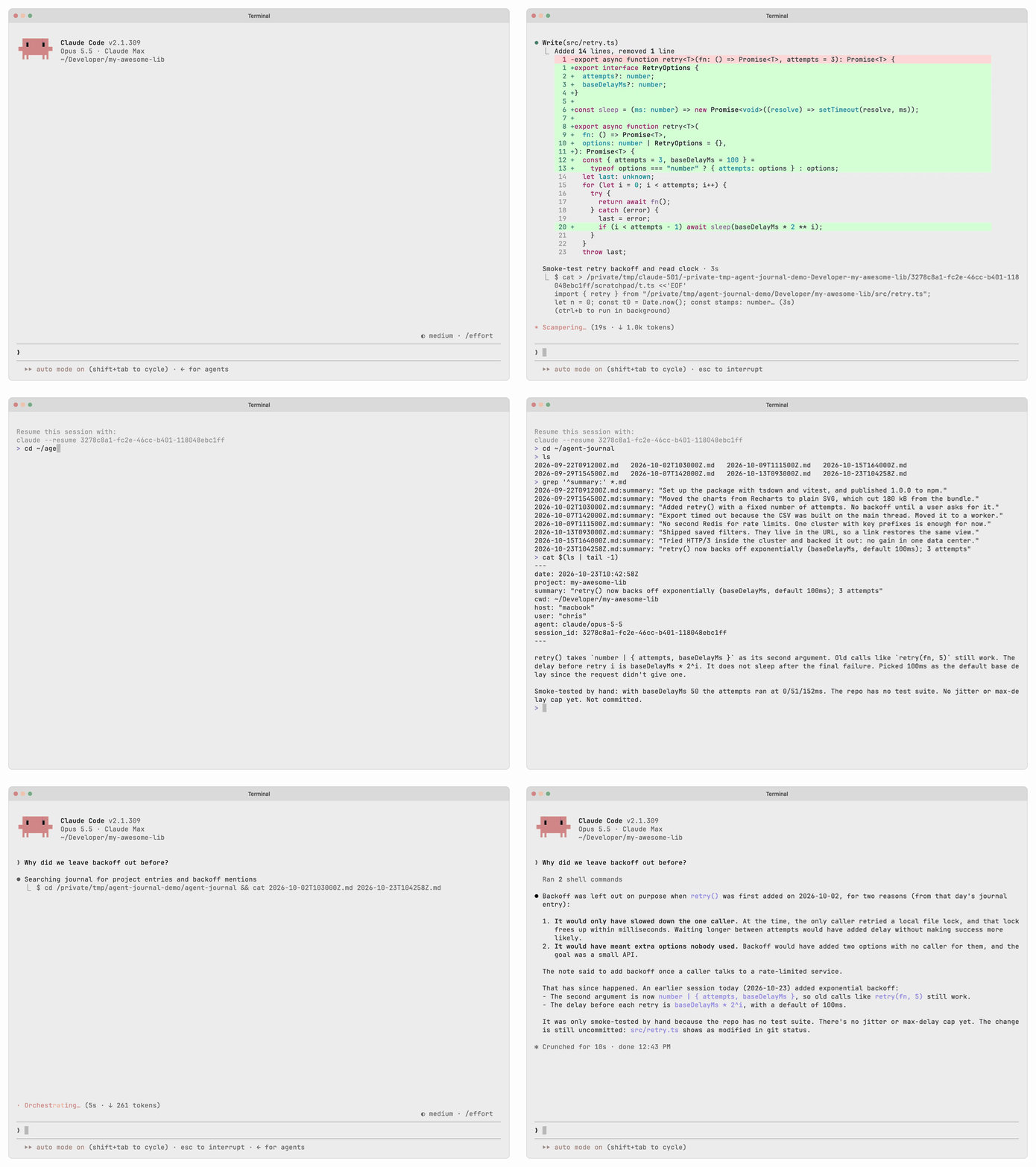
Why
Working with agents is fast-paced: you work on multiple projects in parallel, make decisions on every turn, generate ideas and build new things.
Your agents do the work, then disappear. A week later you cannot answer simple questions:
- What did we do last week?
- Why did we build it this way?
- What did we try that did not work?
Agent Journal makes the model record its work along the way: one small markdown file per milestone, written on its own, in a format that's easy to read and scan. A year later, the answer is one question to your agent, or one grep, away.
Privacy-first
Nothing leaves your machine.
- No server, no account, no API requests. The plugin runs locally and makes no network requests of its own.
- No hidden tool calls. Entries are written by the model's own file-writing tool, in your session, in front of you.
- A read-only hook. At session start, a hook reads the config and resolves the dynamic values (project, agent, session, etc.).
- Your own files. Entries are plain markdown in a directory you choose. Delete one and it is gone.
Everything stays between you and your model.
How
At the start of a session, the plugin injects INSTRUCTIONS.md into the context. It contains the journalling rules and the resolved values for your current project, working directory, agent and session.
The model then records each important event in a new markdown file. It does this without being asked and without interrupting you.
Format
Each journal entry is a new markdown file. The filename is the current UTC timestamp in YYYY-MM-DDTHHMMSSZ format:
~/agent-journal/2026-10-07T142000Z.md
The file starts with frontmatter, so a search across many files can match single fields. The body describes what happened:
---
date: 2026-10-07T14:20:00Z
project: acme-dashboard
summary: "Export timed out because the CSV was built on the main thread. Moved it to a worker."
cwd: ~/Developer/acme-dashboard
host: "macbook"
user: "chris"
agent: claude/opus-5-5
session_id: 743d02a3-22f3-4016-b13e-dd448ad58daf
---

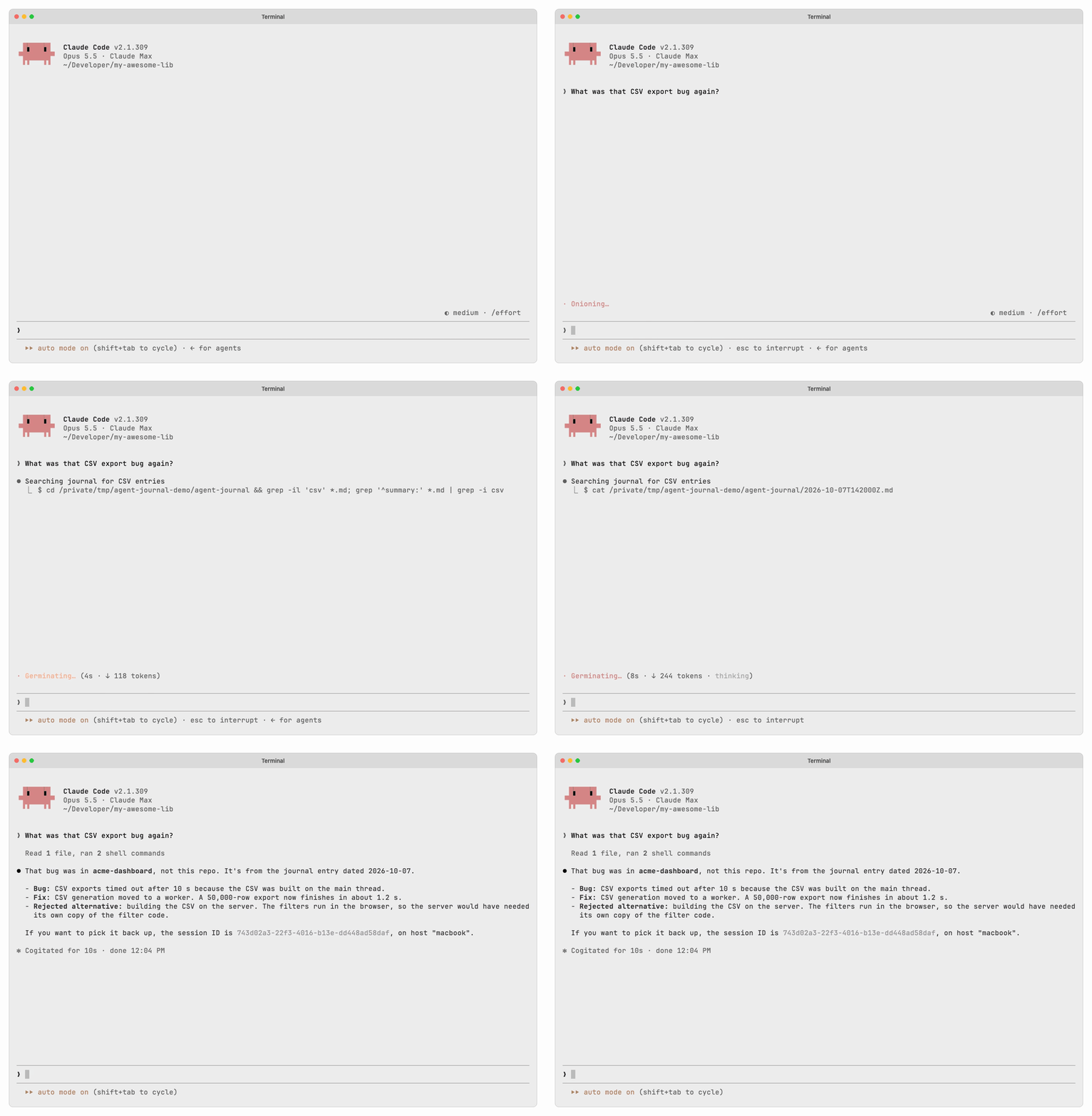
Exports of 50,000 rows now finish in 1.2 s instead of timing out after 10 s.

Considered building the CSV on the server instead. Rejected for now: the filters run in the browser, so the server would need a second copy of the filter code.
Recall
Filenames are UTC timestamps, so a glob is a range of UTC dates and ls is already chronological:
# the most recent entries
ls ~/agent-journal | tail -5

# how many entries this year
ls ~/agent-journal/2026-*.md | wc -l

# one dated line per entry, for a day or a month
grep -h '^summary:' ~/agent-journal/2026-10-*.md

# every entry for one project
grep -rl '^project: acme-dashboard$' ~/agent-journal

# anywhere in an entry, body included
grep -rli 'filter code' ~/agent-journal | tail -3

# one entry in full
cat ~/agent-journal/2026-10-07T142000Z.md
The agent can also recall entries on its own. To try it, ask "What was that CSV export bug again?".
Install
Shell
Run this command:
curl -fsSL https://raw.githubusercontent.com/zirkelc/agent-journal/main/install.sh | sh
It finds the agents installed on this machine and prints the steps for each one. It also symlinks the agent-journal CLI into ~/.local/bin. If that directory is not on your $PATH, it prints the line to add to your shell profile.
Claude
The plugin needs Claude Code 2.1.287 or later, because it is a mod, a hooks module that Claude Code loads itself. Install the plugin:
/plugin marketplace add zirkelc/agent-plugins
/plugin install agent-journal@zirkelc
Then open a new session and ask Claude to write a journal entry. By default, it writes to the directory ~/agent-journal/.
Update
Get the latest marketplace catalog, then update the plugin:
claude plugin marketplace update zirkelc
claude plugin update agent-journal@zirkelc
Then restart Claude Code or run /reload-plugins to load the new version.
Permissions
Depending on your permission mode, Claude asks for permission to write a journal entry. To allow all journal entries, add this to ~/.claude/settings.json:
{
  "permissions": {
    "allow": ["Edit(~/agent-journal/**)"]
  }
}
If you changed journal_dir, use that directory in the rule.
For the journal pane, how the hooks give the rules to the session, and what the plugin runs, reads and sends, see the Claude Code plugin README.
Codex
Install the plugin:
codex plugin marketplace add zirkelc/agent-journal
codex plugin add agent-journal@zirkelc
Codex reviews a hook before it runs it, so one step is left. Start Codex, run /hooks, and trust agent-journal. Until you do, Codex skips the hook and shows no message.
Then open a new session and ask Codex to write a journal entry. By default, it writes to the directory ~/agent-journal/.
Permissions
Codex grants write access by path rather than by tool, so the journal directory has to be a writable root. Add to ~/.codex/config.toml:
sandbox_mode = "workspace-write"

[sandbox_workspace_write]
writable_roots = ["/Users/you/agent-journal"]
Use the full path rather than ~. writable_roots only applies in workspace-write mode; in read-only every entry stops to ask, and in danger-full-access nothing is restricted and this is unnecessary.
CLI
[!NOTE]
You need to run the shell installation to make the CLI available.
The CLI is optional. You need it only to work with the journal from your shell. It is a thin layer over ls and grep for common commands:
| command | same as | description |
|---|---|---|
aj list |
ls ~/agent-journal | tail -20 |
the most recent entries, one line each |
aj search TEXT |
grep -rli 'rate limit' ~/agent-journal |
summaries and bodies, ignoring case |
aj read ID |
cat "$(ls ~/agent-journal/*.md | tail -1)" |
one entry in full |
aj write |
$EDITOR ~/agent-journal/$(date -u +%Y-%m-%dT%H%M%SZ).md |
add an entry yourself |
aj config |
cat ~/.config/agent-journal/config |
read and change the settings |
aj sync |
git add -A && git commit && git push |
commit the journal folder and push it, see Git sync |
aj install |
which agents are on this machine, and how to wire each one up | |
aj help |
every command and option |
list is the default command, so aj and aj list are the same.
Entries are listed oldest first, so the newest is nearest the prompt. Each line starts with the entry ID, which aj read takes as it is. In a terminal the columns are aligned. Down a pipe they are separated by one tab each (ID, project, summary), so aj list | cut -f1 gives the IDs, and an entry with no project has an empty field.
list and search take the same filters:
| filter | value | description |
|---|---|---|
--date |
2026, 2026-01, 2026-01-11 |
one year, month or day |
--since |
2026-01-11, today, 7d, 2026-01-11T14:30:00+01:00 |
from this day or time on |
--until |
same forms | up to and including this day or time |
--project |
a project name, or . for here |
entries filed under one project, across all its worktrees. . names the repository of the current directory the same way the session-start hook does, and fails outside a repository |
--cwd |
a directory, or . for here |
one directory and everything under it |
--limit |
a number, default 20 |
how many of the most recent to print |
--offset |
a number, default 0 |
skip this many of the most recent first, to page back through older entries |
--all |
no limit |
Days are local days, in the time zone of the machine. The IDs stay UTC, so an entry written just after local midnight can carry the date before: in Berlin in winter, --date 2026-01-11 includes 2026-01-10T231500Z. A time takes an offset (+01:00) or Z, and without one it is local time. --until with a time includes an entry written in that second. For one exact entry, use aj read with its ID.
aj write also takes --project .. There it names the repository of --cwd, the directory the entry records, and also fails outside a repository.
aj install with no agent named lists the ones found on this machine, with the command to wire up each. Naming one (aj install codex) runs that agent's own plugin commands for you. It writes nothing into any agent's configuration.
Run aj help for the usage help.
Configuration
The config lives in ~/.config/agent-journal/config and you can edit the file directly:
# agent-journal config

# journal_dir=<directory>
journal_dir=~/agent-journal

# sync=git
sync=git

# host=<machine name>, or empty to record none
host=macbook

# user=<account name>, or empty to record none
user=chris
If you have the CLI installed, you can change the config with agent-journal config set <key> <value>:
journal_dir: the directory for journal entries. Default:~/agent-journal.sync: set it togitto commit and push the journal folder after each write, see Git sync. Default: off.host: the machine name each entry records. If not set, the local host name on macOS, else the host name without its domain. If set to empty (host=), entries record no host.user: the account name each entry records. If not set, the login name. If set to empty (user=), entries record no user.
[!TIP]
With git sync, one journal can hold entries from several machines.hostandusertell you where an entry was written, and so where you can resume its session. Set a stable name if the system's name changes or tells more than you want to share, for exampleaj config set host macbook.aj config unset hostgives the system's name back.
Git sync
agent-journal can keep the journal in a git repository. It commits each new entry, and it pushes when the branch has a remote. Sync is off by default. To turn it on:
aj sync init                                  # commit only, on this machine
aj sync init [email protected]:you/journal.git   # commit and push
aj sync init makes the journal folder a git repository if it is not one yet, adds the URL as origin, sets sync=git, and makes the first commit. If the folder is already a repository, it uses it. The journal folder must be the root of its own repository. aj sync init refuses a folder inside a larger repository (for example your notes or your dotfiles), because a push sends the whole branch, with your other commits too. To turn sync off, run aj config unset sync.
To make a new private repository on GitHub for the journal, use the GitHub CLI after aj sync init. It adds the repository as origin and pushes the first commit, and every later sync pushes to it:
aj sync init
gh repo create agent-journal --private --source ~/agent-journal --remote origin --push
Use your own journal folder in --source if you changed journal_dir.
When sync is on, aj sync runs:
- in Claude Code, after each entry and when the session ends (more).
- after
aj write. - when you run
aj syncyourself, for example for entries that Codex wrote.
Each sync commits every file in the journal folder. The commit names a single new entry by its ID and summary. Then it pushes the current branch. If the remote has commits that this machine does not have (another machine pushed first, or you created the repository with a README), it rebases onto them and pushes again; entries have unique file names, so this does not conflict. If the push fails (no network, no credentials), the commit stays, and the next sync pushes it. A sync commits nothing on a detached HEAD or while a merge, rebase or bisect is open.
A sync never waits for input: git does not prompt for a password, ssh runs in batch mode (also with your own core.sshCommand), and the journal's commits are not signed, so no passphrase dialog opens.
[!WARNING]
A push sends your entries to the remote. Entries describe your work, so use a private repository.
Credits
The idea for an agent journal comes from Malaiac's Claude Diary.
License
MIT
Reviews (0)
Sign in to leave a review.
Leave a reviewNo results found