orbit-tui
Health Pass
- License — License: MIT
- Description — Repository has a description
- Active repo — Last push 0 days ago
- Community trust — 56 GitHub stars
Code Fail
- child_process — Shell command execution capability in npm/bin/orbit.js
- spawnSync — Synchronous process spawning in npm/bin/orbit.js
- fs module — File system access in npm/bin/orbit.js
- child_process — Shell command execution capability in npm/install.js
- fs.rmSync — Destructive file system operation in npm/install.js
- fs module — File system access in npm/install.js
- fs module — File system access in npm/sync-version.js
Permissions Pass
- Permissions — No dangerous permissions requested
No AI report is available for this listing yet.
The most complete keyboard-driven terminal dashboard in Rust. One pane, six modes — CPU, memory, disk, network, GPU, processes, clock, calendar, media visualizer. ~3MB binary, 0.5% CPU.
🪐 Orbit
The Extensible Terminal Workspace. Your machine, one pane.
Orbit is a fast, highly-aesthetic terminal OS and developer dashboard written in Rust. It's the most complete keyboard-driven workspace — one pane, four modes, zero mouse.





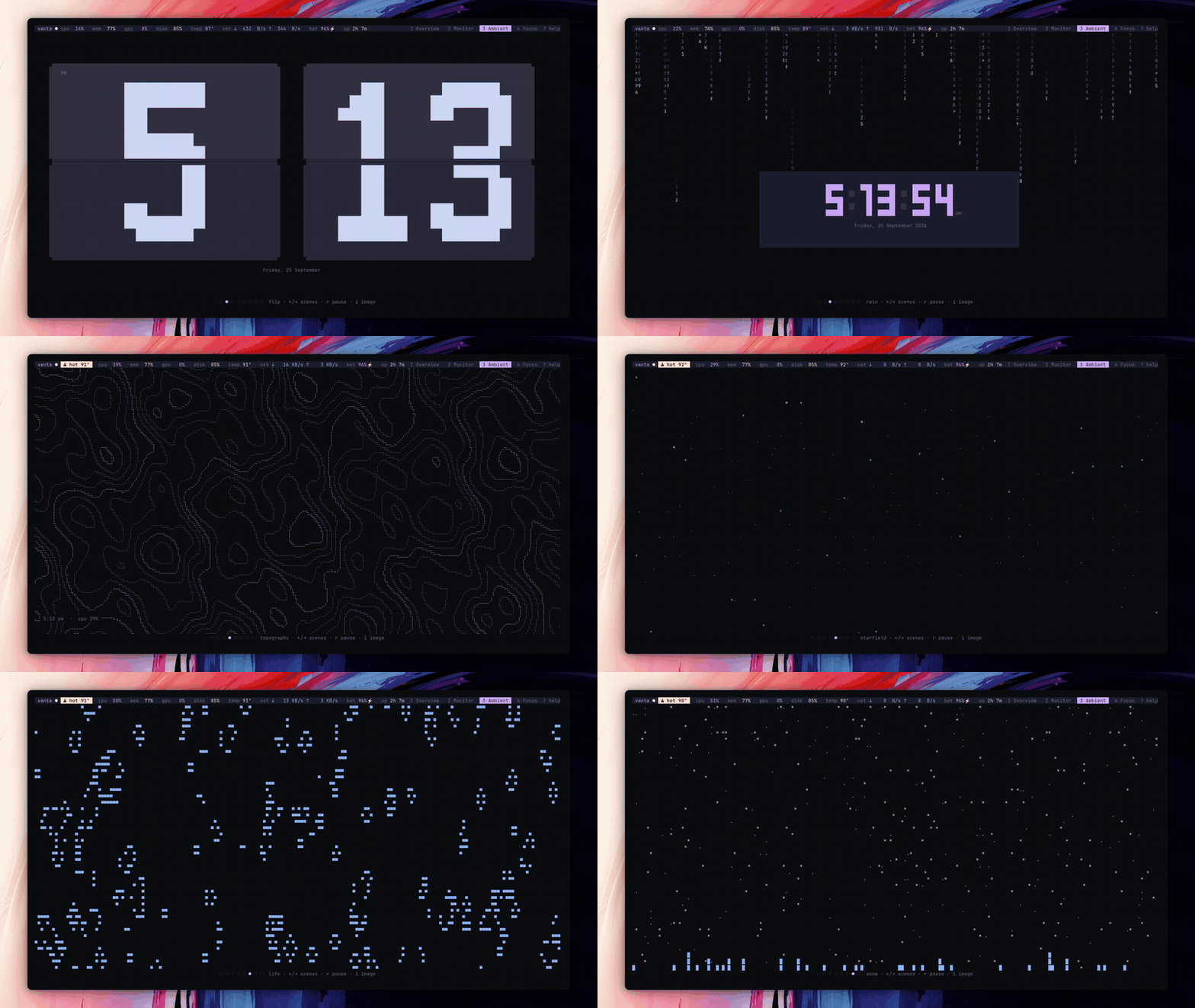
Live terminal workspace in action. Watch 1080p 60FPS video • Visit Website
🌌 The Terminal OS
Orbit is designed to sit on a secondary monitor and never be closed. It is not just a system monitor; it is a complete developer workspace powered by a WebAssembly plugin ecosystem.
It uses zero web tech, runs on roughly 0.5% of a core at idle, and bypasses standard terminal cell boundaries by dynamically rendering block characters at a smooth 60 FPS.
🚀 Quick Start
Install Orbit via NPM (Recommended for prebuilt binaries) or Cargo.
# Via Homebrew (macOS & Linux)
brew install ziuus/tap/orbit

# Via NPM (Prebuilt binaries)
npm install -g @ziuus/orbit

# Via Cargo
cargo install --git https://github.com/ziuus/orbit-tui.git
Note: If you are migrating from our previous iteration, simply rename your configuration folder:
mv ~/.config/vanta ~/.config/orbit
🗂️ Core Workspaces
| Key | Page | What's on it |
|---|---|---|
1 |
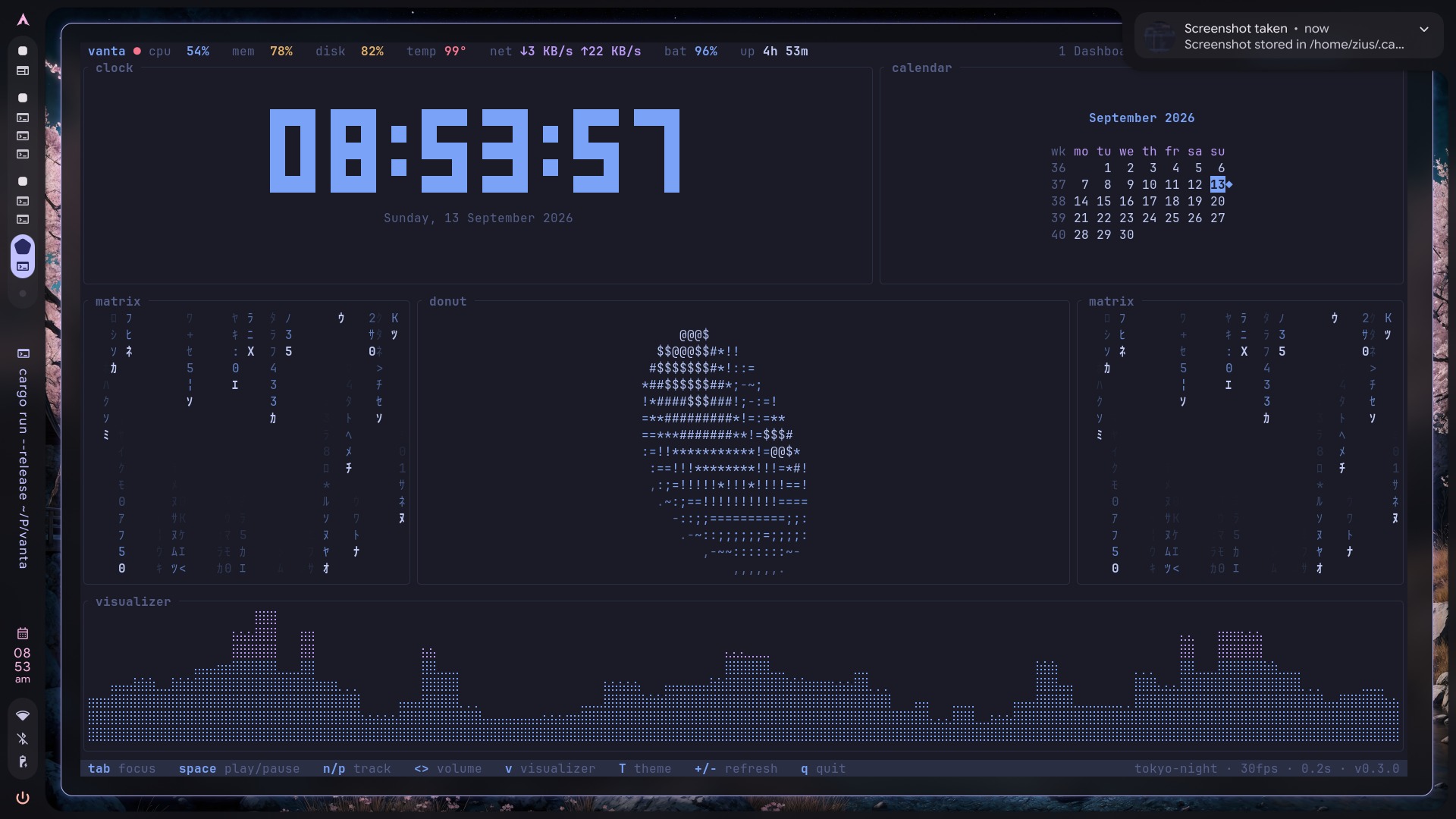
Dashboard | System facts, distro logo, visualizer, top processes, interactive status, memory, network, calendar. |
2 |
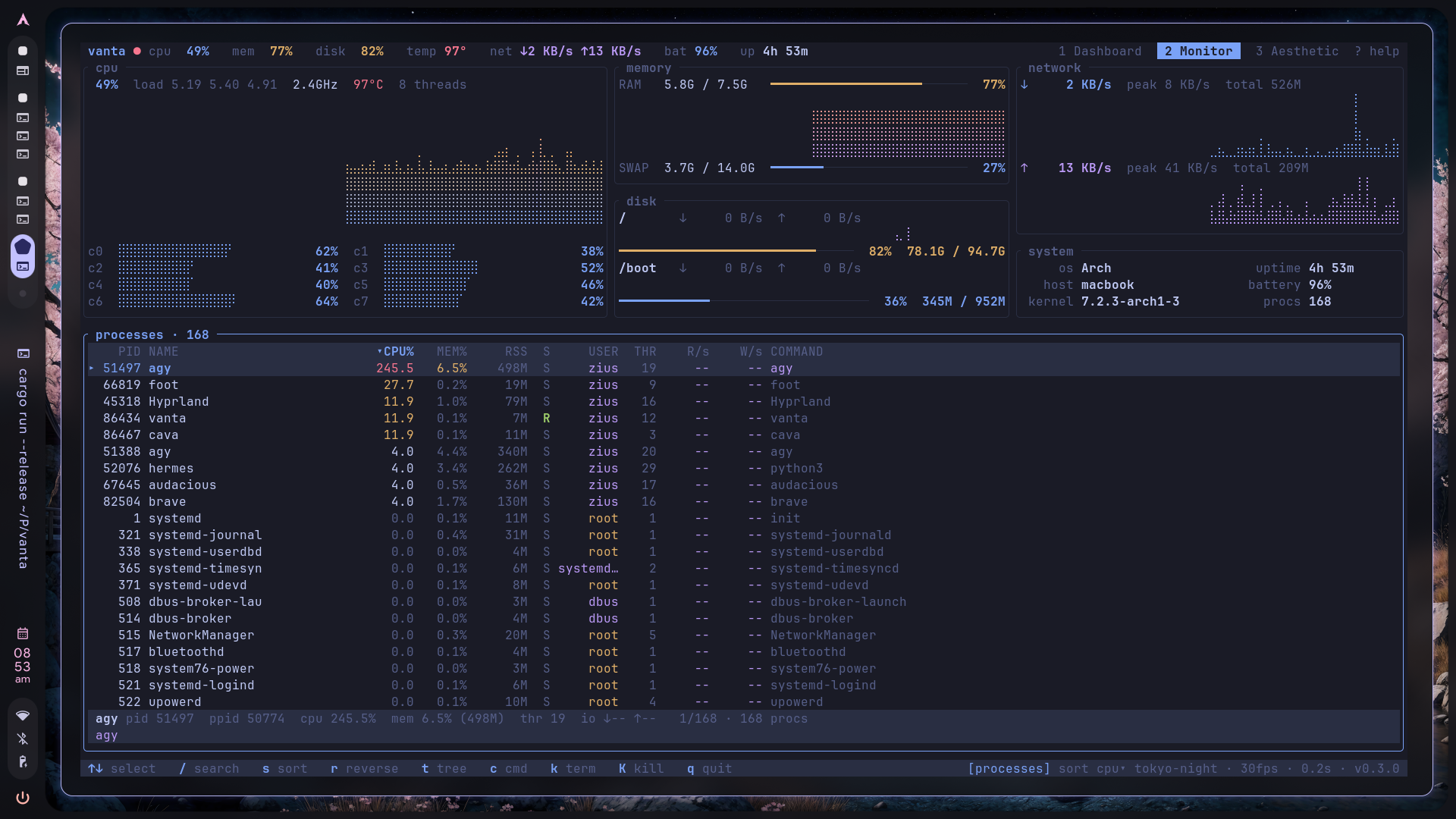
Monitor | Comprehensive system & process matrix. Filter, sort, and manage running tasks effortlessly. |
3 |
Aesthetic | Ambient environments. Matrix rain, 3D starfield, spinning donut, pinned media, full-width visualizer. |
4 |
Workspace | Built-in File Manager (with image previews), Agenda, Tasks, RSS feeds, and Obsidian vault viewer. |
5 |
Orbit AI | Autonomous Agent Workstation. Supervise Claude Code, OpenCode, Antigravity, or Shell sessions 24/7 with zero key conflicts and instant fullscreen handover. |
? |
Help | Keybind reference overlay. |
5 — Orbit AI (Autonomous Agent Cockpit)
Run and supervise background AI coding agents 24/7 without terminal context switches.
- Agent Fleet Telemetry: Live RAM & CPU metrics for all active agents.
- Embedded PTY Stream: 30 FPS non-blocking live terminal stream.
- Zero Key Conflicts: Dual-mode terminal focus passes all keystrokes (
space,q,Tab,1-5) directly to your agent. PressEscanytime for Orbit Nav mode, orAlt+Enterfor native fullscreen tmux handover.
2 — Monitor
A deep dive into your system's heartbeat. Every vital graph on top, every active process below. Sort it, filter it, tree it, kill it.
3 — Aesthetic
For when the build is running and you want a premium ambient display. Includes support for custom pinned images.
Includes 7 immersive ambient scenes:
- Audio Visualizer
- Matrix Rain
- Flip Clock
- Topographic Map
- True 3D Starfield (reacts to CPU spikes and music bass)
- Conway's Game of Life (auto-seeding)
- Terminal Snowfall (piles up and melts dynamically)
4 — Workspace
Turn your terminal into a productivity hub. Manage files (with image previews), read RSS news, track tasks, and view your Obsidian vault with markdown syntax highlighting. Press e on any focused panel to edit content in your $EDITOR.
⌨️ Keybinds
| Key | Action |
|---|---|
1 2 3 4 5 |
Switch workspace (persisted as startup page) |
Tab / Shift-Tab |
Cycle panel focus · Esc clears |
Enter |
Zoom the focused panel to the full page · Esc back |
T |
Next theme (persisted) |
v |
Visualizer style: bars / mirror / wave / peaks |
+ / - |
Sample faster / slower |
Space n p |
Play/pause · next · previous (MPRIS, any page) |
< > |
Volume down / up |
? |
Help overlay |
q |
Quit |
~ / F12 |
Toggle Debug Logs overlay (s saves them to file) |
S / , |
Open Settings overlay |
Ctrl + ←/→ |
Resize dashboard columns horizontally |
Ctrl + ↑/↓ |
Resize dashboard components vertically |
Processes (Monitor): ↑↓ PgUp PgDn Home End select · / filter · s sort field · r reverse · t tree · ←→ fold · c full command · k SIGTERM · K SIGKILL.
🎨 Themes & Customization
Cycle through built-in themes with T:dark · catppuccin · tokyo-night · nord · gruvbox · dracula · light · solarized-light
Custom Themes
You can load custom themes dynamically without recompiling Orbit:
- Create a
themesfolder inside your config directory (e.g.~/.config/orbit/themes/). - Drop in a
.tomlfile with your theme name (e.g.,cyberpunk.toml). - Define your colors using hex codes (
bg,accent,surface, etc.). - Press
Tin Orbit to cycle to it.
Want more? There are some community presets (Night Owl, Nightfox, Rosé Pine Dawn and more) in themes/. Copy one over or just orbit link themes/<name>.toml.
🔌 Extensions & Plugins
Orbit is fully extensible via sandboxed WebAssembly (WASM). Anyone can install community widgets or build their own!
Quick Tutorial: Installing Extensions
Browse and install verified extensions directly from the terminal:
# 1. Browse community extensions
orbit browse

# 2. Install any extension (e.g. 3D Crypto Coin)
orbit install crypto_coin

# 3. Enable in ~/.config/orbit/config.toml
orbit enable crypto_coin
Drop the installed widget ID (e.g. "coin") anywhere into your [dashboard.layout] in ~/.config/orbit/config.toml:
[dashboard]
layout = [
    ["system", "coin", "cpu", "storage"],
    ["clock", "media", "processes", "network"],
    ["weather", "calendar", "upnext", "status"]
]
Quick Tutorial: Building Your Own Extension
We provide ready-to-use templates for every extension type:
- Component (Widget): Rust WASM plugin returning a UI widget (
templates/component) - Page (Workspace): Multi-column custom page layout (
templates/page) - Theme (Palette): Custom 9-color TOML palette (
templates/theme)
Test your plugin locally in Orbit without publishing:
orbit link /path/to/my_widget.wasm
Explore the official registry and templates:
👉 github.com/ziuus/orbit-integrations
📚 Documentation
- CONFIGURATION.md: Layouts, custom shell widgets, and performance profiles.
- EXTENSIONS.md: Orbit Extension Developer Guide (WASM).
- AGENTS.md: AI Agent architecture guide for modifying Orbit.
- ORBIT_CONFIG_SKILL.md: Prompt instructions for your AI to configure your dashboard.
🏗️ Architecture
All telemetry is collected on a single background sampler thread (/proc, /sys, sysinfo, D-Bus) into lock-guarded snapshots. The render loop only reads snapshots and never blocks on I/O.
| Layer | Technology |
|---|---|
| TUI | Ratatui 0.29 + Crossterm |
| Telemetry | sysinfo, /proc, /sys/class/{hwmon,drm,power_supply} |
| GPU | NVIDIA (nvidia-smi), AMD (sysfs), Intel (clock only) |
| Media | MPRIS over D-Bus (dbus crate) |
| Audio viz | cava raw output, idle wave fallback |
🤝 Contributing
Issues, new themes, and PRs are welcome!
git clone https://github.com/ziuus/orbit-tui.git && cd orbit-tui
cargo run --release

# Ensure CI passes
cargo fmt --all -- --check
cargo clippy --all-targets -- -D warnings
cargo test
Read CONTRIBUTING.md first to understand our sampler-thread rule (never do I/O inside a render()) and our UI degradation contract.
Looking for something to work on? Check out our good first issues.
🧩 Ecosystem & Companion Tools
- settings-tui — Lightweight universal Linux Settings Center for your terminal (D-Bus, PipeWire, BlueZ, Hyprland, systemd). The settings management companion to Orbit's system monitoring.
📄 License
MIT — Do what you like, keep the notice.
Reviews (0)
Sign in to leave a review.
Leave a reviewNo results found