clawd-pet
Health Gecti
- License — License: NOASSERTION
- Description — Repository has a description
- Active repo — Last push 0 days ago
- Community trust — 12 GitHub stars
Code Gecti
- Code scan — Scanned 1 files during light audit, no dangerous patterns found
Permissions Gecti
- Permissions — No dangerous permissions requested
Bu listing icin henuz AI raporu yok.
Desktop pet for Claude Code on Windows — walks your taskbar, reacts to Claude sessions in real time.
Clawd Pet
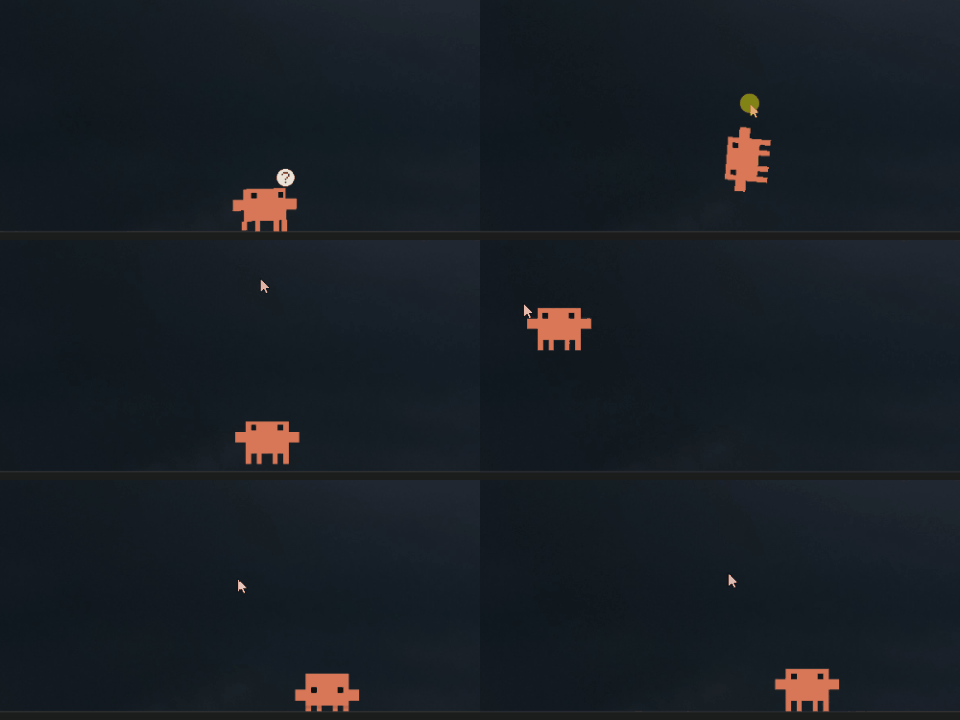
A desktop pet for Windows built in plain PowerShell + WinForms — no installer, no build step. He walks along the taskbar, follows your cursor, blinks, and gets into all kinds of trouble on his own.
What he does
Walks with real frame-by-frame animation, eyes track your cursor, a confused "?" floats up when you start typing, and he climbs onto open app windows and rides them around.
Pick him up and he dangles from the cursor. Throw him and he actually gets flung — speed matches how fast you flick, he arcs through the air, bounces off the walls, squashes on impact. The physics was the part I cared about most.
Leave him running and he starts doing his own thing. I won't spoil them, but they're all sitting in the right-click menu if you don't want to wait.
Claude Watch — he shows what Claude Code is doing
This is the part I'm proudest of. Hook him into Claude Code and a small bubble shows up over his head telling you exactly what it's doing right now:
thinking… · running a command… · writing code… · reading files… · done ✓
To turn it on:
Right-click tools\claude-watch-on.ps1 → Run with PowerShell
Installs the hooks into your Claude Code settings and leaves everything else alone. tools\claude-watch-off.ps1 removes them.
Codex Watch
Clawd can also follow Codex CLI and Codex Desktop, alongside Claude Code. Run:
powershell.exe -NoProfile -ExecutionPolicy Bypass -File tools\codex-watch-on.ps1
Restart Clawd and Codex, then review the Clawd hooks in Codex's /hooks screen.
The installer merges ~/.codex/hooks.json, backs up existing hooks, and replaces
old Clawd commands that would otherwise write Codex events into Claude's file.
It leaves config.toml, its existing notify command, and unrelated hooks alone.
Codex itself saves hook trust decisions in config.toml when you approve hooks.
The session JSONL watcher always runs as a fallback, including when hooks are
disabled or untrusted. For a setup with no Codex configuration changes, usecodex-watch-on.ps1 -FallbackOnly. If you already have old Codex hooks writingclawd-status.txt, use the normal installation to migrate those hooks first.
To disable, run tools\codex-watch-off.ps1 and restart both apps. If hooks have
not changed since installation, the original hooks.json is restored byte for
byte. Otherwise, only Clawd's new hooks are removed, migrated hooks are restored,
and subsequent user edits are kept. Codex-managed trust records are left alone.
Both setup scripts respect CODEX_HOME and accept -CodexHome explicitly.
How it works
Claude Code hooks -> legacy token file --+
                                        +-> shared state selection -> existing Clawd UI
Codex hooks + session JSONL -> adapter --+
The UI reads shared tokens, not Codex tool names. Claude's existing%TEMP%\clawd-status.txt protocol and installer are unchanged. Codex uses one
hidden Windows PowerShell worker, owned by Clawd, that tails recently modified$CODEX_HOME\sessions\**\*.jsonl files. It recognizes CLI/exec and main Codex
Desktop sessions (currently source: vscode, originator: Codex Desktop). Internal
guardian/subagent transcripts are excluded. Existing codexWatch installations
only need a Clawd restart to add Desktop support; no extra hooks or configuration
are required. No additional runtime or service is installed.
| Codex activity | Token |
|---|---|
| Turn start / recorded reasoning | think |
| Shell / exec | bash |
| File read / search | read |
| Patch / file change | edit |
| Web search | web |
| Delegated agent tools | task |
| Approval / explicit input request | notify |
| Turn completed / interrupted | done |
Codex hook records have unique filenames and are published atomically. The
worker is the single state writer; it orders events by timestamp, tracks each
Codex session/turn independently, and rejects a late completion for another turn.
An active agent takes priority over any agent's done; otherwise the newest
activity wins. A small checkpoint retains approval state across Clawd restarts.
Only tokens, identifiers, and timestamps are saved under %TEMP%\clawd-codex.
Limits and troubleshooting
- Tested against CLI
0.154.0-alpha.6.2. This machine also has terminal CLI0.144.6, which loads hooks but rejects its configuredgpt-6-astramodel as
requiring a newer CLI. The adapter does not upgrade Codex or change its model. - JSONL is a version-dependent fallback, not a stable API. The adapter supports
task_started/task_complete, response tool calls, and the neweritem_completedrecords. Unknown events are ignored. See the
official hooks documentation. - Hosted web search bypasses local tool hooks. Code-mode calls can wrap tools;
when a granular start event is unavailable, the fallback shows the most recent
recorded activity when its completed item arrives. It never infers activity
from assistant prose or executes transcript content. Very short steps may
coalesce between polls (500 ms; file discovery every 3 seconds). - Approval resolution may not appear until the next recorded tool event. The
last observed attention state can remain during that gap. - Without a finish event, activity expires after 30 minutes. In dual-agent mode
this also applies to Claude so long commands survive another agent finishing.
Claude-only mode retains the original 15-second timeout.donelasts 8 seconds.
Legacy Claude tokens cannot distinguish multiple simultaneous Claude sessions. - Startup replays at most the last 512 KiB of each recently modified transcript;
partial lines are retained for the next poll. A stale worker snapshot is ignored
after 5 seconds. Remote sessions without local JSONL are not detected.
For diagnostics, launch clawd-pet.ps1 -WatchLog C:\path\watch.jsonl to record
rendered source/token transitions and save the corresponding bubble PNGs. This
does not record prompts or tool arguments. Run the isolated PowerShell checks:
powershell.exe -NoProfile -ExecutionPolicy Bypass -File tools\test-agent-watch.ps1
Getting started
Needs Windows 10 or 11 (PowerShell 5.1 is already there) and internet on the first run.
- Download or clone the repo
- Double-click
start-clawd.vbs— first launch pulls the sprites from claude.ai automatically - Want him to start with Windows? Right-click
autostart-on.ps1→ Run with PowerShell
If SmartScreen warns about the
.vbs, click More info → Run anyway. It's three lines — you can read the whole thing.
Config — clawd.json
Change anything, restart, done.
| Key | Default | What it does |
|---|---|---|
size |
80 |
Width in px (48–200). Everything scales with it. |
walkSpeed / gravity |
1.0 |
Speed and gravity multipliers |
features.claudeWatch |
true |
The Claude Code status bubble |
features.codexWatch |
false when absent |
Codex CLI + Desktop adapter; setup enables it |
features.agentWatch |
true when absent |
Master switch for both agents |
features.eyeTracking |
true |
Eyes follow the cursor |
features.windowPlatforms |
true |
Stand and ride on app windows |
features.mischief |
true |
The rarer, unprompted antics |
About the sprites
Clawd and his artwork belong to Anthropic. Most sprites are pulled from claude.ai on first run. Dance, Cook Intro, Working, Cooking, and Loading are preserved in this repo because some upstream URLs no longer return images. Downloads and existing files are checked as real PNG/GIF images before use; invalid files are downloaded again. Fan project, not official, Anthropic had nothing to do with it.
License
MIT — code only. See above for the sprites.
Yorumlar (0)
Yorum birakmak icin giris yap.
Yorum birakSonuc bulunamadi