Little-Mungbean
Health Pass
- License — License: NOASSERTION
- Description — Repository has a description
- Active repo — Last push 0 days ago
- Community trust — 12 GitHub stars
Code Fail
- exec() — Shell command execution in assets/renderer-inject.js
- network request — Outbound network request in assets/renderer-inject.js
- os.homedir — User home directory access in scripts/check-skills-clients.mjs
- process.env — Environment variable access in scripts/check-skills-clients.mjs
- Hardcoded secret — Potential hardcoded credential in scripts/check-skills-clients.mjs
- rm -rf — Recursive force deletion command in scripts/package-macos-dmg.sh
- process.env — Environment variable access in scripts/test-mcp-live.cjs
- fs module — File system access in scripts/test-mcp-live.cjs
- fs module — File system access in tests/native-model-catalog.cjs
Permissions Pass
- Permissions — No dangerous permissions requested
No AI report is available for this listing yet.
A free, lightweight AI gateway manager that lets Codex and Claude clients share a switchable, observable local gateway with multi-provider management, local protocol conversion, model injection, and usage statistics.
Little-Mungbean
Official website • Documentation • English • 中文
Little Mungbean (小绿豆) • A free, open-source, simple and lightweight AI gateway manager. It enables Codex and Claude clients to share a switchable, observable local gateway. Features include multi-AI provider management, model injection/mapping, local protocol conversion, MCP Server and Skills installation & management, usage statistics, query and more...
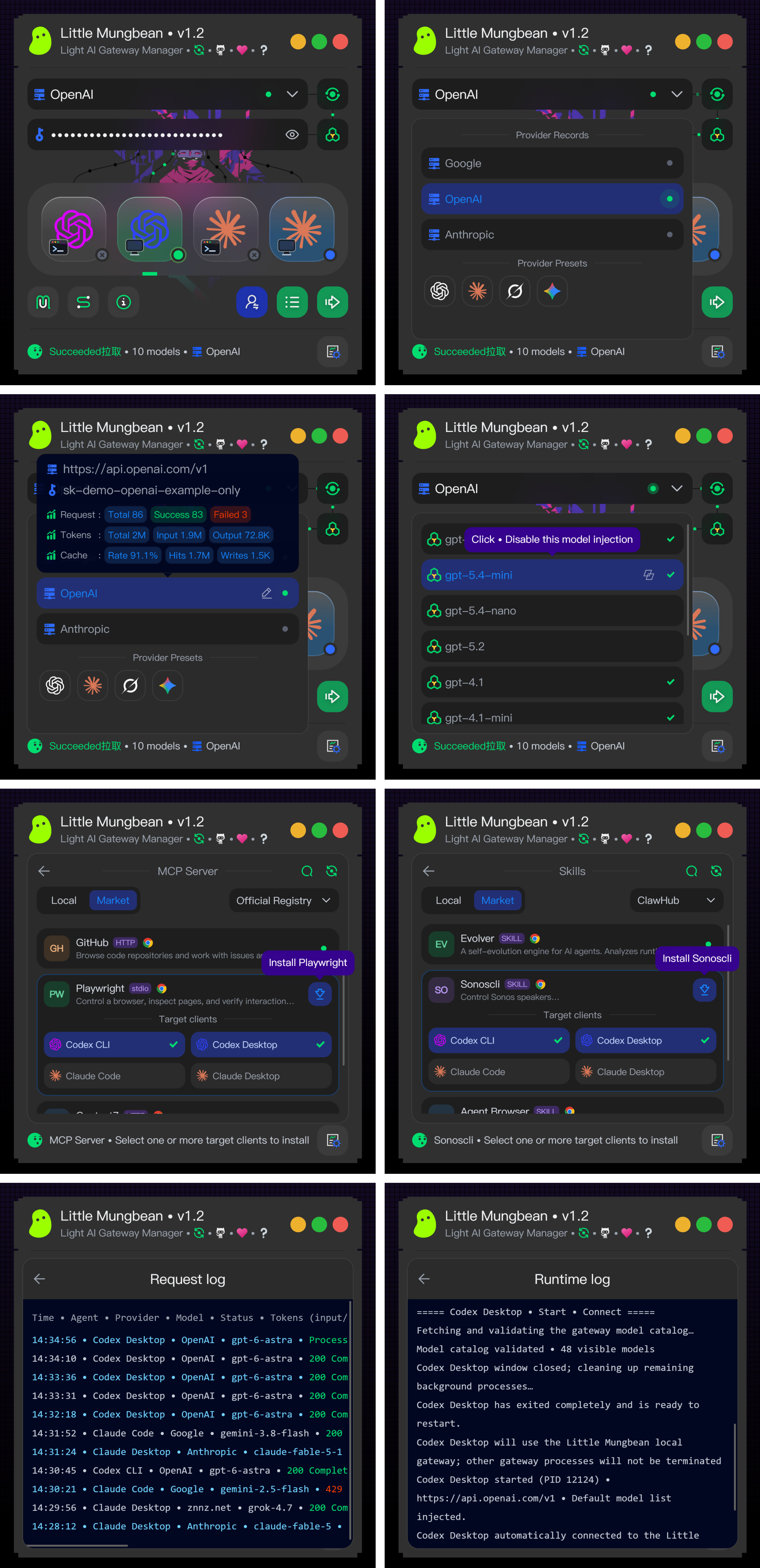
Features
- 🚀 One-Click Client Installation • Supports one-click setup for Codex CLI, Codex Desktop, Claude Code and Claude Desktop.
- 💡 Real-Time Status Detection for Multiple Agent Clients • Automatically detects and displays installation, running and connection status of Agent clients.
- 🔌 Isolated Access for Multiple Agent Clients • Separately manages connection status and gateway routing for the four types of Agent clients.
- 🔀 Multi-Provider Management • Save multiple provider endpoint URLs and API Keys; supports renaming, drag-to-reorder and quick switching.
- 🔄 Provider Switching • Flexible connections between providers and Agent clients. One provider can serve multiple Agent clients, or multiple providers can connect to multiple Agent clients.
- 📊 Multi-Provider Usage Statistics • Tracks request counts and token consumption independently for each provider.
- 🔐 Account Mode Toggle • Switch between local gateway routing mode and official account login mode for Agent clients without logging out; original configurations are automatically restored.
- 📥 Gateway Model Fetch & Management • Fetch available model lists independently per provider, and enable/disable injection of unused or legacy models into Agent clients on a per-provider basis.
- 🗂️ Model Injection • Each Agent client can separately select either the default model list or the gateway model list, injecting provider models into the client’s model selector for direct use.
- 🧩 Local Protocol Conversion • Supports protocol translation for OpenAI, Anthropic, Gemini and more. Same-family models are forwarded directly by default with a live toggle. See FAQs below for details.
- 🧰 MCP Server Management & Marketplace • Manage local and marketplace MCP Servers: manual addition, marketplace installation, editing, search, toggle, deletion, deployment to multiple target clients, and viewing MCP Server homepage.
- 📚 Skills Management & Marketplace • Manage local and marketplace Skills: manual addition, marketplace installation, import from folder/ZIP, editing, search, toggle, deletion, deployment to multiple target clients, and viewing Skill homepage.
- 🖱️ Quick Client Actions & Connection Info • Right-click the client card to quickly open the Agent client’s config folder, or copy the local Base URL and Token for use with other tools.
- 📝 Runtime Logs • Records operation history and error messages.
- 📋 Request Logs • Logs Agent, provider, model, status code, token usage, latency, time-to-first-token, endpoint and protocol conversion details.
- 🛡️ Secure Configuration • API Keys are encrypted locally. The gateway only listens on the loopback address. No telemetry, ads or behavioral analytics.
- 🌍 Dual-Language UI • Supports Chinese and English interface and log output.
Agent client status lights
- ⚪ Gray with × • Not installed
- ⚪ Gray • Not running
- 🔵 Blue • Running, not connected to the local gateway
- 🟢 Green • Connected to the local gateway
Provider flow indicators
- ⚫ Black • No client is both running and connected to the gateway
- 🟢 Green • Each running, connected client has its own green branch; the input flow is green when at least one branch is green. Moving dots do not represent real-time data transfer.
Usage
- Open Little-Mungbean and enter an endpoint and API Key, or choose a provider preset.
- Fetch models and select the model to inject into the Agent client.
- Select a client and click Start • Connect.
After changing the endpoint or API Key, click Restart • Connect. Little-Mungbean automatically restarts the related client. Protocol conversion can be toggled independently without restarting the client.
Closing the Little-Mungbean window keeps the local gateway running in the system tray. Choose Exit to stop the gateway completely. You must click Start • Connect again the next time you use a client.
Network proxies
Little-Mungbean automatically uses your system proxy for model requests, model lists, markets, and downloads. Usually, enabling System Proxy in your proxy app is all you need.
- Supported proxies • HTTP, HTTPS, SOCKS4/4a, SOCKS5/5h, and PAC (automatic proxy scripts). Use
socks5h://to let the proxy resolve destination domain names. - Custom settings • Set
HTTP_PROXY,HTTPS_PROXY, orALL_PROXYbefore starting Little-Mungbean; lowercase names also work. These override the system proxy for the relevant protocol. UseNO_PROXYto bypass the proxy for specified addresses. Local gateway connections always bypass proxies. - TUN / VPN • Routing is handled by your operating system and proxy app; no separate setup in Little-Mungbean is needed.
Frequently asked questions
What is local gateway mode?
In local gateway mode, an Agent client such as Claude Code or Codex Desktop connects to Little-Mungbean first. Little-Mungbean then forwards requests to the actual AI provider, including official APIs or third-party gateways.
The local gateway handles protocol conversion, request routing, provider switching, and API Key management, making it easier for different clients to use different models.
What is account mode?
In account mode, the Agent client connects and chats directly through the signed-in official account of the AI provider. Requests do not use Little-Mungbean’s local gateway route.
What is protocol conversion?
Protocol conversion translates the API format used by an Agent client into the format supported by the upstream model service, and converts requests and responses in both directions, including streaming responses.
The main formats currently involved in local protocol conversion include:
- OpenAI Chat Completions
- OpenAI Responses
- Anthropic Messages
- Gemini GenerateContent
When should local protocol conversion be enabled?
Enable it when you need to use a model from a different model family, for example:
- Using Claude, Gemini, or another model family in Codex.
- Using GPT, Grok, Gemini, or another model family in Claude.
When should local protocol conversion be disabled?
- When you do not need cross-family models.
- When the provider already performs protocol conversion on the server. Disabling local conversion avoids converting the request twice.
- Grok natively supports OpenAI Responses, so local conversion is usually unnecessary when using Grok in Codex.
Does the gateway stop when the Little-Mungbean window is closed?
No. Closing the window leaves the gateway running in the system tray so connected clients can continue making requests. Choose Exit from the tray menu to stop the gateway completely. You must click Start • Connect again the next time you use a client.
Where are API Keys stored?
API Keys are encrypted and stored locally. The gateway listens only on the local loopback address and does not expose a listener on the LAN or public Internet.
How can I report a bug?
Bug reports: [email protected]
License
This project is released under the Apache License 2.0.
Reviews (0)
Sign in to leave a review.
Leave a reviewNo results found