servicebar
Health Warn
- No license — Repository has no license file
- Description — Repository has a description
- Active repo — Last push 0 days ago
- Low visibility — Only 7 GitHub stars
Code Pass
- Code scan — Scanned 2 files during light audit, no dangerous patterns found
Permissions Pass
- Permissions — No dangerous permissions requested
No AI report is available for this listing yet.
macOS menu bar app for monitoring services, ports, Docker containers and MCP servers. Scan processes, manage services, track CPU/memory usage, install Claude Code/Codex MCP servers.
ServiceBar
A lightweight macOS menu bar utility that monitors all services listening on TCP ports. Instantly see what's running, which ports are in use, and manage processes — all from your menu bar.
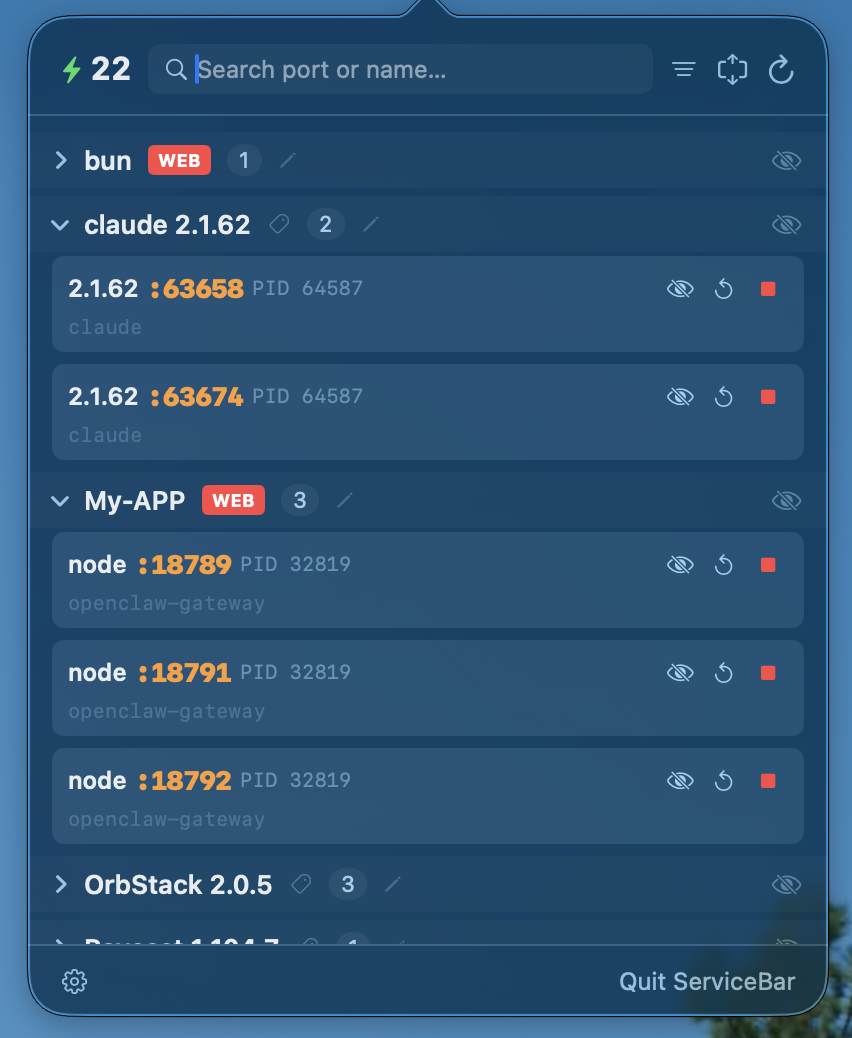
Features
- Real-time port monitoring — Scans listening TCP ports via
lsofand displays grouped services - Smart grouping — Automatically groups services by application name with dev tool detection
- Process control — Stop, restart, or start services directly from the menu bar
- Search & filter — Filter by service name, port number, port range, or custom tags
- Tag system — Categorize groups with color-coded tags (DEV / SYS / APP / DB / WEB)
- Drag-to-reorder — Rearrange service groups to your preferred order
- Click-to-copy — Copy port numbers, PIDs, or command paths with a single click
- Hide services — Hide noisy system or background services from the main view
- Group aliases — Rename service groups for better readability
- Auto-refresh — Configurable refresh interval (30s to 10min)
- Launch at login — Optional auto-start via macOS Service Management
Requirements
- macOS 13.0 (Ventura) or later
- Swift 5.9+
Build
swift build                # Debug build
swift build -c release     # Release build
swift run ServiceBar       # Run locally
Install
Download the latest ServiceBar.zip from Releases, unzip, and drag ServiceBar.app to your Applications folder.
Or build from source:
swift build -c release
cp -R dist/ServiceBar.app /Applications/
Usage
Once launched, ServiceBar lives in your menu bar as a ⚙ icon with an active service count badge.
Click the icon to open the dashboard:
- Browse all services grouped by application
- Use the search bar to filter by name or port
- Click a port number or command path to copy it
- Stop/restart services with inline action buttons
- Tag groups, rename them, or drag to reorder
- Toggle the filter icon to show only specific tag categories
Settings (gear icon in footer):
- Launch at Login
- Auto-refresh interval
- Port range filter
- Menu bar icon style
- Manage hidden items
Project Structure
Sources/ServiceBar/
├── ServiceBarApp.swift            # App entry, AppDelegate, menu bar setup
├── Models/
│   └── ServiceInfo.swift          # Service data model
├── Services/
│   ├── ServiceScanner.swift       # Core scanning engine & process control
│   ├── HiddenItemsManager.swift   # Hidden items persistence
│   └── GroupAliasManager.swift    # Group aliases & tag system
├── Views/
│   ├── StatusBarView.swift        # Main popover UI
│   ├── ServiceRowView.swift       # Service card component
│   ├── SettingsView.swift         # Settings panel
│   └── RefreshButton.swift        # Animated refresh button
└── Resources/
    ├── Info.plist
    └── AppIcon.png
License
MIT License. See LICENSE for details.
Reviews (0)
Sign in to leave a review.
Leave a reviewNo results found