openhistory
Health Gecti
- License — License: MIT
- Description — Repository has a description
- Active repo — Last push 0 days ago
- Community trust — 44 GitHub stars
Code Basarisiz
- rm -rf — Recursive force deletion command in native/bridge/build.sh
- rm -rf — Recursive force deletion command in native/collector/scripts/package-release-app.sh
- process.env — Environment variable access in scripts/benchmark-apple-foundation-model.ts
Permissions Gecti
- Permissions — No dangerous permissions requested
Bu listing icin henuz AI raporu yok.
Your private, searchable work timeline for macOS and local AI agents.
OpenHistory
A private, searchable timeline of what you worked on.



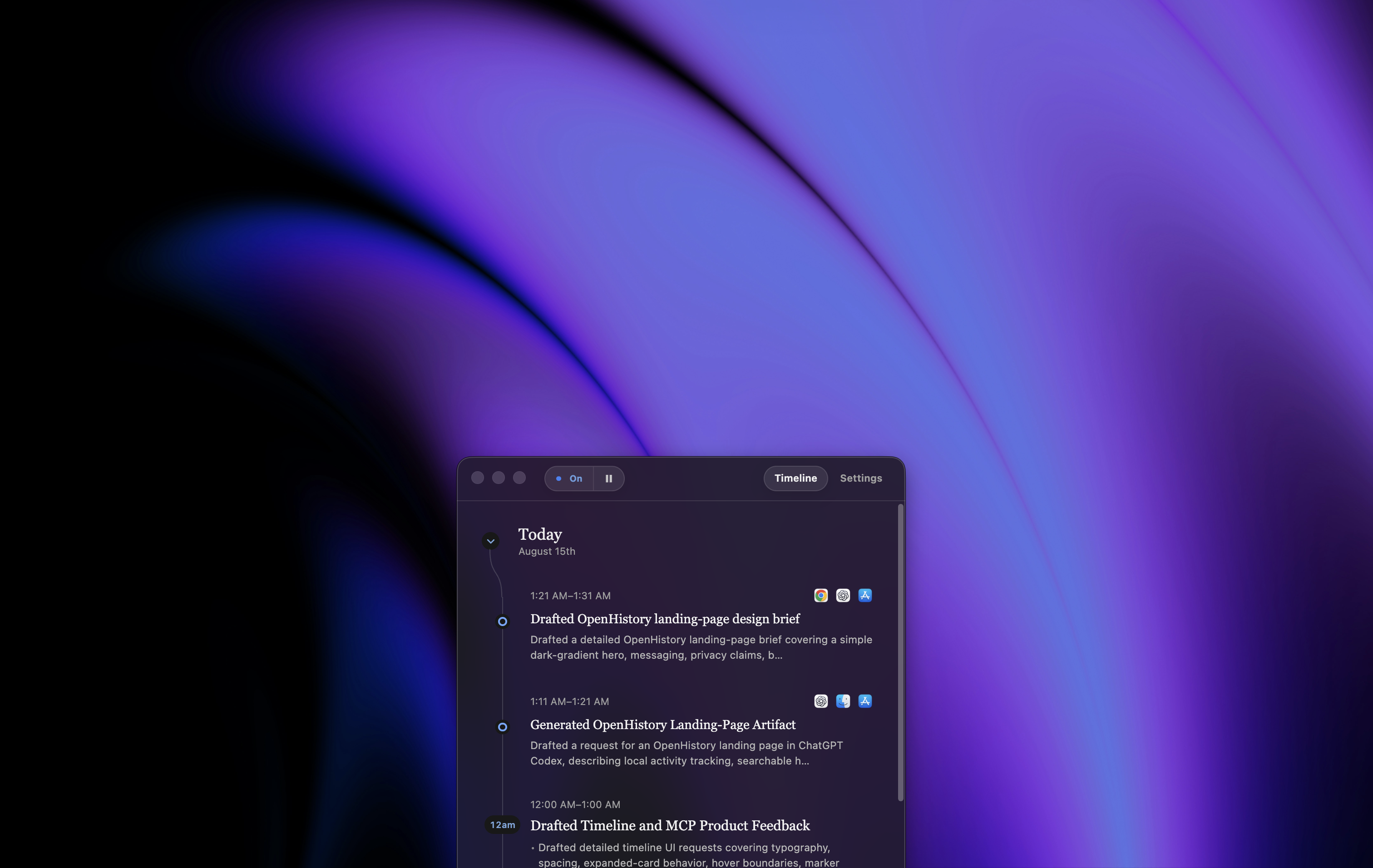
OpenHistory turns activity you permit on your Mac into a private record of your work. It builds a timeline, creates hourly and daily summaries, and gives approved local AI agents a controlled way to answer questions about what you did.
OpenHistory is under active development. It runs on macOS 14 or later and is currently installed from source.
Why OpenHistory?
Work gets scattered across editors, browsers, terminals, documents, and issue trackers. By the end of the day, it can be surprisingly hard to remember what moved forward—or where you left off.
OpenHistory leaves you with a useful memory of the day without taking screenshots or recording every keystroke. You can use it to answer questions like:
What did I finish yesterday?
Where did I leave that release task?
What work is still unfinished?
What you get
- An automatic work timeline. Permitted foreground activity is grouped into clear work summaries.
- Hourly and daily recaps. OpenHistory turns work summaries into a history you can scan later.
- Searchable out of the box. Find past work immediately with built-in history search.
- Choose your own inference. Use Apple's experimental on-device model for maximum privacy—or connect OpenAI, Anthropic, or Kimi. Or simply turn off automatic summaries to keep just your logs.
- Controlled agent access. Local AI tools can search a redacted, read-only view through an authenticated MCP server.
Privacy at a glance
| OpenHistory behavior | |
|---|---|
| What it records | Foreground application activity and permitted accessibility changes needed to create work summaries. |
| What it never records | Screenshots, audio, or individual key events. Password fields, private browser windows, and protected apps and websites are excluded. |
| Where data lives | Raw activity, summaries, settings, and agent credentials stay in a permission-restricted local data directory. |
| When cloud models receive data | Only after you choose a cloud provider, supply its key, and accept the provider-specific transmission disclosure. |
| What agents can see | A redacted projection—not the raw activity log—served over loopback with bearer authentication. |
Collection can be paused at any time. Settings → Data & privacy → Delete all local data removes recorded activity, summaries, settings, saved keys, and agent connections.
During first-run setup, email activity and recognized Messages/iMessage and chat activity are selected for inclusion by default. You can clear either selection before finishing setup and later control each category independently in Settings. Enabled email, messaging, or text-edit capture can contain sensitive text, so the local data directory should still be treated as private. Read the full privacy policy and security policy before using OpenHistory with sensitive work.
Quick start
Download for Mac
The easiest way to get started is to download OpenHistory for Mac →. No Node.js or Xcode setup is required.
OpenHistory requires macOS 14 or later. Apple's on-device summaries require Apple Intelligence on macOS 26 or later; OpenAI, Anthropic, and Kimi are available as optional alternatives.
Build from source
If you'd rather inspect, modify, or build OpenHistory yourself, you'll need:
- macOS 14 or later
- Node.js 22
- Xcode with Swift 6.1 or later
git clone https://github.com/ztratar/openhistory.git
cd openhistory
npm ci
npm run dev
First launch
On first launch, OpenHistory keeps collection paused until you accept the privacy notice. You will then choose how summaries should work:
- Apple On-Device keeps evidence on the Mac and requires no API key.
- A cloud provider requires its own API key and an explicit transmission disclosure.
- Summaries off keeps local collection running without model-generated timeline entries.
Keys entered in Settings are encrypted separately for each provider using macOS-backed Electron secure storage. They are never returned to the renderer, collector, or MCP clients.
Using environment variables instead of SettingsCopy the example file and add only the provider you want:
cp .env.example .env.local
OpenHistory reads ignored local environment files as a fallback. Supplying a key does not itself grant consent or enable cloud transmission; onboarding still requires the matching provider disclosure.
Accessibility permission
Richer context requires macOS Accessibility permission. In OpenHistory, open Settings and choose Grant access. The collector runs in the Electron main process, so packaged builds present a single OpenHistory Accessibility entry instead of requiring permission for a second helper app.
Architecture
macOS Accessibility APIs
          │
          ▼
Electron main process + embedded Swift collector
          │
          ├──────────────► permission-restricted JSONL
          │
          ▼
deterministic episodes
          │                      │
          │                      ▼ automatic update
          │          selected inference provider
          │                      │
          ▼                      ▼
React UI ◄──────── timeline + hour + daily-rollup indexes
                                 │
                                 ▼ sanitized projection
                     authenticated local MCP server
The renderer is sandboxed and communicates through a narrow typed preload bridge. Structured model outputs are validated before persistence. Raw events, indexes, Markdown, settings, and agent credentials are restricted to the current macOS user.
Inference inputs, prompts, schemas, limits, providers, and the native worker protocol are versioned and covered by preservation tests. See the inference architecture and model-quality methodology.
Privacy model
- Collection can be paused at any time.
- When automatic summaries are enabled and the selected provider has an API key, completed episode evidence is sent directly to that provider about every 10 minutes.
- Chat requests send the conversation and relevant retrieved evidence to the configured cloud provider; questions about very recent work can include privacy-filtered activity not yet covered by a timeline summary.
- OpenAI requests use
store: false; Anthropic and Kimi requests are governed by their respective API data policies. - Credentials and credential-shaped text are redacted before persistence or projection.
- Raw activity is excluded from the MCP projection.
- Agent credentials are random, independently revocable, and stored only as SHA-256 hashes.
- The MCP server binds to
127.0.0.1, requires bearer authentication, and rejects non-local browser origins.
See the complete privacy policy and SECURITY.md for reporting security issues. Startup automatically removes historical protected activity and invalid derived summaries. To run that raw-event scrub manually, use:
npm run privacy:scrub-protected -- "/path/to/activity-data"
Raw JSONL remains the source of truth. Timeline items reference their exact source event IDs, while hourly and daily rollups independently reference revisions of verified timeline items. Stale derived data is not shown or sent back to the model. Existing version-1 data in memory/ is imported into daily-rollups/ on first launch after upgrading.
Use Settings > Data & privacy > Delete all local data to remove raw activity, summaries, settings, saved keys, and agent connections. OpenHistory confirms the action natively and restarts. For a full uninstall, delete local data first, remove the app, then remove its Accessibility permission in System Settings.
Local agent access
In Settings, choose Copy prompt and paste it into your local coding agent. OpenHistory creates a dedicated, independently revocable credential for that connection. Credentials are sent in the Authorization header and are never placed in the MCP URL.
The read-only MCP tools can:
- search your work history;
- retrieve a day or timeline item;
- find referenced files, links, and other work surfaces;
- identify unfinished work.
The default endpoint is http://127.0.0.1:47831/openhistory/mcp.
Where we'd love help
OpenHistory is still early, and some of the most interesting work is ahead of us. We'd especially welcome help with:
- Exploring what's possible on Windows. Investigate native activity collection, privacy boundaries, packaging, and which parts of the current macOS architecture can be shared.
- Improving the local model. Design an opt-in, privacy-preserving way for people to contribute human-corrected training examples for a future LoRA-based local model—without uploading raw activity logs.
- Performance and battery life. Measure and reduce the cost of running OpenHistory throughout the workday.
- More agent integrations. Improve the MCP experience across local agents and find useful new ways for them to work with personal history safely.
- Privacy, accessibility, and app coverage. Test unfamiliar macOS setups, strengthen protected-surface detection, and make onboarding work well for more people.
- You name it. If you see a better workflow, a missing safeguard, or a surprising use for OpenHistory, we'd like to hear it.
Start with the contributing guide, or open an issue to propose an idea before building it.
Development
npm test          # TypeScript and Swift tests
npm run build     # Native collector and Electron production bundles
npm run check     # Complete local quality gate
Desktop distribution
The repository includes a credential-free local path for testing the ToDesktop packaging and update configuration. It isolates the release CLI from the application dependency tree, builds universal native components, embeds the Swift collector inside Electron's main process, and uses an explicit upload manifest that excludes local data and private evaluation assets. See the ToDesktop release guide.
Build a complete runnable application locally without ToDesktop credentials or an upload:
npm run desktop:package:local
The verified, ad-hoc-signed application is written under .todesktop/local/. It contains only compiled application output, production dependencies, the public icon, the in-process collector bridge, and the Foundation Models worker.
Useful references:
- Architecture and inference contracts
- Model-quality methodology
- ToDesktop release process
- Contributing guide
License
OpenHistory is available under the MIT License.
Yorumlar (0)
Yorum birakmak icin giris yap.
Yorum birakSonuc bulunamadi