plum-code-webui
Health Gecti
- License — License: MIT
- Description — Repository has a description
- Active repo — Last push 0 days ago
- Community trust — 10 GitHub stars
Code Basarisiz
- rm -rf — Recursive force deletion command in package.json
- rm -rf — Recursive force deletion command in packages/backend/package.json
- rm -rf — Recursive force deletion command in packages/backend/src/cli/permission-prompt.ts
- os.homedir — User home directory access in packages/backend/src/cli/permission-prompt.ts
- process.env — Environment variable access in packages/backend/src/cli/permission-prompt.ts
- process.env — Environment variable access in packages/backend/src/config.ts
- exec() — Shell command execution in packages/backend/src/db/index.ts
- process.env — Environment variable access in packages/backend/src/db/index.ts
Permissions Gecti
- Permissions — No dangerous permissions requested
This tool is a web-based user interface that allows developers to interact with various AI command-line tools (like Claude Code, Codex, and Gemini). It provides real-time streaming, multi-session management, and file editing capabilities directly from your browser.
Security Assessment
Overall Risk: Medium
The application acts as a bridge between a web UI and local command-line interfaces, which inherently requires elevated permissions. The scan flagged several instances of `rm -rf` (recursive force deletion) and shell command execution. While common in development scripts and CLI orchestration tools, these commands are powerful and could be dangerous if exploited or misconfigured. The application also accesses the user's home directory and reads environment variables (where API keys are often stored), though this is strictly necessary for its core functionality to manage AI providers and monitor context windows. No hardcoded secrets were found, and the tool does not request explicitly dangerous system permissions.
Quality Assessment
The project is relatively new but well-constructed and actively maintained, with its last code push occurring today. It uses a standard, permissive MIT license, making it safe for most commercial and personal open-source projects. However, community trust is currently very low, as it has only accumulated 10 GitHub stars. This means the codebase has not yet been widely reviewed by a large audience of independent security researchers or developers.
Verdict
Use with caution: The code is modern, actively maintained, and well-structured, but its low community validation and inherent requirement to execute shell commands warrant a careful security review before exposing it to sensitive environments.
Web UI for Claude Code, Codex, Gemini & GLM CLIs - Multi-provider support, real-time streaming, tool execution tracking, orchestration, and self-rebuild. Built with React, Express, Socket.IO.
Plum Code WebUI
A powerful web-based interface for Claude Code, Codex, Gemini, and GLM CLIs with multi-provider support, real-time streaming, tool execution tracking, orchestration, and self-rebuild capabilities.



Screenshots
Desktop
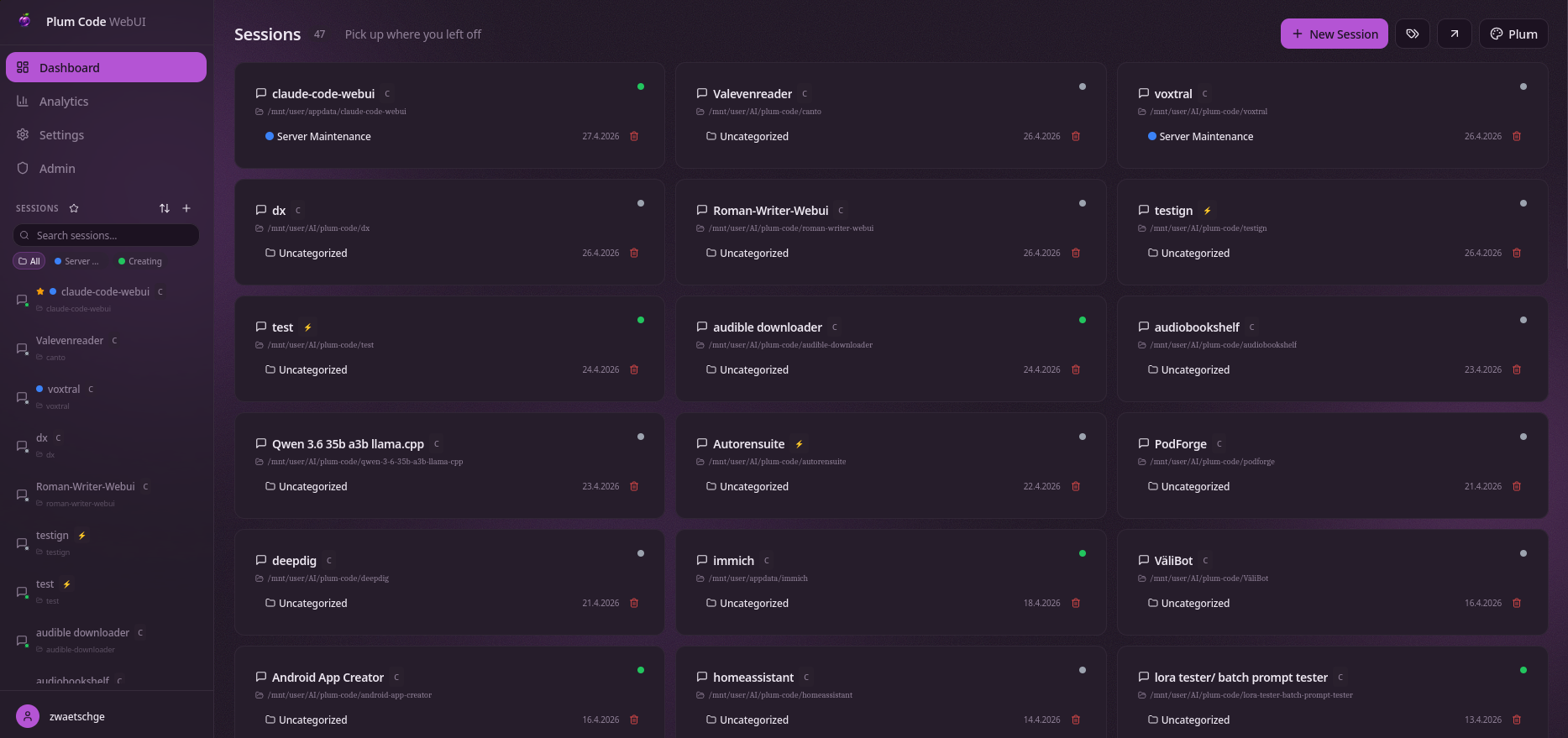
Sessions dashboard — pick up where you left off across providers and projects.
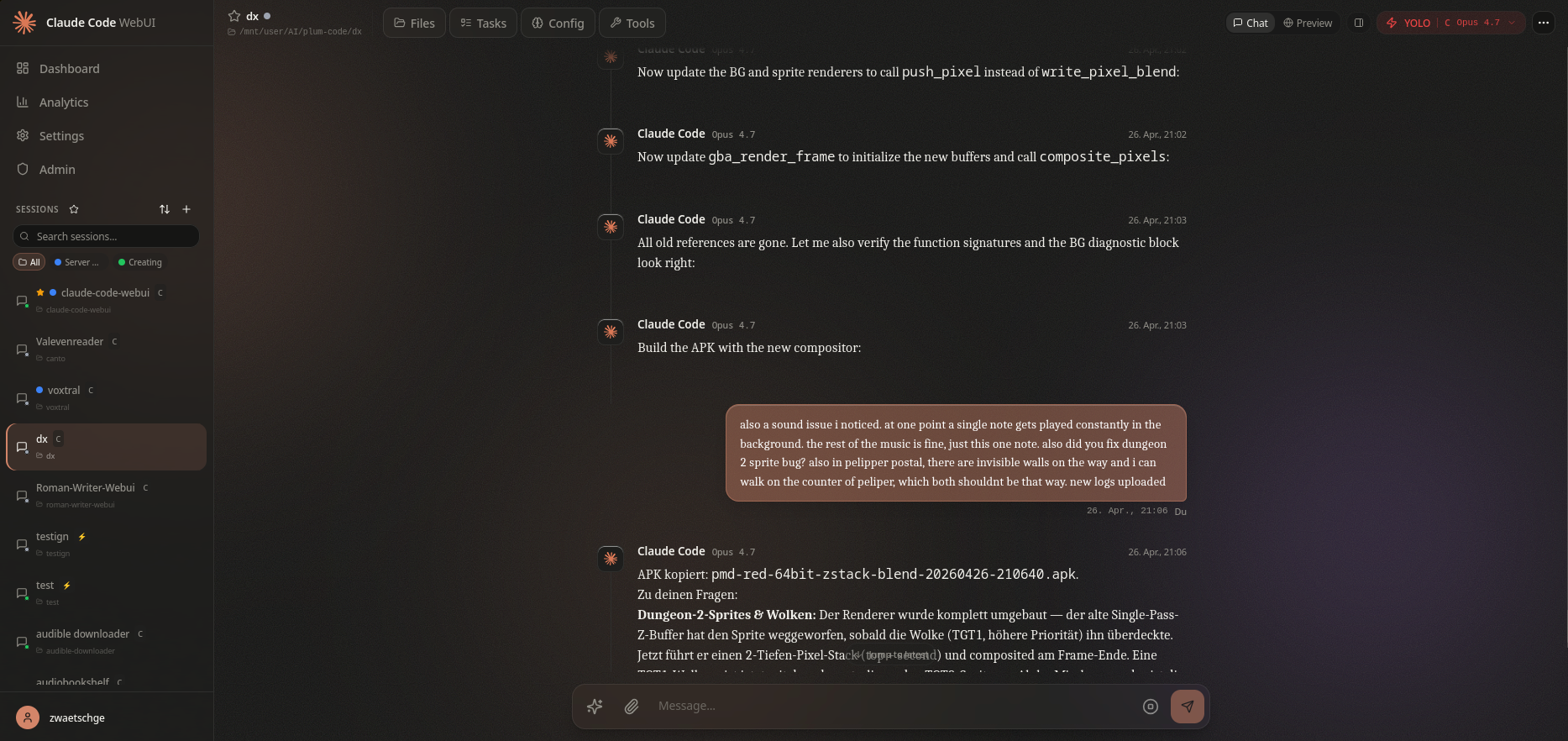
Live chat session driving the Claude Code CLI with streaming responses, tool execution, and inline preview.
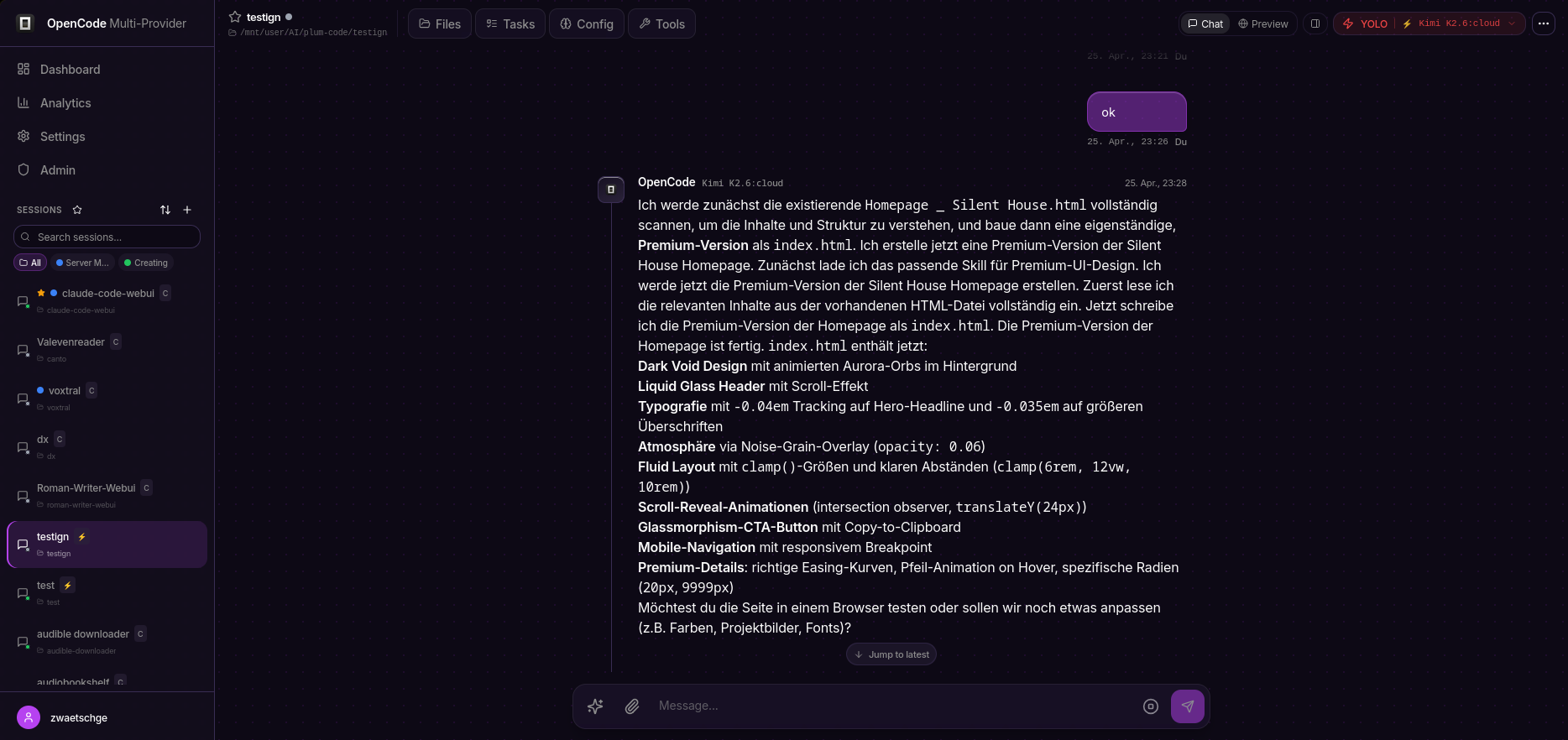
OpenCode session running Kimi K2.6 — 75+ LLMs available behind a single CLI.
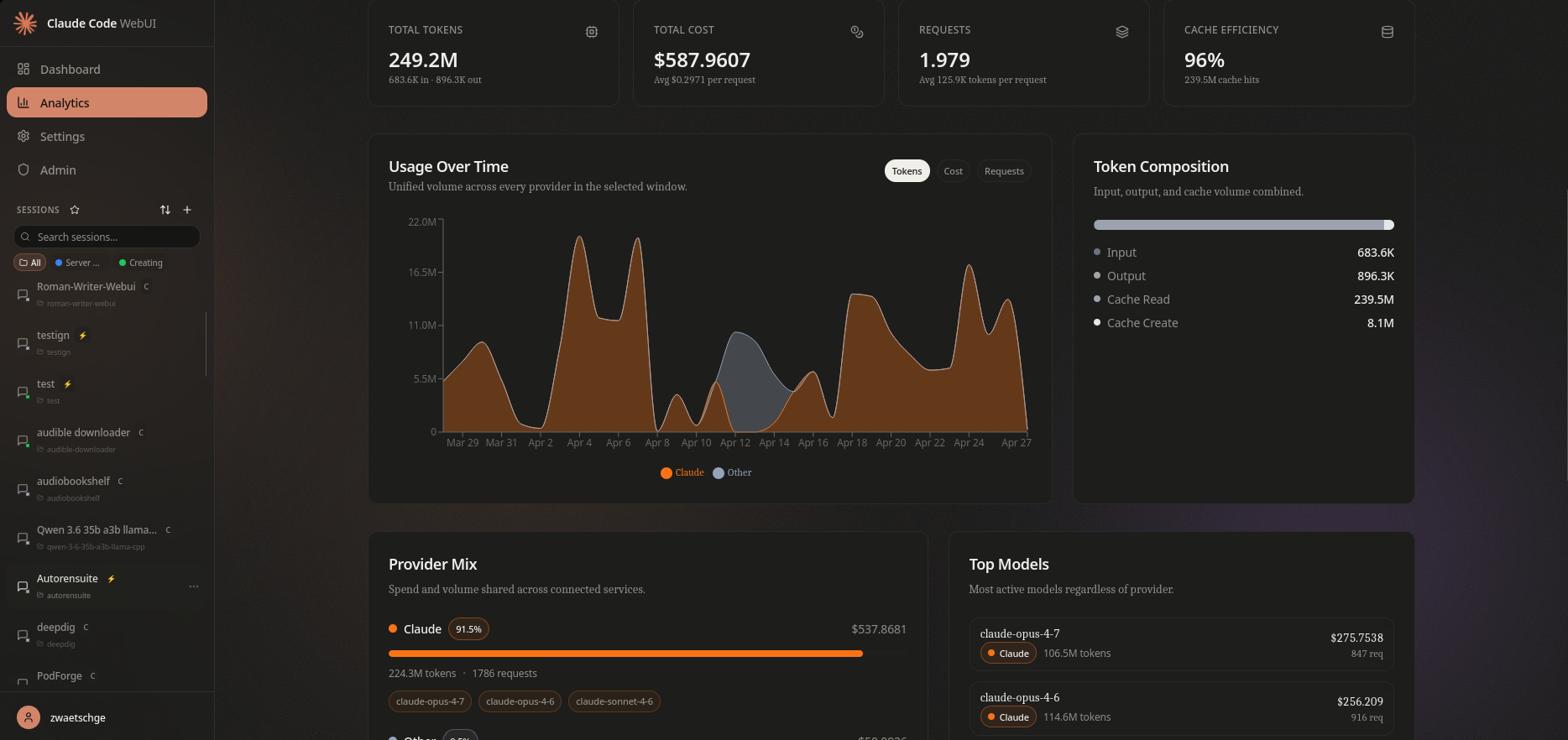
Analytics — token volume, cost, request count, cache efficiency, and per-model breakdown.
Mobile
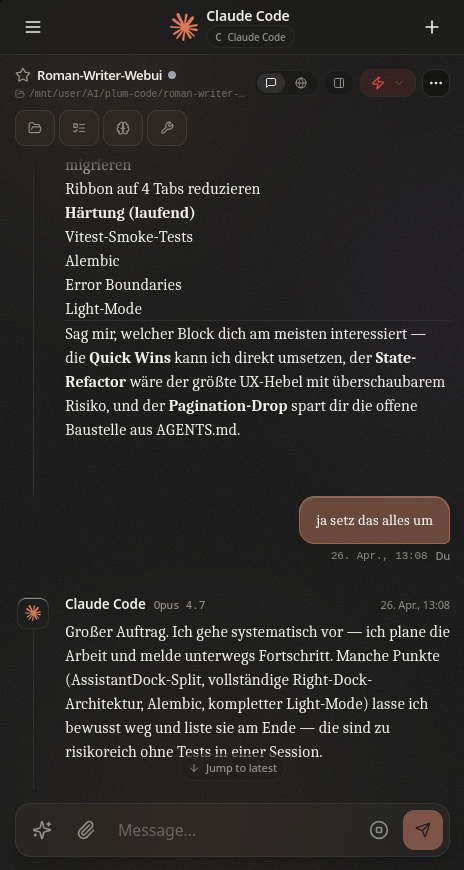
Responsive chat with the same provider-aware UI on phone-sized viewports.
Features
Chat Interface
- Real-time streaming responses via WebSocket
- Multi-session management with history
- Image attachments and Gemini image generation
- LaTeX/Math rendering with KaTeX
- Interactive choice prompts
- Context & token popover with live progress bar
- Todo tracking from Claude's TodoWrite tool
DevTools Integration
- Context Popover: Inline progress bar showing context window usage (green→yellow→red), click to see full token breakdown (input/output/cache read/cache write), cost, and model
- Tool-Log Panel: Full tool execution timeline with filter buttons (All, Read, Write, Bash, Web, Agent), duration tracking per tool, live timers for running tools, expandable input/output details
- Compaction Boundary Cards: Visual separators in chat when context is compacted, with expandable summary text
Multi-Provider Support
- Claude (Anthropic) — primary provider
- Codex (OpenAI) — alternative provider
- GLM (Z.AI) — Chinese market provider
- Per-session provider selection
- Independent CLI instances per provider
Orchestration
- Multi-provider task delegation
- Parallel worker execution
- Task routing and progress tracking
- Worker output streaming
Ralph (Autonomous Loop)
- Iterative autonomous task execution
- Plan generation and progress tracking
- Multi-iteration workflows with checkpoints
File Management
- File Tree Browser with lazy loading and git status
- Monaco Code Editor with syntax highlighting
- Create, edit, delete, and rename files
- Three view modes: Simple, Compact, Detailed
Git Integration
- Full Git Panel (staging, commits, diffs, history)
- Visual branch management (create, publish, delete)
- Commit history with diff viewer
- AI-powered commit message generation
- Pull/Fetch with remote status (ahead/behind)
GitHub Integration
- Create new repositories
- Clone repositories (with repo browser)
- Push to GitHub with remote management
- Token-authenticated operations
Custom Commands
- Built-in commands:
/help,/clear,/model,/status,/cost,/compact - User commands from
~/.claude/commands/*.md - Project commands from
{project}/.claude/commands/*.md - Autocomplete dropdown when typing
/
Project Management
- Project Auto-Discovery from
~/.claude/projects - Working directory navigation
- Session starring and filtering
- PTY Reconnect with 30-minute buffer
Self-Rebuild
- Container can rebuild and redeploy itself
- Rebuild Robot for external container management
- Status tracking and reporting
Watchdog & Monitoring
- Session health monitoring
- Telegram bot notifications
- Configurable alert thresholds
Mobile Support
- Progressive Web App (PWA)
- Bottom tab navigation
- Swipe gestures for panel navigation
- Responsive design
Settings
- Tabbed settings interface
- Theme configuration
- API key management (Gemini, GitHub)
- MCP Server management with connection testing
- Memory viewer for session context
Tech Stack
Backend
- Express.js - HTTP server
- Socket.IO - Real-time communication
- SQLite (better-sqlite3) - Database
- node-pty - Claude CLI process management
- simple-git - Git operations
- @octokit/rest - GitHub API
Frontend
- React 18 - UI framework
- Vite - Build tool with code splitting
- Radix UI - Accessible components
- Tailwind CSS - Styling
- Zustand - State management
- TanStack Query - Data fetching
- Monaco Editor - Code editing
- KaTeX - Math rendering
Shared
- TypeScript - Type safety across all packages
Installation
Quick start (Docker)
git clone https://github.com/zwaetschge/plum-code-webui.git
cd plum-code-webui
./scripts/install.sh
The installer walks you through:
- Prereq check — docker, docker compose plugin, openssl, daemon connectivity.
- Interactive
.env— public URL, port, allowlisted login emails, host paths for data/config/workspace. Auto-generatesSESSION_SECRET+JWT_SECRET. docker compose build+up -d— first run takes a few minutes.- Health wait — polls
/health(or the container's healthcheck) for up to 2 min. - Optional
claude /login— drops you into the in-container Claude TUI so you can run/loginand link an Anthropic account immediately. Can be skipped with--skip-login.
Re-run any time to reconfigure (existing .env values are preserved unless you pass --reset). Non-interactive mode (--non-interactive) takes all defaults — useful for CI bootstraps.
Requirements: Docker 24+, Docker Compose plugin, openssl. The container ships its own Node + the claude, codex, and opencode CLIs.
Site-specific deployment (Traefik, Unraid, etc.)
The repo's docker-compose.yml is intentionally portable — no Traefik labels, no absolute paths, no external networks. Site-specific overrides go into docker-compose.override.yml (gitignored), which Compose auto-merges. A copy-paste starting point lives at docker-compose.override.yml.example and shows how to add Traefik labels, absolute host paths (e.g. /mnt/user/appdata/... on Unraid), group_add for the docker socket GID, and a repair-bot self-rebuild sidecar.
Manual Docker (no installer)
cp .env.example .env       # then edit: SESSION_SECRET, JWT_SECRET, AUTH_ALLOWED_EMAILS, FRONTEND_URL
docker compose up -d --build
Access the WebUI at the FRONTEND_URL you configured (default http://localhost:4545).
Development setup (no Docker)
pnpm install                # workspace deps
pnpm dev                    # backend (3006) + frontend (5173) in parallel
# or:
./scripts/start-webui.sh    # generates ephemeral secrets, kills stale PIDs, tails logs
Prerequisites: Node 20+, pnpm 9+, the claude CLI installed locally if you want OAuth-linked sessions.
Production build (no Docker)
pnpm build
pnpm start
Configuration
Environment Variables
Full schema in packages/backend/src/config.ts (zod-validated, fails fast on startup). Most setups can ignore everything below the divider — scripts/install.sh writes the required values into .env for you.
| Variable | Description | Required |
|---|---|---|
SESSION_SECRET |
Express session secret (min 32 chars). Installer auto-generates. | Yes |
JWT_SECRET |
JWT signing key (min 32 chars). Installer auto-generates. | Yes |
AUTH_ALLOWED_EMAILS |
Comma-separated email allowlist enforced for both OAuth and basic-auth. Empty = no allowlist — only safe behind a private network or SSO proxy. | Recommended |
FRONTEND_URL |
Public URL the WebUI is reached at (default: http://localhost:4545). Used for CORS + OAuth redirects. |
No |
CORS_ALLOWED_ORIGINS |
Comma-separated additional CORS origins. | No |
SEED_ADMIN_EMAIL |
First user with this email gets role=admin on first login. |
No |
WEBUI_PORT |
Host port to expose (default: 4545). Container always listens on 3001 internally. |
No |
DATA_DIR / CONFIG_DIR / WORKSPACE_DIR |
Host paths bind-mounted to /app/packages/backend/data, /home/node/.<cli>, and /workspace (defaults: ./data, ./config, ./workspace). |
No |
GITHUB_CLIENT_ID / GITHUB_CLIENT_SECRET / GITHUB_CALLBACK_URL |
Optional GitHub OAuth. Callback: ${FRONTEND_URL}/auth/github/callback. |
No |
GOOGLE_CLIENT_ID / GOOGLE_CLIENT_SECRET / GOOGLE_CALLBACK_URL |
Optional Google OAuth. Callback: ${FRONTEND_URL}/auth/google/callback. |
No |
CLI_PROVIDER_CLAUDE_MODELS |
Override the Claude model menu (default: opus,sonnet,haiku). |
No |
CLI_PROVIDER_CODEX_MODELS / CLI_PROVIDER_OPENCODE_MODELS |
Empty = auto-discover from the installed CLI. | No |
CLI_PROVIDER_OPENCODE_DEFAULT_MODEL |
Default model for OpenCode sessions (default: z-ai/glm-5.1). |
No |
TRUST_PROXY |
Express trust proxy (default: 1). Setting true without a guarding proxy defeats IP-based rate-limiting. |
No |
Claude CLI Integration
The backend communicates with Claude CLI in stream-json mode:
claude --print --verbose --output-format stream-json --input-format stream-json \
       --include-partial-messages --dangerously-skip-permissions
GLM (Z.AI) sessions run a separate Claude Code CLI instance with its own config home (~/.glm by default). See the CLI_PROVIDER_GLM_* and WEBUI_GLM_CONFIG_HOME environment variables above.
Project Structure
packages/
├── backend/              # Express + Socket.IO server
│   ├── src/
│   │   ├── routes/       # REST API endpoints
│   │   ├── services/     # Business logic
│   │   │   ├── claude/   # Claude CLI process management
│   │   │   ├── orchestration/  # Multi-provider orchestration
│   │   │   ├── ralph/    # Autonomous loop engine
│   │   │   ├── watchdog/ # Health monitoring & alerts
│   │   │   └── gemini/   # Gemini image generation
│   │   ├── websocket/    # Socket.IO handlers
│   │   └── db/           # SQLite database
├── frontend/             # React + Vite application
│   ├── src/
│   │   ├── components/
│   │   │   ├── chat/     # Chat messages, tools, compaction cards
│   │   │   ├── session/  # Controls, tool log, watchdog
│   │   │   ├── orchestration/  # Multi-provider UI
│   │   │   ├── ralph/    # Autonomous loop UI
│   │   │   └── ui/       # Shared UI primitives
│   │   ├── pages/
│   │   ├── stores/       # Zustand stores
│   │   ├── services/     # API & Socket clients
│   │   └── hooks/        # Custom React hooks
├── shared/               # Shared TypeScript types
└── scripts/              # Rebuild robot & helper scripts
API Endpoints
Sessions
GET /api/sessions- List all sessionsPOST /api/sessions- Create new sessionGET /api/sessions/:id- Get session detailsPATCH /api/sessions/:id/star- Toggle star
Files
GET /api/files?path=- List directory contentsGET /api/files/content?path=- Read file contentPOST /api/files- Create filePUT /api/files- Update fileDELETE /api/files?path=- Delete file
Git
GET /api/git/status?path=- Get git statusPOST /api/git/stage- Stage filesPOST /api/git/commit- Create commitPOST /api/git/pull- Pull from remotePOST /api/git/push- Push to remotePOST /api/git/branch/create- Create branchPOST /api/git/generate-commit-message- AI commit message
GitHub
GET /api/github/repos- List user reposPOST /api/github/repos- Create repoPOST /api/github/clone- Clone repoPOST /api/github/push- Push to GitHub
Commands
GET /api/commands- List available commandsPOST /api/commands/execute- Execute command
WebSocket Events
Client → Server
session:send- Send message to Claudesession:subscribe- Subscribe to session updatessession:interrupt- Interrupt Claude (Ctrl+C)session:reconnect- Reconnect with buffer replay
Server → Client
session:output- Streaming textsession:message- Complete messagesession:thinking- Thinking indicatorsession:tool_use- Tool usage events (with duration tracking)session:todos- Todo list updatessession:usage- Token usage datasession:compact- Context compaction eventssession:agent- Subagent lifecycle eventssession:mode- Permission mode changesorchestration:*- Orchestration state, tasks, workersralph:*- Ralph autonomous loop events
Contributing
- Fork the repository
- Create a feature branch
- Make your changes
- Run
pnpm typecheckandpnpm lint - Submit a pull request
License
MIT License - see LICENSE for details.
Acknowledgments
- Anthropic for Claude
- Claude Code CLI for the underlying tool
Yorumlar (0)
Yorum birakmak icin giris yap.
Yorum birakSonuc bulunamadi