comandos
Health Warn
- License — License: MIT
- Description — Repository has a description
- Active repo — Last push 0 days ago
- Low visibility — Only 6 GitHub stars
Code Fail
- network request — Outbound network request in adapters/opencode-comandos.js
- network request — Outbound network request in dash/sw.js
- rm -rf — Recursive force deletion command in tests/test_codex_adapters.sh
Permissions Pass
- Permissions — No dangerous permissions requested
No AI report is available for this listing yet.
Mission control for running many Claude Code agents in parallel — live dashboard, actionable popups with full markdown, voice alerts, tabbed terminals, one-key answers, Telegram remote control. Linux, no cloud, survives reboots.
ComandOS
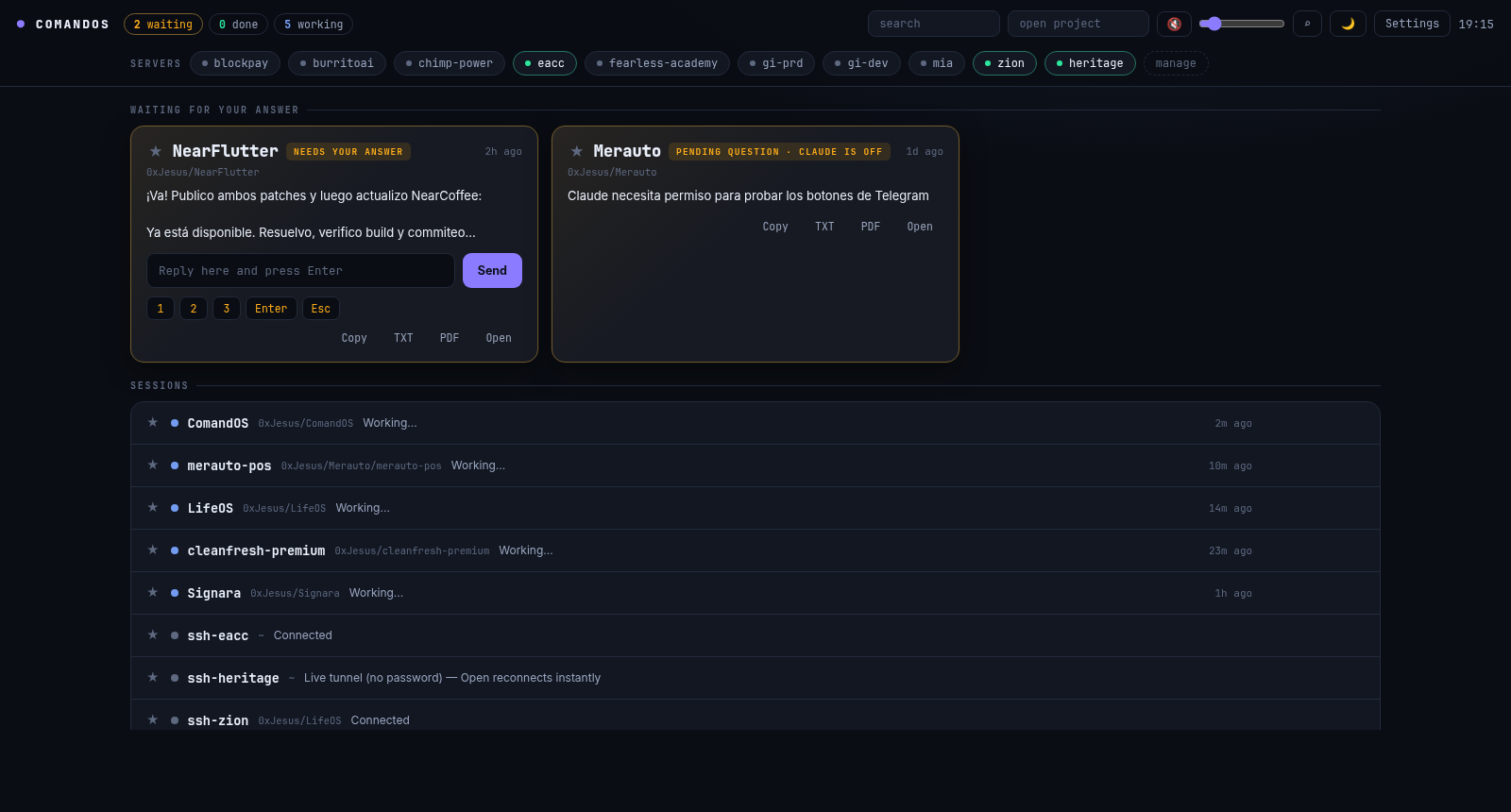
Mission control for running many Claude Code agents in parallel — it tells you who needs you.
Offline voice alerts, actionable popups with full rendered markdown, tabbed terminals,
and Telegram remote control. You answer with one keystroke and move on.



Why
When you run 10 Claude Codes at once, the problem isn't terminals — it's knowing
which one needs you and getting back to it without friction. ComandOS turns that
into an event-driven flow: the system interrupts you (voice + actionable popup),
you answer with a key or a line, and you keep going. No tab-scanning.
What you get
- Live dashboard (
127.0.0.1:4777): whatever waits for YOUR answer shows up big,
with the question's real options as buttons. Respond without switching windows. - Actionable popups: full text with rendered markdown (tables included),
1/2/3 buttons, inline reply, Copy, and "View ALL". Never answer blind. - Native app (GTK + VTE): one tab per session with a status dot
(amber = waiting · blue = working · green = done), Ctrl+K jumps to any session,
renameable tabs, splits, and Night/Day/Warm themes. - Copy & export any response: clipboard,
.txt, or PDF with rendered markdown —
from the terminal, the popup, or the dashboard. - Local voice (piper, 100% offline) + chime, one global volume that everything respects.
- SSH manager: CRUD over
~/.ssh/config, one-click connect, detects live
multiplexed tunnels (no-password reconnect). - Telegram: buttons on notifications, reply to answer,
/ls /out /run. - Everything is files (tmux, JSON, ssh config). No cloud, no DB. Survives reboots.
- UI in English and Spanish (auto-detected from
$LANG, switchable in Settings).
Install
git clone https://github.com/0xAI-Builders/comandos.git
cd comandos && ./install.sh
Requires Linux with GNOME/X11, python3-gi, tmux, jq.
Recommended: xclip, wmctrl, piper (voice), kitty.
Open ComandOS from your app menu, or the dashboard at http://127.0.0.1:4777.
Agents
| Agent | Integration | What you get |
|---|---|---|
| Claude Code | native hooks (auto via install.sh) |
working · waiting with real options · done · full reply |
| Codex CLI | lifecycle hooks + notify fallback (cc-agents setup) |
working · waiting for permissions · done + last message |
| OpenCode | plugin (cc-agents setup) |
working · waiting · errors · done |
| Gemini CLI | hooks (cc-agents setup) |
working · waiting · done · full reply |
Antigravity CLI (agy) |
hooks (cc-agents setup) |
working · done — verified on a real session |
One command connects everything you have installed: cc-agents setup.
If Codex asks you to review new hooks, open /hooks in Codex and trust the
ComandOS hook once.
Any other agent can join with a single HTTP call:POST 127.0.0.1:4777/event {"agent","event","cwd","msg?","full?"}.
Phone & tablet (secure)
Keep prompting from your phone — securely, in one command:
cc-mobile # connects over your tailnet and shows a QR to pair
Scan the QR, open the dashboard, "Add to Home Screen" — it installs as an app
(PWA), no App Store. Answer prompts, reply to agents, run sessions from bed.
Want the FULL interactive terminal on your phone? Install ttyd and runcc-webterm — every session gets a Terminal button that opens the real,
live, interactive terminal (xterm.js attached to the same tmux session). Type,
scroll, run vim — exactly like sitting at your desk, shared in real time.
Routed under /term by the same Tailscale Serve, behind the same token.
Security is layered, on by default:
- Tailscale (WireGuard): only your devices, end-to-end encrypted. Never on the public internet — Serve only, never Funnel.
- Automatic TLS via
tailscale serve(https on your tailnet). - Access token: even inside your tailnet, no token → no access.
cc-dashstill binds only to127.0.0.1; Serve bridges it. - Anti-DNS-rebinding: Host-header allowlist (loopback +
*.ts.net). - Local desktop app/browser needs no token; only remote/proxied requests do.
cc-mobile off stops exposing it.
Platforms
| Platform | Status |
|---|---|
| Linux (GNOME/X11) | Everything — this is the daily driver ✓ |
| Windows 11 | Via WSL2 + WSLg (GUI app, audio and all) — beta |
| macOS | Engine + web dashboard + native notifications/voice (osascript, say, afplay); GTK app/popups pending — beta, testers welcome |
Pieces
| Piece | What it is |
|---|---|
bin/cc-dash |
Engine: dashboard + tmux/ssh actions (127.0.0.1:4777) |
bin/cc-app |
Native app: dashboard + terminal tabs |
bin/cc-notifyd |
Actionable popup daemon |
bin/cc-telegram |
Telegram bridge |
hooks/cc-notify.sh |
Claude Code hook: state + notifications |
bin/ccx |
One tmux session per project (ccx name, ccx -a codex name) |
bin/cc-agents |
Connect Codex / OpenCode / Gemini / Antigravity |
bin/cc-mobile |
Expose the dashboard to your phone over Tailscale (secure) |
bin/cc-webterm |
Full interactive web terminal (ttyd) for your sessions |
Roadmap
Support for more agents is planned — see
Codex CLI and
Antigravity. PRs welcome.
Support
If it saves you time, buy me a coffee — it keeps the project alive:
Buy Me a Coffee ·
GitHub Sponsors
License
Reviews (0)
Sign in to leave a review.
Leave a reviewNo results found