comandos
Health Uyari
- License — License: MIT
- Description — Repository has a description
- Active repo — Last push 0 days ago
- Low visibility — Only 6 GitHub stars
Code Uyari
- process.env — Environment variable access in adapters/opencode-comandos.js
Permissions Gecti
- Permissions — No dangerous permissions requested
Bu listing icin henuz AI raporu yok.
Local-first terminal mission control for Claude Code, OpenAI Codex CLI, Gemini CLI and OpenCode. Run AI coding agents in parallel tmux sessions, manage direct SSH connections, monitor usage and continue securely from phone via Tailscale. No ComandOS cloud, hosted database, telemetry or SSH proxy.
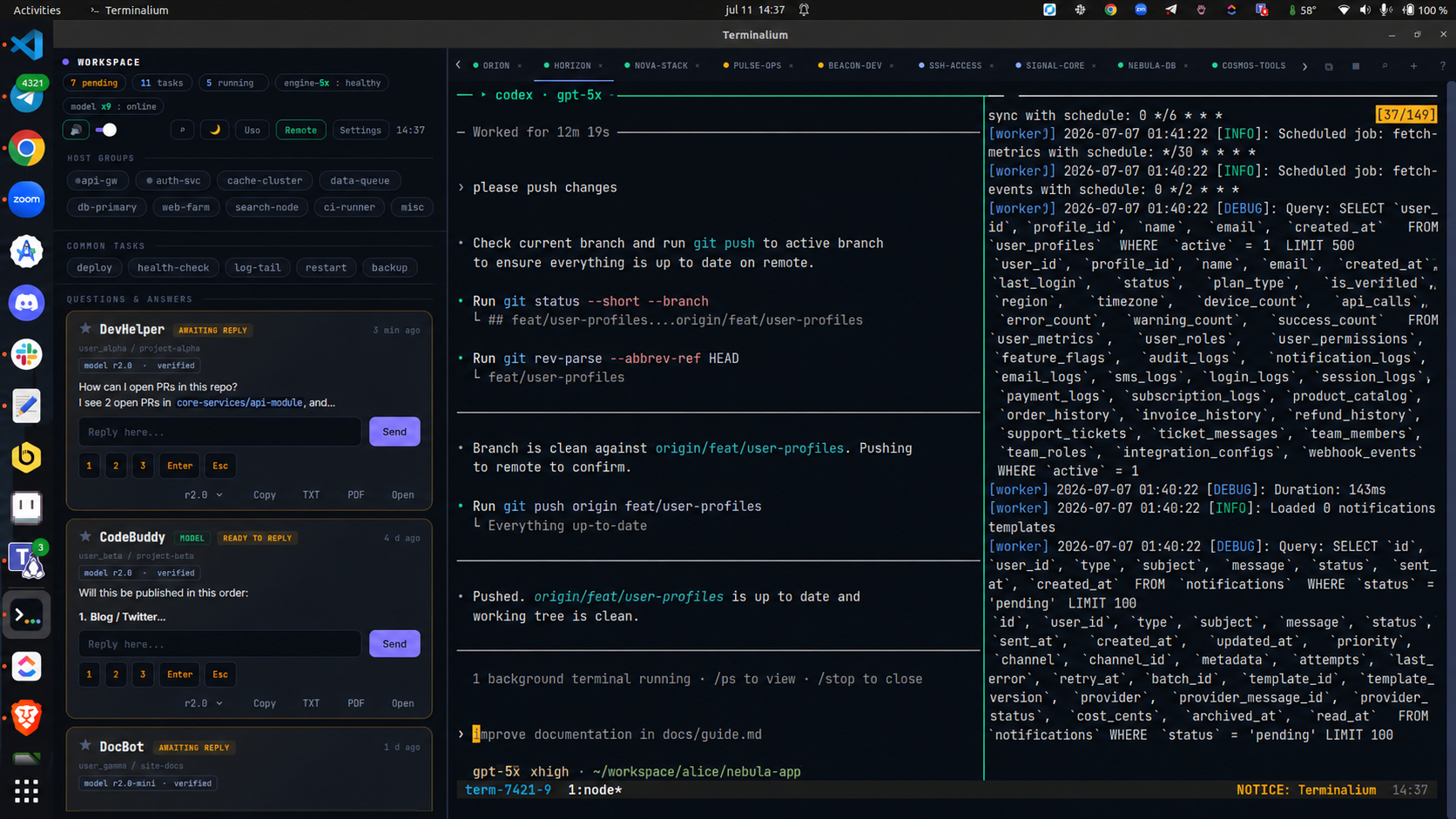
ComandOS — Local-First Mission Control for AI Coding Agents
Run Claude Code, OpenAI Codex CLI, Gemini CLI, OpenCode, and other coding
agents side by side in persistent tmux terminals. Get actionable
notifications, manage direct SSH sessions, monitor plan usage, and continue
securely from your desktop, phone, or tablet through the remote terminal
PWA over Tailscale — without a hosted ComandOS backend, external ComandOS
database, telemetry, or SSH proxy.


Why
When you run many coding agents at once, the problem isn't terminals — it's
knowing which one needs you and getting back to it without friction.
ComandOS turns Claude Code, Codex CLI, Gemini CLI, OpenCode, and regular shell
sessions into an event-driven flow: the system interrupts you (voice +
actionable popup), you answer with a key or a line, and you keep going. No
tab-scanning.
Local-first by design
ComandOS runs on your computer. Runtime state lives in local tmux sessions,
JSON and configuration files, and local SQLite at~/.claude/hooks/comandos-usage.sqlite. There is no hosted ComandOS backend,
external ComandOS database, telemetry service, or ComandOS SSH proxy.
SSH hosts are read from ~/.ssh/config, and the installed OpenSSH client
connects directly from your computer to the selected server. ComandOS does not
upload your SSH configuration or private keys to a ComandOS service. If you
explicitly request passwordless setup, ssh-copy-id copies only the selected
public key to that server.
Some features cross the network only when you use or configure them:
- Agent CLIs communicate with their own AI providers under those providers'
terms and settings. - Plan-usage monitoring may query Anthropic or OpenAI usage endpoints directly
when matching credentials are configured. - Remote access through Tailscale Serve is optional and stays inside the
tailnet configuration you control. - ComandOS no longer includes a Telegram bot: notifications do not pass
through the Telegram Bot API. Upgrading keeps any oldtelegram.envon disk
untouched; delete it yourself if you no longer need it. - Voice playback is local after installation;
cc-doctor --fixmay download
an optional Piper voice model when you ask it to repair voice support.
What you get
- Live dashboard (
127.0.0.1:4777): whatever waits for YOUR answer shows up big,
with the question's real options as buttons. Respond without switching windows. - Quota sharing (Analytics → Reparto): each plan is a tank showing what you have
spent and what your live sessions will add before it renews, with "reaches the reset"
or "runs out in 1d 22h" instead of a bare percentage. One click proposes a
redistribution across accounts, motors, models and efforts; drag a session to another
tank to overrule it; apply restarts them keeping the conversation, with per-session
progress and revert. - Actionable popups: full text with rendered markdown (tables included),
1/2/3 buttons, inline reply, Copy, and "View ALL". Never answer blind. - Native app (GTK + VTE): one tab per session with a status dot
(amber = waiting · blue = working · green = done), Ctrl+K jumps to any session,
renameable tabs, splits, and Night/Day/Warm themes. - Copy & export any response: clipboard,
.txt, or PDF with rendered markdown —
from the terminal, the popup, or the dashboard. - Local voice (piper, 100% offline) + chime, one global volume that everything respects.
- SSH manager: CRUD over
~/.ssh/config, one-click connect, detects live
multiplexed tunnels (no-password reconnect). - Snippets: save reusable shell commands (one-liners or multi-line scripts) and paste them into the active session with Ctrl+Shift+K. Bracketed paste — nothing runs until you press Enter.
- Local-first state: tmux, JSON/configuration files, and local SQLite survive
restarts without a hosted ComandOS service. - UI in English and Spanish (auto-detected from
$LANG, switchable in Settings).
Install
git clone https://github.com/0xjesus/comandos.git
cd comandos && ./install.sh
Requires Linux with GNOME/X11, python3-gi, tmux, jq.
Recommended: xclip, wmctrl, piper (voice), kitty.
Open ComandOS from your app menu, or the dashboard at http://127.0.0.1:4777.
Agents
| Agent | Integration | What you get |
|---|---|---|
| Claude Code | native hooks (auto via install.sh) |
working · waiting with real options · done · full reply |
| Codex CLI | lifecycle hooks + notify fallback (cc-agents setup) |
working · waiting for permissions · done + last message |
| Grok Build | official xAI CLI + hooks (cc-agents setup) |
Grok 4.6/4.5 · low→xhigh · MCPs · skills · subagents · accounts · splits |
| OpenCode | plugin (cc-agents setup) |
working · waiting · errors · done |
| Gemini CLI | hooks (cc-agents setup) |
working · waiting · done · full reply |
Antigravity CLI (agy) |
hooks (cc-agents setup) |
working · done — verified on a real session |
One command connects everything you have installed: cc-agents setup.
If Codex asks you to review new hooks, open /hooks in Codex and trust the
ComandOS hook once.
Grok has two modes: native Grok Build (ccx -a grok project, recommended)
and Grok as the engine inside Claude Code. Both reuse the subscription in~/.grok/auth.json; no XAI_API_KEY is required. The latter uses the local
gateway and is labeled Labs because the CLI subscription endpoint is not a
public stable API. The picker preserves the same session ID/context across
Claude ↔ Codex ↔ Grok and confirms model/effort before updating the card.
Any other agent joins through the hook binary: comandos hook <agent> … (the
adapters in adapters/ show the exact call). The old POST 127.0.0.1:4777/event
endpoint is retired and answers 410.
Phone & tablet (secure)
Keep prompting from your phone — securely, in one command:
cc-mobile # connects over your tailnet and shows a QR to pair
Scan the QR, open the dashboard, "Add to Home Screen" — it installs as an app
(PWA), no App Store. Answer prompts, reply to agents, run sessions from bed.
Want the FULL interactive terminal on your phone? Install ttyd and runcc-webterm — every session gets a Terminal button that opens the real,
live, interactive terminal (xterm.js attached to the same tmux session). Type,
scroll, run vim — exactly like sitting at your desk, shared in real time.
It is routed under /term by the same Tailscale Serve. ComandOS passes the
existing access token as a per-connection launch capability; the attach helper
rejects the connection before opening tmux when it is missing or wrong. There
is no second login prompt.
When you enable remote access, security is layered:
- Tailscale (WireGuard): access follows your tailnet policy for authorized users and devices, with end-to-end encryption. ComandOS uses Serve, never public Funnel.
- Automatic TLS via
tailscale serve(https on your tailnet). - Access token: protects the remote dashboard, cc-dash API, and every
interactive terminal attachment.cc-dashstill binds only to127.0.0.1;
Serve bridges it. - Interactive terminal boundary: ttyd also binds only to loopback. Its
attach helper validates the same token before opening tmux, while Tailscale
policy limits who can reach/termand:8443in the first place. - Anti-DNS-rebinding: Host-header allowlist (loopback +
*.ts.net). - Local clients receive the terminal capability automatically; remote/proxied
dashboard and API requests must present the access token.
cc-mobile off stops exposing it.
Platforms
| Platform | Status |
|---|---|
| Linux (GNOME/X11) | Everything — this is the daily driver ✓ |
| Windows 11 | Via WSL2 + WSLg (GUI app, audio and all) ✓ |
| macOS | Engine + web dashboard + native app (cc-app, PyObjC + WKWebView; needs pip install pyobjc-framework-Cocoa pyobjc-framework-WebKit + brew install tmux jq ttyd) + native notifications/voice (osascript, say, afplay); popups pending — beta, testers welcome |
Windows setup (WSL2 + WSLg)
- In PowerShell (as Administrator):
wsl --install -d Ubuntu-24.04and reboot when asked. - Open Ubuntu from Start Menu and set your Linux username/password.
- Inside Ubuntu:
git clone https://github.com/0xjesus/comandos.git && cd comandos && ./install.sh - If the installer tells you to enable systemd, follow its instructions: from PowerShell run
wsl --shutdown, reopen Ubuntu, and run./install.shagain. - Find ComandOS in your Windows Start Menu (WSLg publishes it automatically) or open Edge at
http://127.0.0.1:4777.
Pieces
| Piece | What it is |
|---|---|
bin/cc-dash |
Engine: dashboard + tmux/ssh actions (127.0.0.1:4777) |
bin/cc-app |
Native app: dashboard + terminal tabs |
bin/cc-notifyd |
Actionable popup daemon |
hooks/cc-notify.sh |
Claude Code hook: state + notifications |
bin/ccx |
One tmux session per project (ccx name, ccx -a codex name) |
bin/cc-agents |
Connect Codex / OpenCode / Gemini / Antigravity |
bin/cc-doctor |
Diagnostics: checks platform, deps, services (--fix offers batched fixes) |
bin/cc-mobile |
Expose the dashboard to your phone over Tailscale (secure) |
bin/cc-webterm |
Full interactive web terminal (ttyd) for your sessions |
Support
If it saves you time, buy me a coffee — it keeps the project alive:
Buy Me a Coffee ·
GitHub Sponsors
Art credits
The Pomodoro hourglass and the tab status robot are ComandOS' own pixel art (see assets/pomodoro/CREDITS.md). The rest of the pixel art and its licenses are listed in assets/pomodoro/CREDITS.md.
License
Yorumlar (0)
Yorum birakmak icin giris yap.
Yorum birakSonuc bulunamadi