claude-code-resume
Health Pass
- License — License: MIT
- Description — Repository has a description
- Active repo — Last push 0 days ago
- Community trust — 12 GitHub stars
Code Pass
- Code scan — Scanned 1 files during light audit, no dangerous patterns found
Permissions Pass
- Permissions — No dangerous permissions requested
No AI report is available for this listing yet.
A fuzzy-search picker for resuming Claude Code sessions across every project — fzf menu, rich preview, live sort, directory filter, quick resume, bilingual UI, and mobile Remote Control.
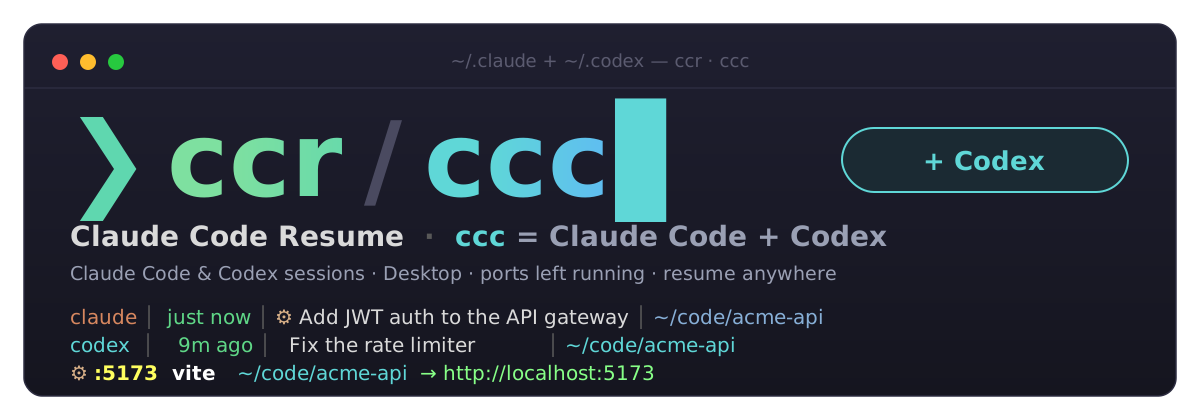
ccr — a fuzzy-search picker for resuming Claude Code sessions across every project.
ccc — the same picker with your OpenAI Codex sessions in it too.
Browse all your Claude Code sessions across every project in a fuzzy-search
menu, see a rich preview of each, then resume the one you want — ccr auto-cds
into the session's working directory and runs claude --resume for you. No more
hunting for which folder a conversation lived in.
Beyond the CLI's own sessions, it also lists Claude Desktop (Cowork)
conversations and sessions Claude has already cleaned up, shows the ports
and watchers your agents left running, and can resume with mobile Remote
Control. Use ccc to get Claude Code + Codex in one list.
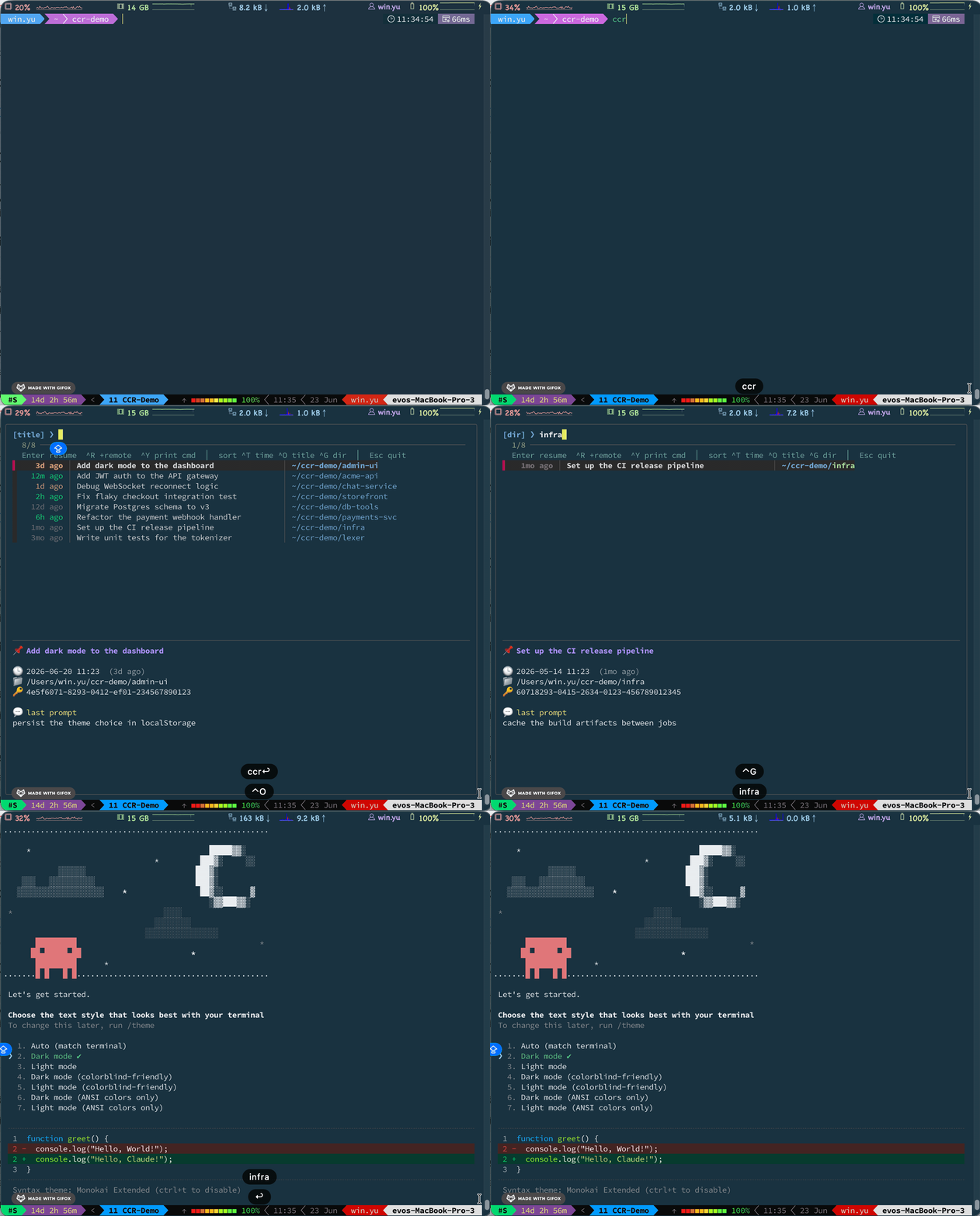
⚙ processes running under your session projects (by CPU)
  :5173   PID 4242    12.5% CPU   200 MB  vite                        ~/code/acme-api  → http://localhost:5173
  -       PID 6060     1.0% CPU    80 MB  tsc --watch                 ~/code/acme-api
────────────────────────────────────────────────────────────────────────
Enter resume  ^R +remote  ^F fork  ^Y print cmd  │  sort ^T time ^O title ^G dir  │  Esc quit
^X show/hide expired sessions  │  Desktop sessions open as a fork
[time] ❯
 just now │ ⚙ Add JWT auth to the API gateway          │ ~/code/acme-api
   2m ago │   Fix flaky checkout integration test      │ ~/code/storefront
   1d ago │   Teach the team Claude Desktop features   │ Desktop · ~/code/handbook
  11d ago │   Set up the CI release pipeline           │ ~/code/infra
┌──────────────────────────────────────────────────────────┐
│ 📌 Add JWT auth to the API gateway                       │
│ 🕒 2026-06-20 14:08  (just now)                          │
│ 📁 /Users/you/code/acme-api                              │
│ 🔑 0a1b2c3d-4e5f-6789-abcd-ef0123456789                  │
│ 💬 last prompt: extract the token check into middleware  │
└──────────────────────────────────────────────────────────┘
(中文說明請見 下方。)
What's new in 0.4 —
ccclists Claude Code and Codex sessions together.
0.3 added the process pane, 0.2 added Desktop / expired sessions and fork.
See Releases.
Features
Sessions
- Cross-project — scans
~/.claude/projects/*/*.jsonl, every session, every folder. - Your names first — titles prefer the name you gave a session (
/rename,claude -n), then the AI-generated title, an oldersummary, or the first prompt. - Claude Desktop sessions — Cowork sessions from the Desktop app show up in magenta (
Desktop · <folder>). They open in the CLI as a fork (--fork-session), so the original stays untouched in Desktop. - Expired sessions — Claude deletes transcripts idle for
cleanupPeriodDays(default 30).Ctrl-X/ccr --expiredlists the ones still in your prompt history, greyed out, with their first prompt. They can't be resumed. - Retention warning — the header warns when
cleanupPeriodDaysis unset or under 90 days. - Rich preview — title, timestamp, working directory, session id, and the last prompt.
Resuming
- One-key resume —
Entercd's into the project and runsclaude --resume. - Fork —
Ctrl-F(orccr --fork) resumes into a new session id with--fork-session, leaving the original untouched. - Mobile handoff —
Ctrl-Rresumes with--remote-controlso you can continue on the Claude mobile app / web. - Quick resume —
ccr --last/ccr -n Nresume straight away without opening the menu. - Print only —
Ctrl-Yprints thecd … && claude --resume …command instead of running it.
Process pane
- What's still running — a pane above the session list shows processes still running under any session's directory, busiest first: listening ports an agent left up as demos (with a
http://localhost:<port>link) and dev watchers liketsc --watch, with CPU, memory and project. - Highlighted — yellow port, bright command, cyan project, green link, and red CPU once a process is at 50% or more.
- Marked sessions — sessions with something running get a
⚙, and resuming one prints its processes first. - No noise — shells, coding agents themselves (
claude,codex) and the MCP servers they start are left out; one row per process tree.
Codex (ccc)
- One list for both tools — Claude Code and Codex sessions side by side, with a leading
claude/codexcolumn you can filter on (^codex,^claude) andCtrl-Ato cycle all / Claude / Codex. Seeccc.
Everyday
- Live sorting — by time, title, or working directory; switch inside the menu without restarting.
- Color & alignment — recency-colored timestamps, CJK-width-aware columns that line up even with mixed Chinese/English titles.
- Bilingual UI — English / 繁體中文, auto-detected from
$LANG. - Fast — caches the parsed index and only re-reads sessions whose files changed.
- Zero config — a single self-contained Bash script. No daemon, no background process.
Requirements
bash(3.2+, the macOS default works)fzfpython3- the
claudeCLI (to actually resume) lsof(optional, macOS default; for the process pane)- the
codexCLI (optional; only to resume Codex sessions fromccc)
Install
git clone https://github.com/kylinfish/claude-code-resume.git
cd claude-code-resume
./install.sh            # symlinks bin/ccr and bin/ccc into ~/.local/bin
./install.sh --tip      # also add a one-line startup hint to your shell rc
Or just drop bin/ccr anywhere on your PATH (and a ccc symlink to it if you use Codex).
Usage
ccr                      # all sessions, newest first
ccr .                    # only sessions whose cwd is under the current directory
ccr ~/code/myproject     # only sessions under a given directory
ccr --last               # resume the most recent session, no menu
ccr -n 2                 # resume the 2nd most recent session, no menu
ccr --last --fork        # fork the most recent session into a new session id
ccr --expired            # also list sessions Claude has already cleaned up
ccr -s title             # sort by title  (time | title | dir)
ccr --lang zh            # force Chinese UI (default: auto-detect from $LANG)
ccr --version            # print the version
ccr --help
In-menu keys
| Key | Action |
|---|---|
Enter |
resume the selected session |
Ctrl-R |
resume + mobile Remote Control (--remote-control) |
Ctrl-F |
fork: resume into a new session id (--fork-session) |
Ctrl-Y |
print the cd … && claude --resume … command without running |
Ctrl-X |
show / hide cleaned-up (expired) sessions |
Ctrl-A |
ccc only: cycle the source — all → Claude → Codex |
Ctrl-T |
sort by time |
Ctrl-O |
sort by title |
Ctrl-G |
sort by working directory |
Esc |
quit |
Remote Control requires a Claude Pro/Max/Team/Enterprise subscription, and
your machine must stay running and online — the phone/web is just a window into
the session that keeps running locally.
ccc — Claude Code + Codex
ccr only looks at Claude Code. ccc is the same script run under another
name: everything ccr does, plus your OpenAI Codex
sessions in the same list.
ccc                      # Claude Code + Codex sessions, newest first
ccc --last               # resume the most recent session of either tool
ccc --version            # ccc 0.4.0
codex  │   9m ago │   Fix the rate limiter                     │ ~/code/acme-api
claude │ just now │ ⚙ Add JWT auth to the API gateway          │ ~/code/acme-api
claude │   1d ago │   Teach the team Claude Desktop features   │ Desktop · ~/code/handbook
- A leading tool column says
claudeorcodex. Because it is the first thing on each row, typing^codexor^claudein the search filters by tool (Desktop and expired sessions count asclaude). The preview of a Codex row shows branch, model and token count. Enterrunscodex resume <id>,Ctrl-Frunscodex fork <id>,Ctrl-Yprints the command. Codex has no Remote Control, soCtrl-Rrefuses with a message.Ctrl-Acycles the source filter: all → Claude → Codex.- Only interactive threads are listed (
cli/vscodesource, not archived); subagent, review and MCP threads are skipped. - Codex sessions are read from
~/.codex/state_*.sqlite(read-only). That index is internal and versioned, soccclooks its columns up by name and falls back to the~/.codex/sessions/**/rollout-*.jsonlfiles when it can't be used. SetCODEX_HOMEto point elsewhere. - The process pane covers Codex projects too, and never lists
codexitself or the MCP servers it starts.
Environment variables
| Variable | Purpose |
|---|---|
CCR_LANG |
zh or en — override the UI language |
CCR_PROJECTS_DIR |
override the scan path directly |
CLAUDE_CONFIG_DIR |
Claude's config dir; ccr scans $CLAUDE_CONFIG_DIR/projects |
CCR_CACHE |
override the index cache dir (default ~/.cache/ccr) |
CCR_DESKTOP_DIR |
override the Claude Desktop Cowork sessions dir |
CCR_HISTORY_FILE |
override the prompt history file (default ~/.claude/history.jsonl) |
CODEX_HOME |
ccc: Codex's home dir (default ~/.codex) |
CCR_CODEX |
1 turns on Codex sessions when running as ccr |
Scan path resolution:
CCR_PROJECTS_DIR→$CLAUDE_CONFIG_DIR/projects→~/.claude/projects.
How it works
Each Claude Code session is one .jsonl file under ~/.claude/projects/<slug>/.ccr reads every file, pulling the title (your /rename name, then theai-title, an older summary, or the first user prompt), the last prompt, the
working directory (cwd), and the file's modification time. It renders an
aligned, colored list into fzf; the hidden columns feed the preview pane and
the final cd "$cwd" && claude --resume "$sessionId".
Claude Desktop Cowork sessions live under~/Library/Application Support/Claude/local-agent-mode-sessions/: alocal_<id>.json metadata file (title, last activity, granted folders) next to
a sandbox folder holding the transcript. ccr resumes that transcript by path
with --fork-session, so the new conversation is saved as a normal CLI session
and Desktop's copy is never written to.
Claude Code deletes transcripts that have been idle for cleanupPeriodDays
(default 30). Their prompts stay in ~/.claude/history.jsonl, which is where the
expired rows come from. To keep sessions longer, add this to~/.claude/settings.json:
{ "cleanupPeriodDays": 365 }
The process pane comes from one ps call plus lsof for listening TCP ports
and each candidate's working directory, cached for 5 seconds. A process is shown
when it listens on a port or runs a known dev command (vite, next, tsc, nodemon,
python, …) and its working directory is inside one of the listed sessions'
directories (the deepest one wins; $HOME and / never count). Shells, coding
agents and the MCP servers they start are skipped, and only one row is kept per
process tree, port holders first.
Sorting is done in the scan step, so the in-menu sort keys simply reload the
list. A small on-disk index cache (~/.cache/ccr) keyed by file modification
time means unchanged sessions are never re-parsed — startup stays fast even with
hundreds of sessions.
Releases
| Version | Highlights |
|---|---|
| 0.4.0 | ccc: Claude Code + Codex sessions in one picker, with a claude / codex column and Ctrl-A source cycling |
| 0.3.0 | Process pane: ports and watchers still running under your session projects, highlighted, with ⚙ marks |
| 0.2.0 | Beyond the CLI: Claude Desktop and expired sessions, retention warning, /rename titles, fork, --version |
| 0.1.0 | Initial release |
Full details are in the CHANGELOG.
License
MIT © 2026 kylinfish
中文說明
ccr 讓你在一個模糊搜尋選單裡瀏覽所有專案、所有 Claude Code 歷史對話,
看到每個 session 的摘要預覽,選定後自動 cd 到該專案目錄並 claude --resume,
不必再手動記哪段對話在哪個資料夾。
除了 CLI 本身的 session,也會列出 Claude Desktop(Cowork) 的對話與已被 Claude
清理的 session,顯示 agent 留在背景的 port 與 watcher,並可一鍵開啟手機遠端控制。
用 ccc 可以把 Claude Code + Codex 放在同一個列表。
0.4 新功能:
ccc同時列出 Claude Code 與 Codex 的 session。
0.3 加入 process 區,0.2 加入 Desktop/已清理的 session 與分支續接。
詳見 版本紀錄。
功能
| 類別 | 功能 | 說明 |
|---|---|---|
| Session | 跨專案掃描 | 掃 ~/.claude/projects/*/*.jsonl 全部 session |
| Session | 你取的名字優先 | 標題優先用你用 /rename、claude -n 取的名字,其次是 AI 標題、舊版 summary、第一句 prompt |
| Session | Desktop 對話 | Claude Desktop 的 Cowork 對話以洋紅色顯示(Desktop · <資料夾>),以 --fork-session 在 CLI 開啟,Desktop 原對話不受影響 |
| Session | 已清理的 session | Claude 會刪除超過 cleanupPeriodDays(預設 30 天)沒活動的對話;Ctrl-X/ccr --expired 以灰色列出仍留在 prompt 歷史裡的 session 和第一句 prompt,但無法 resume |
| Session | 保留天數提醒 | cleanupPeriodDays 沒設定或小於 90 天時,選單標頭會提醒 |
| Session | 預覽 | 標題、時間、工作目錄、session id、最後一次 prompt |
| Resume | 一鍵 resume | Enter 直接切目錄並 claude --resume |
| Resume | 分支續接 | Ctrl-F(或 ccr --fork)以 --fork-session 開新 session id,原對話不受影響 |
| Resume | 手機接手 | Ctrl-R 加 --remote-control,用 Claude 手機 app/網頁繼續 |
| Resume | 快速 resume | ccr --last / ccr -n N 不開選單直接續 |
| Resume | 只印指令 | Ctrl-Y 印出 cd … && claude --resume …,不執行 |
| Process 區 | 背後還在跑什麼 | 列表上方獨立一區,依 CPU 排序列出所有 session 目錄底下還在跑的 process:agent 開來 demo 的 port(附 http://localhost:<port>)和 tsc --watch 這類 watcher,含 CPU、記憶體與所屬專案 |
| Process 區 | 高亮 | port 黃色、指令亮白、專案青色、連結綠色,CPU 達 50% 以上顯示紅色 |
| Process 區 | 標記 session | 有 process 的 session 標 ⚙,resume 前也會印出 |
| Process 區 | 不列雜訊 | 不列 shell、coding agent 本身(claude、codex)與它們啟動的 MCP server;同一個 process tree 只列一筆 |
| Codex | ccc |
Claude Code 與 Codex 的 session 放在同一個列表,最前面一欄是 claude/codex,可輸入 ^codex、^claude 篩選,Ctrl-A 切換來源;詳見下方 |
| 日常 | 即時排序 | 時間/標題/目錄,選單內直接切換 |
| 日常 | 彩色 + 對齊 | 時間依新舊上色,正確計算全形字寬度,中英混排也對齊 |
| 日常 | 中英雙語 | 依 $LANG 自動偵測,可用 --lang 或 CCR_LANG 覆寫 |
| 日常 | 快取加速 | 依檔案修改時間快取索引,沒變動的 session 不重複解析 |
| 日常 | 零設定 | 單一 Bash 腳本,無背景程式 |
需求
bash(3.2+)、fzf、python3、claude CLI;lsof(選用,macOS 內建,用於 process 區);codex CLI(選用,只有用 ccc resume Codex session 時需要)。
安裝
git clone https://github.com/kylinfish/claude-code-resume.git
cd claude-code-resume
./install.sh          # 連結 bin/ccr 與 bin/ccc 到 ~/.local/bin
./install.sh --tip    # 另外在 shell 啟動時加一行提示
也可以直接把 bin/ccr 放到任何 PATH 目錄下(有用 Codex 的話再建一個指向它的 ccc symlink)。
ccc:Claude Code + Codex
ccr 只看 Claude Code。ccc 是同一支腳本換個名字執行:ccr 的所有功能,再加上
OpenAI Codex 的 session,放在同一個列表。
codex  │   9 分鐘前 │   修 rate limiter                          │ ~/code/acme-api
claude │       剛剛 │ ⚙ Add JWT auth to the API gateway          │ ~/code/acme-api
| 項目 | 說明 |
|---|---|
| 工具欄 | 列表最前面一欄是 claude 或 codex;因為在行首,搜尋時輸入 ^codex 或 ^claude 就能依工具篩選(Desktop 與已清理的 session 算 claude)。Codex 的預覽顯示 branch、model、token 用量 |
| 動作 | Enter 執行 codex resume <id>,Ctrl-F 執行 codex fork <id>,Ctrl-Y 印出指令;Codex 沒有 Remote Control,Ctrl-R 會提示並取消 |
| 來源切換 | Ctrl-A:全部 → Claude → Codex |
| 過濾 | 只列互動式 thread(cli/vscode 來源、未封存),不列 subagent、review、MCP thread |
| 資料來源 | 以唯讀方式讀 ~/.codex/state_*.sqlite;這是 Codex 內部、會改版的格式,所以依欄位名稱讀取,讀不到時改讀 ~/.codex/sessions/**/rollout-*.jsonl;可用 CODEX_HOME 指定其他位置 |
ccc --last |
續兩邊之中最近的一個 session |
用法
| 指令 | 作用 |
|---|---|
ccr |
列出所有 session,最新在上 |
ccr . |
只看當前目錄(含子目錄)的 session |
ccr <path> |
只看指定目錄(含子目錄)的 session |
ccr --last |
不開選單,直接續最近一個 session |
ccr -n N |
不開選單,直接續第 N 新的 session |
ccr --last --fork |
把最近一個 session 分支成新的 session id |
ccr --expired |
一併列出已被 Claude 清理的 session |
ccr -s title |
依標題排序(time|title|dir) |
ccr --lang zh |
強制中文介面(預設依 $LANG 自動偵測) |
ccr --version |
顯示版本 |
ccr --help |
顯示說明 |
選單內快捷鍵
| 按鍵 | 行為 |
|---|---|
Enter |
開啟選定的 session |
Ctrl-R |
開啟 + 手機遠端控制(--remote-control) |
Ctrl-F |
分支:以新的 session id 續接(--fork-session) |
Ctrl-Y |
只印出 cd … && claude --resume … 指令,不執行 |
Ctrl-X |
顯示/隱藏已清理的 session |
Ctrl-A |
僅 ccc:來源切換,全部 → Claude → Codex |
Ctrl-T |
依時間排序 |
Ctrl-O |
依標題排序 |
Ctrl-G |
依工作目錄排序 |
Esc |
取消 |
手機遠端控制需 Claude Pro/Max/Team/Enterprise 訂閱,且本機需持續開著並連網
(手機只是視窗,運算仍跑在你電腦)。
環境變數
| 變數 | 用途 |
|---|---|
CCR_LANG |
zh 或 en,覆寫介面語言 |
CCR_PROJECTS_DIR |
直接覆寫掃描路徑 |
CLAUDE_CONFIG_DIR |
Claude 設定目錄;ccr 會掃 $CLAUDE_CONFIG_DIR/projects |
CCR_CACHE |
覆寫索引快取目錄(預設 ~/.cache/ccr) |
CCR_DESKTOP_DIR |
覆寫 Claude Desktop Cowork 對話的路徑 |
CCR_HISTORY_FILE |
覆寫 prompt 歷史檔(預設 ~/.claude/history.jsonl) |
CODEX_HOME |
ccc:Codex 的目錄(預設 ~/.codex) |
CCR_CODEX |
設為 1 時,以 ccr 執行也會列出 Codex session |
掃描路徑優先序:
CCR_PROJECTS_DIR→$CLAUDE_CONFIG_DIR/projects→~/.claude/projects。
Claude Code 預設會刪除 30 天沒活動的對話。想保留更久,在
~/.claude/settings.json加上"cleanupPeriodDays": 365。
運作原理
- CLI session:每個 Claude Code session 是
~/.claude/projects/<slug>/底下的一個.jsonl。ccr讀出標題(你/rename的名字優先,其次ai-title、summary、第一句 prompt)、最後一句 prompt、工作目錄與修改時間,交給fzf顯示;選定後執行cd "$cwd" && claude --resume "$sessionId"。 - Desktop 對話:Cowork 對話在
~/Library/Application Support/Claude/local-agent-mode-sessions/,local_<id>.json存標題、最後活動時間與授權資料夾,旁邊的沙盒資料夾存對話紀錄。ccr以對話檔路徑加--fork-session開啟,新對話存成一般 CLI session,Desktop 的原檔不會被寫入。 - 已清理的 session:對話紀錄被清理後,prompt 仍留在
~/.claude/history.jsonl,已清理的列就是從這裡來的。 - Process 區:一次
ps,加上lsof取得 listen 的 TCP port 與工作目錄,快取 5 秒。有 listen port 或執行已知開發指令(vite、next、tsc、nodemon、python…),且工作目錄在某個 session 目錄底下的 process 才會列出(以最深的目錄為準;$HOME與/不算)。不列 shell、coding agent 與它們啟動的 MCP server,同一個 process tree 只留一筆,有 port 的優先。 - 快取:依檔案修改時間快取索引(
~/.cache/ccr),沒變動的 session 不重複解析,數百個 session 也能快速啟動。
版本紀錄
| 版本 | 重點 |
|---|---|
| 0.4.0 | ccc:Claude Code 與 Codex 的 session 放在同一個選單,含 claude/codex 工具欄與 Ctrl-A 來源切換 |
| 0.3.0 | Process 區:列出 session 專案底下仍在跑的 port 與 watcher,高亮顯示並以 ⚙ 標記 session |
| 0.2.0 | 不只 CLI:Claude Desktop 與已清理的 session、保留天數提醒、/rename 標題、分支續接、--version |
| 0.1.0 | 初版 |
完整內容請見 CHANGELOG。
授權
MIT © 2026 kylinfish
Reviews (0)
Sign in to leave a review.
Leave a reviewNo results found