coding-agent-console-resume
Health Gecti
- License — License: MIT
- Description — Repository has a description
- Active repo — Last push 0 days ago
- Community trust — 12 GitHub stars
Code Basarisiz
- rm -rf — Recursive force deletion command in demo/teardown.sh
- rm -rf — Recursive force deletion command in tests/run.sh
Permissions Gecti
- Permissions — No dangerous permissions requested
Bu listing icin henuz AI raporu yok.
CCR — Coding-agent Console & Resume. Pick up exactly where your agents left off: fuzzy-find any Claude Code or Codex session across projects, preview its artifacts and changed files, see the dev servers it left running, and resume or fork in one keystroke. Single Bash script + fzf.
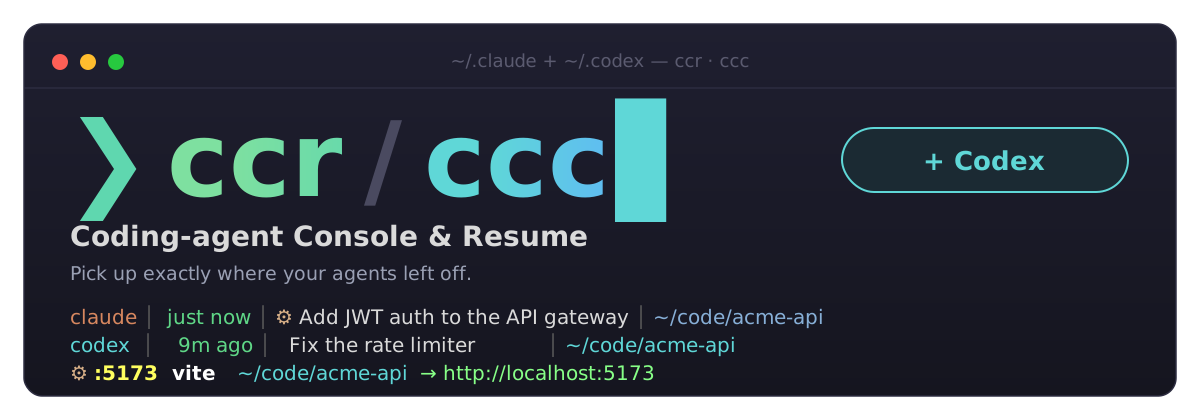
CCR — Coding-agent Console & Resume
Pick up exactly where your agents left off.
ccr — your Claude Code sessions · ccc — Claude Code + Codex in one list
English · 繁體中文
CCR is a terminal console for your coding agents. Fuzzy-find any Claude Code or
Codex session across every project, preview what it was doing and what it
produced, then resume it — ccr cd's into the session's working directory and
runs claude --resume (or codex resume) for you.
Why CCR
- ⚙ See the whole workspace — the dev servers, ports and watchers your
agents started sit right above the session list, matched to their projects,
with CPU, memory and a clickablelocalhostlink. Resume with the full
picture in view. - 🛟 Keep every session within reach — CCR tells you how long Claude keeps
transcripts and how to keep them longer, andCtrl-Xbrings back the
sessions already cleaned up, with their first prompt. - 🗂 One list, every surface — Claude Code, Codex and Claude Desktop
(Cowork) sessions together, each tagged by tool. Desktop conversations
continue in the CLI as a fork. - ✦ Know what each session produced — artifacts and the files each session
wrote appear as blocks in the preview;Ctrl-Lopens them. - 🎨 Make it yours —
ccr --themesopens a live theme picker: browse
Tokyo Night, Catppuccin, Kanagawa, Gruvbox and Classic on a real CCR screen,
in 24-bit color, and save withEnter.
All of it is one Bash script plus fzf: no daemon, no build step, andccr --update keeps it current.

╭ ⚙ Processes · 2 ──────────────────────────────────────────────────────────────────────────────╮
│  -       PID 4242   59.1% CPU   45 MB  webpack --watch    ~/payments                          │
│  :5173   PID 6060    0.0% CPU   38 MB  vite --port 5173  ~/acme-api  → http://localhost:5173  │
╰───────────────────────────────────────────────────────────────────────────────────────────────╯
╭ 🔍 Search · time ─────────────────────────────────────────────────────────────────────────────╮
│ ❯ jwt                                                                                    3/14 │
╰───────────────────────────────────────────────────────────────────────────────────────────────╯
╭ Sessions ─────────────────────────────────────────────────────────────────────────────────────╮
│▌ just now │ ⚙✦ Add JWT auth to the API gateway         │ ~/code/acme-api                      │
│    2m ago │    Fix flaky checkout integration test     │ ~/code/storefront                    │
╰───────────────────────────────────────────────────────────────────────────────────────────────╯
 Enter resume ^R RC ^F fork ^Y cmd ^L open ^X expired ^T/^O/^G sort
╭ Preview ──────────────────────────────────────────────────────────────────────────────────────╮
│ 📌 Add JWT auth to the API gateway                                                            │
╰───────────────────────────────────────────────────────────────────────────────────────────────╯
What's new in 0.6 — Tokyo Night theme by default, four more palettes
(--theme/CCR_THEME), and a stacked, boxed fzf layout (fzf ≥ 0.58). 0.5
added artifacts and files written (✦,Ctrl-L), 0.4ccc(Codex), 0.3 the
process pane, 0.2 Desktop / expired sessions and fork.
See Releases.
Features
- Sessions — what shows up in the list
- Resuming — what happens when you pick one
- Process pane — what your sessions left running
- Artifacts & files — what each session produced
- Codex (
ccc) — Claude Code and Codex in one list - Themes — color palettes and the boxed layout
- Everyday — sorting, colors, language, speed
Sessions
- Cross-project — scans
~/.claude/projects/*/*.jsonl, every session, every folder. - Your names first — titles prefer the name you gave a session (
/rename,claude -n), then the AI-generated title, an oldersummary, or the first prompt. - Claude Desktop sessions — Cowork sessions from the Desktop app show up in magenta (
Desktop · <folder>). They open in the CLI as a fork (--fork-session), so the original stays untouched in Desktop. - Expired sessions — Claude deletes transcripts idle for
cleanupPeriodDays(default 30).Ctrl-X/ccr --expiredlists the ones still in your prompt history, greyed out, with their first prompt. They can't be resumed. - Retention warning — the header warns when
cleanupPeriodDaysis unset or under 90 days. - Rich preview — title, timestamp, working directory, session id, and the last prompt.
Resuming
- One-key resume —
Entercd's into the project and runsclaude --resume. - Fork —
Ctrl-F(orccr --fork) resumes into a new session id with--fork-session, leaving the original untouched. - Mobile handoff —
Ctrl-Rresumes with--remote-controlso you can continue on the Claude mobile app / web. - Quick resume —
ccr --last/ccr -n Nresume straight away without opening the menu. - Print only —
Ctrl-Yprints thecd … && claude --resume …command instead of running it.
Process pane
- What's still running — a pane above the session list shows processes still running under any session's directory, busiest first: listening ports an agent left up as demos (with a
http://localhost:<port>link) and dev watchers liketsc --watch, with CPU, memory and project. - Highlighted — yellow port, bright command, cyan project, green link, and red CPU once a process is at 50% or more.
- Marked sessions — sessions with something running get a
⚙, and resuming one prints its processes first. - No noise — shells, coding agents themselves (
claude,codex) and the MCP servers they start are left out; one row per process tree.
Artifacts & files
- Artifacts — sessions that published claude.ai artifacts list them in the preview: title, number of versions, last update, the
claude.ai/code/artifact/…link, and the local source file with✓/✗. - Files written — files the session created (
+) or changed (~), newest first, with✓/✗for whether they still exist. For Claude Code they come fromWrite/Editcalls; for Codex from itsFileChangerecords. Files in temp / scratchpad dirs are left out. ✦mark — sessions with artifacts or files get a✦next to the⚙.- Open one —
Ctrl-Lopens an artifact in the browser or a file in its default app; with several, a small picker comes up first.
Codex (ccc)
- One list for both tools — Claude Code and Codex sessions side by side, with a leading
claude/codexcolumn you can filter on (^codex,^claude) andCtrl-Ato cycle all / Claude / Codex. Seeccc.
Themes
- Five themes —
tokyonight(default),catppuccin,kanagawa,gruvbox,
andclassic(the pre-0.6 look). Pick one withccr --theme gruvboxorCCR_THEME=catppuccin ccr(--themewins if both are set). - Colour blocks — section titles are filled pill badges and each preview
block has a faint tint of its colour (classicstays plain). - Theme picker —
ccr --themeslists the themes with a live preview: a small
ccr screen (processes, sessions, preview blocks) drawn in the highlighted
theme, on its own background.Entersaves the choice to~/.config/ccr/theme($XDG_CONFIG_HOME/ccr/theme);Ctrl-Yonly printsexport CCR_THEME=…. Order:--theme>CCR_THEME> saved theme >tokyonight. - Truecolor, with a 256-color fallback — themes render in full 24-bit color
when$COLORTERMistruecolor/24bit, and fall back to the nearest
xterm-256 color otherwise. - Boxed layout — each part of the picker (processes, search, sessions,
preview) sits in its own titled, rounded-border box. It needs fzf ≥ 0.58 —brew upgrade fzfif you're on an older version; older fzf gets a single-borderclassiclayout instead. Force it either way withCCR_LAYOUT=boxed/CCR_LAYOUT=classic. Inside the Preview box (in either layout, on any fzf) the
content is split again into titled blocks — Session, Artifacts, Files, Last prompt — side by side when the
pane is at least 100 columns wide, stacked otherwise.
Everyday
- Live sorting — by time, title, or working directory; switch inside the menu without restarting.
- Color & alignment — recency-colored timestamps, CJK-width-aware columns that line up even with mixed Chinese/English titles.
- Bilingual UI — English / 繁體中文, auto-detected from
$LANG. - Fast — caches the parsed index and only re-reads sessions whose files changed.
- Zero config — a single self-contained Bash script. No daemon, no background process.
Requirements
bash(3.2+, the macOS default works)fzf— fzf ≥ 0.58 gets the boxed layout;
older versions still work, with the classic layout (brew upgrade fzfto get boxed)python3- the
claudeCLI (to actually resume) lsof(optional, macOS default; for the process pane)- the
codexCLI (optional; only to resume Codex sessions fromccc)
Install
git clone https://github.com/kylinfish/coding-agent-console-resume.git
cd coding-agent-console-resume
./install.sh            # symlinks bin/ccr and bin/ccc into ~/.local/bin
./install.sh --tip      # also add a one-line startup hint to your shell rc
Or just drop bin/ccr anywhere on your PATH (and a ccc symlink to it if you use Codex).
Updating
install.sh links the command to your clone, so updating the clone updates ccr:
ccr --update # 0.6.1+: git pull the clone and show what changed
On 0.6.0 or older, update once by hand from your clone (cloned before the rename, it is still
called claude-code-resume) — --update is available from then on:
cd claude-code-resume && git pull
Usage
ccr                      # all sessions, newest first
ccr .                    # only sessions whose cwd is under the current directory
ccr ~/code/myproject     # only sessions under a given directory
ccr --last               # resume the most recent session, no menu
ccr -n 2                 # resume the 2nd most recent session, no menu
ccr --last --fork        # fork the most recent session into a new session id
ccr --expired            # also list sessions Claude has already cleaned up
ccr -s title             # sort by title  (time | title | dir)
ccr --lang zh            # force Chinese UI (default: auto-detect from $LANG)
ccr --theme gruvbox      # tokyonight (default) | catppuccin | kanagawa | gruvbox | classic
ccr --themes             # pick a theme with a live preview and save it
ccr --version            # print the version
ccr --update             # update (git pull) and show what changed
ccr --help
In-menu keys
| Key | Action |
|---|---|
Enter |
resume the selected session |
Ctrl-R |
resume + mobile Remote Control (--remote-control) |
Ctrl-F |
fork: resume into a new session id (--fork-session) |
Ctrl-Y |
print the cd … && claude --resume … command without running |
Ctrl-X |
show / hide cleaned-up (expired) sessions |
Ctrl-L |
open one of the session's artifacts / files written (✦) |
Ctrl-A |
ccc only: cycle the source — all → Claude → Codex |
Ctrl-T |
sort by time |
Ctrl-O |
sort by title |
Ctrl-G |
sort by working directory |
Esc |
quit |
Remote Control requires a Claude Pro/Max/Team/Enterprise subscription, and
your machine must stay running and online — the phone/web is just a window into
the session that keeps running locally.
ccc — Claude Code + Codex
ccr only looks at Claude Code. ccc is the same script run under another
name: everything ccr does, plus your OpenAI Codex
sessions in the same list.
ccc                      # Claude Code + Codex sessions, newest first
ccc --last               # resume the most recent session of either tool
ccc --version            # ccc 0.6.0
codex  │   9m ago │  ✦ Fix the rate limiter                    │ ~/code/acme-api
claude │ just now │ ⚙✦ Add JWT auth to the API gateway         │ ~/code/acme-api
claude │   1d ago │    Teach the team Claude Desktop features  │ Desktop · ~/code/handbook
- A leading tool column says
claudeorcodex. Because it is the first thing on each row, typing^codexor^claudein the search filters by tool (Desktop and expired sessions count asclaude). The preview of a Codex row shows branch, model and token count. Enterrunscodex resume <id>,Ctrl-Frunscodex fork <id>,Ctrl-Yprints the command. Codex has no Remote Control, soCtrl-Rrefuses with a message.Ctrl-Acycles the source filter: all → Claude → Codex.- Only interactive threads are listed (
cli/vscodesource, not archived); subagent, review and MCP threads are skipped. - Codex sessions are read from
~/.codex/state_*.sqlite(read-only). That index is internal and versioned, soccclooks its columns up by name and falls back to the~/.codex/sessions/**/rollout-*.jsonlfiles when it can't be used. SetCODEX_HOMEto point elsewhere. - The process pane covers Codex projects too, and never lists
codexitself or the MCP servers it starts.
Environment variables
| Variable | Purpose |
|---|---|
CCR_LANG |
zh or en — override the UI language |
CCR_PROJECTS_DIR |
override the scan path directly |
CLAUDE_CONFIG_DIR |
Claude's config dir; ccr scans $CLAUDE_CONFIG_DIR/projects |
CCR_CACHE |
override the index cache dir (default ~/.cache/ccr) |
CCR_DESKTOP_DIR |
override the Claude Desktop Cowork sessions dir |
CCR_HISTORY_FILE |
override the prompt history file (default ~/.claude/history.jsonl) |
CCR_THEME |
theme: tokyonight (default), catppuccin, kanagawa, gruvbox, classic; overrides the one saved by ccr --themes |
CCR_LAYOUT |
boxed or classic (default: boxed on fzf ≥ 0.58, else classic) |
CODEX_HOME |
ccc: Codex's home dir (default ~/.codex) |
CCR_CODEX |
1 turns on Codex sessions when running as ccr |
Scan path resolution:
CCR_PROJECTS_DIR→$CLAUDE_CONFIG_DIR/projects→~/.claude/projects.
How it works
Each Claude Code session is one .jsonl file under ~/.claude/projects/<slug>/.ccr reads every file, pulling the title (your /rename name, then theai-title, an older summary, or the first user prompt), the last prompt, the
working directory (cwd), and the file's modification time. It renders an
aligned, colored list into fzf; the hidden columns feed the preview pane and
the final cd "$cwd" && claude --resume "$sessionId".
Claude Desktop Cowork sessions live under~/Library/Application Support/Claude/local-agent-mode-sessions/: alocal_<id>.json metadata file (title, last activity, granted folders) next to
a sandbox folder holding the transcript. ccr resumes that transcript by path
with --fork-session, so the new conversation is saved as a normal CLI session
and Desktop's copy is never written to.
Claude Code deletes transcripts that have been idle for cleanupPeriodDays
(default 30). Their prompts stay in ~/.claude/history.jsonl, which is where the
expired rows come from. To keep sessions longer, add this to~/.claude/settings.json:
{ "cleanupPeriodDays": 365 }
The process pane comes from one ps call plus lsof for listening TCP ports
and each candidate's working directory, cached for 5 seconds. A process is shown
when it listens on a port or runs a known dev command (vite, next, tsc, nodemon,
python, …) and its working directory is inside one of the listed sessions'
directories (the deepest one wins; $HOME and / never count). Shells, coding
agents and the MCP servers they start are skipped, and only one row is kept per
process tree, port holders first.
Artifacts come from the frame-link records Claude Code writes each time it
publishes one (title, link, local file, time); files written come from Write /Edit / NotebookEdit tool calls, and for Codex from the FileChange items in
each thread's rollout file. Both are extracted during the scan and cached with
the rest of the index, so they cost nothing on later runs.
Sorting is done in the scan step, so the in-menu sort keys simply reload the
list. A small on-disk index cache (~/.cache/ccr) keyed by file modification
time means unchanged sessions are never re-parsed — startup stays fast even with
hundreds of sessions.
Releases
| Version | Highlights |
|---|---|
| 0.6.1 | ccr --update: update a git install in place and see what changed |
| 0.6.0 | Tokyo Night theme by default, four more palettes (--theme / CCR_THEME), boxed fzf layout on fzf ≥ 0.58 with a themed classic fallback |
| 0.5.0 | Artifacts and files written per session (✦, Ctrl-L), tidier process pane, split READMEs, demo data, tests |
| 0.4.0 | ccc: Claude Code + Codex sessions in one picker, with a claude / codex column and Ctrl-A source cycling |
| 0.3.0 | Process pane: ports and watchers still running under your session projects, highlighted, with ⚙ marks |
| 0.2.0 | Beyond the CLI: Claude Desktop and expired sessions, retention warning, /rename titles, fork, --version |
| 0.1.0 | Initial release |
Full details are in the CHANGELOG.
License
MIT © 2026 kylinfish
Yorumlar (0)
Yorum birakmak icin giris yap.
Yorum birakSonuc bulunamadi