omniclock
Health Pass
- License — License: MIT
- Description — Repository has a description
- Active repo — Last push 0 days ago
- Community trust — 39 GitHub stars
Code Fail
- rm -rf — Recursive force deletion command in cli/install.sh
- rm -rf — Recursive force deletion command in scripts/audit-linux-catalog.sh
- rm -rf — Recursive force deletion command in scripts/benchmark-linux-providers.sh
Permissions Pass
- Permissions — No dangerous permissions requested
No AI report is available for this listing yet.
Native Liquid Glass AI token tracker for macOS. Breakdown into sessions/models/tools.
简体中文 · English
🕰️ OmniClock
AI usage, subscription quotas, news, reminders, and practical tools—on your desktop.







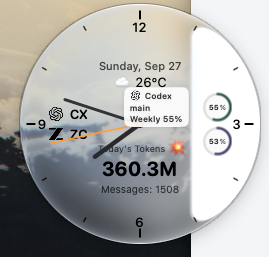 Liquid Glass A glanceable desktop overview |
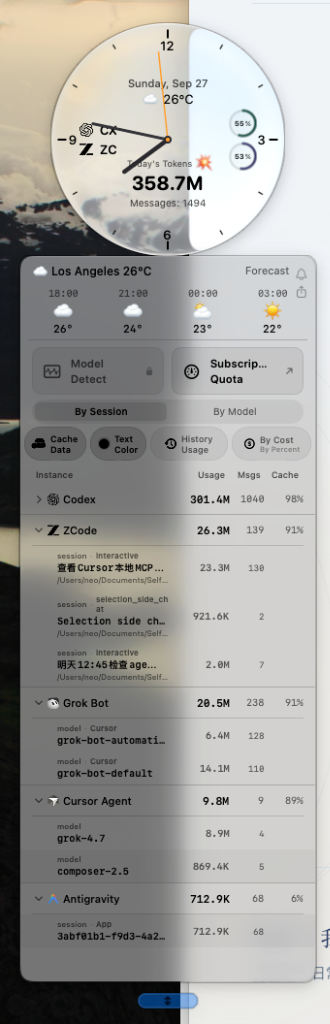 Usage details Tools, sessions, and models |
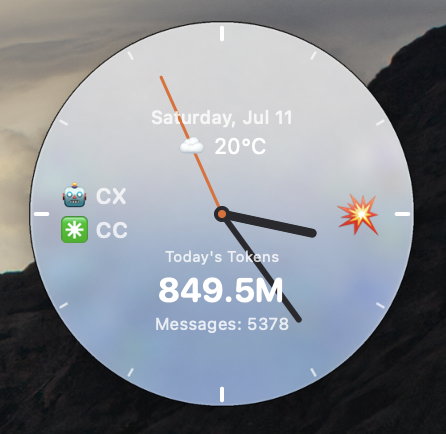 Normal Theme-aware native presentation |
OmniClock, formerly TokenClock, brings the everyday details of working with AI into one desktop companion. The clock shows activity and selected quotas; its panels provide usage history, costs, a notebook, AI news, and local or network diagnostics.
The repository retains its history. The primary macOS/Linux command is now omniclock; existing tokenclock commands remain compatible. This rename keeps the current release versions: v1.6.3 for macOS and Linux, and the previous verified v1.5.12 Windows build. It does not announce a v1.0.0 application release.
Features
| Area | What you can do |
|---|---|
| Desktop overview | See today's tokens, messages, active tools, weather, and subscription rings. Choose a theme, size, and optional always-on-top behavior. |
| Usage and API-equivalent cost | Explore harnesses, sessions, and models; switch the cache-read basis; inspect cost estimates and supported Fast/Priority breakdowns. Recent generation speed refreshes every three minutes. |
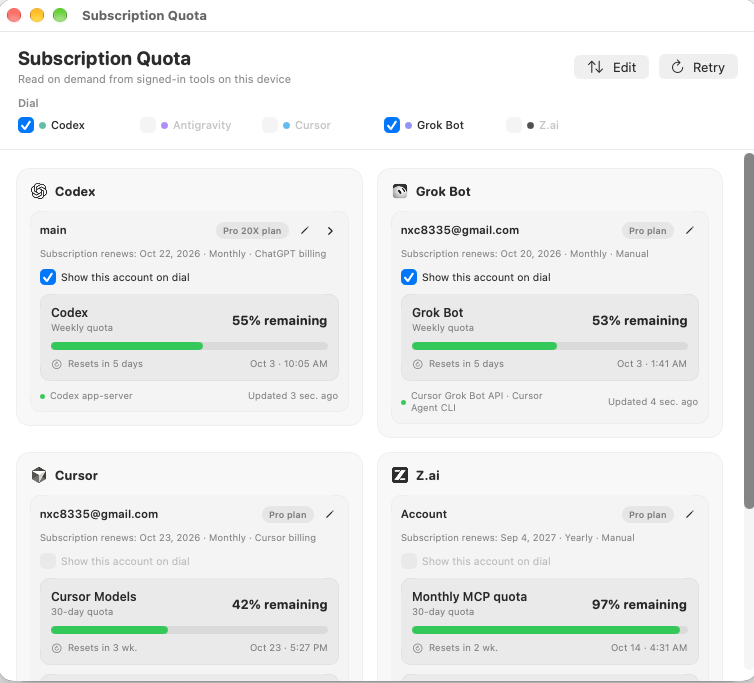
| Subscription quotas | Review supported provider accounts, remaining allowances and reset times. Select up to four providers, displayed two at a time. Configure renewal reminders 1, 2, 3, or 7 days before a known or manually entered renewal date. |
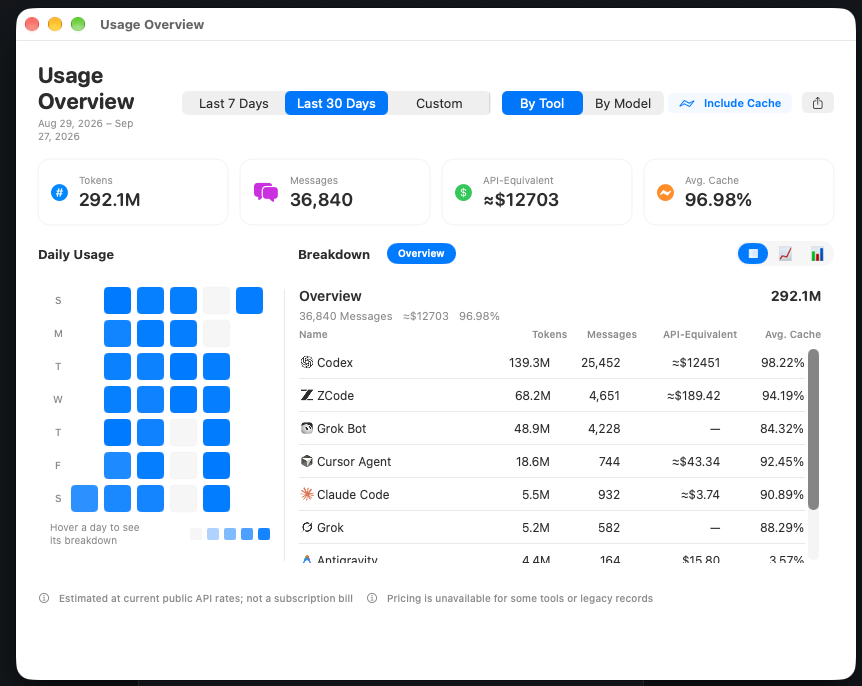
| History and sharing | Browse the last 30 days or a date range. A single-day range shows hourly usage. Export a share image for a day, recent days, a month, or a calendar week, with optional cache reads and selectable artwork. |
| AI digest and notebook | Read Ailyre's AI digest with provider logos and topic labels. Keep plain-text notes and timed reminders. Digest refreshes every two hours; application update checks run every twelve hours. |
| Network Toolbox | Run DNS/DoH, WebRTC, IPv6, exit-IP/location, AI-domain routing, and mainland-reachability reference checks on demand. Results distinguish possible issues from inconclusive checks. |
| Local Toolbox and Model Detect | Inspect environment conflicts and disk use, scan logs locally for exposed secrets, check clock offset, and validate configured API keys with masked results. Model Detect reviews available session evidence and supports explicitly initiated external checks. |
The macOS summary panel brings together hourly usage, comparison with yesterday, cache use, quota reset times, the notebook, and tool/model lists. Shortcut visibility and order are editable. Linux provides corresponding functions through its native menus and panels; some checks open the browser.
Platforms
| Platform | Edition | Current distribution |
|---|---|---|
| macOS 26+ | Glass or Normal | v1.6.3 universal packages for Apple Silicon and Intel |
| macOS 12–25 | Normal | v1.6.3 universal package; opaque themed dial |
| Linux x86_64 | Normal, GTK3/Cairo | v1.6.3 AppImage; glibc 2.35+; extraction fallback when FUSE is unavailable |
| Windows 11 x86_64 | Normal, Win32 | Previous verified v1.5.12 package; newer feature parity and binaries await testing on the project's own Windows machine |
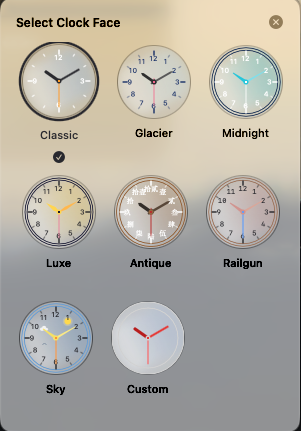
Glass has its own transparent materials and optical effects. Normal keeps its own themes and contrast rules. In Normal, the quick Text Color control affects the detail panel; dial text has a separate appearance setting.
Windows does not yet include every feature listed for current macOS/Linux builds. New Windows packages are not published until native validation resumes. Project tests run locally or on project-owned machines, not GitHub Actions.
Installation
macOS and Linux
curl -fsSL https://www.ailyre.com/omniclock/install.sh | bash
The installer selects the supported edition, verifies package checksums, and installs both commands:
omniclock doctor
omniclock start --normal
omniclock restart
omniclock update
omniclock update --check
update --check downloads the current installer without installing or restarting anything. Use --glass or --normal when you want a specific macOS edition. omniclock uninstall removes the installed runtime; the CLI commands are retained for reinstalling.
Existing TokenClock installations
Your old command remains valid:
tokenclock update
# After the CLI update, either name works:
omniclock doctor
tokenclock doctor
The new installer installs omniclock as the main implementation and tokenclock as a forwarding entry point. Both use the same installation and settings. Existing TOKENCLOCK_* environment overrides, ~/.tokenclock, application identifiers, and executable names remain compatible. There is no second copy of your usage history to maintain.
The previous https://www.ailyre.com/tokenclock/install.sh address remains available. If you install the CLI manually from this repository, install both files together into the same directory on your PATH.
macOS may request permission to access protected or external-disk folders. Current ad-hoc-signed packages do not guarantee that permissions carry across binary updates.
Windows
& ([scriptblock]::Create((irm https://www.ailyre.com/omniclock/install.ps1)))
This installs the existing verified Windows package for the current user, with SHA-256 verification. The installation path and executable retain the TokenClock name for compatibility. The omniclock/tokenclock shell commands described above apply to macOS and Linux.
# Install without launching; optionally create a Start Menu shortcut.
& ([scriptblock]::Create((irm https://www.ailyre.com/omniclock/install.ps1))) -NoStart -StartMenuShortcut

# Inspect installation state.
& ([scriptblock]::Create((irm https://www.ailyre.com/omniclock/install.ps1))) -Action Check

# Uninstall while retaining Windows user settings.
& ([scriptblock]::Create((irm https://www.ailyre.com/omniclock/install.ps1))) -Action Uninstall
Everyday use
- Click the dial to open usage details. Expand a tool, session, or model to inspect its contributions.
- Use the first-row shortcuts for tools and history. The shortcut editor controls visibility and order.
- Switch to AI digest to read news within the lower part of the dropdown; use Back to return to usage.
- Open Subscription Quota to select providers and accounts for the dial. Click a ring to advance when multiple groups are available; right-click it to open the quota panel.
- On macOS, click the menu-bar icon for today's summary. Double-click to bring the dial temporarily forward or hide it; the right-click menu also provides visibility controls.
- Right-click the dial for general and appearance settings, source paths, notifications, updates, and restart.
The detail panel supports horizontal resizing, and notifications support resizing in both directions. On some nonactivating macOS panels, the pointer may remain an arrow at a resizable edge; the bottom resize handle remains available.
Supported data sources
Current macOS/Linux sources cover Codex, Claude Code, Cursor Agent, Grok Bot, Antigravity, OpenClaw, Gemini CLI, Hermes, OpenCode, Qwen Code, Copilot CLI, Grok CLI, Aider, Cline, Continue, ZCode, Kilo Code, Pi, OMP, PiG, DSH, Command Code, and Freebuff, subject to the records each tool actually saves.
- Custom paths and external disks can be selected in Settings → Data Source Paths.
- Freebuff exposes completed local reply counts, not token receipts; these counts are excluded from token and API-equivalent cost totals.
- Cloud-only chat activity is not converted into invented token estimates.
- Speed and TTFT appear only when the source contains suitable timing evidence. Missing values remain unavailable.
- Quota cards reuse available saved quota records or permitted sign-ins. Some accounts require a user-initiated connection or authorization. A shared subscription is deduplicated only when sharing is confirmed.
See additional harnesses, hourly history, and subscription billing for details.
Accounting and privacy
The main token figure excludes cache reads by default; you can include them explicitly. Cache writes, output, and reasoning follow the source's recorded accounting rules. API-equivalent cost uses the Ailyre pricing catalog, with user overrides supported. It is an estimate at public API rates, not a subscription bill.
Usage collection reads local logs and databases without modifying the harness's records. Quota, weather, news, and user-triggered network checks contact their respective services. Local secret scans stay on the device. API-key checks send credentials only to the paired configured endpoint and mask them in results. External Model Detect checks require confirmation of their scope and cost; their results are evidence, not proof of model identity.
A successful network probe is not a guarantee that every app or route is leak-free. Mainland reachability results are references; an ordinary timeout is not reported as proof of GFW blocking.
Local API
When enabled, the read-only HTTP API binds to loopback:
curl http://127.0.0.1:9988/api/usage
curl 'http://127.0.0.1:9988/api/history?days=30'
The port is configurable. API-equivalent costs carry costBasis: "api_equivalent_public_list".
Screenshots
 |
 |
Development and help
git clone https://github.com/Neo-Isshin/omniclock.git
cd omniclock
main contains macOS Glass, normal contains macOS Normal, and codex/linux-theme-parity contains the current Linux edition. Internal Swift targets and bundle names retain TokenClock for compatibility. See platform behavior and Model Detect integration before changing shared components.
Run omniclock doctor first if an installation is not behaving as expected. For missing usage, check that the selected source path contains real usage records. For quota failures, distinguish a missing local record, permission request, expired sign-in, and provider-side rejection.
Report an issue · Gitea mirror · Ailyre
License and acknowledgements
MIT. Bundled third-party libraries and artwork retain their own licenses and attribution. Ailyre supplies the digest, pricing catalog, and network-check page; network tools also use services including Cloudflare, Google, and Globalping where indicated in the interface. OmniClock is an independent project and is not an official client of the supported AI providers.
Reviews (0)
Sign in to leave a review.
Leave a reviewNo results found