TokenClock
Health Gecti
- License — License: GPL-3.0
- Description — Repository has a description
- Active repo — Last push 0 days ago
- Community trust — 101 GitHub stars
Code Basarisiz
- rm -rf — Recursive force deletion command in cli/install.sh
Permissions Gecti
- Permissions — No dangerous permissions requested
Bu listing icin henuz AI raporu yok.
Native Liquid Glass AI token tracker for macOS — monitor Claude Code, Codex, Gemini CLI, OpenCode, and 10 more tools locally.
简体中文 · English
🕰️ TokenClock
A native Liquid Glass desktop clock for your AI coding usage
Track Claude Code, Codex, Antigravity(parse by CLI IDE App), OpenCode, and 10 more tools on one living glass dial — entirely on your Mac.





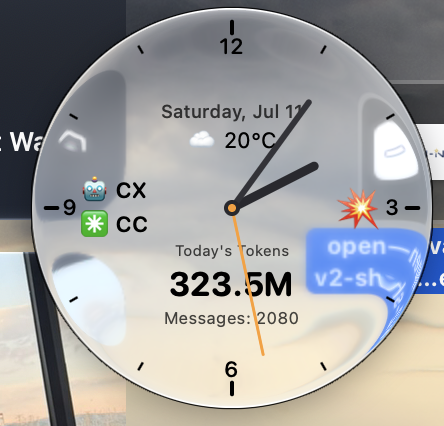
Native Liquid Glass on macOS 26+ · wallpaper-aware refraction · ambient tint · adaptive contrast · always-on-top
🧊 Liquid Glass is the interface, not a skin
TokenClock turns macOS 26's native Liquid Glass into a useful, glanceable instrument. The clock disc refracts the desktop behind it, picks up a subtle theme tint, and automatically switches its ink contrast to stay readable as the wallpaper changes. An adjustable frosted backing lets you move from clean, transparent glass to a denser dial without losing the native material.
The result is not a dashboard hidden in another window. It is an always-on-top glass object that belongs on the desktop: draggable, position-aware, and calm enough to live beside your work all day.
7 glass faces · adjustable translucency · full theme editor · macOS-native rendering
⚡ Install in one line
The installer automatically selects the native Liquid Glass build on macOS 26+ and the classic compatible build on macOS 12–15.
curl -fsSL https://raw.githubusercontent.com/Neo-Isshin/TokenClock/main/cli/install.sh | bash
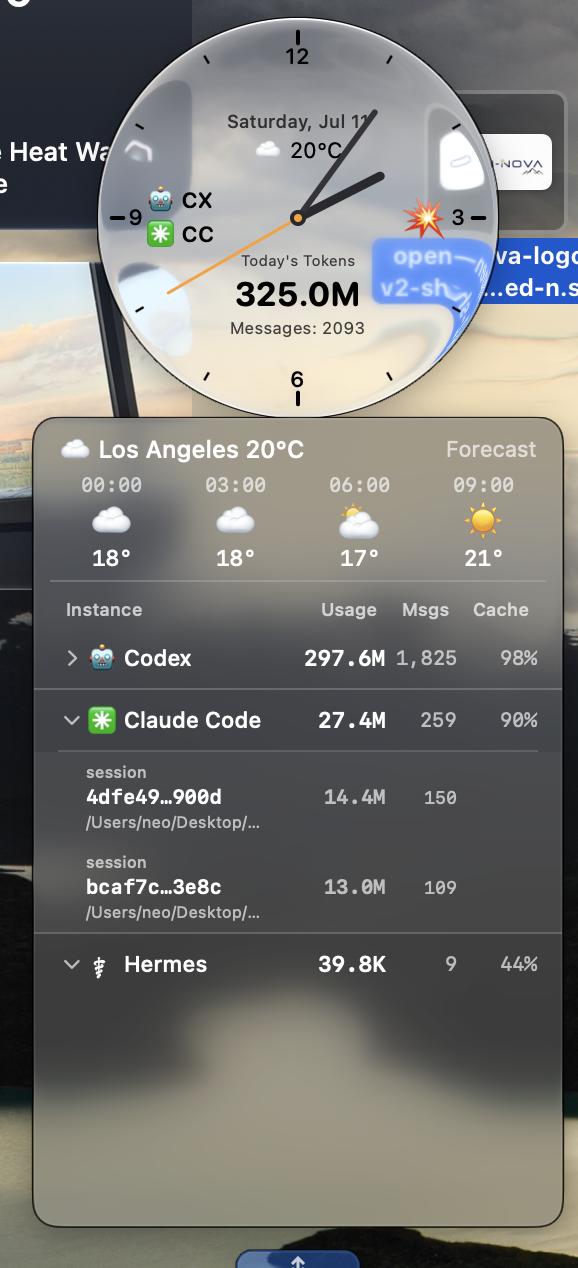
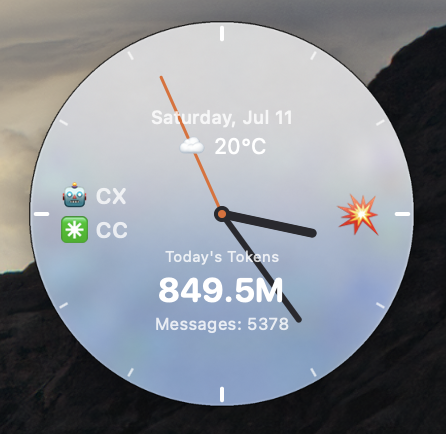
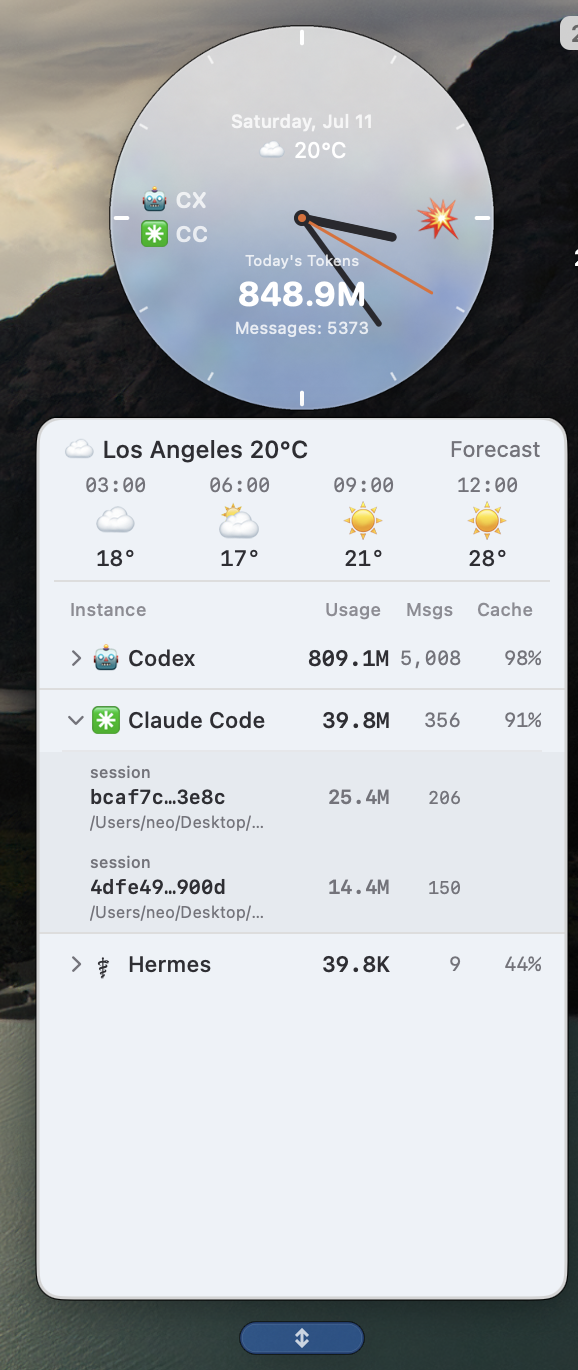
TokenClock overlays live data on the dial: today's token consumption, message count, active AI tools, usage rate, and weather. Click it to drill down from tool → session / agent and see exactly where the tokens went.
It reads the logs your AI coding tools already keep on your Mac. Nothing is uploaded.
[!NOTE]
Liquid Glass build has supported macOS 27 beta 3, but may break with beta version updates.
📑 Contents
- 🌟 Core advantages
- ✨ Features
- 📸 Screenshots
- 🤖 Supported AI tools
- 🚀 Quick start — One-line install ·
tokenclockCLI - 🎨 Themes
- 🧊 Liquid Glass
- 🔌 Local API server
- 🔒 Privacy
- 🛣 Roadmap
- 📦 Tech stack
- 📄 License
- 🙏 Acknowledgments
🌟 Core advantages
| 🧊 Native Liquid Glass A refractive glass disc that responds to the wallpaper behind it, with ambient tint and adaptive high-contrast ink. |
🎨 Glass you can make your own 7 built-in faces, adjustable frosted backing, glass tint, hands, ticks, numerals, fonts, dial size, and window opacity. |
| 🤖 All your tools, one dial Token / message usage from 14 AI coding tools flows into a single clock face — no more hopping between terminals and web dashboards. |
🔍 Drill down per session / agent From a per-tool overview all the way down to every session / agent — see exactly where the tokens went and which conversation burned them. |
| 🌤️ Always visible, never disruptive A floating, always-on-top instrument; a glance gives you the live consumption and rate (🔥 burst / 🌊 calm) without breaking focus. |
📜 Usage history you can revisit Each day's usage is auto-settled into a local SQLite store (30 days) and exposed via the local API — feed your own charts. |
| ⚡ Tiny footprint Native Swift + efficient polling (clock 1s / usage 30s / weather 5min) + streaming JSONL; sits in the background almost unnoticed. |
🔒 Purely local, zero upload Reads only local logs each tool writes; nothing leaves your machine, and the API listens on 127.0.0.1 only. |
| 🔌 Zero config, ready out of the box Auto-detects 14 AI coding tools' log paths on first launch. New tools without history are auto-discovered by background workers on their first session, requiring no manual setup. |
✨ Features
🤖 Unified multi-AI-tool detection
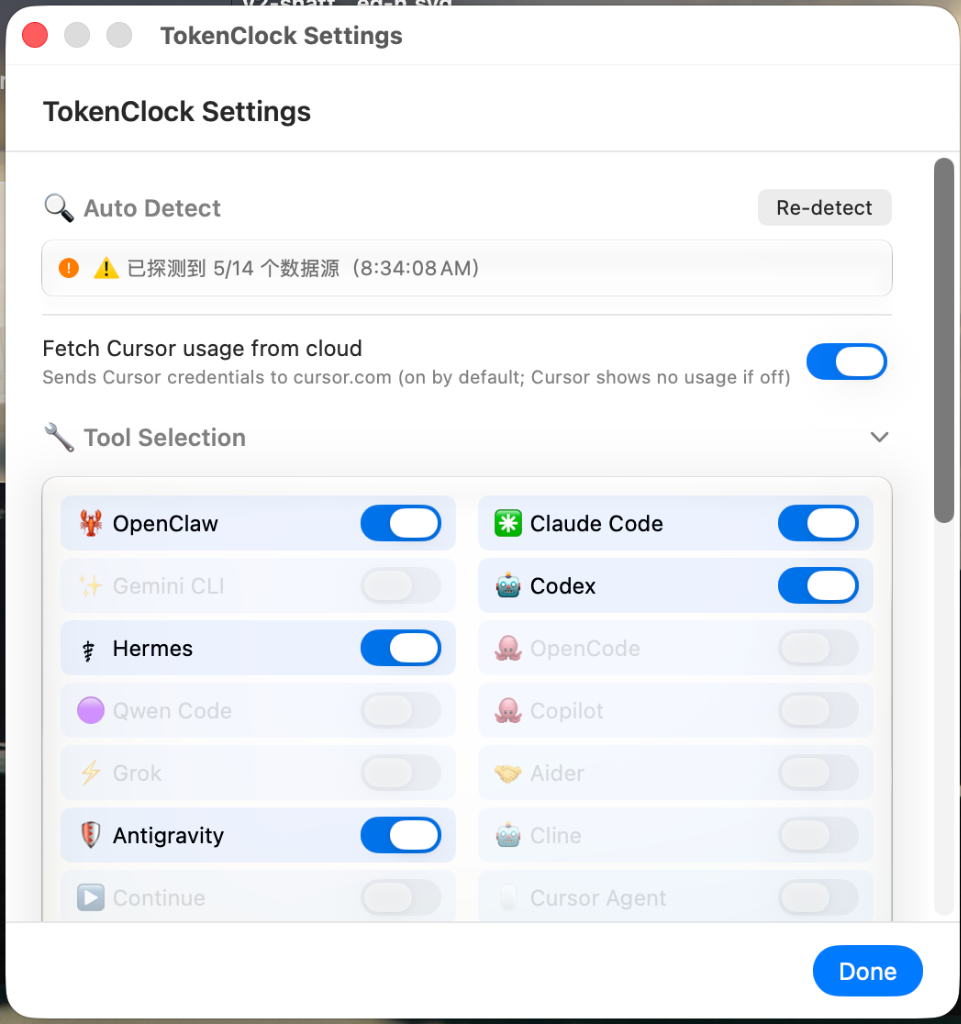
- Auto-detects and reads the local token / message usage logs written by 14 AI coding tools and aggregates them.
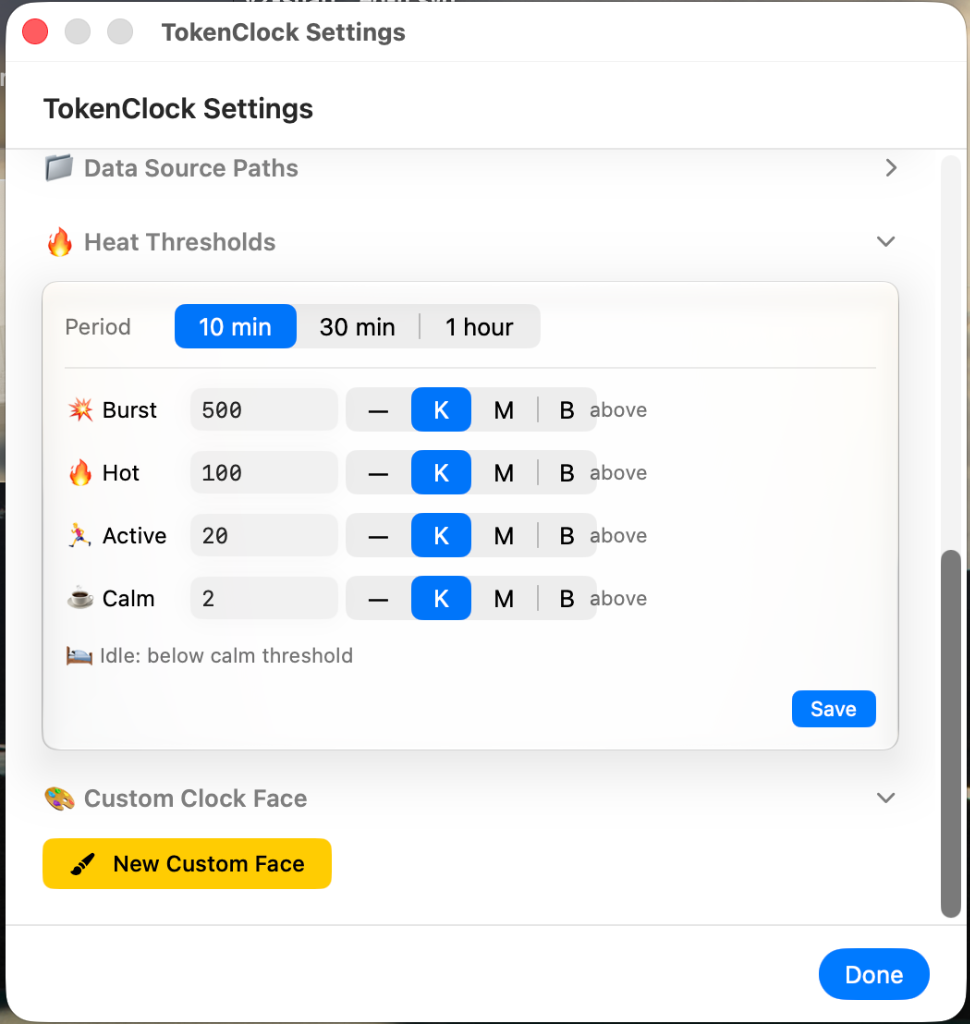
- The dial overlays today's totals, active-tool labels, and a rate emoji (🔥 burst / 🌊 calm thresholds).
- Click to expand the dropdown panel for the breakdown (tool → session / agent; see Core advantages).
🧊 Liquid Glass
- On macOS 26 the disc renders with the native Liquid Glass material — it adapts to your wallpaper and carries a subtle theme tint.
- Adaptive high-contrast ink: lighter-tinted themes automatically switch to near-black ticks / numerals for legibility.
- Ships in two variants —
main(macOS 26) andnormal(macOS 12) — and thetokenclockCLI picks the right one for your OS automatically.
📦 One-line install & CLI
- The normal build runs on macOS 12+, the Liquid Glass build on macOS 26+. The one-liner picks the right variant for your OS automatically, and the lightweight
tokenclockCLI handles start / stop / switch / diagnose. See the install guide.
🎨 Multiple faces & thoughtful design
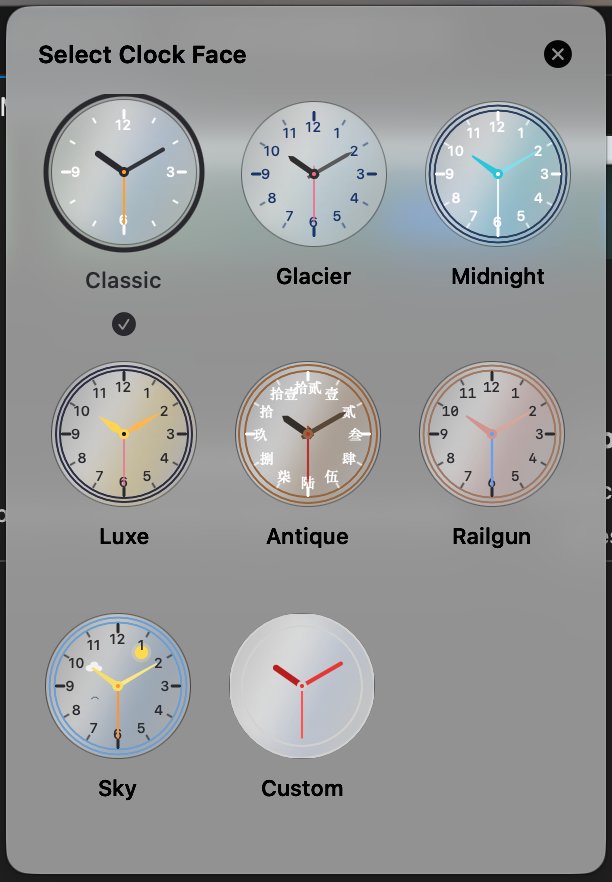
- 7 built-in faces (Classic / Glacier / Midnight / Luxe / Gu Feng / Railgun / Sky), each with its own personality.
- 4 hand styles (round / tapered / lance / sword); numerals in Arabic or Chinese.
- Fully custom themes: dial color, glass tint, all three hands, ticks, numerals, borders, and fonts are all adjustable.
⚙️ More
- Live clock (1s), usage refresh (30s), weather (5min).
- Weather + 12-hour forecast (auto-located by IP or pick a city); 8 time zones.
- Internationalization: Simplified Chinese / Traditional Chinese / English.
- Always-on-top · draggable · position remembered across relaunch; launch-at-login via
SMAppService. - Local API server (
:9988) for integration / scripting. - Privacy-first: all data read locally, zero upload.
📸 Screenshots
🧊 Liquid Glass build preview (macOS 26+)
| Floating Liquid Glass clock disc refracts the wallpaper · tokens / messages / rate / weather on the dial |
Overview glass clock + expanded panel together |
|
 |
⬜ Normal build preview (macOS 12+)
| Floating clock classic opaque dial · tokens / messages / rate / weather on the dial |
Overview opaque clock + expanded panel together |
 |
 |
⚙️ Settings preview
| Settings panel Auto-detected tool paths & parameters configuration |
Theme picker 7 built-in faces & fully custom theme editing |
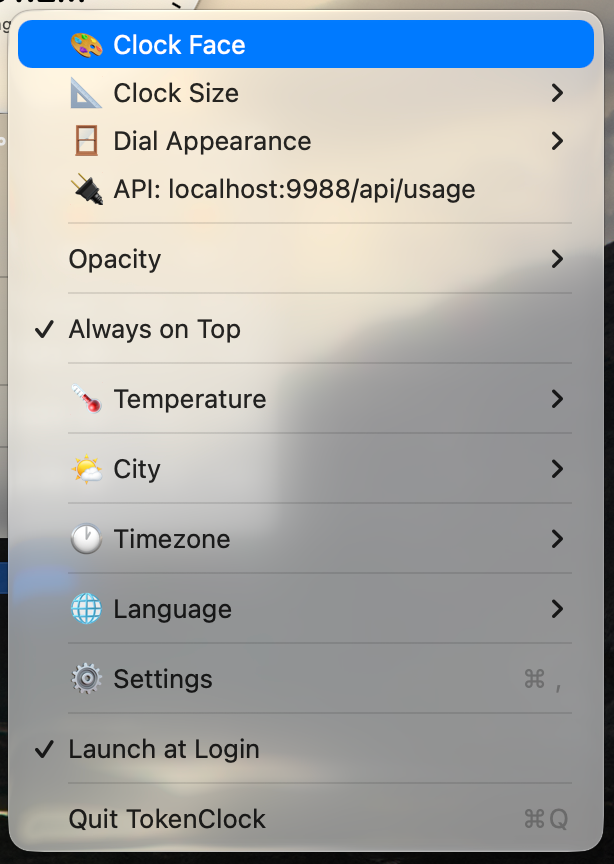
Context menu Quick access to dial themes, sizes & preferences |
 |
 |
 |
 |
🤖 Supported AI tools
TokenClock reads the JSONL / SQLite usage files that each tool writes locally (path priority: custom path > env var > default path; auto-detected on first launch). Defaults and env vars below.
| Tool | Default data source | Env var |
|---|---|---|
| OpenClaw | ~/.openclaw/ |
OPENCLAW_HOME |
| Claude Code | ~/.claude/ |
CLAUDE_CONFIG_DIR |
| Gemini CLI | ~/.gemini/ |
GEMINI_HOME |
| Codex | ~/.codex/ |
CODEX_HOME |
| Hermes | ~/.hermes/ |
HERMES_HOME |
| OpenCode | ~/.local/share/opencode/ |
OPENCODE_HOME |
| Qwen Code | ~/.qwen/ |
QWEN_HOME |
| GitHub Copilot CLI | ~/.copilot/ |
COPILOT_HOME |
| Grok CLI | ~/.grok/ |
GROK_HOME |
| Aider | ~/.aider/analytics.jsonl |
AIDER_HOME |
| Antigravity | ~/.gemini/antigravity-cli/ |
ANTIGRAVITY_HOME |
| Cline (VSCode extension) | ~/Library/Application Support/Code/User/globalStorage/saoudrizwan.claude-dev/ |
CLINE_HOME |
| Continue (VSCode extension) | ~/.continue/ |
CONTINUE_HOME |
| Cursor Agent | ~/.cursor/ |
CURSOR_AGENT_HOME |
Token-counting formulas differ slightly per service: Codex and Gemini/Qwen have
input(promptTokenCount) already including cached tokens, so cached must not be added again (it would double-count) — they useinput + output + (thought); other services (Claude/OpenClaw, etc.) sum input/output/cache fields that are mutually exclusive. Seedocs/TOOL_SCHEMA_ANALYSIS.md.
🚀 Quick start
One-line install (easiest)
Auto-detects the macOS version → downloads the precompiled matching variant (universal, SHA256-checked + de-quarantined) → installs to ~/.tokenclock → puts tokenclock on your PATH → launches and scans each AI tool's local paths — no manual steps. Falls back to a local build only on download failure or with --build-from-source.
💡 Download & run — no Xcode, no $99/yr notarization: it fetches precompiled universal binaries (SHA256-checked + de-quarantined) and just works.
# one-line install (recommended):
curl -fsSL https://raw.githubusercontent.com/Neo-Isshin/TokenClock/main/cli/install.sh | bash

# or, if you've cloned this repo:
./cli/install.sh
Options: --normal / --glass (pick the variant) / --no-start (don't auto-launch) / --build-from-source (force a local build) / --check (check only, don't install) / --debug (debug build).
Or build manually from source below.
Prerequisites
- macOS 12+ (normal build); macOS 26+ (Liquid Glass build)
- The precompiled install needs no toolchain at all; Swift 6 (Xcode 16+ / Command Line Tools) is only required for
--build-from-sourcelocal builds
Build & run from source
git clone https://github.com/Neo-Isshin/TokenClock.git TokenClock
cd TokenClock

# debug build and run directly
swift run

# or build first, then run
swift build            # debug
swift build -c release # release
.build/debug/TokenClock      # or .build/release/TokenClock
The
mainbranch'sPackage.swiftdeclares.macOS(.v26), soswift runproduces the Liquid Glass build; the classic (opaque) macOS 12-compatible build lives on thenormalbranch.
Gotcha: on macOS 27 with only Command Line Tools installed (no full Xcode), a bare
swift buildon themainbranch fails because the 27 SDK macro-expands@State; passSDKROOT=/Library/Developer/CommandLineTools/SDKs/MacOSX26.sdk swift buildto fix it (in the 26 SDK@Stateis still a plain property wrapper). Thenormalbranch is unaffected.
Use the tokenclock CLI
Install the lightweight shell script onto your PATH:
sudo install -m755 cli/tokenclock /usr/local/bin/tokenclock
| Command | Description |
|---|---|
tokenclock start [--glass|--normal] [--force] |
Start the clock; auto-picks by OS (26+ → glass, 12+ → normal); --force opens another instance |
tokenclock stop |
Stop all running TokenClock instances |
tokenclock restart [--glass|--normal] |
Restart |
tokenclock doctor |
Diagnose: OS version, installed variant paths, running processes, env vars |
tokenclock update [--check] [--force] |
Update to the latest release: pulls the latest install.sh → SHA256-checks → installs new binaries → restarts (no-op if unchanged); --check checks only, --force forces |
tokenclock help |
Show help |
Variant discovery order: $TOKENCLOCK_GLASS / $TOKENCLOCK_NORMAL env vars → ~/.tokenclock/ → /Applications/ → repo .build/debug/.
🎨 Themes
7 built-in faces, plus full custom:
| Theme | Name | Personality |
|---|---|---|
classic |
Classic | Clear glass disc · charcoal hands + amber second hand · 3/6/9/12 only |
glacier |
Glacier | Crystal ice-blue glass · ink sword hands + cherry-blossom pink second hand · ice-blue numerals & ticks |
midnight |
Midnight | Cyan glass · cyan tapered hands |
luxe |
Luxe | Gold glass · gold lance hands |
gufeng |
Gu Feng | Warm-brown glass · ink sword hands · Chinese numerals |
railgun |
Railgun | Pink-orange glass · electric-blue second hand · monospaced |
sky |
Sky | Blue glass · sun & clouds · gold hands |
custom |
Custom | Glass tint / hands / ticks / numerals / fonts… fully customizable |
Right-click the clock → theme picker, or open the theme editor in the settings window to switch or customize.
🧊 Liquid Glass
TokenClock ships in two builds:
| Branch | Target | Rendering |
|---|---|---|
main |
macOS 26+ | Native Liquid Glass material; the disc adapts to the wallpaper and carries a subtle tint |
normal |
macOS 12+ | Classic opaque themed dial, for backward compatibility |
- The glass disc uses an ambient tint (glass tint) instead of the old opaque dial fill: a clean glass base plus a theme hint color, preserving each face's character without hiding your wallpaper.
- Adjustable frosted backing — a public frosted-glass plate sits beneath the clear refractive glass, with opacity adjustable across 5 steps (0 = clean see-through glass, 100 = solid plate), letting you dial translucency to taste (macOS 26 Liquid Glass build only).
- Lighter-tinted themes (Luxe / Railgun / Sky) automatically use high-contrast near-black ink for text, ticks, and numerals; darker/mid tints (Classic / Midnight / Gu Feng) use pure white.
- The
tokenclockCLI selects the matching variant from thesw_versmajor version — no manual guessing.
🔌 Local API server
TokenClock starts a local NWListener HTTP server:
GET http://127.0.0.1:9988/api/usage          # live aggregated usage (today's totals / per-tool / session detail)
GET http://127.0.0.1:9988/api/history?days=30 # daily snapshots for the last N days (max 30, for trend charts)
It returns JSON usage data, handy for external scripts / dashboards. It listens on loopback only and is never exposed externally.
🔒 Privacy
- All usage data is read locally from the log files each AI tool writes itself — TokenClock uploads no token / session data.
- The local API server listens only on
127.0.0.1and is opt-in. - Weather uses approximate IP geolocation or a city you pick, solely to show current conditions and a forecast.
🛣 Roadmap
- Support more AI coding tools (keep extending the detector)
- Signed / notarized release builds (
.app) — currently shipping unsigned via GitHub; this needs an Apple Developer account ($99/yr) and isn't currently planned — open to sponsorship / volunteers - Richer history stats and charts
📦 Tech stack
| Language | Swift 6 (-parse-as-library) |
| UI | SwiftUI + AppKit (lock-free dual-NSPanel architecture) |
| Build | Swift Package Manager (no .xcodeproj) |
| Platforms | macOS 26 SDK (main branch) / macOS 12 SDK (normal branch) |
| i18n | Custom L10n engine (zh-Hans / zh-Hant / en, no .xcstrings) |
| Size | ~12,400 lines of Swift |
📄 License
TokenClock is open-sourced under the GPL v3 License — © 2026 Neo-Isshin. You are free to use, distribute, and modify it, but any distributed or modified derivative works must also be open-sourced under the GPL v3 License.
🙏 Acknowledgments
TokenClock exists thanks to the many excellent AI coding tools and their communities. Thanks to these tools for writing token usage to local logs, making unified visualization possible..
The Liquid Glass refraction effect (macOS 26+) is powered by reverse-engineered macOS private API
NSGlassEffectView. Special thanks to the pioneering open-source project electron-liquid-glass (maintained by Meridius-Labs).The dial designs draw inspiration from traditional mechanical watches and pop culture (the Gu Feng / Railgun themes).
⭐ Finding TokenClock useful?
A Star means a lot — it's what keeps the project going 🚀

Yorumlar (0)
Yorum birakmak icin giris yap.
Yorum birakSonuc bulunamadi