pai-pro
Health Warn
- License — License: NOASSERTION
- Description — Repository has a description
- Active repo — Last push 0 days ago
- Low visibility — Only 5 GitHub stars
Code Fail
- rm -rf — Recursive force deletion command in docker/entrypoint.sh
- process.env — Environment variable access in server/__tests__/canvas_mutator_http.test.js
- network request — Outbound network request in server/__tests__/canvas_mutator_http.test.js
Permissions Pass
- Permissions — No dangerous permissions requested
No AI report is available for this listing yet.
Local AI filmmaking canvas for your coding agent. Skills for scripts, characters, clips, voices — assembled on a visual timeline. From Utopai Studios
pai-pro
Local AI filmmaking canvas, driven by Claude Code. Built by Utopai Studios.
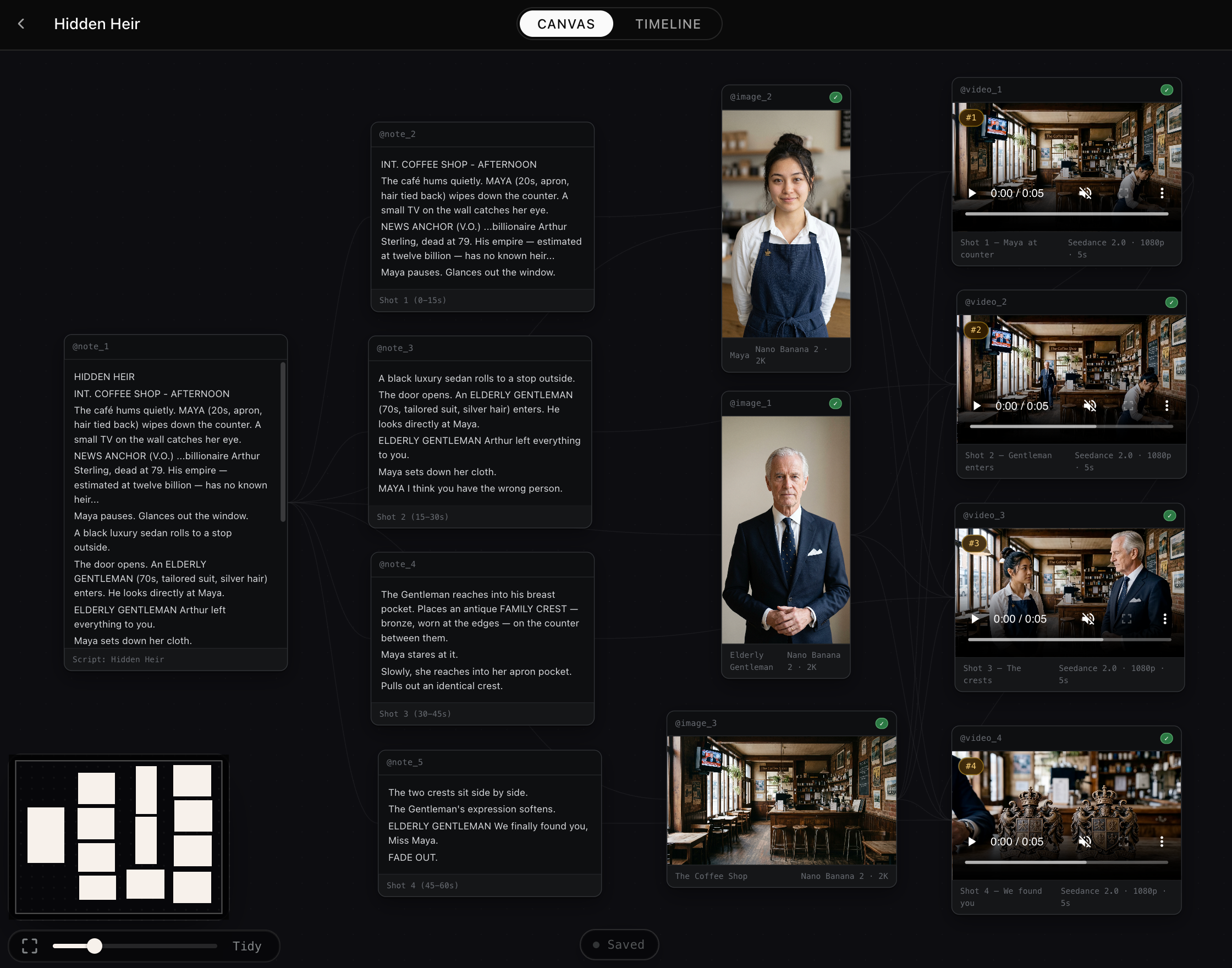
Seven filmmaking skills, a React Flow canvas, and an embedded claude terminal — write a screenplay, design characters, generate clips, lay them out on a timeline. Local-first: your project files live on disk, generated media is mirrored alongside, nothing leaves your machine except the actual generation calls.
┌─ Canvas │ Timeline ──────────────────┬─ Terminal │ History ─┐
│ │ │
│ Detective Morris ──► Diner shot │ > design morris, │
│ │ │ │ weathered, noir │
│ ▼ ▼ │ ✓ image_3 created │
│ Morris voice Morgue still │ > animate the diner │
│ │ ⠋ rendering 8s… │
└──────────────────────────────────────┴──────────────────────┘
Bring-your-own AI coding agent. Today: Claude Code (fully wired, embedded terminal, auto-discovered skills). On the roadmap: Codex CLI, Cursor agent, Gemini CLI — the skill format and CLI surface are already cross-agent-compatible; only the launcher + terminal embedding are Claude-Code-specific.
| Compatible agent | Status |
|---|---|
| Claude Code | ✅ Tested. Embedded PTY + auto-discovered skills via ./setup. |
| Codex CLI | ⏳ Skills work via ~/.codex/skills/; embedded terminal swap-in pending. |
| Cursor agent | ⏳ Skills work via .cursor/rules/; embedded terminal swap-in pending. |
| Gemini CLI | ⏳ Skills work via ~/.gemini/skills/; embedded terminal swap-in pending. |
What's in the box
- Seven filmmaking skills (
skills/) that route filmmaking intent → CLI scripts. Standard Anthropic SKILL.md format; the same shape Codex/Cursor/Gemini CLI also consume. - A React Flow canvas with character, location, image, video, and note nodes; drag-to-reorder, grouped scenes, mention-pill references between nodes and chat.
- A Timeline tab that plays your shots in sequence — drag clips onto the reel, reorder, scrub, preview any unattached clip without committing it.
- An embedded
claudeterminal in the right rail. Real PTY, tmux-style: survives page reloads, replays a rolling 256 KB buffer on attach, auto-resumes the project's session. - Per-project memory — every project owns its
workflow.jsonand asset folder. Switch projects, agent context follows. - Live sync via Socket.IO — agent-side edits hit the canvas without a refresh.
Quick start
Two ways to run pai-pro. Docker is the fastest on-ramp — one command from a fresh clone, every system dependency (ffmpeg, poppler, cloudflared, Claude CLI) bundled in the image. Host mode is for active development on the canvas itself — Vite HMR, live code reload, easier debugging. They use different ports (:7588 and :7488) so you can run both side by side, useful for catching "works on my machine" regressions before they ship.
Docker (recommended)
Prereq: Docker Desktop (macOS / Windows, WSL2 backend on Windows) or Docker Engine + Compose v2 (Linux). Tested on Docker 28.
Windows users: run the commands below in PowerShell or a WSL2 terminal — not
cmd.exe(which doesn't expand~or${HOME}the same way). Make sure Docker Desktop is using the WSL2 backend (default for new installs on Windows 10/11). If you use WSL2, clone into your WSL2 home for best file-system performance.
git clone https://github.com/Utopai-Research/pai-pro.git ~/pai-pro
cd ~/pai-pro
cp .env.example .env # add the API keys you have — all optional
docker compose up --build # ~5-10 min first build, cached after
open http://localhost:7588 # browser entry (use `start` on Windows, or just paste into a browser)
In the embedded terminal, pick a Claude Code theme and run /login once. After that the canvas is fully wired — generate images, chain into videos, drop notes, scrub the timeline. Your work lives in the pai_projects named volume and survives docker compose restart / down; only docker compose down -v wipes it.
What the image gives you:
- Non-root runtime as the
nodeuser (UID 1000). - Multi-stage build — native modules (
sharp,node-pty) rebuilt against linux/glibc; runtime layer ships only what's needed. /healthzprobe verifies ffmpeg, poppler, claude CLI, volume writability, and PTY availability on every healthcheck interval.- An in-container Cloudflare quick tunnel for video-gen reference fetching (PAI's
video-generation-assetsendpoint fetches refs server-side andlocalhostis unreachable to it). Anonymous, no account required, ~3 s to land a URL. SetPUBLIC_VIEWER_URLin.envto skip the tunnel and use your own named domain instead. - Hardened build context —
.dockerignorekeeps.env,.tunnel_url,projects/, and other state out of any image layer. Credentials cannot land in the image even by accident. - No published image. Build-locally only, so a maintainer's laptop can never push secrets to a registry.
Port differs from host mode on purpose. Container is on
:7488internally but maps to host:7588. Your existing./start.shon:7488keeps working. SetHOST_VIEWER_PORT=7488in.envif you don't run host mode and want the canonical port.
Host mode (active development)
The original install path — runs Node directly on the host with Vite HMR. Use this when you're hacking on the canvas source itself.
Prerequisites
- Node.js ≥20 and npm
- Claude Code installed and logged in (
claudeshould run from any directory) - tmux —
./start.shlaunches viewer + web in detached tmux sessions - cloudflared —
brew install cloudflaredon macOS, or binary download for Linux/Windows../start.shauto-launches it as a quick tunnel so PAI'svideo-generation-assetsendpoint can fetch local video refs from a publicly-reachable URL. Only required for video generation. - poppler (
pdftotext) —brew install poppleron macOS,apt-get install poppler-utilson Debian/Ubuntu../start.shauto-installs on macOS. Used at upload time to inline a PDF's text into the note body so the agent can read it without a shell-out. Missing → PDF notes fall back to filename-only.
Bootstrap (paste into an AI coding agent)
If you're driving an AI coding agent (Claude Code, Codex, Cursor, Gemini CLI), paste this block — it does the whole install:
git clone https://github.com/Utopai-Research/pai-pro.git ~/pai-pro
cd ~/pai-pro
./setup # symlinks skills into your agent's skills dir
npm --prefix server install
npm --prefix web install
cp .env.example .env
# Edit .env — see the API keys section below for which keys you need.
./start.sh # tmux: viewer (:7488) + web (:7443)
open http://localhost:7443 # or visit it manually
The first run creates projects/ (gitignored) and brings up the projects grid. Click + New project to start.
API keys
One key, PAI_KEY, drives every capability — image, video, voice, and reference-asset uploads all route through PAI Lite's raw-passthrough surface.
PAI_KEY=PAI_… # image + video + voice + asset upload
Get a key (and watch your live balance) at https://pai-pro.utopaistudios.com/. See .env.example for the full template with comments.
Costs are real. Per call: image ~$0.07–0.15 / voice $0.01 per 500 chars / asset upload $0.01 per ref / video several dollars depending on duration + resolution. CLIs only fire when you explicitly ask for media; chat suggestions don't burn credits.
First session
In a new project, drop these into the terminal:
"Design Detective Morris — weathered mid-40s homicide detective, noir style."
"Give him a voice — gravelly, smoke-stained baritone."
"Now a 6-second clip of Morris standing in the rain outside a diner, neon reflections."
"Take a note: morgue scene opens with cold blue light."
Each generation lands as a node, edges show provenance, assets mirror into projects/<slug>/assets/. Open the Timeline tab to play clips back as a reel.
The seven skills
Each skill is a standard SKILL.md with YAML frontmatter — Claude Code auto-discovers them after ./setup. You don't type a slash command; you describe what you want.
| Skill | Triggers on phrases like | What it does |
|---|---|---|
script-compose |
"Write a screenplay for…", "Break this into shots" | Triages screenplay vs. concept, iterates dialogue, splits into ≤15s shots. |
image-compose |
"Design a character", "Edit this image", "Storyboard mosaic" | Wraps generate_image.js (~10–30s). |
video-compose |
"Animate this", "Continue the clip", "Restyle the shot" | Wraps generate_video.js. Handles I2V, V2V continuation, voice-locked dubs, narrative sequencing. |
voice-compose |
"Give the detective a voice" | Wraps generate_voice.js. Attaches to the character node in place. |
groups-compose |
"Group these as Scene 2", "Frame the character refs" | Maintains semantic groupings (scenes, ref sets, act beats) on the canvas. |
add-note |
"Take a note", "Remember that", "Jot down…" | Appends a note node with provenance edges to neighbors. |
show-dag |
"What do we have?", "Show the graph" | Prints a compact rundown of the canvas to chat. |
Parallel generations run concurrently — three independent images render in ~20s, not ~60s. See the Parallel calls rule in CLAUDE.md for the contract.
Install via Claude Code plugin marketplace
Want just the skills without the canvas? Install them as a plugin in any Claude Code session:
/plugin marketplace add Utopai-Research/pai-pro
/plugin install pai-pro@pai-pro
The canvas + viewer + embedded terminal require cloning the repo.
How it works
Three layers, each independent enough to hack on alone:
┌─ Browser (web/) ──────────────┐ ┌─ server/local_viewer.js ──────┐
│ │ │ │
│ React Flow canvas ◄── Socket.IO ─────►│ chokidar watcher │
│ xterm.js terminal ◄── PTY bridge ────►│ projects/<id>/ │
│ │ │ workflow.json │
└───────────────────────────────┘ │ assets/ (served HTTP) │
│ node-pty → zsh → claude │
└───────────────────────────────┘
▲ writes
│
┌─ skills/ ─┐ ┌─ server/scripts/ ────┴────┐
│ *.md │──►│ generate_image.js │
│ │ │ generate_video.js │ local mirror
│ Claude in │ │ generate_voice.js │ → assets/
│ the PTY │ │ split_image.js │
│ reads │ │ switch_project.js │
└───────────┘ └────────────────────────────┘
- Skills are plain markdown read by the agent inside the embedded terminal.
- CLI scripts call PAI Lite (one key, one base URL — image, video, voice, asset uploads all route through
/api/v1/generateor/api/v1/submit), write each result intoprojects/<slug>/assets/, and print one JSON line. - Viewer watches every project's files and pushes deltas to the browser over Socket.IO, bridges xterm.js ↔
claudevia node-pty, and serves the mirrored assets at/projects/:id/assets/....
Layout
pai-pro/
├── skills/ # the seven skills + skills/CLAUDE.md author guide
├── server/
│ ├── local_viewer.js # Express + Socket.IO + chokidar + node-pty + asset routes
│ ├── local_mirror.js # writes/mirrors generated media into projects/<active>/assets/
│ ├── scripts/ # CLI wrappers (generate_*, canvas_mutate, split_image, …)
│ ├── pai_client.js # shared HTTP plumbing for /api/v1/generate, /submit, /task/status
│ ├── pai_image_client.js # image (PAI raw `image-generation`)
│ ├── pai_video_client.js # video (PAI raw `video-generation`)
│ ├── pai_voice_client.js # voice (PAI raw `tts`)
│ └── pai_assets_client.js # asset preupload for video refs (PAI raw `video-generation-assets`)
├── web/ # Vite + React 18 + TS + Tailwind + xyflow + xterm
├── projects/ # gitignored — your work lives here
├── CLAUDE.md # canvas schema + agent persona + skill routing
├── .claude-plugin/marketplace.json
├── setup # symlink skills into ~/.claude/skills
└── start.sh / stop.sh # tmux launcher / killer
FAQ
Skills don't trigger. Restart your AI agent session after ./setup — skills load at session start. If you're inside the embedded terminal, close the project and reopen.
Generation fails with bad_args. Either .env is missing PAI_KEY, or you asked for a video with a local ref and the tunnel isn't running. Re-run ./start.sh; if cloudflared is missing, install it (macOS: brew install cloudflared; Linux/Windows: https://github.com/cloudflare/cloudflared/releases) and re-run. Last resort: pass a public URL via --reference-image-url / --reference-audio-url / --reference-video-url.
Canvas is empty even though I see asset files on disk. The agent may have mirrored to the wrong project (stale .active_project). Reload the page — CanvasView POSTs /projects/:id/activate on mount to re-sync the symlinks.
Can I run this without an API key? Yes — canvas, terminal, and notes work. Media generation just fails with a clean infra-class error ("PAI_KEY not set in env") until you add the key.
License & Contributing
Released under the PAI PRO Sustainable Use License by Utopai Studios.
See CONTRIBUTING.md for development setup and contribution guidelines.
Reviews (0)
Sign in to leave a review.
Leave a reviewNo results found